Blog
Technician scheduling software in 2027: Essential capabilities for modern field service
What should technician scheduling software actually do? Nine essential capabilities, from skill matching and SLA priorities to real-time replanning, explainability, and API integration.
Technician scheduling software assigns field technicians to jobs and plans their days so that the right person, with the right skills, arrives within the promised window without wasting hours on the road.
The best tools do this automatically across hundreds or thousands of technicians, and they keep the plan valid as the day changes.
Most products in this category show a calendar and a map. The difference between them is what happens underneath: whether the software can weigh skills, time windows, SLAs, travel, and working-hour rules together, or whether it leaves those tradeoffs to a dispatcher.
This guide lists nine capabilities that separate modern technician scheduling from a digital whiteboard. It's written for operations leaders comparing tools and for product teams at field service software companies deciding what their own scheduling engine needs.
Why technician scheduling has become harder
Two pressures are pushing field service teams to rethink how they schedule.
- The first is labor. In the US HVAC trade alone, industry estimates put the technician shortage at around 110,000 open positions. When every skilled technician counts, a schedule that wastes an hour of their day on avoidable driving is a real capacity problem.
- The second is expectations. Customers expect narrow arrival windows, live updates, and a fix on the first visit. Nobody wants to be anticipating their technician coming in all day.
Both pressures land on the schedule.
Nine essential capabilities
1. Skill and certification matching
The software should know what each job requires and what each technician can do, including certifications, seniority, languages, and equipment access. Hard requirements (a gas-safe certificate) should never be violated. Softer preferences (a technician the customer has worked with before) should be encouraged but not forced.
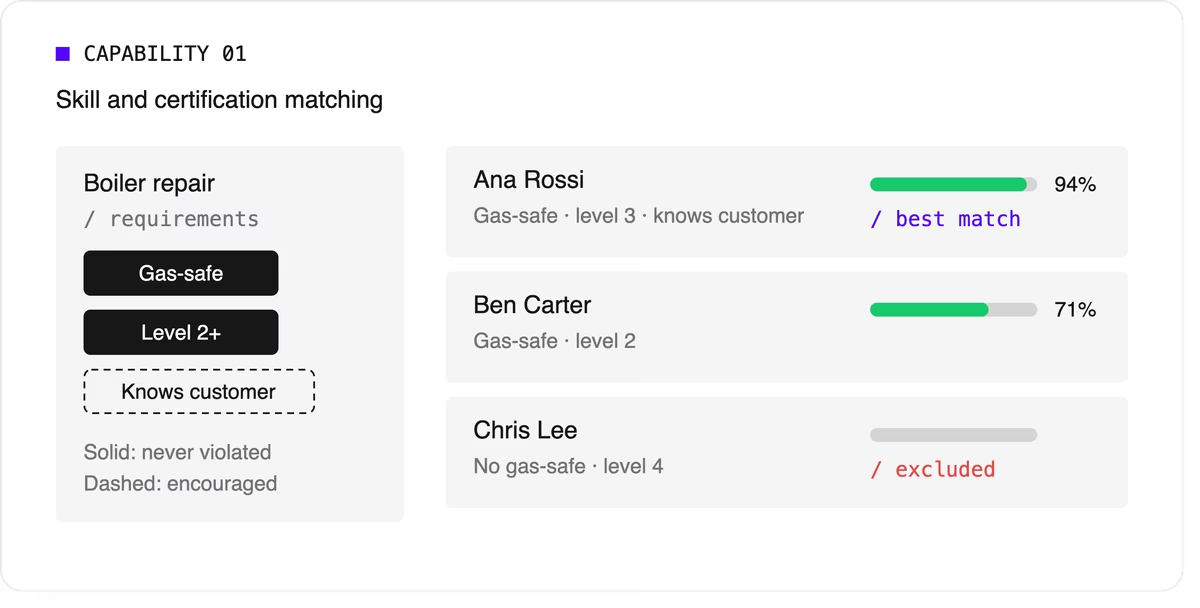
Look for support for skill levels and customer affinity in addition to simple yes-or-no skills. Matching the right skills is also one of the most direct ways to improve first-time fix rates.
2. Time windows and SLA priorities
Jobs come with customer availability windows, and many come with contractual deadlines.
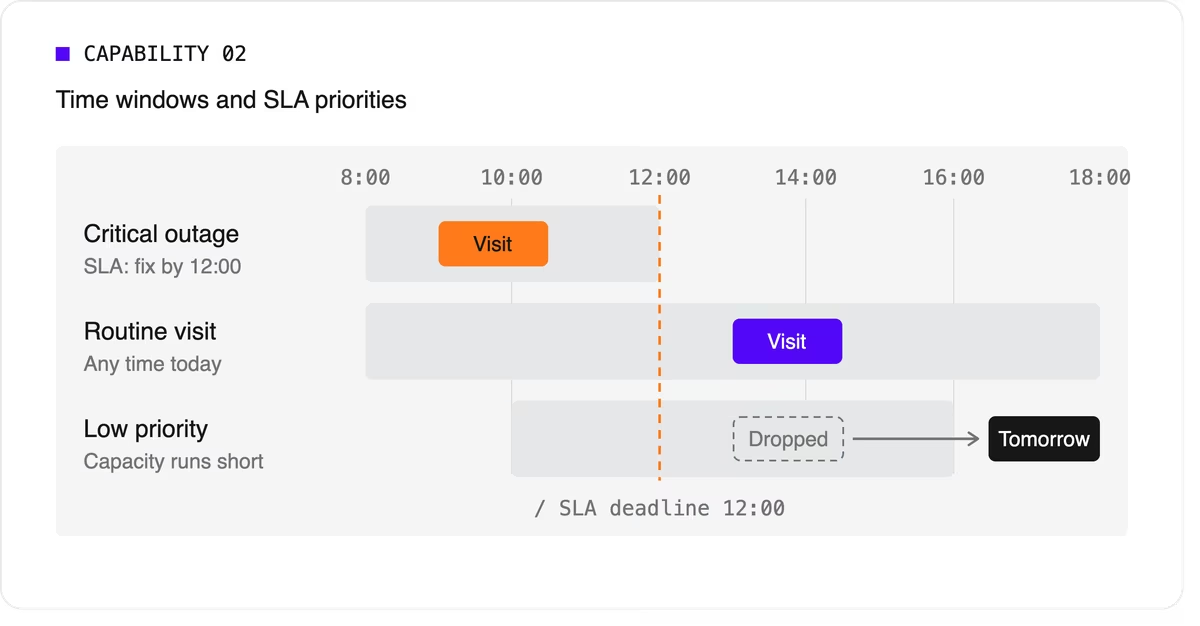
The software needs to treat a critical SLA differently from a routine visit that can move to tomorrow. That means supporting multiple time windows per job, priority levels, and deadlines that can push lower-priority work out of the plan when capacity runs short.
3. Travel-aware planning with real road data
A schedule that assumes straight-line distances will fall apart on the road. Technician scheduling software should use real travel times, ideally with support for traffic patterns and your own map provider if you already have one.
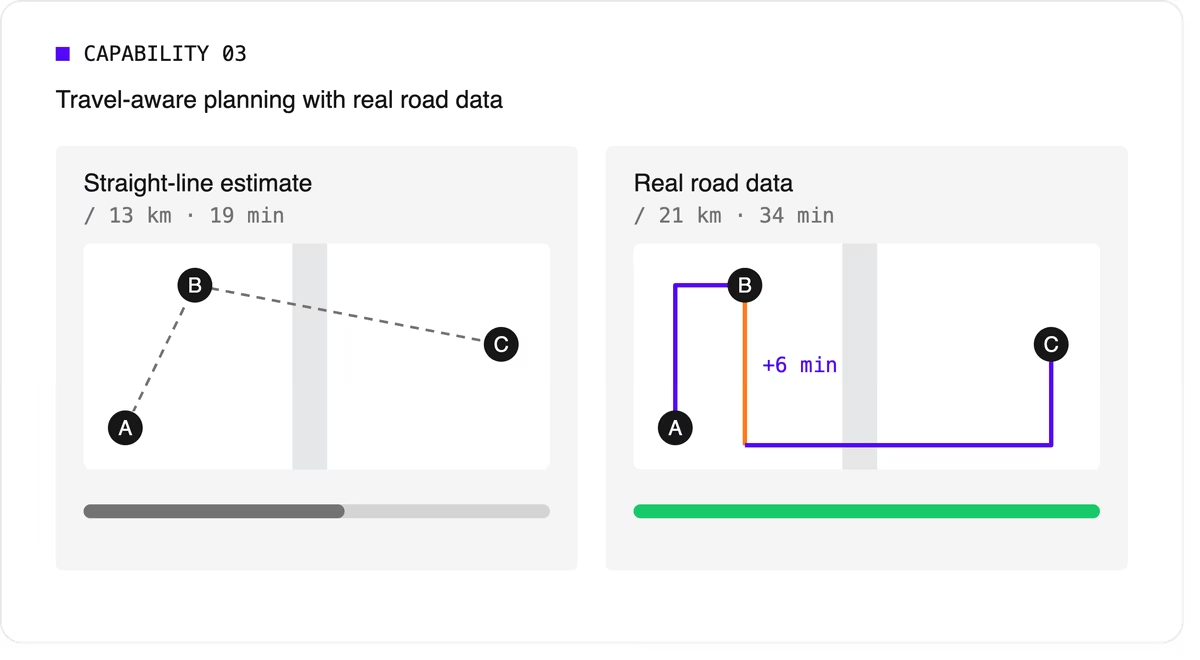
It should let you choose what to minimize, total travel time or total distance, because the two goals give different answers.
4. Multi-technician visits and job dependencies
Some jobs need two or more people on site at the same time for safety or lifting. Others must happen in order, sometimes with a delay: isolate the power before rewiring, or let a surface dry before painting.
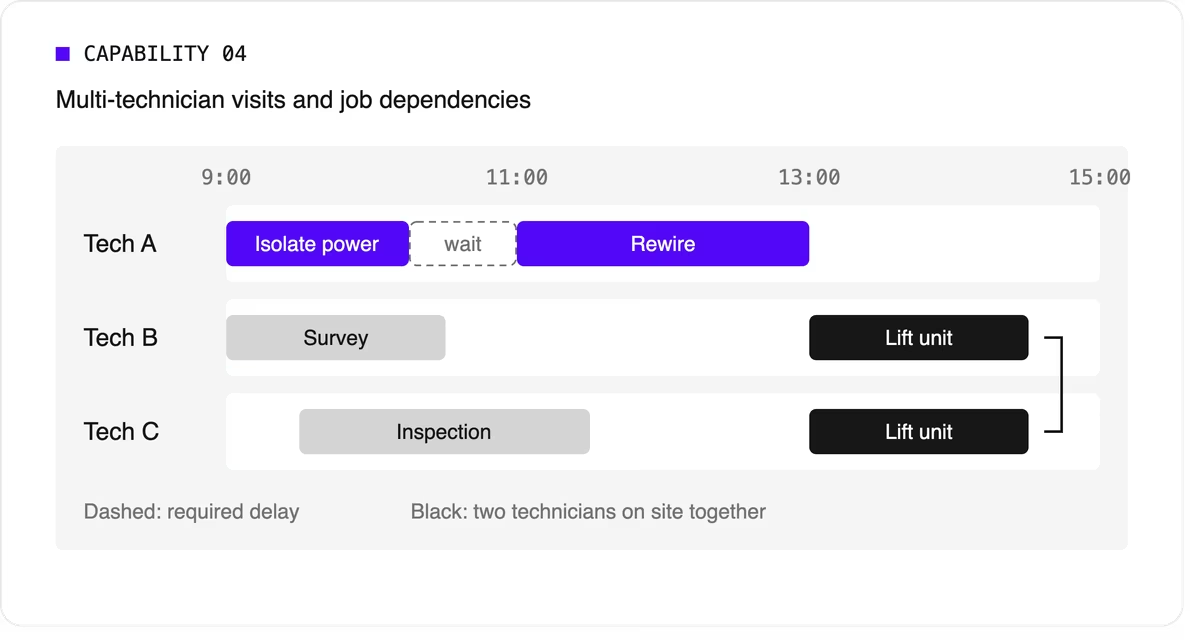
Many tools can't express these rules, so dispatchers track them by hand. If your operation has them, this capability is non-negotiable.
5. Working hours, breaks, and fairness
The plan has to respect shift start and end times, mandatory breaks, maximum working hours, and overtime rules. It should also spread work fairly so the same technicians don't always get the long days or the difficult jobs. Fairness affects retention, and retention matters more when technicians are hard to replace.
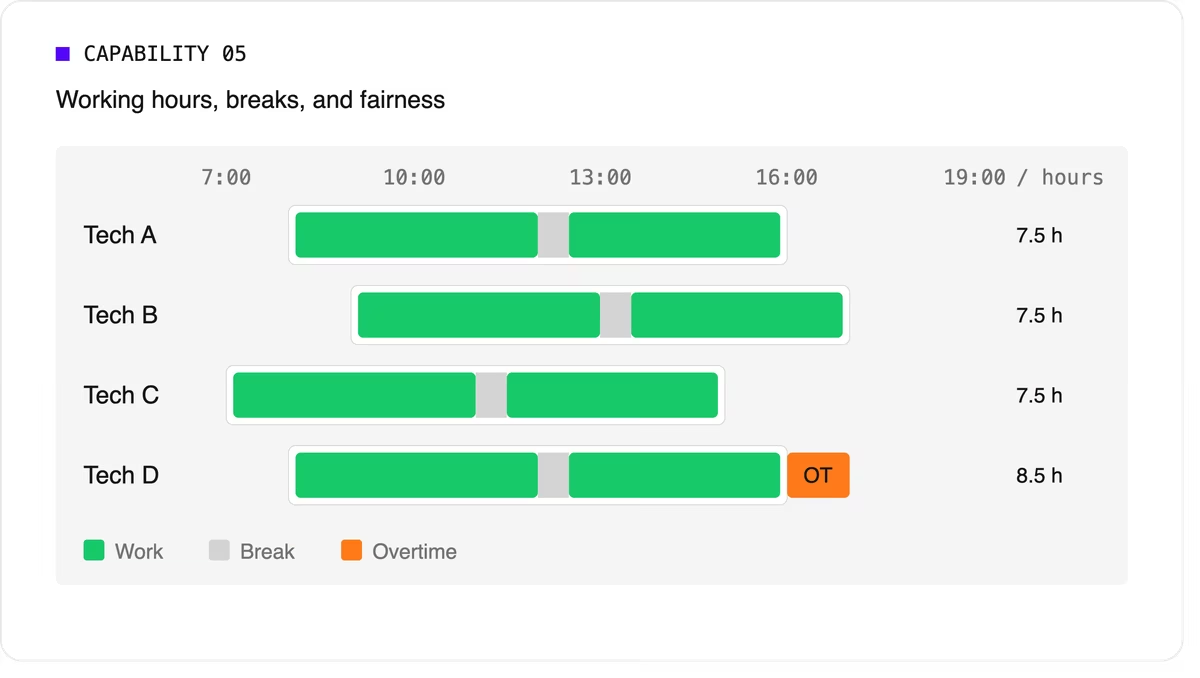
Scheduling software can support labor-law-style rules as constraints, but your organization remains responsible for verifying compliance with the regulations that apply to you.
6. Real-time replanning
Every schedule meets reality by mid-morning. A technician calls in sick, a job overruns, or an urgent call comes in. The software should replan quickly while changing as little as possible for everyone else. It should also let dispatchers lock (pin) jobs that are already in progress or confirmed with the customer.
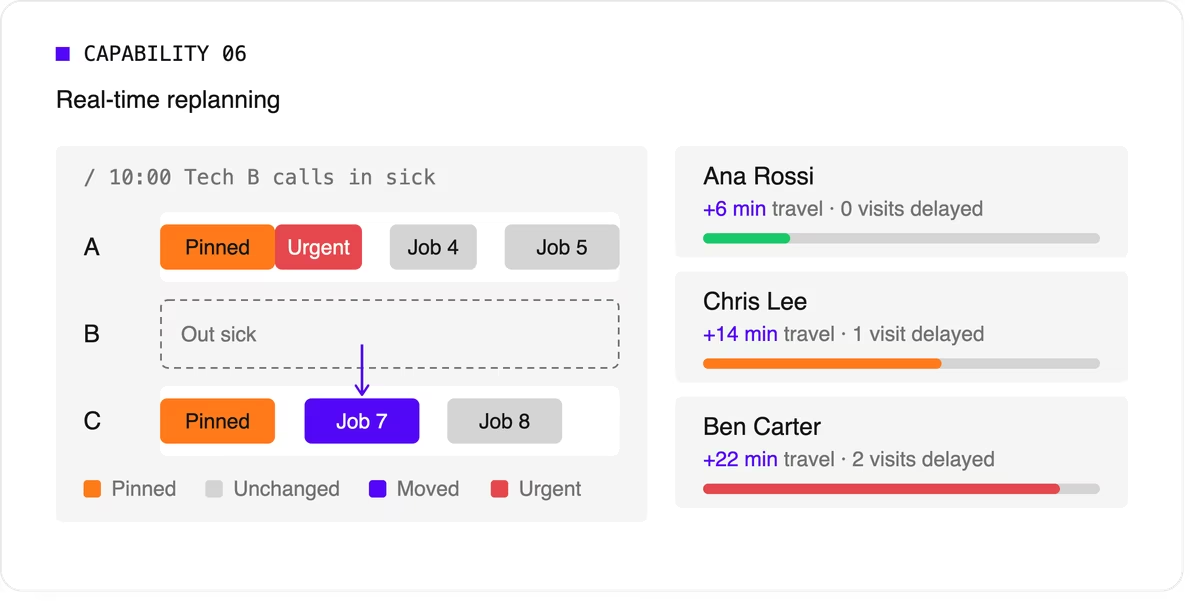
A strong version of this capability also recommends options. When a new urgent job arrives, the dispatcher should see which technicians could take it and what each choice would cost in travel or delayed work.
7. Explainability
Dispatchers and managers won't trust a plan they can't understand. Good technician scheduling software shows why a job was assigned the way it was, which rules were bent, and why some jobs couldn't be scheduled at all.
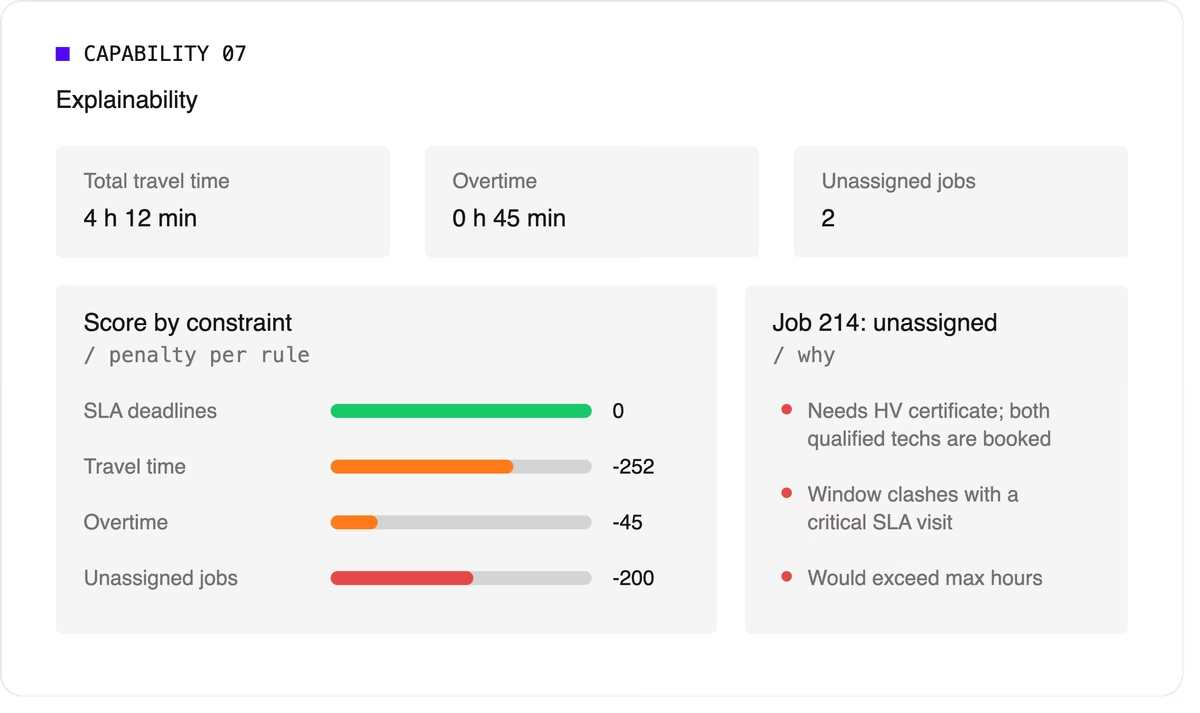
Look for a breakdown by constraint and clear metrics such as total travel time, overtime, and unassigned jobs.
8. Configurable priorities
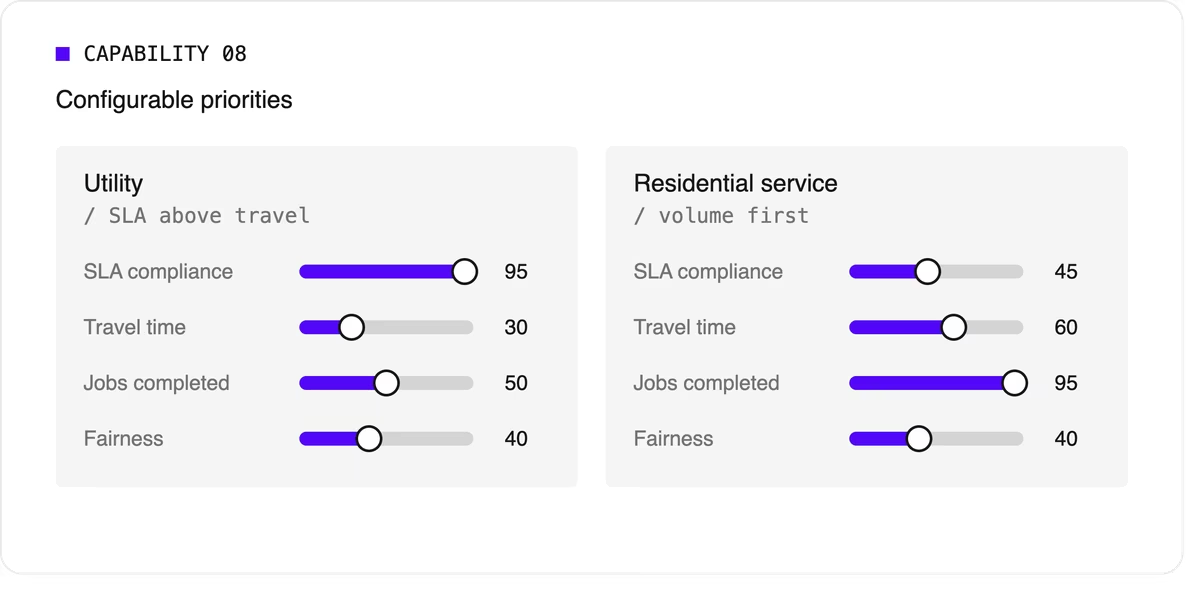
Every operation weighs its goals differently. A utility may put SLA compliance far above travel savings, while a residential service company may care most about completing as many jobs as possible per day. The software should let you adjust the relative weight of each goal without rewriting the underlying logic.
9. Integration and scale
Scheduling doesn't live on its own. It needs job data from your FSM or work order system, technician data from HR or workforce tools, and a way to push the finished plan to mobile apps. An API-first design makes this far easier than a closed tool with a separate interface.
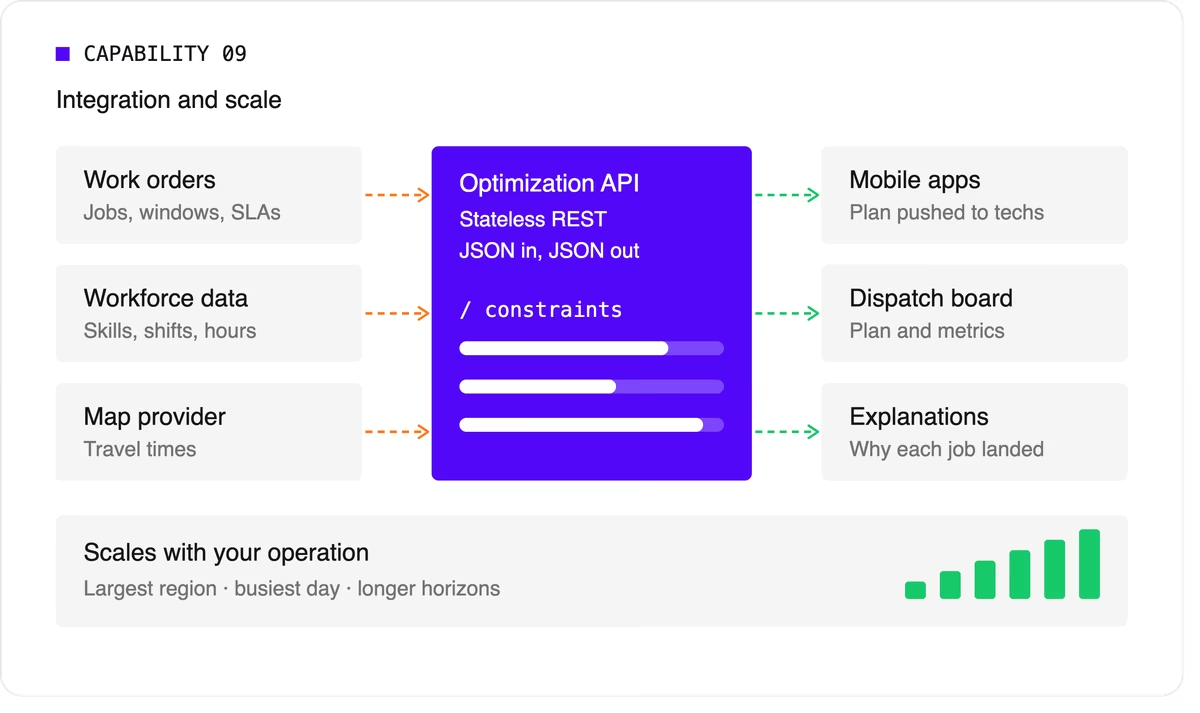
Scale matters too. The software should handle your largest region on your busiest day, and it should keep up as you add technicians, regions, or longer planning horizons.
A quick evaluation checklist
Use this table when comparing technicians scheduling software options or reviewing your own engine.
Scheduling software, FSM platform, or optimization engine?
When people search for technician scheduling software, they find three kinds of product.
- FSM platforms with a built-in scheduler cover the full workflow: work orders, mobile apps, invoicing, and scheduling. Their scheduling depth varies widely, from drag-and-drop boards to real optimization.
- Standalone scheduling tools focus on the dispatch board and often add basic auto-assignment. They're quick to adopt but can struggle with complex constraints.
- Optimization engines sit behind a user interface and do the heavy lifting. They don't manage work orders or invoices. Instead, they take in jobs, technicians, and rules, and return an optimized plan through an API. FSM vendors often embed one to strengthen their own scheduling, and large enterprises use one to add optimization to systems they already run.
Where Timefold fits
Timefold is an optimization engine in the third group. The Timefold Field Service Routing model covers the capabilities above: skill and seniority matching, customer time windows, visit dependencies with delays, multi-technician visits, working hours and fairness, and real-time replanning with recommendations. It ships with 50+ pre-configured constraints with adjustable weights, and every plan comes with metrics that show the tradeoffs it made.

It connects through a stateless REST API, so it fits alongside the FSM or work order system you already use. To see how this applies to field teams specifically, read about route optimization for field technicians. If you're preparing to integrate, the data foundations of efficient field service walks through the data you'll need.
FAQ
What does technician scheduling software do?
It assigns jobs to technicians and plans each technician's day, taking skills, time windows, travel, and working hours into account. More advanced tools optimize the whole plan at once and replan automatically when things change.
What's the difference between technician scheduling and dispatching?
Technician scheduling creates the plan ahead of time. Dispatching sends technicians to jobs and manages changes during the day. Modern software blends the two by replanning continuously.
Do I need technician scheduling software if I have an FSM platform?
It depends on how deep your FSM's scheduling goes. If dispatchers still spend hours adjusting assignments by hand, or your FSM can't express rules like dependencies or multi-technician visits, an optimization engine behind your FSM can close the gap.
How many technicians do I need before scheduling software is worth it?
There's no fixed number. Complexity matters more than headcount. A team of 20 with several skill types, tight SLAs, and multi-technician jobs can benefit as much as a team of 200 with simple, uniform work.


Optimize routing and scheduling in Python: a new open source solver Timefold
In Python, data scientists have a rich, open source AI toolkit to handle any business challenge, except for planning and scheduling. How do you optimally route field service technicians, assign employees to shifts, or schedule maintenance jobs?
For large organizations, solver technologies can reduce operational costs by $100,000,000 and CO² emissions by 10 million kg. So why doesn’t every Data Scientist use optimization solvers?
It’s because solvers are notoriously hard to use. Even a simple Vehicle Routing Problem implementation involves dealing with mathematical equations. Most solvers are too complex to handle real-world complexity. That’s about to change.
We are excited to announce Timefold Solver for Python, the new open source solver for Python developers and data scientists. It’s easy to use, powerful, and fast.
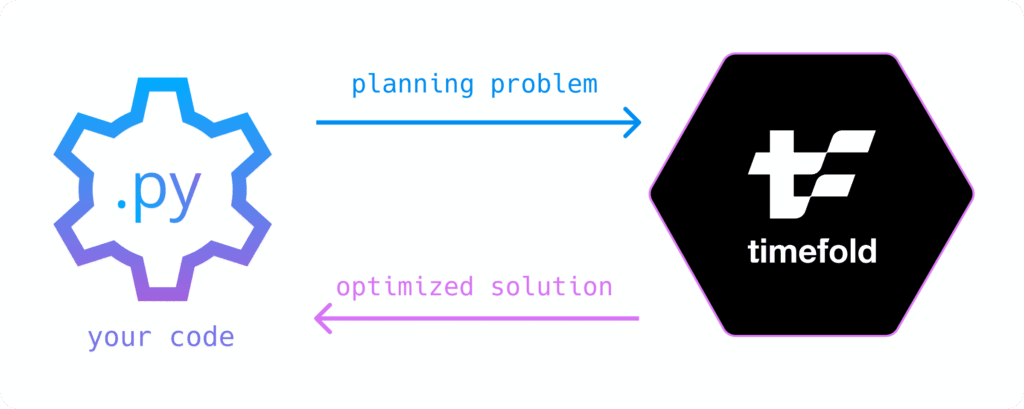
Solve a planning problem by calling solve():
solution = solver.solve(problem)
Timefold is built for real-world complexity, such as Field Service Routing, Maintenance Scheduling, Employee Scheduling, Last Mile Delivery, and Task Assignment. It’s not optimized for a simple Traveling Salesman Problem. It scales to large datasets with business constraints for tens of thousands of employees, and more.
Timefold Solver for Python is free to use (open source under the Apache License),documented, thoroughly tested, and released on PyPi. It’s backed by our open core company that lives and breathes planning optimization.
Just pip install timefold and run one of the quickstarts:
Hello worldEmployee SchedulingVehicle Routing ProblemSchool Timetabling
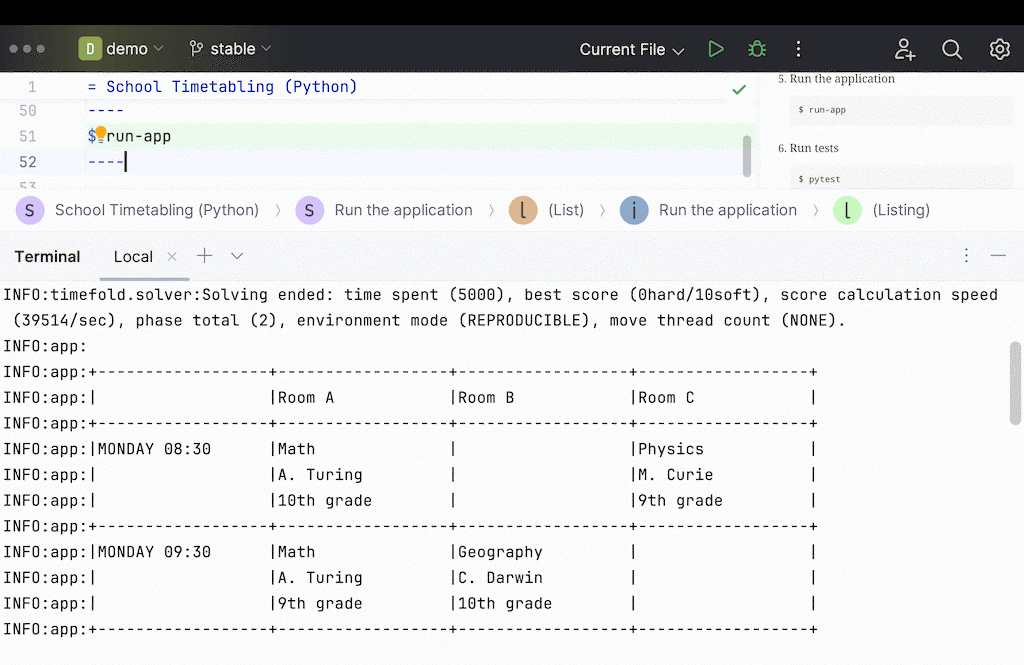
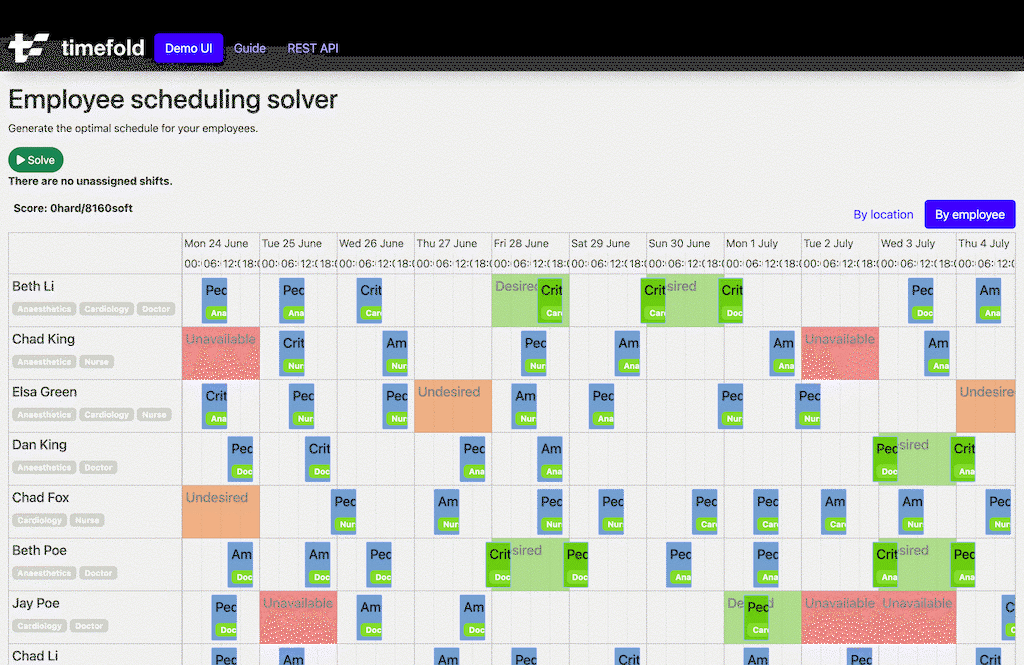
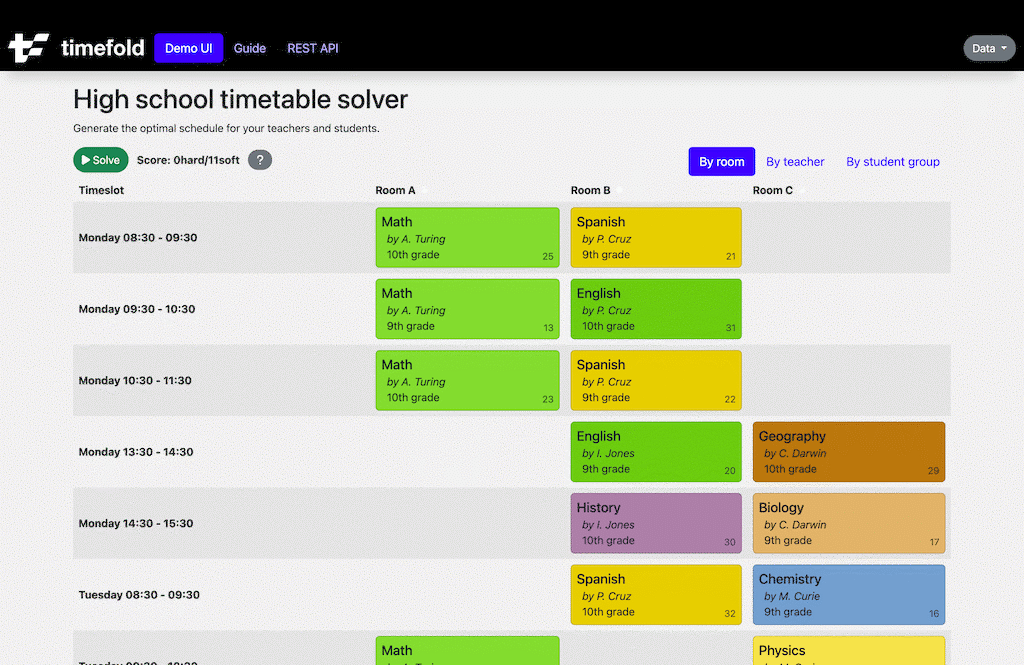
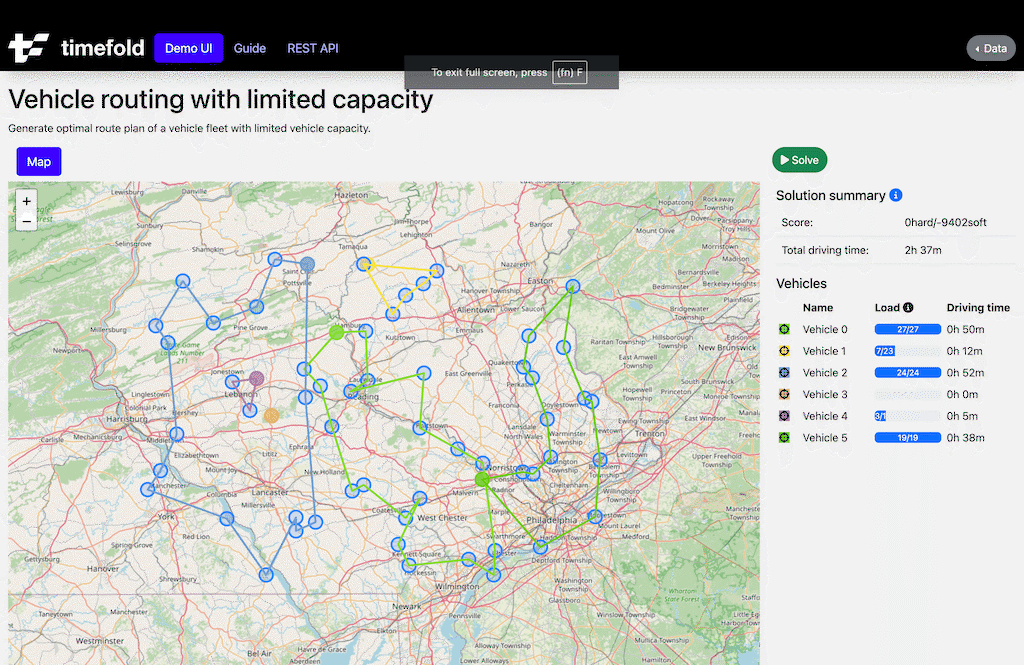
Each quickstart comes with a fully functional REST API, unit tests, and web UI.
Easy to use
Timefold puts developer productivity front and center. In Timefold, you define your model as domain classes and your constraints as code.
No need for mathematical equations. No need for a double array of binary variables. Timefold is the solver for Data Scientists and Software Engineers, not mathematicians. It integrates naturally with the rest of your Python software stack.
Let’s take a look at the source code for Employee Scheduling and Vehicle Routing:
Employee Scheduling
In Employee Scheduling, assign shifts to employees, while adhering to labor regulations and employee availability requests. It’s commonly used for healthcare personnel, security guards, police, or any employees that work in shifts.

Domain code
The Employee class has the name and skills of an employee:
class Employee:
    name: str
    skills: set[str]
The Shift class contains the start and end of each shift, as well as the required skill.
It also has an employee field, annotated with PlanningVariable. That’s the field(s) that Timefold changes during solving. Because it contains such an annotated field, the class has a @planning_entity decorator.
@planning_entity
class Shift:
    start: datetime
    end: datetime
    required_skill: str
    employee: Annotated[Employee | None, PlanningVariable]
Employee and Shift are custom domain classes, so you can add attributes as needed, for your constraints, to fulfill your business requirements.
Constraints
Timefold assigns each shift to an employee, taking into account the constraints, such as:
- Required skill: Every assigned employee must have the required skill. Add this as a hard constraint:
# For each shift ...
(constraint_factory.for_each(Shift)
  # ... that is assigned an employee that doesn't have the required skill ...
  .filter(lambda shift: shift.required_skill not in shift.employee.skills)
  # ... penalize as an infeasible solution
  .penalize(HardSoftScore.ONE_HARD)
  .as_constraint("Missing required skill"))
- Ten hours between shifts: Ideally, an employee has 10 hours between two shifts. Add this as a soft constraint (AKA an objective):
# For each shift ...
(constraint_factory.for_each(Shift)
  # ... combined with a later shift with the same employee ...
  .join(Shift,
    Joiners.equal(lambda shift: shift.employee.name),
    Joiners.less_than_or_equal(lambda shift: shift.end, lambda shift: shift.start)
  )
  # ... with less than 10 hours in between ...
  .filter(lambda first_shift, second_shift:
        (second_shift.start - first_shift.end).total_seconds() // (60 * 60) < 10)
  # ... penalize as a soft constraint weighted by the number of minutes less than 10 hours
  .penalize(HardSoftScore.ofSoft(1), lambda first_shift, second_shift:
        600 - ((second_shift.start - first_shift.end).total_seconds() // 60))
  .as_constraint("At least 10 hours between 2 shifts"))
- Fairness: All employees are assigned the same amount of work.
- and many more
Each constraint is unit tested. Run pytest on a quickstart to validate every constraint works as you intended:
def test_required_skill():
    ann = Employee(name="Ann", skills={"Doctor"})
    (constraint_verifier.verify_that(required_skill)
    .given(ann,
           Shift(start=..., end=..., required_skill="Nurse", employee=ann))
    .penalizes(1))
    beth = Employee(name="Beth", skills={"Nurse"})
    (constraint_verifier.verify_that(required_skill)
    .given(beth,
           Shift(start=..., end=..., required_skill="Nurse", employee=beth))
    .penalizes(0))
Vehicle Routing
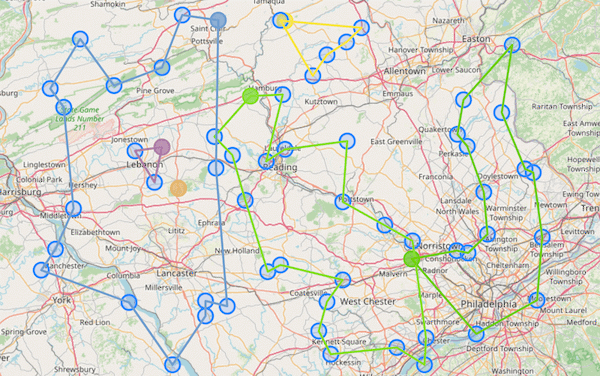
In the Vehicle Routing Problem, assign each visit to a vehicle and decide the order of the visits for each vehicle. The goal is to minimize driving time while adhering to capacity, time windows, overtime, and other constraints.
Domain
The Vehicle class has a list of visits, annotated with PlanningListVariable. Timefold fills in the list of visits:
@planning_entity
class Vehicle:
    name: str
    home_location: Location
    visits: Annotated[list[Visit], PlanningListVariable]
    ... # shift hours, capacity, skills, ...
The Visit class has a name and location:
class Visit:
    name: str
    location: Location
    ... # time windows, weight/volume usage, skill requirements, ...
Constraints
Constraints, such as the capacity constraint, are written in code:
def vehicle_capacity(factory: ConstraintFactory):
    return (factory.for_each(Vehicle)
            .filter(lambda vehicle: vehicle.calculate_total_demand() > vehicle.capacity)
            .penalize(HardSoftScore.ONE_HARD,
                      lambda vehicle: vehicle.calculate_total_demand() - vehicle.capacity)
            .as_constraint("Vehicle capacity"))
This approach has the following benefits:
Powerful
Many solvers claim to be the fastest solver. But even the fastest solver is useless if it can’t implement all of your business requirements:
- Hard constraints are physical or legal limitations. For example, an employee can’t be in two places at the same time.
- Medium constraints assign as much work as possible, without breaking hard constraints. Ideally, all work is assignable, but on some days there is more work than people to do it.
- Soft constraints (AKA objectives) reduce costs, increase service quality, and improve employee retention. For example, minimize traveling time or minimize overtime. These constraints are aggregated into a weighted function.
If a solution breaks a single hard constraint, the entire solution is useless. But also, every soft constraint that is missing constitutes a hidden cost to the company.
Therefore, Timefold can handle any constraint. Not just linear constraints. Not just quadratic constraints. Even constraints such as fairness and load balancing are fully supported.
Reliable, fast, and scalable
Timefold is built for complex business constraints and large datasets. It uses significantly less memory than traditional solvers, allowing it to scale beyond traditional limitations.
Because of many internal performance optimizations, it’s extremely fast. Even with custom code in your constraints. Under the hood, it uses a JVM to speed up performance.
To orchestrate high-scale datasets or maps integration, Timefold is developing a proprietary Enterprise extension.
Get Started
Timefold Solver for Python is ready to automate and optimize your operations scheduling challenges.
Get started with one of the quickstarts today:
$ git clone https://github.com/TimefoldAI/timefold-quickstarts.git
...
$ cd timefold-quickstarts/python/hello-world
...
$ pip install -e .
...
$ run-app
If you have questions, don’t hesitate to ask on StackOveflow. If you find an issue, report it in a GitHub issue.
Join the community
Join us in the community and start a GitHub discussion. To learn more about planning optimization, visit our website or follow us on Youtube.

Timefold Solver Python live in Alpha
At Timefold, our mission has always been to simplify the complexity of planning optimization and make it accessible to a wider audience. We started this journey with our Java solver, empowering developers to tackle NP-hard problems with ease. Today, we are thrilled to announce a major milestone: the release of our Python solver.
Why Python?
Python is a powerful, versatile, and widely-used programming language, particularly popular among data scientists, analysts, and developers. Its simplicity and readability make it an ideal choice for translating real-world constraints into code. By introducing a Python solver, we are expanding our reach and making planning optimization accessible to a larger community of developers who prefer Python over Java.
Benefits of the Timefold Python Solver
1. Ease of Use
Our Python solver simplifies the process of planning optimization by allowing developers to write their planning model directly in Python. This eliminates the need for writing complex mathematical equations, making it easier to translate real-world constraints into code.
2. Accessibility
With Python being a common language in data science and machine learning communities, the Python solver opens up our technology to a new audience. Data scientists and analysts can now leverage the power of Timefold without needing to switch to a different programming language.
3. Integration with Existing Tools
Python’s extensive ecosystem includes a variety of libraries and frameworks that can seamlessly be put into a workflow with our solver. Whether you are using pandas for data manipulation, NumPy for numerical computations, or any other Python library, our solver fits right into your workflow.
4. Flexibility
The Python solver is designed to be flexible and adaptable, allowing you to model complex planning problems with ease. Whether you are dealing with employee scheduling, field service routing, or maintenance scheduling, our solver can handle it all.
Important note: Alpha Release
Please not that our Python solver is currently in Alpha. The API set is not stable and it will likely change until we reach the Beta Phase. We are actively seeking feedback to help us refine and improve the Python Solver.
Getting Started with the Python Solver
We understand that getting started with a new tool can be daunting, so we have prepared comprehensive documentation and tutorials to guide you through the process. Our documentation covers everything from installation and setup to advanced usage and integration with other tools.
Visit this URL to access our Python solver and start optimizing your planning problems today. Our team is dedicated to supporting you every step of the way, so don’t hesitate to reach out with any questions or feedback.
Join the Conversation
We believe in the power of community and are excited to engage with you. Share your experiences, ask questions, and connect with other users in our community forums. Follow us on social media for the latest updates, tips, and success stories.
Conclusion
The release of our Python solver marks a significant step forward in our mission to make planning optimization accessible to all. We are excited to see how our community will leverage this new tool to solve complex planning problems and drive innovation in their fields.
Install Timefold Python Solver on PyPi: https://pypi.org/project/timefold-solver/
About Timefold
Timefold is dedicated to providing cutting-edge solutions for planning optimization. Our solvers are designed to simplify complex NP-hard problems, making them accessible to developers across various industries. With a focus on innovation and community, we strive to be the go-to platform for planning optimization and education.
By sharing this blog post, you can help us spread the word and make planning optimization accessible to a wider audience.

How to speed up Timefold Solver Startup Time by 20x with native images
As more applications are moving towards cloud deployments, minimizing startup time is becoming more and more important. Read on to find out how to use Timefold Solver with Spring native images to reduce startup time in your application.
If you want to follow along, clone the Timefold quickstarts and change to the technology/java-spring-boot directory, which is already set up to support Spring native images:
git clone https://github.com/TimefoldAI/timefold-quickstarts.git
cd timefold-quickstarts/technology/java-spring-boot
Setup
You can modify your existing Spring applications to support building Spring native images by modifying your configuration.
MavenGradle
Add org.graalvm.buildtools:native-maven-plugin to your build plugins:
<build>
  <plugin>
      <groupId>org.graalvm.buildtools</groupId>
      <artifactId>native-maven-plugin</artifactId>
  </plugin>
</build>
Note: If you are not using spring-boot-starter-parent, you would need to configure executions for the process-aot goal from Spring Boot’s plugin and the add-reachability-metadata goal from the Native Build Tools plugin.
Building
Spring provides two ways of building a native image:
- Using Docker
- Using a locally installed GraalVM
Build using Docker
MavenGradle
mvn -Pnative spring-boot:build-image
This will produce an image tagged as docker.io/library/${name}:${version} where ${name} is the artifactId in Maven or the archivesBaseName in Gradle.
You can then run the image using Docker:
docker run --rm -p 8080:8080 docker.io/library/docker.io/library/timefold-solver-spring-boot-school-timetabling-quickstart:1.0-SNAPSHOT
Build using locally installed GraalVM
MavenGradle
mvn -Pnative native:compile
This will create an executable in target using the project’s artifactId as the name. The native image can then be run directly:
./target/timefold-solver-spring-boot-school-timetabling-quickstart
Benefits
The primary benefit of native images is the massively reduced startup time:
./target/timefold-solver-spring-boot-school-timetabling-quickstart
...
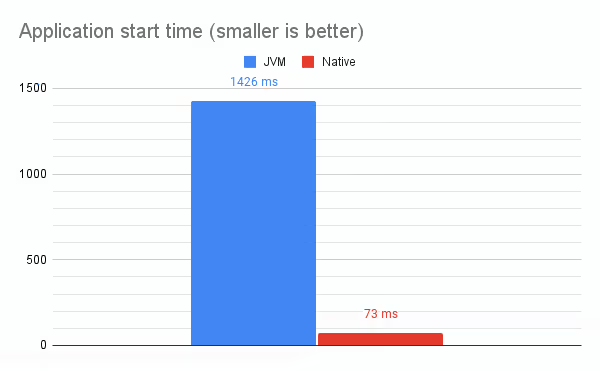
20:40:44.888  INFO [main           ] Started TimetableSpringBootApp in 0.07 seconds (process running for 0.073)
Compared to running with a JVM:
java -jar target/timefold-solver-spring-boot-school-timetabling-quickstart-1.0-SNAPSHOT.jar
...
20:42:40.323  INFO [main           ] Started TimetableSpringBootApp in 1.216 seconds (process running for 1.426)
The native image started 20 times faster! This means a freshly started Kubernetes pod can respond to its first requests 20 times faster when a native image is used, changing an abysmal ~1 seconds wait time to a much more acceptable ~0.1 seconds wait time.
However, it is not all roses, since a native image is unable to perform various profiling based optimizations that a JVM can perform, reducing the speed of compute bound problems (such as solving):
./target/timefold-solver-spring-boot-school-timetabling-quickstart
...
20:58:43.064  INFO [pool-5-thread-1] Solving ended: ... score calculation speed (124774/sec) ...
Compared to running with a JVM:
java -jar target/timefold-solver-spring-boot-school-timetabling-quickstart-1.0-SNAPSHOT.jar
...
20:56:17.441  INFO [pool-2-thread-1] Solving ended: ... score calculation speed (213780/sec) ...
In a native image, Timefold Solver ran about 42% slower compared to a JVM run. This means to get to the same solution as a JVM run, the native image would need to run almost twice as long!
Important: Make sure to use GraalVM JDK 22 or above to generate the native image, which fixes a major performance regression involving record hashCode and equals.
Conclusion
It is easy to modify your existing Spring applications to make use of native images, allowing you to massively reduce startup time and thus respond to requests quicker on newly spawned Kubernetes pods. However, using native images currently prevents profiling based JIT optimizations, significantly impacting performance for compute bound tasks such as solving. If you have long-running solving tasks, consider running the solver in a separate application, which will allow you to gain the startup time benefits without affecting the performance of the solver.

Red Hat: OptaPlanner End Of Life Notice (EOL)
Timefold offers continued support and further innovation.
As the original team behind OptaPlanner, we witnessed firsthand the challenges and limitations of continuing our mission to eliminate wasteful scheduling within Red Hat. The end of the Red Hat build of OptaPlanner and its evolution into an Apache project marks the end of an era. This moment signifies not just an end, but also a new beginning with Timefold.
What are the advised steps to safeguard your OptaPlanner project?
- Reach Out Directly: Your first step is as simple as saying hello. Contact us via email at [email protected] or through our website's contact form. We guarantee a response within 24 hours on business days.
- Discover what's new: We invite you to explore the enhancements and new features we’ve integrated into Timefold Solver by visiting our release notes page at https://timefold.ai/releases. Our solver is now twice as fast as OptaPlanner, thanks to the introduction of new features and critical bug fixes over the past year.
- Upgrade to Timefold: Transitioning from OptaPlanner to Timefold is straightforward. We’ve designed the process to be completed in less than two minutes. Detailed instructions are available on our upgrade page, guiding you through every step.
All the knowledge and passion for planning optimization are now embodied in Timefold. Let us help you with continued support.

Newsletter 4: A big Speed Upgrade for Timefold - Our First Customer Story and AMA!
Bye Bye dummy vehicles, hello speed upgrade!
TL;DR: OptaPlanner and pre-1.8.0 Timefold users should upgrade for yet another significant performance boost.
Building on last year’s massive speed gains, we’re shifting to a higher gear.
Timefold 1.8.0 introduces support for planning list variables with unassigned values (nullable), enhancing scalability and efficiency.
Why should you care? It represents a big performance gain, especially when your operations doesn’t have enough resources to assign all necessary tasks to.
Your planning model benefits from this upgrade if it…
- Encounters Overconstrained Planning: struggling to assign all necessary tasks due to a shortage of resources.
- Implements the @PlanningListVariable annotation for managing planning list variables.
- Uses Multi-Resource Planning: Ideal for scenarios requiring multiple resources, like several vehicles or technicians at one location.
Impact of this upgrade
- OptaPlanner and pre-1.8.0: Models used "virtual vehicles" for tasks, which didn't scale well in multi-resource scenarios.
- Now, with 1.8.0: Introducing nullable planning list variables significantly improves scalability, showing remarkable performance in datasets with multi-resource visits.
Ok, what does the data say?
In the graph below we look at the impact on a Field Service Routing model with varying data set sizes. We look at the score calculation speed and benchmark versus the baseline, before Timefold 1.8.0 and after Timefold 1.8.0.
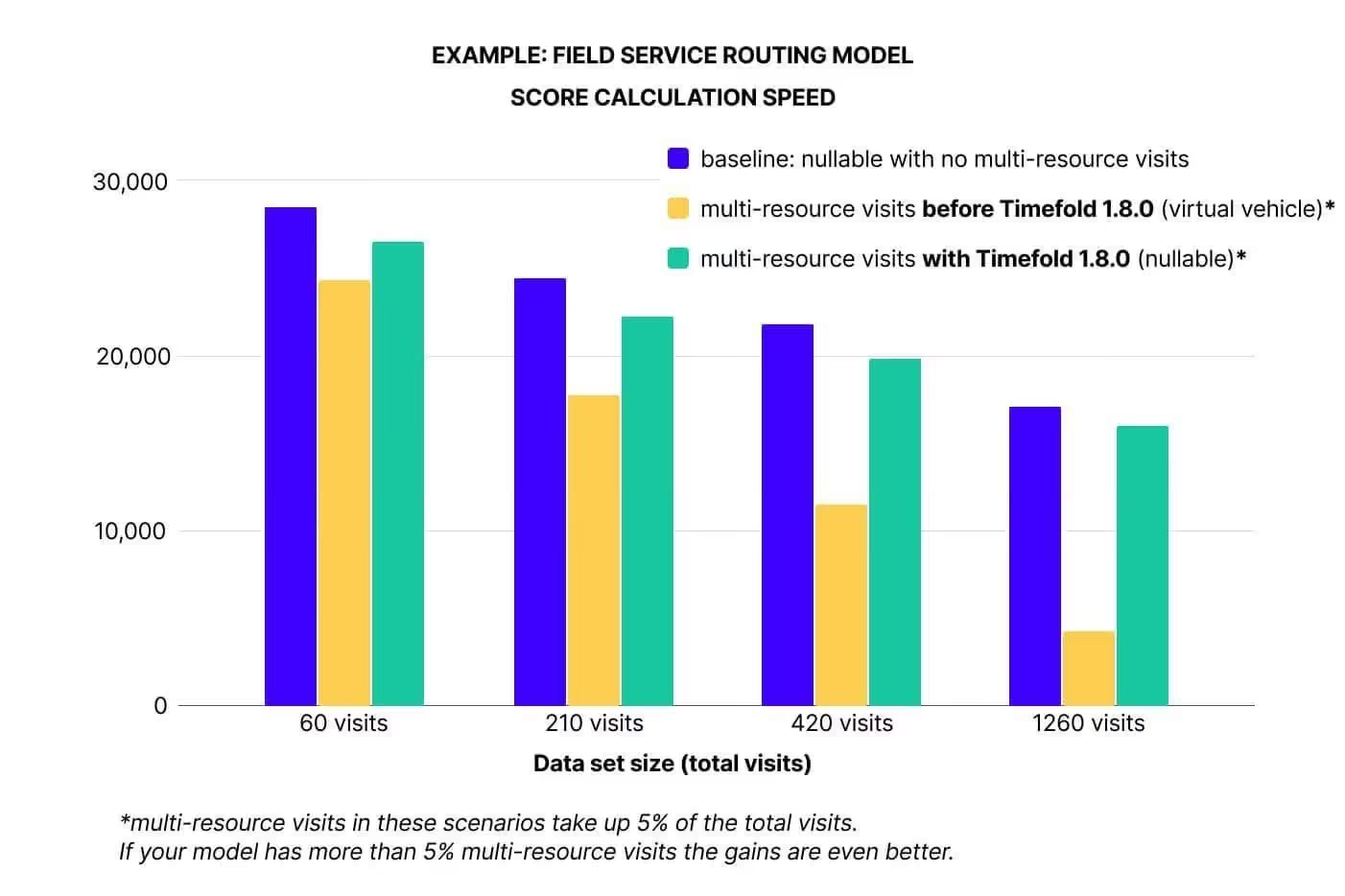
What is important for scalability is not the absolute value of the bar, but the speed with which it decreases with larger datasets.
The comparison of performance across different dataset sizes (from 60 to over 1200 visits) shows that nullable planning list variables maintain consistent performance, unlike virtual values that degrade with larger datasets.
This update is crucial for anyone dealing with overconstrained planning and multi-resource tasks, promising substantial scalability and efficiency improvements. Upgrade today
———
Case Study
Ecoprogram Flotte, an Italian leader in automotive logistics, needed a solution to optimize its transport planning. With Timefold, the company managed to build the best operational change ever for the company: a platform that makes vehicle deliveries and pick-ups more efficient and environmentally friendly.
Challenge
Streamlining the logistics to prepare and deliver 245,000 new cars to customers, while also managing the pickup of their used vehicles. This requires custom route planning for each driver, factoring in availability, residence, and more.
About Ecoprogram Flotte
- €258 million revenue (2024)
- 245000 car deliveries (2024)
- 850 employees, 300 drivers
Collaborates with international groups such as Arval, Gruppo Bnp Paribas, ALD Automotive, Leasys, Unipol Rental, LeasePlan.
What Ecoprogram Flotte says about Timefold
“The Timefold platform is better than anything we have ever seen in the history of the company. Moreover, it fits in perfectly with our company’s sustainable ambitions.”
“The number of staff in the planning team decreased from five to one. We still see a big potential to further improve our planning and service delivery. This software enables us to stand out in our industry.”
Gregoire Chové - Managing Director
———
Blog
How fast is Java22?
With the release of Java 22 just around the corner, you may be wondering how it compares to Java 21 and whether you should upgrade. Additionally we compare it vs GraalVM.
Read the blog post
Advanced pinning in VRP. Reacting to sudden change
This article is focused on a more advanced pinning application for the Vehicle Routing Problem.
Read the blog post
———
Release notes
Timefold Solver Community Edition 1.8.0. full release notes
Spring is in the air, and so is another release of Timefold solver. This release is a significant leap forward, not just for our Community Edition users but for our Enterprise Edition clients as well, with each edition packed with features designed to supercharge your operations.
For our Community Edition, we have prepared the following features:
- List variables now allow for unassigned values. Read the beginning of this mail for more information.
- Spring Boot users among you can now easily generate native images, as was already possible for Quarkus.
- ConstraintVerifier can now test for justifications and indictments, allowing you to write tests that will give you even more confidence in your constraints than was possible before.
- We have exposed new metrics that allow you to better monitor the currently running solver(s).
- And last but not least, we've brought the usual bugfixes and dependency upgrades.
Exclusive Features for Enterprise Edition 1.8.0: Beyond the enhancements of the Community Edition, our Enterprise Edition users can access additional powerful features designed to significantly boost efficiency and performance.
- Automatic node sharing. Use cases with a large number of complex constraints may run as much as 30 % faster without any changes to your code.
- Nearby Selection can now be enabled with a single switch in your configuration, as opposed to the cumbersome configuration of old. If you're still not using Nearby Selection for your large routing problems, you're missing out on cost savings coming from significantly improved solutions!
Going forward, we will be publishing an Upgrade Recipe to let you know of any things you may or may not run into when upgrading to the latest version of Timefold Solver. It's a good read!
Here you can find all previous releases of Timefold Solver.
———
Latest Videos

How fast is Java 22?
As the Java 22 release is fast approaching, we took our usual look at its performance when it comes to the Timefold Solver. Read on to find out how the solver performs on Java 22, compared to Java 21. This time including GraalVM!
But first, let’s get some things out of the way.
What is Java 22 and how to get it
Java 22 is a new release of the Java platform, the trusty programming language that Timefold Solver is written in. It brings a bunch of new features, as well as the usual bugfixes and smaller improvements.
Java 22 will be generally available on March 19, 2024, but you can already try it out using the release candidate builds. We find that the easiest way to get started with Java 22 is to use SDKMAN, and that is what we did as well. We have also decided to test GraalVM for JDK 22. You may know GraalVM as the tool to run Java natively, but today we actually mean the regular JDK distribution that GraalVM provides.
While long-term support won’t likely be available for Java 22, it is still a good idea to try it out just to make sure your code is still in good shape and will be ready for the next LTS. For Timefold Solver, that means making sure the entire codebase continues to work flawlessly on Java 22, as well as running some benchmarks to ensure our users can expect at least the same performance as before. Let’s get started on that.
Micro-benchmarks
We’ll start with score director micro-benchmarks, which we use regularly to establish the impact of various changes on the performance of Constraint Streams. These benchmarks do not run the entire solver; rather, they focus exclusively on the score calculation part of the solver.
They are implemented using Java Microbenchmark Harness (JMH), and they run in many Java Virtual Machine (JVM) forks and with sufficient warmup. This gives us a good level of confidence in the results. In fact, the margin of error on these numbers is only ± 2%.
Here is the Constraint Streams performance on Java 22 vs. Java 21:
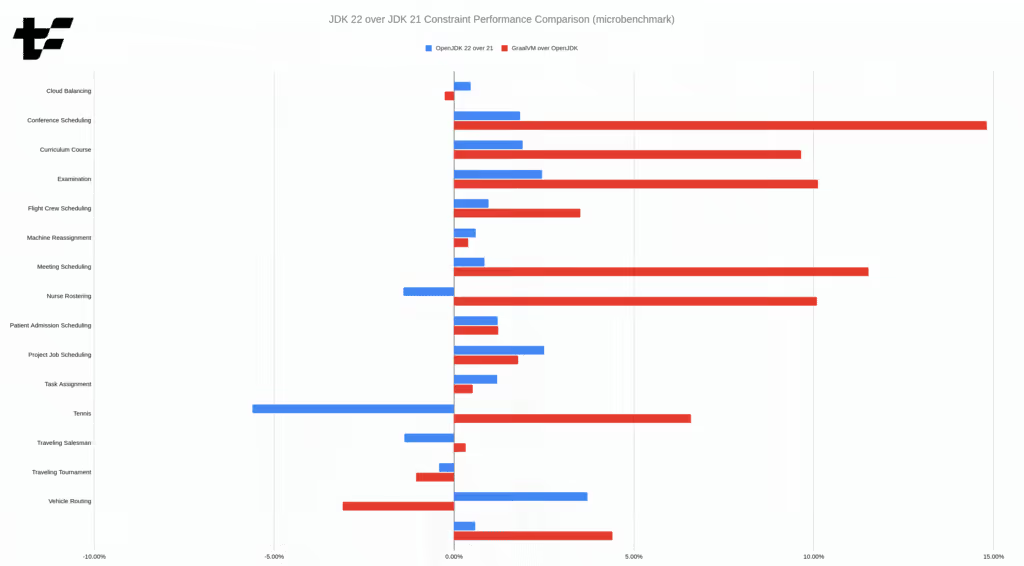
In all cases but one, the difference between OpenJDK 22 and 21 is within the margin of error for the benchmark. What that means is that we have observed no statistifically significant change in performance between the two releases. The "Tennis" benchmark is the only outlier, and it will be interesting for us to look into it and find out why.
The more interesting finding is that GraalVM for JDK 22 can be significantly faster than OpenJDK 22! With an average performance improvement of ~5% across the benchmarks, and a maximum improvement of ~15% in the "Conference Scheduling" benchmark, GraalVM is definitely worth considering for your Timefold Solver application.
It should be noted that we ran these benchmarks with ParallelGC as the garbage collector (GC), instead of the default G1GC. We are making this choice because ParallelGC has been the best GC for the solver in the past, as the solver is all about throughput and not latency.
Real-world benchmarks
Now that we’ve seen the micro-benchmarks, it’s time to compare them to real-world solver performance. This includes the entire solver, not just the score calculation part.
We ran the solver manually in 10 different JVM forks, and used the median score calculation speed. We selected a subset of the available benchmarks, to keep the run time short; the selection is representative of the entire benchmark suite in terms of heuristics used and code paths exercised. Once again, ParallelGC is used as the garbage collector. Here are the results:
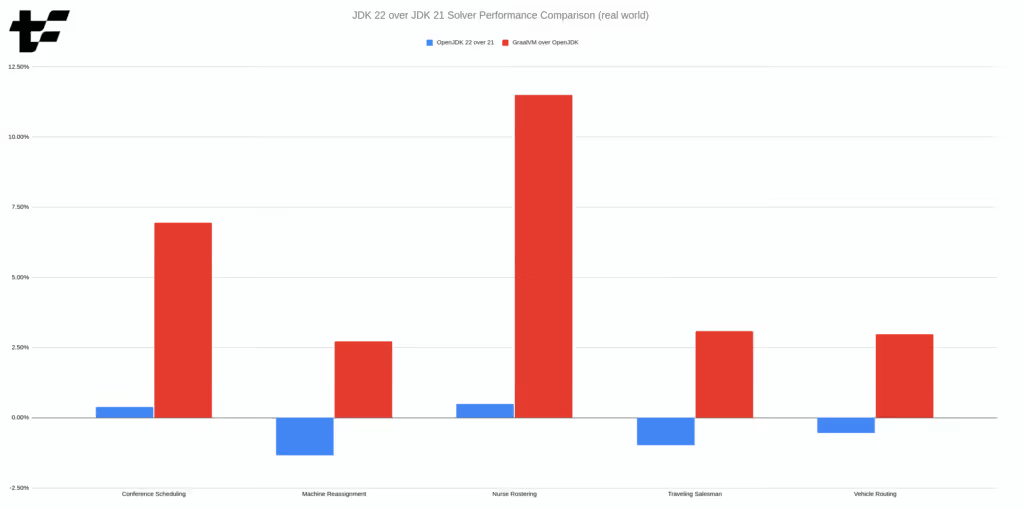
The numbers confirm the results of the micro-benchmarks. The difference between OpenJDK 22 and OpenJDK 21 is negligible, while GraalVM for JDK 22 brings improvements of up to 10 %.
Since we haven’t established a formal interval of confidence for these large benchmarks, we can’t say with certainty that the improvements are statistically significant. However, the fluctuations observed between runs have been small enough to give us confidence in the results.
Conclusion
In this post, we’ve shown that:
- Timefold Solver 1.8.0 works perfectly fine with Java 22, no changes are needed. Switching to the latest version of Java is a non-event for us here at Timefold, a testament to Java’s backward compatibility promise.
- Switching to Java 22 likely won’t bring any performance improvements or regressions for the solver.
- GraalVM for JDK 22 can bring performance improvements of up to 10 % for the solver.
Even though OpenJDK 22 doesn’t bring any performance improvements for us, we still encourage you to try Java 22. It is free after all, and you’ll be able to enjoy the latest and greatest Java platform.
Appendix A: Reproducing the results
These benchmarks use Timefold Solver 1.8.0, the latest version at the time of writing.
All benchmarks were run on Fedora Linux 39, with Intel Core i7-12700H CPU and 32 GB of RAM. We used the following JDK distributions:
OpenJDK Runtime Environment Temurin-21.0.2+13 (21.0.2+13-LTS), available as21.0.2-temon SDKMAN.OpenJDK Runtime Environment 22.ea.36 (22+36-2370), available as22.ea.36-openon SDKMAN.GraalVM for JDK 22.ea.06 (22-dev+36.1), available on Github.
Source code of the micro-benchmarks can be found in my own personal repository. The real-world benchmarks were run using timefold-solver-benchmark, using this configuration. (You’ll need timefold-solver-examples on the classpath.) Raw data used for the charts can be found in this spreadsheet.

Continuous Planning Optimization with Pinning
How does your business adapt when unexpected changes disrupt your carefully planned schedules after a part of the plan has already been executed? Can you quickly adjust a vehicle routing plan when an additional urgent customer request comes in or an employee unexpectedly takes the afternoon off?
Perhaps you have read Fast Planning Optimization with the Recommended Fit API blog post by Frederico and you are wondering how to handle the cases where a new visit comes in after the route plan has started?
With Timefold, you can mark the historical part of the plan, telling the solver not to change it anymore. In addition, you can prevent changes to future parts of the plan which are to be executed "soon enough", such as redirecting a technician who had already started travelling to another customer.
In models such as Employee shift scheduling, marking the historical part of the plan is straightforward by using Timefold Solver’s Pinned planning entities feature. This article is focused on a more advanced pinning application for the Vehicle Routing Problem.
The Vehicle Routing Problem
The Vehicle Routing Problem (VRP) is a commonly encountered real-world scenario with numerous variants.
Let’s recall Frederico’s VRP definition from his blog post:
- The available vehicles must visit a list of locations within their capacity and before a deadline.
- The goal is to minimize the total driving time of the vehicles.
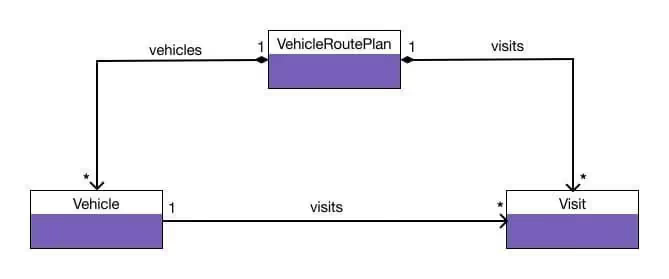
You can check the VRP quickstart and its documentation to get an idea how this scenario is implemented with Timefold.
Continuous planning example
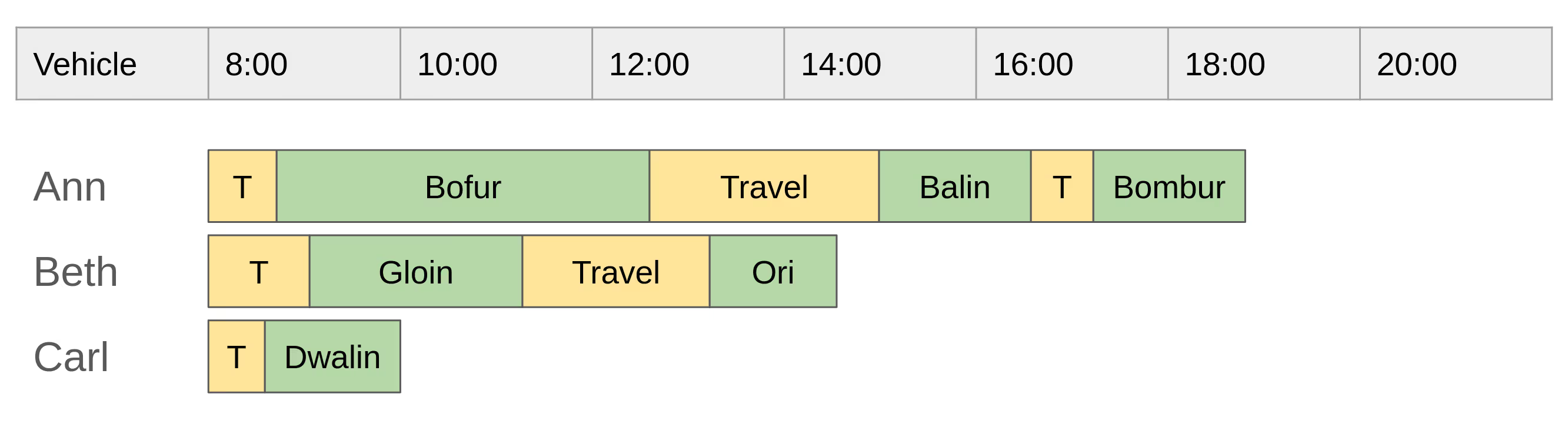
Imagine an initial plan for the day has been created and optimized before the vehicles start to work. The yellow blocks with "T" or "Travel" illustrate travelling time to the customer’s location, the green ones represent a technician’s visit at a particular customer):
The vehicles are on their way to customers and the shift goes on as expected until noon, when a new customer calls in and needs to schedule an urgent visit for today:
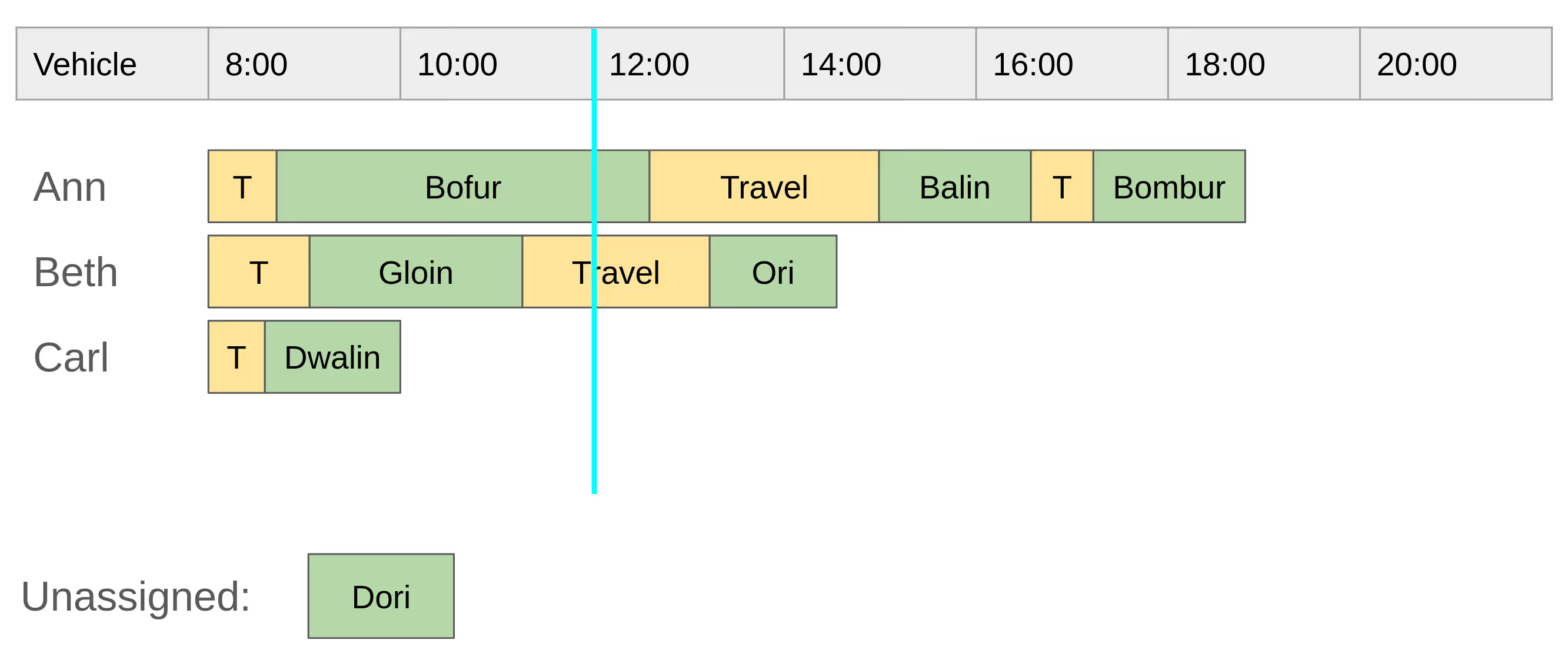
The plan needs to be adjusted by including a new customer visit, but we need to let the solver know that some of the visits must not be changed (we call them pinned), either because they are already done, or a change in their planning would be disruptive. See a possible plan incorporating the change at 12:00:
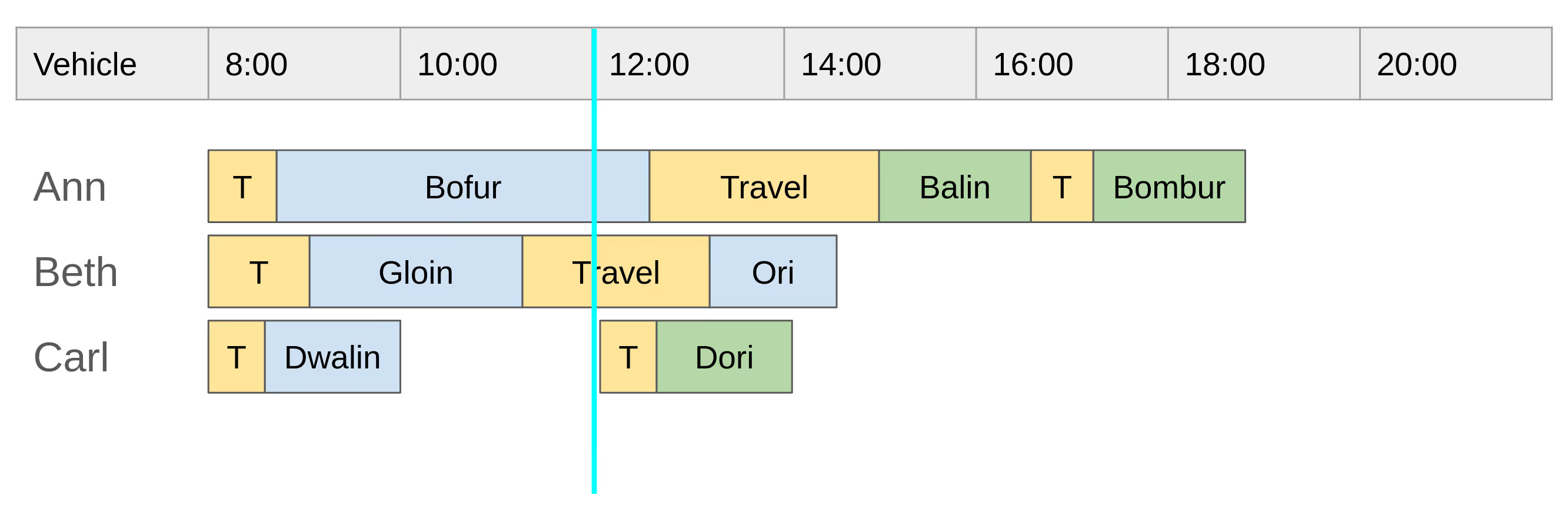
By the time of re-planning (12:00), the blue customer visits are pinned: either they have already been finished, or a vehicle has already started travelling to their location (see Beth’s last visit). Not changing their plan is the first requirement (R1) for pinning. We will discuss its implementation for VRP models shortly.
Notice the time the newly requested customer visit is planned to: travelling to the customer starts at 12:00, even though this visit has been assigned to Carl whose last visit finished around 10:00. This is the second requirement (R2) for pinning: any visit cannot be planned for a time interval already in the past. Again, we will discuss its implementation for VRP models in the next section.
The adjusted plan conforms with the above requirements and the execution continues until another customer calls in at 16:00, requesting a visit for that day:
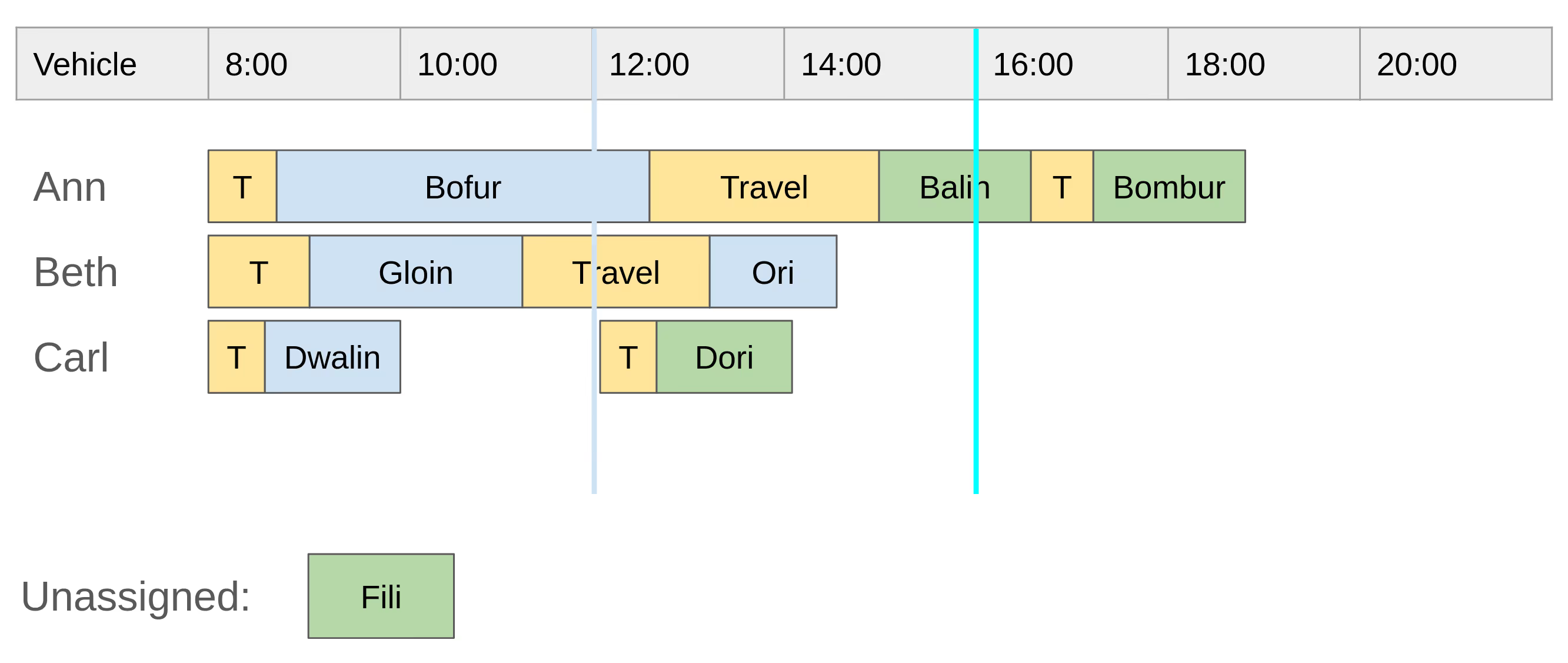
Let’s check how an updated solution at 16:00 could look like:
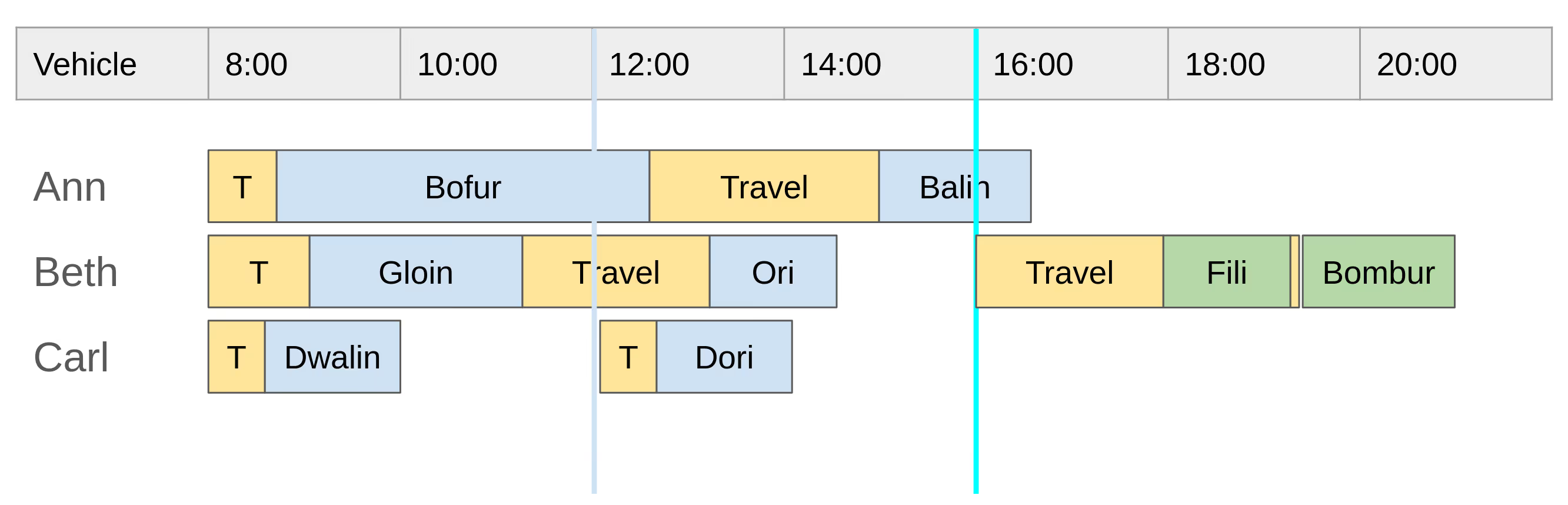
We can see that a few other visits have been finished by 16:00, therefore they were marked as pinned. The newly requested visit is planned after the time of re-planning (16:00).
In addition, you can see that the last visit originally assigned to Ann has been re-assigned to Beth. Such a re-assignment is possible, because the last visit was not pinned, and desired, because it allows the solver to find a more optimal solution: for instance by optimizing the travel distance for all vehicles as Beth’s last two visits locations are very close to each other.
Implementation
How to implement the two aforementioned requirements in a VRP model?
Requirement R1: do not change the plan for visits in history
In a VRP model, the list of visits assigned to a vehicle shift can be implemented by a Planning list variable, such as in the VRP quickstart. The requirement not to change the plan for visits that already finished can be implemented using PlanningPinToIndex, for example:
public class VehicleShift {
  // omitted other class members

  @PlanningListVariable
  private List<Visit> visits = new ArrayList<>();

  @PlanningPinToIndex
  private int firstUnpinnedIndex = 0;
}
However, we need an easy way how to specify the time instant defining which visits are to be considered pinned. For this purpose, we introduce a new attribute into the Vehicle Route Plan model, named, for instance, freezeDeparturesBeforeTime (corresponding to the blue line in the diagrams above). The model uses the attribute value to set VehicleShift.firstUnpinnedIndex (for all vehicle shifts) to the index of the first unpinned visit in the list of visits assigned to that vehicle shift.
Before submitting the plan to the solver, the model calculates the firstUnpinnedIndexvalues automatically by determining the pinned and unpinned visits using the following criteria:
- every visit ending before freezeDeparturesBeforeTime is pinned,
- every visit that a vehicle already started travelling to before freezeDeparturesBeforeTime is pinned as well,
- all other visits are unpinned.
Requirement R2: any visit cannot be scheduled for a time period in the past
By having set the VehicleShift.firstUnpinnedIndex value, we ensure that the solver can schedule any unassigned visit only after all pinned visits. However, this does not guarantee that the last pinned visit did not end several hours before freezeDeparturesBeforeTime - see Carl’s second visit in Continuous planning example.
In order to fulfil this requirement, we need to set a lower bound when a vehicle shift can start travelling to a visit and apply it during visit’s arrival time calculation in a VariableListener, based on this one from the VRP quickstart:
LocalDateTime calculateArrivalTime(Visit visit, LocalDateTime previousDepartureTime, LocalDateTime freezeDeparturesBeforeTime) {
    if (visit == null || previousDepartureTime == null) {
        return null;
    }

    LocalDateTime adjustedDepartureTime = adjustByFreezeTime(previousDepartureTime, freezeDeparturesBeforeTime);
    return adjustedDepartureTime.plusSeconds(visit.getDrivingTimeSecondsFromPreviousStandstill());
}
Let’s think about the time adjustment method implementation:
LocalDateTime adjustByFreezeTime(LocalDateTime timeToAdjust, LocalDateTime freezeDeparturesBeforeTime) {
    return freezeDeparturesBeforeTime != null && timeToAdjust.isBefore(freezeDeparturesBeforeTime) ? freezeDeparturesBeforeTime : timeToAdjust;
}
However, this approach does not work correctly when re-planning happens multiple times with different freezeDeparturesBeforeTime values - in our example scenario above, the adjustByFreezeTime(…) method would delay the travel start of Carl’s second visit not to 12:00 but to 16:00.
To remedy the situation, we need to remember the minimum time when a vehicle is allowed to start travelling to each visit:
public class Visit {
  // other class members omitted

  private LocalDateTime minimumStartTravelTime;
}
Every unpinned visit gets the minimumStartTravelTime field set to the current value of freezeDeparturesBeforeTime, the model can do it before submitting the plan to the solver. Every pinned visit already has the value set either from the previous pinning, or, in the case of no previous pinning, the planning window start (or another sensible default):
void updateVisitsMinimumStartTravelTime(VehicleRoutePlan plan) {
    LocalDateTime effectiveMinimumStartTravelTime =
            plan.getFreezeDeparturesBeforeTime() != null ? plan.getFreezeDeparturesBeforeTime()
                    : plan.getPlanningWindow().getStartDate();

    plan.getAllVisits().forEach(visit -> {
        if (!visit.isPinned()) {
            visit.setMinimumStartTravelTime(effectiveMinimumStartTravelTime);
        } else if (visit.getMinimumStartTravelTime() == null) {
            // the edge case of freezeDeparturesBeforeTime set for the initial solving,
            // some visits may already be pinned
            visit.setMinimumStartTravelTime(plan.getPlanningWindow().getStartDate());
        }
    });
}
The adjustByFreezeTime(…) method is adjusted to take it into account, handling multiple pinnings correctly:
LocalDateTime adjustByFreezeTime(LocalDateTime timeToAdjust, Visit visit) {
    LocalDateTime travelStartsFrom = visit.getMinimumStartTravelTime();
    return travelStartsFrom != null && timeToAdjust.isBefore(travelStartsFrom) ? travelStartsFrom : timeToAdjust;
}
Then, the arrival time calculation can look as follows:
LocalDateTime calculateArrivalTime(Visit visit, LocalDateTime previousDepartureTime) {
    if (visit == null || previousDepartureTime == null) {
        return null;
    }

    LocalDateTime adjustedDepartureTime = adjustByFreezeTime(previousDepartureTime, visit);
    return adjustedDepartureTime.plusSeconds(visit.getDrivingTimeSecondsFromPreviousStandstill());
}
Conclusion
We have shown the importance of being able to adjust a plan which already started to be executed and one possible approach to it using Pinned planning entities.
With Timefold, it is possible to handle this use-case for most models, including VRP, allowing the customer to react on unexpected requirements in time.

Fast Planning Optimization with the Recommended Fit API
How does your business adapt when unexpected changes disrupt your carefully planned schedules? Can you quickly adjust a vehicle routing plan when a last-minute customer request comes in or an employee unexpectedly takes a day off? Are your current planning solutions flexible enough to handle these curveballs efficiently without requiring hours of recalibration?
The ability to swiftly respond to unforeseen circumstances isn’t just an advantage; it’s a necessity.
Timefold’s answer to this: the Recommended Fit API, providing immediate, feasible adjustments to existing plans, enabling businesses to respond to changes in real time. Whether it’s incorporating a new delivery stop or reassigning tasks due to sudden changes, the Recommended Fit API delivers quick and efficient solutions.
With Timefold, you can fetch solution recommendations and incorporate them into the final solution.
The Vehicle Routing Problem
The Vehicle Routing Problem (VRP) is a commonly encountered real-world scenario, and this article aims to use it as an example to elucidate the Recommended Fit API. It is important to understand that the Recommended Fit API is not limited to VRP, and it will work in any situation where quick responses to unexpected events are necessary.
Let’s suppose a solution for the VRP runs overnight to provide a feasible route plan for the next day. That means the process requires hours to complete. The available vehicles must visit a list of locations within their capacity and before a deadline. The goal is to minimize the total drive time of the vehicles. This article will demonstrate the feature in focus using models and resources from the VRP quickstart.
An Unexpected Phone Call
After optimizing the problem last night, the produced route plan is ready for execution. However, we receive a phone call from a customer who wishes to schedule a visit to a new location. The customer must now promptly know which vehicle to use and when to visit the new location.

We cannot re-optimize the problem with the new visit due to time constraints, as the customer is waiting on the phone. Therefore, the answer must quickly provide a feasible solution, including the new visit.
Solving Unexpected Events with the Recommended Fit API
Timefold has the Recommended Fit API that provides quicker suggestions when the problem changes. To reproduce the scenario described, please follow the steps outlined below:
- Create an initial solution that reflects the optimization performed overnight.
- Generate a new visit to reproduce the phone call event.
- Call the RecommendedFit API to fetch recommendations and provide quick feedback to the client with available recommendations.
- Once the customer chooses a recommendation, include it in the solution.
Create an Initial Solution
The Recommended Fit API expects a feasible solution as input, with all entities initialized except the one we want to add.
Generate a new location to visit
It’s worth noting that the unscheduled visit is part of the current solution visits list.Recommended Fit API searches for an uninitialized entity to start the optimization process. The process can only succeed if there is a single uninitialized entity.
Fetching recommendations with Recommended Fit API
At this moment, the customer is waiting for an answer. We need to specify three arguments to call the Recommended Fit API: the current solution, the unscheduled visit, and a proposition function that extracts the necessary details. Let’s find the visit we want to schedule:
// Find the visit
Visit visit = request.solution().getVisits().stream()
                .filter(c -> c.getId().equals(request.visitId()))
                .findFirst()
                .orElseThrow(() -> new IllegalStateException("Visit %s not found".formatted(request.visitId())));
The SolutionManager::recommendFit() function returns a list of recommendation instances. Let’s retrieve the recommendations and gather the details of the vehicles:
// Fetch the recommendations
List<RecommendedFit<VehicleRecommendation, HardSoftLongScore>> recommendedFitList =
solutionManager.recommendFit(request.solution(), visit, v -> new VehicleRecommendation(v.getVehicle().getId(), v.getVehicle().getVisits().indexOf(c)));
The recommendation call includes the current solution, unscheduled visit, and a function to extract the vehicle ID and position of the visit. As the recommendation list can be extensive, we will only provide the top five recommendations:
 // Return the best five recommendations
 if (!recommendedFitList.isEmpty()) {
     return recommendedFitList.subList(0, Math.min(MAX_RECOMMENDED_FIT_LIST_SIZE, recommendedFitList.size()));
 }
 return recommendedFitList;
The recommendation process involves evaluating the feasibility of various elements, also known as placement. Each placement receives a score based on the entire solution. The proposition function extracts the necessary information from the current placement.
After testing the placement, the solution reverts to its original state, undoing all changes made by the fitting in the placement. Therefore, the proposition function must extract data that won’t change after resetting the placement. In our example, the function extracts two pieces of information - the vehicle ID and the recommended visit position. None of them is affected or lost during the placement evaluation.
The list of recommendations sorts its elements based on their score, with the most favorable score at the top. When executing the VRP quickstart, a list of recommendations is presented as options:
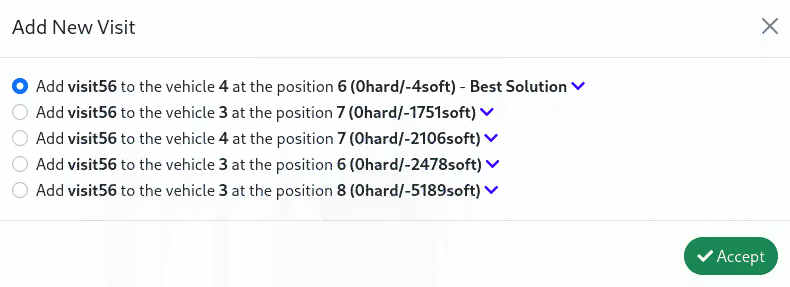
The response follows the structure of the JSON snippet provided below:
[
  {
    "proposition": {
      "vehicleId": "4",
      "index": 5
    },
    "scoreDiff": {
      "score": "0hard/-4soft",
      "constraints": [
        ...
      ]
    }
  },
  {
    "proposition": {
      "vehicleId": "3",
      "index": 6
    },
    "scoreDiff": {
      "score": "0hard/-1751soft",
      "constraints": [
        ...
      ]
    }
  }
  ...
]
Applying a Selected Recommendation
Upon receiving our recommendations, the customer selects the best one, which is the first element of the list. In order to incorporate a recommendation into a solution, let’s find the vehicle and visit targets:
// Find the target vehicle
String vehicleId = request.vehicleId();
Vehicle vehicleTarget = updatedSolution.getVehicles().stream()
            .filter(v -> v.getId().equals(vehicleId))
            .findFirst()
            .orElseThrow(() -> new IllegalStateException("Vehicle %s not found".formatted(vehicleId)));

// Find the target visit
 Visit visit = request.solution().getVisits().stream()
            .filter(c -> c.getId().equals(request.visitId()))
            .findFirst()
            .orElseThrow(() -> new IllegalStateException("Visit %s not found".formatted(request.visitId())));
Next, we must insert the unscheduled visit into the designated vehicle at the specific position. Afterward, update the score of the updated solution.
// Add the visit to the target vehicle at the expected position
vehicleTarget.getVisits().add(request.index(), visit);

// Recalculate the score for the updated solution
solutionManager.update(updatedSolution);
We now have a revised route plan ready to be executed again. So far, we assumed the route plan started after the phone call. In this way, we don’t have to keep track of the routes already visited.
In cases where a new visit comes in after the route plan has started, we need to apply continuous planning techniques to manage them.
Conclusion
We explained the importance of optimization tools being able to respond quickly to unexpected events in real-life situations. Additionally, we evaluated a unique feature of Timefold Solver called Recommended Fit API, which provides feasible solutions promptly when dealing with unforeseen problem changes.

Partnership: NGA 911 and Timefold
Los Angeles, 2024/02/23 - Timefold, a platform for planning optimization, built on established open-source AI solver technology, proudly announces a strategic collaboration with NGA. This partnership aims to enhance 988 Suicide & Crisis Lifeline services and streamline shift planning, ensuring prompt and effective assistance for those in need. NGA’s NEXiSLifeline solution ensures that every center has the tools required to provide life-saving assistance to all citizens.
With a network of over 200 local crisis centers and 1,000’s of call takers proficient in English and/or Spanish, efficient shift planning is imperative for the seamless operation of the 988 service. To optimize this critical aspect, Timefold has partnered with NGA. Leveraging Timefold's sophisticated employee scheduling software, NGA’s NEXiSLifeline solution ensures each center maintains optimal staffing levels, with appropriately skilled call takers available at all times.
Timefold is honored to collaborate with NGA in their mission to provide crucial support to those in need. Our optimization solutions empower centers to efficiently manage operations and deliver prompt assistance to individuals facing distress.
Maarten Vandenbroucke, CEO at Timefold
Through the integration of Timefold's cutting-edge shift planning technology, NGA remains committed to delivering around-the-clock support for those seeking help. Additionally, caller agents experience increased job satisfaction, thanks to the software's ability to consider their scheduling preferences.
The partnership between Timefold and NGA exemplifies the positive influence that optimization technology can have on critical services. Together, we stand resolute in our mission to provide immediate and effective support to individuals navigating difficult circumstances.
Don Ferguson, CEO at NGA
This collaboration marks another significant achievement for NGA, which in January forged a partnership with the state of California to introduce an innovative call-handling solution, NGA’s NEXiSLifeline across the entire state. This transformative system propels emergency communications into a digital realm, enhancing accuracy and ultimately saving valuable seconds and lives.
About Timefold Timefold is a platform for planning optimization, built on established open-source AI solver technology. It delivers advanced AI-powered optimization and scheduling technology to enhance operational efficiency. Timefold's customizable model templates empower developers to integrate cutting-edge planning models into their software. Timefold is engineered to address complex planning problems— ranging from employee scheduling and field service routing to last-mile delivery, vehicle routing and assembly line scheduling. Please visit https://timfold.ai to learn more about the comprehensive services offered. For media inquiries and further information, please contact: Jente De Meyer, Head of Marketing, [email protected]
About NGA Next Generation Advanced: NGA is a comprehensive, adaptable, and dependable NG9-1-1 system that offers public safety emergency communication solutions that are safe and reasonably priced everywhere globally. With the most recent NG9-1-1 technology available, our gradual deployment and proprietary solutions are ready to seamlessly move traditional emergency communication systems to the future of emergency services. For more information about NEXiSLifeline and how it can transform mental health crisis response efforts, please visit https://nga911.com/nexislifeline. For media inquiries and further information, please contact: Rebecca Dungey, Director of Marketing, [email protected].
About 988 Suicide & Crisis Lifeline The National 988 Suicide & Crisis Lifeline serves as a crucial lifeline for individuals facing emotional distress and crisis situations. Offering confidential support through calls, chats, and texts, the lifeline operates 24/7 via a network of local crisis centers and compassionate caller agents fluent in either English or Spanish. The lifeline's mission is to provide immediate assistance and promote emotional well-being for all individuals seeking help.

When scheduling works, everything works.
Less waste. More control. Teams that trust the plan.