Blog
Technician scheduling software in 2027: Essential capabilities for modern field service
What should technician scheduling software actually do? Nine essential capabilities, from skill matching and SLA priorities to real-time replanning, explainability, and API integration.
Technician scheduling software assigns field technicians to jobs and plans their days so that the right person, with the right skills, arrives within the promised window without wasting hours on the road.
The best tools do this automatically across hundreds or thousands of technicians, and they keep the plan valid as the day changes.
Most products in this category show a calendar and a map. The difference between them is what happens underneath: whether the software can weigh skills, time windows, SLAs, travel, and working-hour rules together, or whether it leaves those tradeoffs to a dispatcher.
This guide lists nine capabilities that separate modern technician scheduling from a digital whiteboard. It's written for operations leaders comparing tools and for product teams at field service software companies deciding what their own scheduling engine needs.
Why technician scheduling has become harder
Two pressures are pushing field service teams to rethink how they schedule.
- The first is labor. In the US HVAC trade alone, industry estimates put the technician shortage at around 110,000 open positions. When every skilled technician counts, a schedule that wastes an hour of their day on avoidable driving is a real capacity problem.
- The second is expectations. Customers expect narrow arrival windows, live updates, and a fix on the first visit. Nobody wants to be anticipating their technician coming in all day.
Both pressures land on the schedule.
Nine essential capabilities
1. Skill and certification matching
The software should know what each job requires and what each technician can do, including certifications, seniority, languages, and equipment access. Hard requirements (a gas-safe certificate) should never be violated. Softer preferences (a technician the customer has worked with before) should be encouraged but not forced.
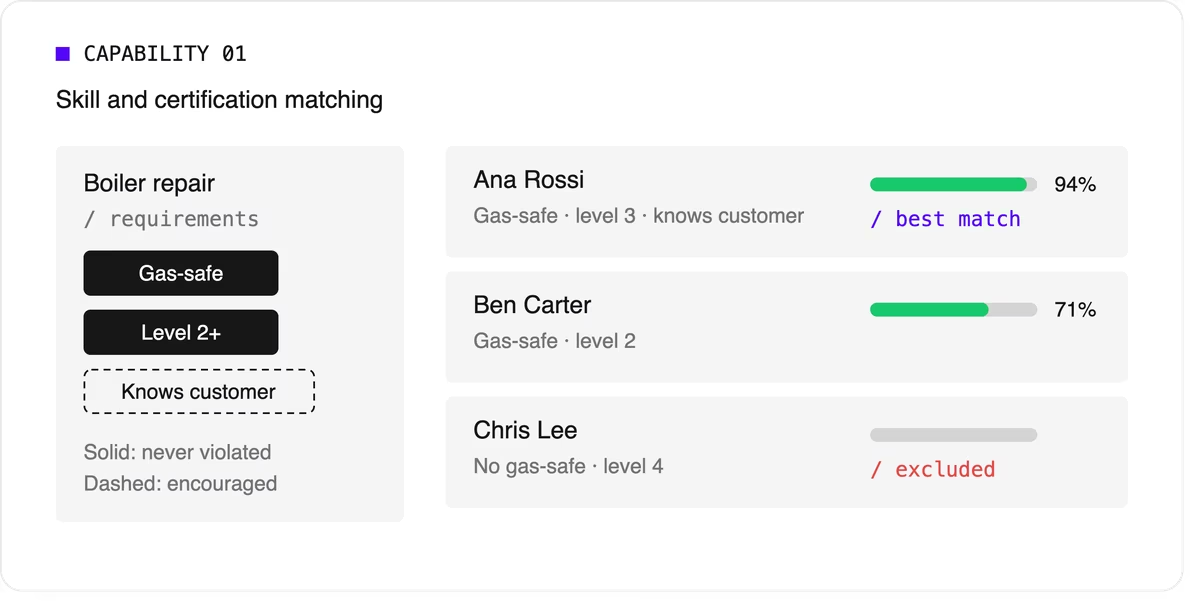
Look for support for skill levels and customer affinity in addition to simple yes-or-no skills. Matching the right skills is also one of the most direct ways to improve first-time fix rates.
2. Time windows and SLA priorities
Jobs come with customer availability windows, and many come with contractual deadlines.
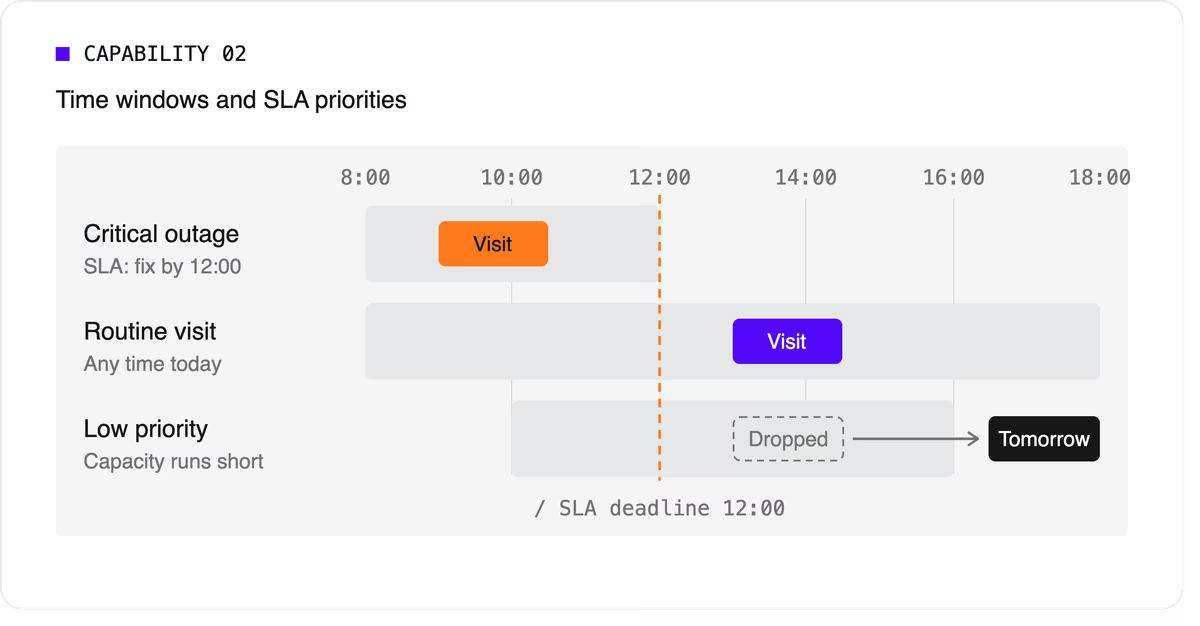
The software needs to treat a critical SLA differently from a routine visit that can move to tomorrow. That means supporting multiple time windows per job, priority levels, and deadlines that can push lower-priority work out of the plan when capacity runs short.
3. Travel-aware planning with real road data
A schedule that assumes straight-line distances will fall apart on the road. Technician scheduling software should use real travel times, ideally with support for traffic patterns and your own map provider if you already have one.
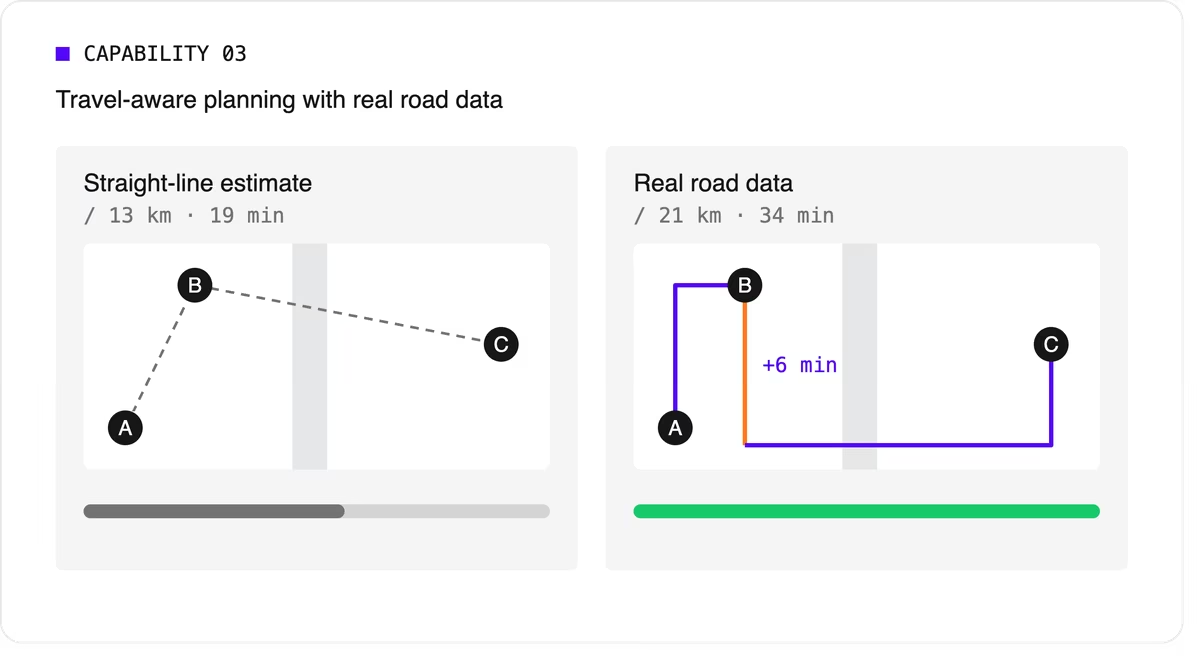
It should let you choose what to minimize, total travel time or total distance, because the two goals give different answers.
4. Multi-technician visits and job dependencies
Some jobs need two or more people on site at the same time for safety or lifting. Others must happen in order, sometimes with a delay: isolate the power before rewiring, or let a surface dry before painting.
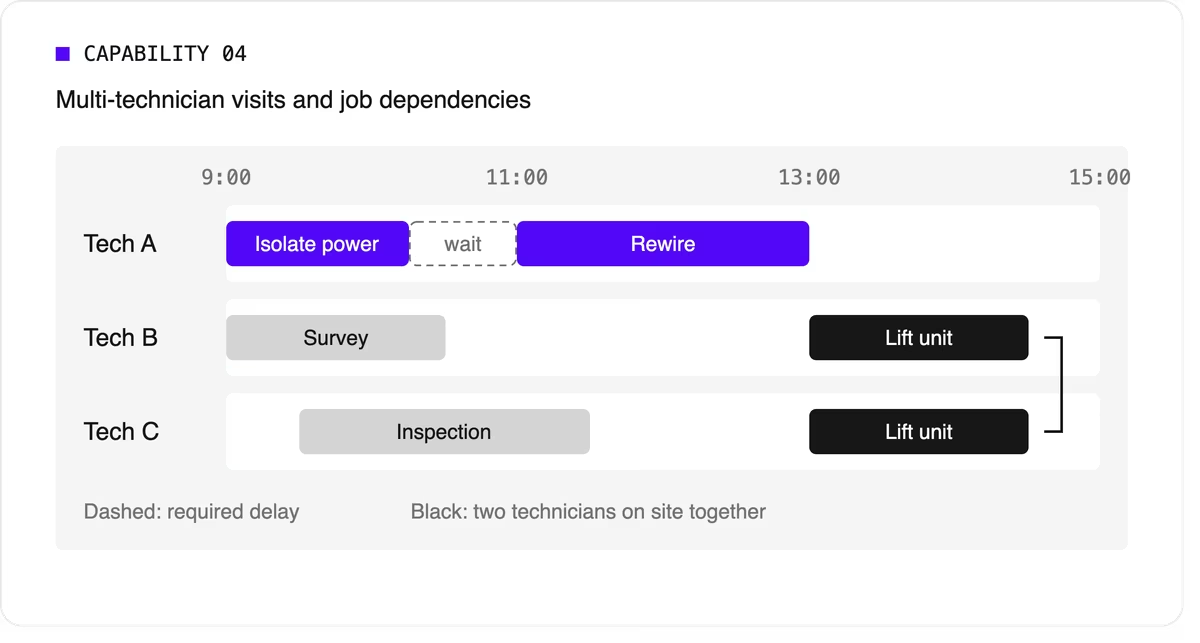
Many tools can't express these rules, so dispatchers track them by hand. If your operation has them, this capability is non-negotiable.
5. Working hours, breaks, and fairness
The plan has to respect shift start and end times, mandatory breaks, maximum working hours, and overtime rules. It should also spread work fairly so the same technicians don't always get the long days or the difficult jobs. Fairness affects retention, and retention matters more when technicians are hard to replace.
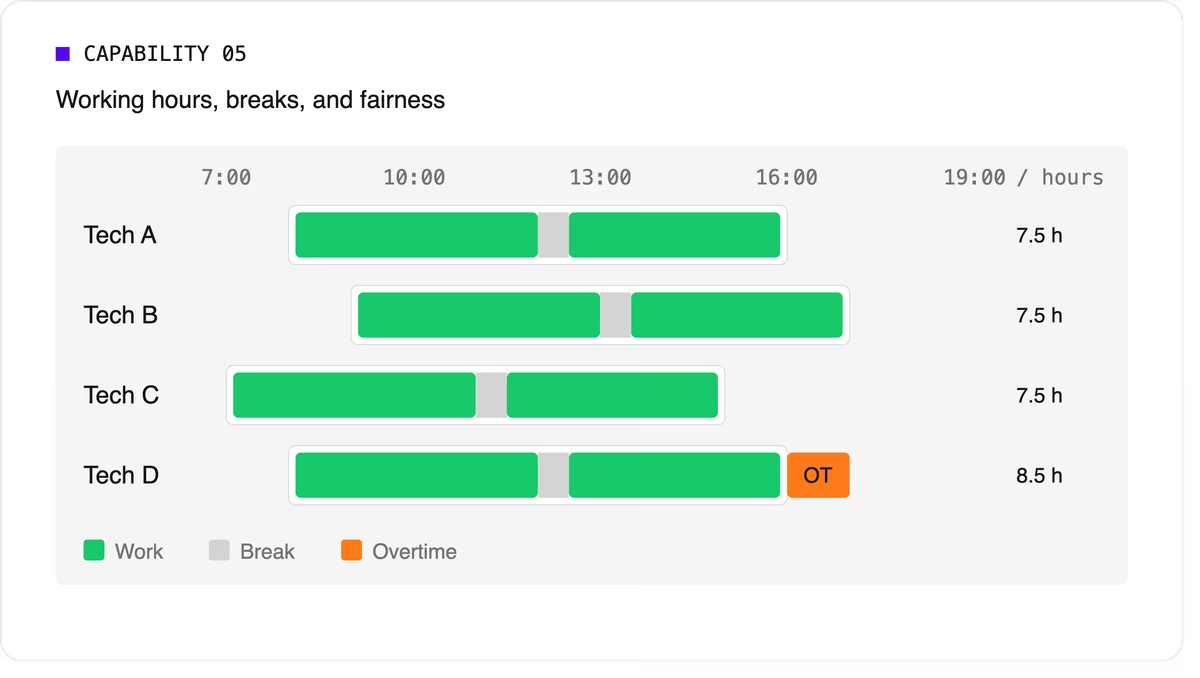
Scheduling software can support labor-law-style rules as constraints, but your organization remains responsible for verifying compliance with the regulations that apply to you.
6. Real-time replanning
Every schedule meets reality by mid-morning. A technician calls in sick, a job overruns, or an urgent call comes in. The software should replan quickly while changing as little as possible for everyone else. It should also let dispatchers lock (pin) jobs that are already in progress or confirmed with the customer.
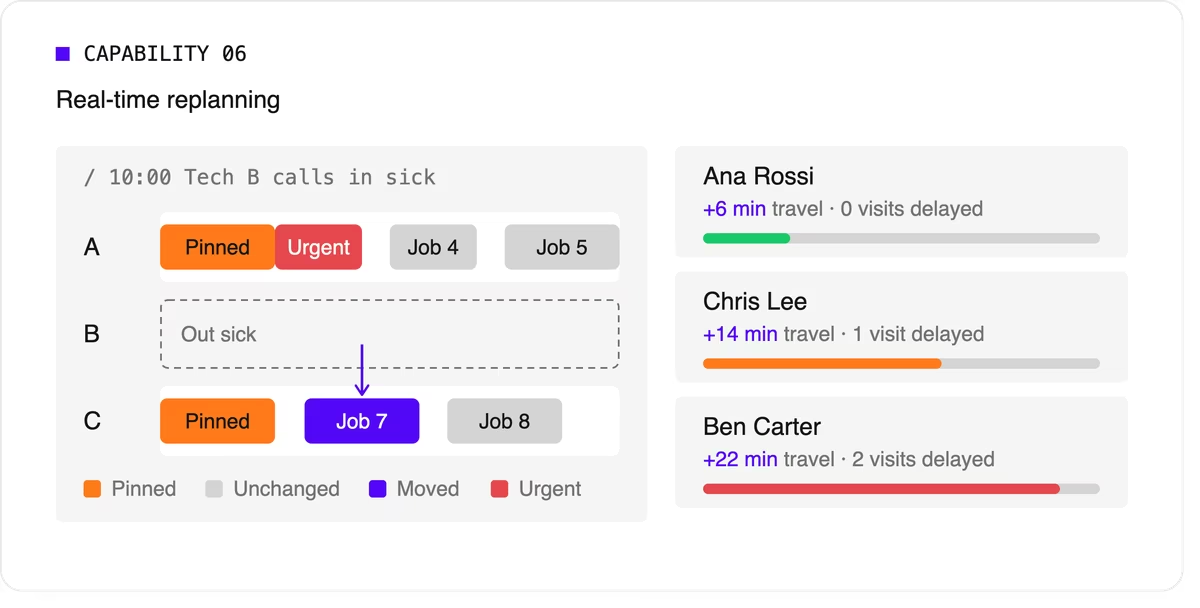
A strong version of this capability also recommends options. When a new urgent job arrives, the dispatcher should see which technicians could take it and what each choice would cost in travel or delayed work.
7. Explainability
Dispatchers and managers won't trust a plan they can't understand. Good technician scheduling software shows why a job was assigned the way it was, which rules were bent, and why some jobs couldn't be scheduled at all.
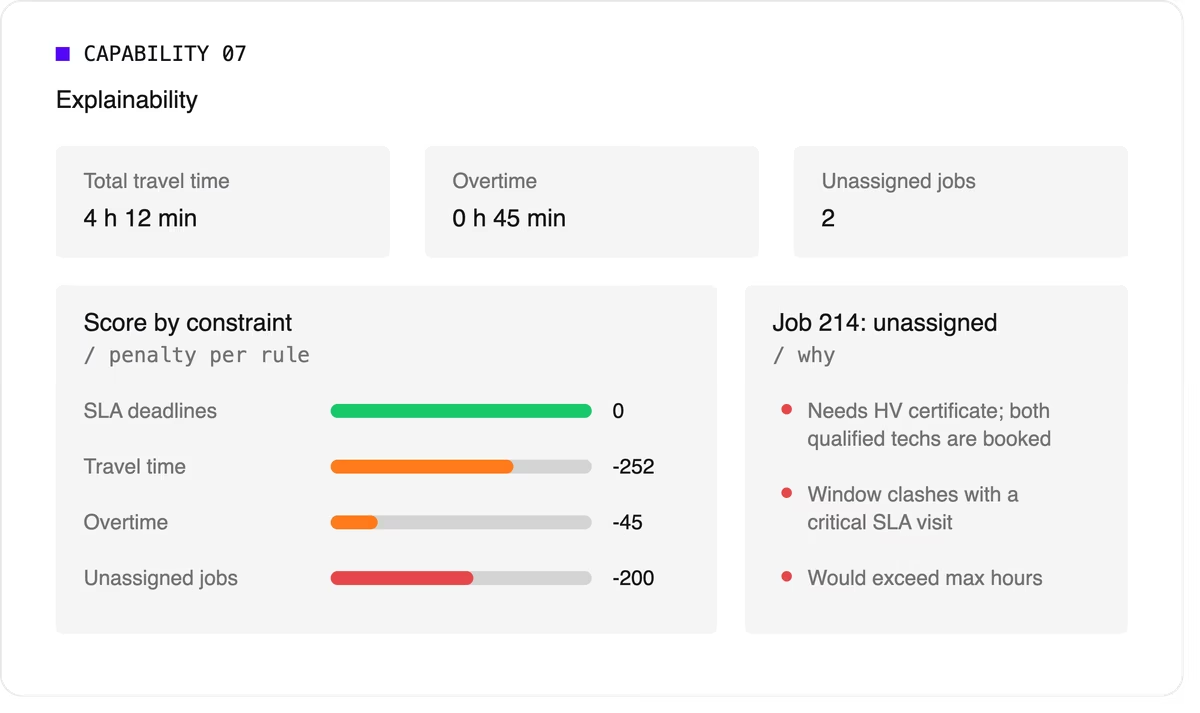
Look for a breakdown by constraint and clear metrics such as total travel time, overtime, and unassigned jobs.
8. Configurable priorities
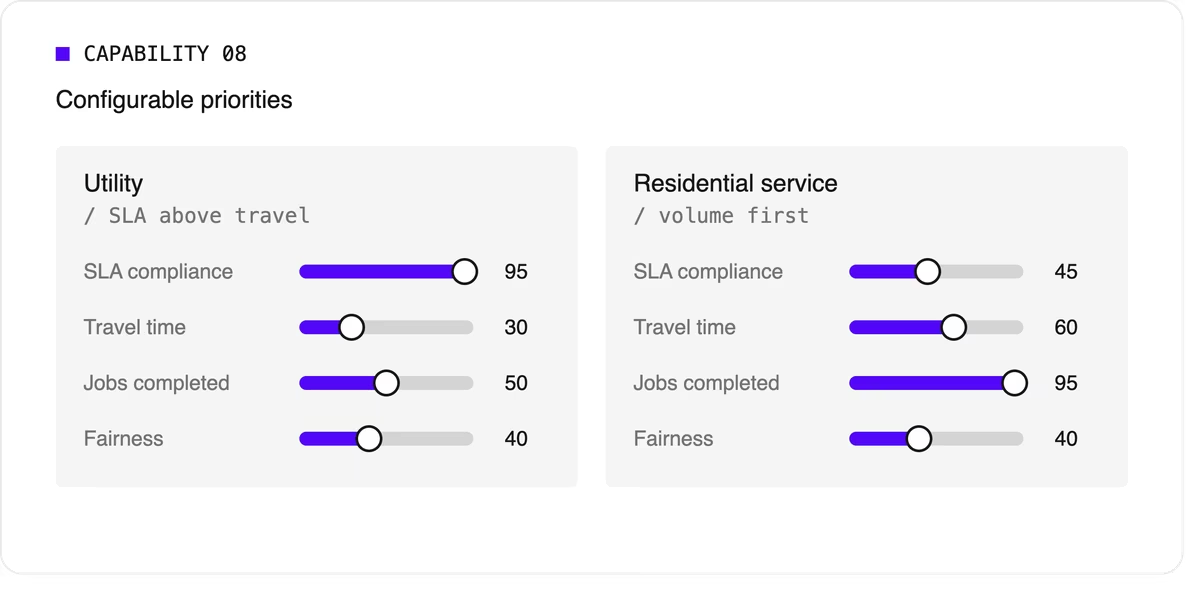
Every operation weighs its goals differently. A utility may put SLA compliance far above travel savings, while a residential service company may care most about completing as many jobs as possible per day. The software should let you adjust the relative weight of each goal without rewriting the underlying logic.
9. Integration and scale
Scheduling doesn't live on its own. It needs job data from your FSM or work order system, technician data from HR or workforce tools, and a way to push the finished plan to mobile apps. An API-first design makes this far easier than a closed tool with a separate interface.
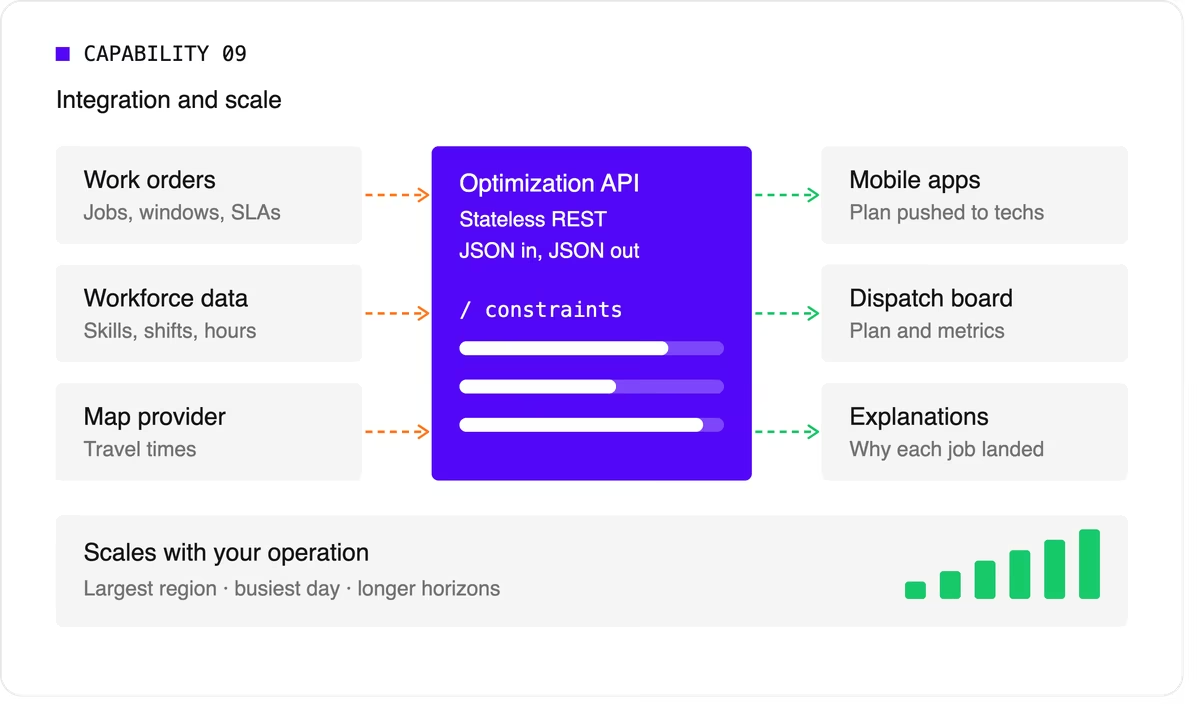
Scale matters too. The software should handle your largest region on your busiest day, and it should keep up as you add technicians, regions, or longer planning horizons.
A quick evaluation checklist
Use this table when comparing technicians scheduling software options or reviewing your own engine.
Scheduling software, FSM platform, or optimization engine?
When people search for technician scheduling software, they find three kinds of product.
- FSM platforms with a built-in scheduler cover the full workflow: work orders, mobile apps, invoicing, and scheduling. Their scheduling depth varies widely, from drag-and-drop boards to real optimization.
- Standalone scheduling tools focus on the dispatch board and often add basic auto-assignment. They're quick to adopt but can struggle with complex constraints.
- Optimization engines sit behind a user interface and do the heavy lifting. They don't manage work orders or invoices. Instead, they take in jobs, technicians, and rules, and return an optimized plan through an API. FSM vendors often embed one to strengthen their own scheduling, and large enterprises use one to add optimization to systems they already run.
Where Timefold fits
Timefold is an optimization engine in the third group. The Timefold Field Service Routing model covers the capabilities above: skill and seniority matching, customer time windows, visit dependencies with delays, multi-technician visits, working hours and fairness, and real-time replanning with recommendations. It ships with 50+ pre-configured constraints with adjustable weights, and every plan comes with metrics that show the tradeoffs it made.

It connects through a stateless REST API, so it fits alongside the FSM or work order system you already use. To see how this applies to field teams specifically, read about route optimization for field technicians. If you're preparing to integrate, the data foundations of efficient field service walks through the data you'll need.
FAQ
What does technician scheduling software do?
It assigns jobs to technicians and plans each technician's day, taking skills, time windows, travel, and working hours into account. More advanced tools optimize the whole plan at once and replan automatically when things change.
What's the difference between technician scheduling and dispatching?
Technician scheduling creates the plan ahead of time. Dispatching sends technicians to jobs and manages changes during the day. Modern software blends the two by replanning continuously.
Do I need technician scheduling software if I have an FSM platform?
It depends on how deep your FSM's scheduling goes. If dispatchers still spend hours adjusting assignments by hand, or your FSM can't express rules like dependencies or multi-technician visits, an optimization engine behind your FSM can close the gap.
How many technicians do I need before scheduling software is worth it?
There's no fixed number. Complexity matters more than headcount. A team of 20 with several skill types, tight SLAs, and multi-technician jobs can benefit as much as a team of 200 with simple, uniform work.


Newsletter 3: Explainable AI for Planning Optimization
Do users trust your planning automation from day one? When you solve a planning problem - for example vehicle routing or maintenance scheduling - and show the optimized solution to the end-users, do they immediately like the schedule? Do they see the value in a heartbeat? Or are they extremely skeptical?
Typically, it is the latter. Because the new planning will drastically affect their lives on a daily basis: just one missing hard constraint could put them in a world of trouble.
So, how can we prove our schedule’s value? With a visualization: show the schedule in rows/columns, or on a map. But for big schedules, a visualization doesn’t show you the forest for the trees. And users really just need to verify if all constraints are taken into account.
This is where Timefold’s new ScoreAnalysis API comes into play. It explains the output of the solver AI. It breaks down the score - a mathematical concept - into business-relevant constraints. It shows you which of the trees in the forest are rotten.
Here’s an example of a ScoreAnalysis on a school timetabling schedule with a score of 0hard/-8soft:
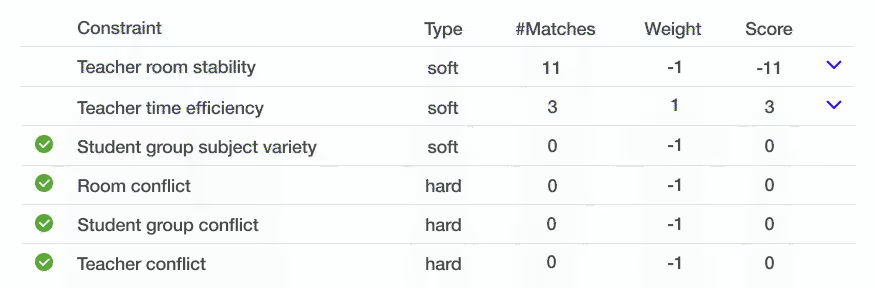
This confirms that there are no room conflicts, student group conflicts or teacher conflicts: the schedule is feasible.
It also shows 11 incidents of teachers having to switch rooms. And 3 cases of teachers benefitting from back to back lessons. The ScoreAnalysis API can even reveal when the teachers need to switch rooms, by showing the 11 matches:
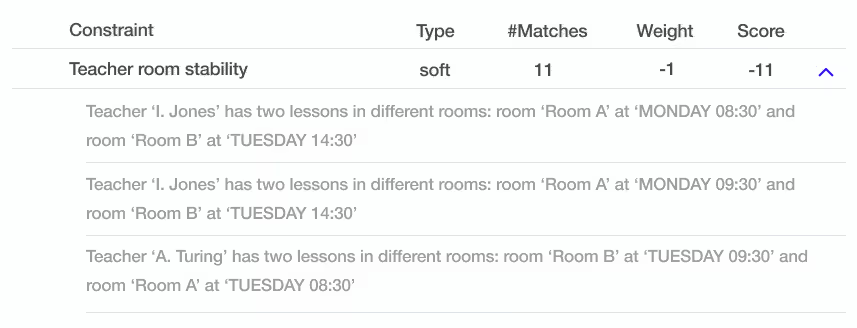
With this info, your users start to trust your automated planning.
The ScoreAnalysis API is available since Timefold Community 1.4.0. Call the SolutionManager.analyze() method to get a ScoreAnalysis instance:
var scoreAnalysis = solutionManager.analyze(solution)
This method returns quickly. Send the result to your frontend as-is: it is JSON friendly unlike our old API’s. To learn more, read our documentation or Lukas’s blog on explainable score or check out the use-cases in the timefold-quickstarts repository.
Timefold AMA - vehicle routing and maintenance scheduling
When: March 19th at 08:00 PDT (San Fransisco) / 11:00 EDT (New York) / 15:00 GMT (London) / 16:00 CET (Paris/Brussels/Berlin)
Dive into the world of vehicle routing and maintenance scheduling with our Timefold Ask Me Anything (AMA) session on March 19th. This event is your chance to engage in in-depth discussions about these topics, directly with the Timefold team. Join us for an AMA with Geoffrey De Smet, creator of OptaPlanner and Co-founder of Timefold, and Lukáš Petrovický, our Timefold Solver Lead Engineer.
How to Participate
No sign-up required! On March 19th, join us on YouTube Live here. Pro tip: follow our YouTube channel to get notified when we go live.
Have Questions? Let's Hear Them!
Got questions about vehicle routing, maintenance scheduling, or any other question? We'd love to hear from you in advance! Submit your questions now using this quick form to ensure they get prioritized during the AMA. Of course, you're also welcome to ask questions live during the event.
———
Blog
Tournament scheduling with Timefold.
2024 is an important year for soccer as it marks the 48th Copa América and the 17th EUFA EURO 2024. That made us think, can we use Timefold to create a good and fair schedule, complying with all the rules? To create this demo tournament schedule, we use Java with Quarkus.
Use multiple solvers in the same application
How can you solve two different planning problems in the same application, potentially in sequence? With two SolverManager instances, one for each problem. In the article, we'll show you how to configure and inject two SolverManager instances in a single application.
Timefold Solver Community Edition 1.7.0. full release notes
A feature often requested by our community is the possibility to inject more than one SolverManager in Quarkus and Spring Boot applications. We’ve heard this and 1.7.0. marks the release of it. Read more in the release blog post by Frederico Gonçalves.
We're excited to see the innovative solutions you'll develop with this capability.
In addition to this we focused on bugfixes, improvements to documentation and to the quickstarts.
Latest Timefold videos

Use Multiple Solvers in the Same Application
What happens when a single application has to address a problem using distinct configurations? How can you solve two different planning problems in the same application, potentially in sequence? With two SolverManager instances, one for each problem. In the article, we’ll show you how to configure and inject two SolverManagerinstances in a single application.
An application may require different configurations to solve a problem or solve problem A to acquire input for solving problem B. That’s why using multiple solvers within one application becomes necessary. The Timefold Solver integrates with Quarkus and Spring Boot, making it easy to manage various solver configurations. It provides all the tools for the hassle-free configuration and utilization of distinct solvers.
In this article, we will discuss how Timefold allows us to configure multiple solver settings and explain how to use the different SolverManager instances in the application.
Distinct Solver Configurations Problem
Let’s consider a situation where we need to solve two distinct school timetabling problems:
- Initially, a specific group of teachers is designated to teach the available lessons.
- The next step involves assigning lessons to the rooms.
The first step will need a different domain model compared to the second. The file teachersConfig.xml shows the XML structure of the first step:
<solver xmlns="https://timefold.ai/xsd/solver" xmlns:xsi="http://www.w3.org/2001/XMLSchema-instance"
        xsi:schemaLocation="https://timefold.ai/xsd/solver https://timefold.ai/xsd/solver/solver.xsd">
  <solutionClass>org.acme.schooltimetabling.domain.TeacherToLessonSchedule</solutionClass>
  <entityClass>org.acme.schooltimetabling.domain.Teacher</entityClass>
</solver>
The following XML file, roomsConfig.xml, describes the model of the second optimization stage:
<solver xmlns="https://timefold.ai/xsd/solver" xmlns:xsi="http://www.w3.org/2001/XMLSchema-instance"
        xsi:schemaLocation="https://timefold.ai/xsd/solver https://timefold.ai/xsd/solver/solver.xsd">
  <solutionClass>org.acme.schooltimetabling.domain.Timetable</solutionClass>
  <entityClass>org.acme.schooltimetabling.domain.Lesson</entityClass>
</solver>
While we can manually create factories that instantiate managed resources for each problem, doing so requires boilerplate and error-prone code.
Injecting Multiple Instances of SolverManager
The Timefold Quarkus and Spring integrations provide built-in managed instances of the SolverManager resource for each problem definition identified during the configuration process. Therefore, there is no need for custom logic to instantiate managed resources when configuring multiple solver settings. Instead, named properties should be defined for each desired configuration. Let’s examine a simple example where we set the maximum amount of time spent on optimizing a single solver configuration in both Quarkus and Spring Boot:
Let’s add two configurations to optimize with distinct optimization time spent. One configuration runs for 5 seconds, and the other runs for 60 seconds.
We can configure multiple solvers using the namespace *.timefold.solver.<solverName> and specify the named property <solverName> for each solver. It is important to note that Quarkus configuration requires properties to have a prefixquarkus and named properties enclosed in double quotes.
Solver Configuration Properties
The following properties are supported:
[quarkus].timefold.solver.<solverName>.solver-config-xml
A classpath resource to read the solver configuration XML.

[quarkus].timefold.solver.<solverName>.environment-mode
Enable runtime assertions to detect common bugs in your implementation during development.
Defaults to REPRODUCIBLE.

[quarkus].timefold.solver.<solverName>.daemon
Enable daemon mode. Defaults to false.

[quarkus].timefold.solver.<solverName>.move-thread-count
Enable multi-threaded solving for a single problem. Defaults to NONE.

[quarkus].timefold.solver.<solverName>.domain-access-type
How Timefold Solver should access the domain model. Defaults to REFLECTION.

[quarkus].timefold.solver.<solverName>.termination.spent-limit
How long the solver can run.

[quarkus].timefold.solver.<solverName>.termination.unimproved-spent-limit
How long the solver can run without finding a new best solution after finding a new best solution.

[quarkus].timefold.solver.<solverName>.termination.best-score-limit
Terminates the solver when a specific score (or better) has been reached.
Working with Multiple Solvers
When revisiting the timetabling problem discussed in Section 2, it is necessary to fill out the properties file for both Quarkus and Spring Boot for the two distinct optimization problems in the following way:
Use the following code to inject the resources.
Conclusion
We evaluated the approach necessary to set up and use multiple solver configurations within the same application. Timefold Solver offers a simple solution for defining and utilizing different solver configurations without requiring custom logic to create and inject related managed resources.

Newsletter 2: The past, present and future of OptaPlanner / Timefold
When I started OptaPlanner 18 years ago, I couldn’t dare to imagine that one day it would schedule millions of resources. It is amazing. This would not have been possible without the dedication, innovation, and high-quality work that each core and community contributor has brought to the table.
During the Holidays, I had time to think about the past, present and future of our open source project. What did we do right? What did we do wrong? And how can we improve going forward?
In the Past, OptaPlanner evolved a lot over the years. The big leap forward started in 2020, with ConstraintStreams: constraints written in plain code. Unit test friendly. IDE friendly. Other major improvements, such as Spring/Quarkus integration and our Quickstart repository, made it easy to build REST APIs.
In the Present, we continue the OptaPlanner fork as Timefold and grow our open-source company around it. Timefold’s new score calculation engine is twice as fast, try it yourself. Our solver is now cloud friendly: lightweight (less dependencies) and fast startup times (Java native compilation), with full support for Spring Boot 3 and Quarkus 3. New features include Score Analysis to explain the score of a schedule, and Recommend Fit, to reserve a time slot for a customer on the phone.
In the Yet to Come, we will make Planning Optimization easy to use. By empowering you to develop new planning models with new constraints quickly. By making it simple to scale horizontally and integrate with map providers. We will improve the documentation, release educational videos and provision ready-to-use models. And last but not least, we will welcome Data Scientists and Operations Researchers to our open-source solver. With support for Python alongside Java and Kotlin. The future of Timefold is bright.
It’s wonderful to see how our community is growing. Join us. Together, let’s make 2024 the year of Planning Optimization!
Best regards,
Geoffrey De Smet, CTO
Releases
Timefold Solver Community Edition 1.6.0. full release notes
Featured Update - Pinning on list variables, enhancing our support for real-time planning:
Pinning of list variables
With a new @PlanningPinToIndex annotation, you can tell the solver that a certain portion of the list variable is pinned and shouldn’t be moved.
For example, for a list of customers that a vehicle will visit, this allows you to model situations where certain visits have either already happened, or where the vehicle is already too far into the trip that it would not be practical for it to turn back.
Previously, pinning was only available for the chained variable. With this, we are ramping up our efforts to bring list variable, which is easier to both understand and implement, on par with the chain variable in terms of features. Stay tuned for more on this front!
Other Enhancements:
- Solver termination can now be overridden without creating a new instance of Solver or SolverManager, look for the SolverConfigOverride class.
- The usual assortment of bugfixes and performance improvements.
- Improvements all over the documentation and quickstarts.
- Dependency upgrades.
Here you can find all previous releases of Timefold Solver
Latest Timefold videos

Generate the optimal soccer schedule with Timefold
If you’ve ever organized a tournament with many teams, you know how hard it is to generate a good and fair tournament schedule that complies with all the rules, regardless if it’s for the national soccer league or your local padel competition.
In this article, we describe how we can create a tournament schedule and adapt it to your needs using Timefold Solver. The tournament we create is similar to a national soccer league: a fixed number of teams, each facing every other team two times.
We use Timefold Solver, which is the open-source AI solver to optimize operations and scheduling in Java, Python or Kotlin. Let’s delve deeper into the problem!
The rules of the tournament schedule
Our league consists of a variable number of teams and a variable number of rounds, with the following rules:
- Each team has to face every other team twice, one time playing at home, the other time playing away.
- All teams should play once per round; if the number of teams is odd, one team will not play per round.
- The league should consist of two parts with equal rounds, with the teams switching the home stadium (eg. if the tournament has 4 rounds, round 1 and round 3 will have the same teams facing each other but the away team switching to be the home team, and vice-versa).
- Rival teams should not face in the first round.
- It should be prevented that the teams play many consecutive games home or away.
Let’s see how we can model that in Java with Timefold Solver.
Implementation with Timefold Solver
To create the tournament schedule, we use Java with Quarkus. The implementation is available in this GitHub repo.
The central domain object of the problem is the team. We schedule matches that have two teams: a home team and an away team. Each match also belongs to a specific round. We also want to know the rivalries between the teams, so that we avoid having matches between rivals in the first round.
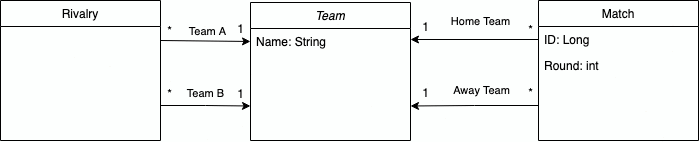
But how do we use Timefold Solver to create our schedule?
We only schedule half of the tournament, since the other half merely mirrors the rounds with the home/away teams swapped. This simplifies our scheduling problem.
Let’s suppose that we are only given the team names that are going to play in this tournament. We already know in advance the number of rounds and games per round that exist, so those are problem facts, as they don’t change during the scheduling.
Note: If the number of teams is even, the number of rounds is the number of teams minus one and the number of games per round is half of the number of teams. If the number of teams is odd, the number of rounds is the number of teams and the number of games per round is half of the number of teams minus one.
What changes during the scheduling is the teams that play in each match. So the match has the @PlanningEntity annotation and the home team and the away team have the @PlanningVariable annotation. The solver changes the @PlanningVariables in the @PlanningEntity annotated objects to optimize the solution. More information about problem facts and planning entities can be seen in the docs.
@PlanningEntity
public class Match {

    @PlanningId
    private Long id;

    @PlanningVariable
    private Team homeTeam;

    @PlanningVariable
    private Team awayTeam;

    private int round;

    public Match() {
    }

    public Match(Long id, int round) {
        this.id = id;
        this.round = round;
    }

    public Long getId() {
        return id;
    }
    public Team getHomeTeam() {
        return homeTeam;
    }

    public Team getAwayTeam() {
        return awayTeam;
    }

    public int getRound() {
        return round;
    }
}
We also need a class that is our @PlanningSolution, with the problem facts for the problem. Let’s call it TournamentSchedule.
This object has a list of teams from which the solver can choose to populate the schedule. That is indicated by the annotation @ValueRangeProvider.
It is also needed to annotate with @ProblemFactCollectionProperty the problem facts to be used by the constraints, as well as the list of matches to optimize, with@PlanningEntityCollectionProperty.
@PlanningSolution
public class TournamentSchedule {

    @PlanningEntityCollectionProperty
    private List<Match> matches;

    @ValueRangeProvider
    @ProblemFactCollectionProperty
    private List<Team> teams;

    @ProblemFactCollectionProperty
    private List<Rivalry> rivalries;

    @PlanningScore
    private HardSoftScore score;

    public TournamentSchedule() {
    }

    public TournamentSchedule(List<Team> teams, List<Rivalry> rivalries) {
        this.matches = generateMatches(teams);
        this.teams = teams;
        this.rivalries = rivalries;
    }

    private List<Match> generateMatches(List<Team> teams) {
        int numberOfRounds = (teams.size() % 2 == 0) ? teams.size() - 1 : teams.size();
        int gamesPerRound =  teams.size() / 2;
        List<Match> matches = new ArrayList<>();
        int id = 0;
        for(int round: IntStream.range(0, numberOfRounds).boxed().toList()) {
            for(int game: IntStream.range(0, gamesPerRound).boxed().toList()) {
                matches.add(new Match((long) id++, round));
            }
        }
        return matches;
    }

    public List<Match> getMatches() {
        return matches;
    }

    public List<Rivalry> getRivalries() {
        return rivalries;
    }

    public HardSoftScore getScore() {
        return score;
    }

    @Override
    public String toString() {
        StringBuilder result = new StringBuilder();
        matches.stream().collect(Collectors.groupingBy(Match::getRound))
                .forEach((round, matches) -> {
            result.append("Round ").append(round).append(": \n");
            String roundMatchesString = matches.stream()
                    .map(match -> "\t" + match.getHomeTeam().getName() + " vs " + match.getAwayTeam().getName())
                    .collect(Collectors.joining("\n"));
            result.append(roundMatchesString).append("\n\n");
        });
        return result.toString();
    }
}
Now that our entities are set up, let’s create an empty list of constraints.
public class ScheduleConstraintProvider implements ConstraintProvider {
    @Override
    public Constraint[] defineConstraints(ConstraintFactory constraintFactory) {
        return new Constraint[] {};
    }
}
Finally, let’s create an endpoint, and create four teams with two rivalries, so that we can run the solver!
@Path("/solve")
public class SolverResource {

    @Inject
    SolverManager<TournamentSchedule, UUID> solverManager;

    @GET
    public String solve() {
        UUID problemId = UUID.randomUUID();
        List<Team> teams = List.of(
                new Team("A"),
                new Team("B"),
                new Team("C"),
                new Team("D")
        );

        List<Rivalry> rivalries = List.of(
                new Rivalry(teams.get(0), teams.get(1)),
                new Rivalry(teams.get(0), teams.get(2))
        );

        TournamentSchedule problem = new TournamentSchedule(teams, rivalries);
        // Submit the problem to start solving
        SolverJob<TournamentSchedule, UUID> solverJob = solverManager.solve(problemId, problem);
        TournamentSchedule solution;
        try {
            // Wait until the solving ends
            solution = solverJob.getFinalBestSolution();
        } catch (InterruptedException | ExecutionException e) {
            throw new IllegalStateException("Solving failed.", e);
        }
        return solution.toString();
    }

}
Start the application and try it out!
> mvn quarkus:dev❯ curl localhost:8080/solve
Round 0:
	A vs A
	A vs A

Round 1:
	A vs A
	A vs A

Round 2:
	A vs A
	A vs A
It seems that the first team is chosen to play in all rounds! That happened because we do not have any constraints yet. There is nothing to tell the solver which situations it should prefer or avoid. Let’s add them!
Constraints
Let’s start with the basic constraints and see where our schedule looks funny. The first thing we don’t want is that a team is scheduled to play against itself.
In Timefold Solver, we can configure hard and soft constraints. A hard constraint cannot be broken, and breaking a hard constraint would mean that the solution is not acceptable. Soft constraints can be broken but that should be avoided. Since a team playing against itself is impossible, let’s configure it as a hard constraint. More information about constraints and score is available in the docs.
    @Override
    public Constraint[] defineConstraints(ConstraintFactory constraintFactory) {
        return new Constraint[] {
                teamCannotPlayAgainstItself(constraintFactory),
        };
    }


    private Constraint teamCannotPlayAgainstItself(ConstraintFactory constraintFactory) {
        return constraintFactory
                .forEach(Match.class)
                .filter(match -> match.getHomeTeam() == match.getAwayTeam())
                .penalize(HardSoftScore.ONE_HARD)
                .asConstraint("A team cannot play against itself");
    }❯ curl localhost:8080/solve
Round 0:
	B vs A
	B vs A

Round 1:
	B vs A
	B vs A

Round 2:
	B vs A
	B vs A
Great! By running the solver, we see that now no team is facing itself, but there are always the same two teams facing each other. Let’s add a hard constraint so each two teams can only face once (Rule 1).
    @Override
    public Constraint[] defineConstraints(ConstraintFactory constraintFactory) {
        return new Constraint[] {
                teamCannotPlayAgainstItself(constraintFactory),
                twoTeamsCanOnlyFaceOneTime(constraintFactory)
        };
    }

    //...

    private Constraint twoTeamsCanOnlyFaceOneTime(ConstraintFactory constraintFactory) {
        return constraintFactory
                .forEachUniquePair(Match.class)
                .filter((match1, match2) -> (match1.getHomeTeam() == match2.getHomeTeam() &&
                        match1.getAwayTeam() == match2.getAwayTeam()) ||
                        (match1.getHomeTeam() == match2.getAwayTeam() &&
                                match1.getAwayTeam() == match2.getHomeTeam())
                )
                .penalize(HardSoftScore.ONE_HARD)
                .asConstraint("Two teams can only face each other one time");
    }❯ curl localhost:8080/solve
Round 0:
	B vs A
	C vs A

Round 1:
	D vs A
	C vs B

Round 2:
	D vs B
	D vs C
Now teams are only facing each other once, but are still playing more than once per round (see the A team in the first round) (Rule 2). Let’s add another hard constraint to solve that.
    @Override
    public Constraint[] defineConstraints(ConstraintFactory constraintFactory) {
        return new Constraint[] {
                teamCannotPlayAgainstItself(constraintFactory),
                twoTeamsCanOnlyFaceOneTime(constraintFactory),
                teamOnlyOnceInRound(constraintFactory)
        };
    }

    // ...

    private Constraint teamOnlyOnceInRound(ConstraintFactory constraintFactory) {
        return constraintFactory
                .forEachUniquePair(Match.class, equal(Match::getRound))
                .filter((match1, match2) -> match1.getHomeTeam() == match2.getHomeTeam()
                        || match1.getAwayTeam() == match2.getHomeTeam()
                        || match1.getHomeTeam() == match2.getAwayTeam()
                        || match1.getAwayTeam() == match2.getAwayTeam()
                )
                .penalize(HardSoftScore.ONE_HARD)
                .asConstraint("Each team can only play once per round");
    }❯ curl localhost:8080/solve
Round 0:
	B vs A
	D vs C

Round 1:
	C vs A
	D vs B

Round 2:
	D vs A
	C vs B
Wow, now the schedule is starting to look much more feasible. No more physical impossibilities neither impossible rounds. We are just breaking two more rules. Teams are playing too many consecutive games at home or away (Rule 5). For example, team D is always playing at home. Let’s implement a soft constraint to avoid that.
    @Override
    public Constraint[] defineConstraints(ConstraintFactory constraintFactory) {
        return new Constraint[] {
                teamCannotPlayAgainstItself(constraintFactory),
                twoTeamsCanOnlyFaceOneTime(constraintFactory),
                teamOnlyOnceInRound(constraintFactory),
                // Soft constraints
                eachTeamShouldNotPlayManyConsecutiveGamesAtHomeOrAway(constraintFactory)
        };
    }

    // ...

    private Constraint eachTeamShouldNotPlayManyConsecutiveGamesAtHomeOrAway(ConstraintFactory constraintFactory) {
        return constraintFactory
                .forEachUniquePair(Match.class)
                .filter(
                        (match1, match2) -> (match1.getRound() == match2.getRound() + 1 &&
                                (match1.getHomeTeam() == match2.getHomeTeam() || match1.getAwayTeam() == match2.getAwayTeam())) ||
                                (match1.getRound() + 1 == match2.getRound() &&
                                        (match1.getHomeTeam() == match2.getHomeTeam() || match1.getAwayTeam() == match2.getAwayTeam()))
                )
                .penalize(HardSoftScore.ONE_SOFT)
                .asConstraint("A team should not play two consecutive house or away games");
    }❯ curl localhost:8080/solve
Round 0:
	B vs A
	D vs C

Round 1:
	C vs B
	A vs D

Round 2:
	C vs A
	D vs B
We can see that sometimes it’s impossible for all teams to not play two consecutive away and home matches (for example, D is playing rounds 1 and 2 away), but we can limit that to at most once per team. Finally, the rival teams are A with B and A with C. So we would like to start the schedule with the game A vs D. Let’s implement another soft constraint to avoid rival teams facing each other in the first round (Rule 4).
    @Override
    public Constraint[] defineConstraints(ConstraintFactory constraintFactory) {
        return new Constraint[] {
                teamCannotPlayAgainstItself(constraintFactory),
                twoTeamsCanOnlyFaceOneTime(constraintFactory),
                teamOnlyOnceInRound(constraintFactory),
                // Soft constraints
                eachTeamShouldNotPlayManyConsecutiveGamesAtHomeOrAway(constraintFactory),
                rivalTeamsShouldNotFaceOnFirstRound(constraintFactory)
        };
    }

    // ...

    private Constraint rivalTeamsShouldNotFaceOnFirstRound(ConstraintFactory constraintFactory) {
        return constraintFactory
                .forEach(Match.class)
                .filter(match -> match.getRound() == 0)
                .join(Rivalry.class)
                .filter((match, rivalry) ->
                        (match.getHomeTeam() == rivalry.getTeamA() && match.getAwayTeam() == rivalry.getTeamB()) ||
                                (match.getHomeTeam() == rivalry.getTeamB() && match.getAwayTeam() == rivalry.getTeamA())
                )
                .penalize(HardSoftScore.ONE_SOFT)
                .asConstraint("Rival teams should not face on first round");
    }❯ curl localhost:8080/solve
Round 0:
	D vs A
	C vs B

Round 1:
	A vs C
	B vs D

Round 2:
	B vs A
	D vs C
Now we have a full tournament scheduling algorithm according to the rules. The best part is that now it is possible to create a tournament with as many teams as we want to. For example, you can see the full scheduling for 20 teams and no rivalries below.
❯ curl localhost:8080/solve
Round 0:
	N vs K
	L vs C
	R vs D
	S vs B
	J vs I
	E vs Q
	H vs T
	F vs A
	G vs O
	P vs M

Round 1:
	L vs H
	S vs Q
	O vs M
	A vs C
	J vs E
	I vs T
	G vs F
	C vs R
	N vs P
	D vs K

Round 2:
	S vs D
	A vs J
	L vs E
	H vs P
	G vs B
	N vs C
	L vs T
	F vs O
	I vs Q
	R vs M

Round 3:
	I vs S
	E vs D
	N vs G
	B vs C
	J vs H
	O vs A
	M vs Q
	F vs K
	R vs T
	P vs L

Round 4:
	T vs F
	H vs Q
	I vs L
	C vs K
	E vs M
	J vs N
	D vs O
	I vs B
	S vs P
	G vs R

Round 5:
	E vs T
	F vs D
	Q vs B
	G vs S
	A vs P
	I vs N
	B vs R
	L vs K
	C vs H
	O vs J

Round 6:
	Q vs K
	D vs I
	S vs N
	M vs R
	G vs L
	P vs B
	H vs O
	E vs F
	N vs T
	C vs J

Round 7:
	G vs E
	I vs K
	O vs O
	C vs F
	B vs H
	R vs N
	S vs A
	J vs P
	T vs D
	M vs L

Round 8:
	K vs S
	L vs R
	I vs G
	H vs F
	M vs B
	J vs T
	A vs Q
	E vs P
	M vs N
	D vs C

Round 9:
	K vs H
	S vs L
	M vs J
	G vs D
	T vs C
	I vs I
	P vs O
	B vs E
	A vs H
	R vs Q

Round 10:
	P vs R
	I vs O
	D vs A
	L vs N
	M vs S
	F vs J
	H vs G
	E vs K
	T vs B
	C vs Q

Round 11:
	N vs S
	T vs M
	R vs I
	A vs L
	J vs D
	P vs F
	H vs H
	O vs K
	E vs S
	G vs Q

Round 12:
	C vs R
	N vs H
	M vs G
	K vs T
	J vs B
	I vs F
	L vs D
	P vs Q
	A vs E
	O vs S

Round 13:
	E vs C
	I vs A
	R vs O
	D vs Q
	K vs B
	S vs T
	G vs P
	F vs N
	H vs M
	L vs J

Round 14:
	I vs P
	E vs N
	H vs R
	K vs K
	T vs O
	C vs G
	J vs S
	Q vs L
	A vs B
	M vs D

Round 15:
	C vs P
	O vs Q
	T vs L
	K vs M
	C vs I
	G vs A
	B vs N
	J vs R
	E vs H
	S vs F

Round 16:
	I vs M
	L vs B
	O vs C
	Q vs F
	P vs T
	A vs K
	H vs D
	O vs N
	R vs S
	G vs E

Round 17:
	F vs L
	K vs J
	T vs Q
	T vs G
	R vs A
	P vs D
	S vs H
	C vs M
	O vs B
	E vs I

Round 18:
	A vs T
	N vs Q
	C vs S
	E vs R
	L vs O
	F vs M
	J vs G
	B vs D
	K vs P
	I vs H
We suggest you to add your own rules to try the solver, such as:
- Add a list of referees to the problem and try to attribute them to each match fairly: each of them should have a similar number of matches, with no more than one match per round, and a similar number of matches between the teams.
- Schedule the matches between closer teams to earlier in the tournament.
- Take into account the time and schedule the matches between rivals to the peak hours with no match overlapping another.
Share your experiments with the community. We can’t wait to know what you build!

Newsletter 1: OptaPlanner team continues as Timefold
In the past, you’ve worked with OptaPlanner. This globally used Open Source software was at the core of a wide array of planning optimization projects, significantly impacting efficiency in diverse industries. My co-founder, Geoffrey De Smet, the creator of OptaPlanner, and I witnessed first-hand the transformative impact of this technology. Driven by our mission to Free the world from wasteful scheduling we decided to build upon this legacy. Thus, Timefold was born.
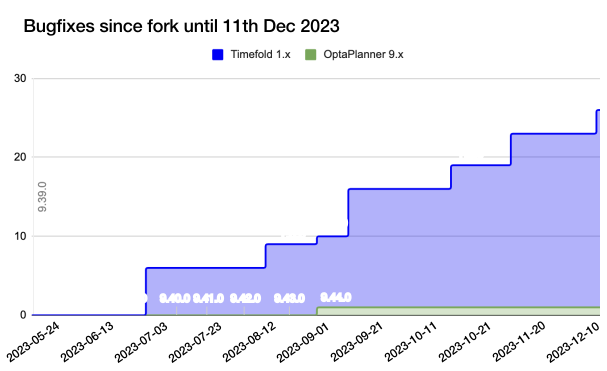
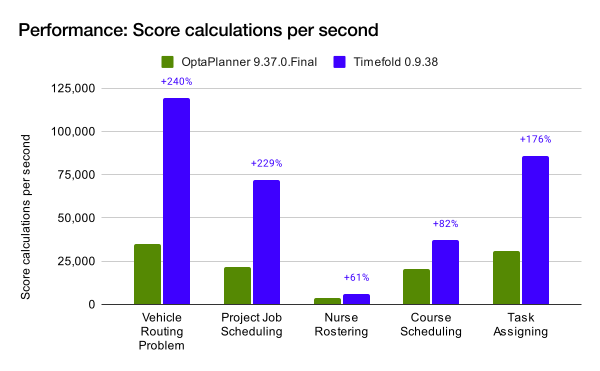
As announced on May 2nd, 2023, OptaPlanner continues as Timefold. When the future of OptaPlanner at Red Hat seemed uncertain, we took the initiative to ensure that this vital technology not only survives but also thrives. Timefold represents not merely a stable continuation but also an evolution - a new chapter. We already fixed a good number of bugs and released new features. Timefold is twice as fast, and comes with better documentation. But this is just the start as our ambition reaches far higher into making our planning optimization products as accessible and easy to use as database technology or even spreadsheets!
We are honored to welcome the core OptaPlanner team - Lukas, Radovan, and Christopher - to Timefold. Their expertise and insights are invaluable in our journey ahead. We are proud of the Timefold team and thankful for being on this ride together.
Timefold is more than a tool; it’s a community and a movement. Your contributions, feedback, and ideas are the keystones of this community. Find us on StackOverflow or star us on GitHub.
We invite you to continue on this journey with us. We will send out a monthly newsletter that we will keep informative and on-point. Feedback is always welcome. We look forward to your continued support and engagement!
Why upgrade OptaPlanner to Timefold?
For reliability, features and speed. Timefold adds features and fixes bugs, many that still reside in OptaPlanner. Timefold is twice as fast as OptaPlanner out-of-the-box. Here’s how to upgrade OptaPlanner to Timefold.
Releases
Timefold Solver Community Edition 1.5.0 full release notes
Featured Update: Recommended Fit API, designed for appointment scheduling. Whilst on a call, operators can receive a list of appointment choices, ranked from best fit to worst, for informed decision-making. Also, score corruption errors now provide better debugging information.
Timefold Solver Community Edition 1.4.0 full release notes
Featured Update: JSON-friendly score explanations. Timefold Solver can now break down the score all the way to individual constraint matches. It can also compute differences between any two solutions. Also, Spring Boot integration has improved significantly.
Here you can find all previous releases of Timefold Solver.
Latest Timefold videos
What the team likes about Timefold Solver:
Coding the capacitated VRP in Java:
Geoffrey De Smet & Lukáš Petrovický at Devoxx Belgium:

Migrate from score DRL to Constraint Streams
Some of the users coming to Timefold from OptaPlanner might still be using score DRL to define their constraints. Since score DRL is the only thing we have not brought with us when we forked OptaPlanner, it is time to explain how to migrate from score DRL to Constraint Streams.
Constraint Streams (CS) is a modern full-featured API for writing Timefold Solver constraints, offering several benefits over score DRL:
- Developers do not need to learn any new language. CS is plain Java (or Kotlin).
- CS provides full IDE support including syntax highlighting and refactoring.
- CS provides comprehensive support for unit testing.
- In most use cases, CS performs considerably faster than score DRL.
Limits of this guide
CS and DRL are very similar in their approach to processing your data model. Because of this, migrating many parts of score DRL to CS is straight-forward, even mechanical. However, this guide does not help you if your score DRL uses the following constructs, because there is no direct mapping between DRL and CS in these cases:
- The DRL
insertLogical()attribute allows information to be transferred between rules. This is not possible in CS, where each constraint is isolated and stands on its own. One typical use case forinsertLogical()was detecting sequences of consecutive shifts in the Nurse Rostering example. This particular use case can be handled by using the consecutive constraint collector. - The DRL right-hand side allows for arbitrary Java code execution that goes far beyond calculating the match weight. This is not possible in CS, where each constraint can only result in either a score reward or a penalty.
If you are using either of these constructs, we recommend that you first refactor them out of your DRL and then check back with this migration guide.
With that out of the way, let’s get the migration started.
Create and configure a ConstraintProvider class
In score DRL, all your constraints are typically written in a single text file, for example:
package org.optaplanner.examples.vehiclerouting.optional.score;
dialect "java"

import ...;

global HardSoftLongScoreHolder scoreHolder;

rule "vehicleCapacity"
    when
        ...
    then
        ...
end

...
In this file, each rule represents one or more constraints. In CS, the DRL file is replaced by standard Java source code:
package ai.timefold.solver.examples.vehiclerouting.score;

import ...;

public class VehicleRoutingConstraintProvider implements ConstraintProvider {

    @Override
    public Constraint[] defineConstraints(ConstraintFactory factory) {
        return new Constraint[] {
                vehicleCapacity(factory),
                ...
        };
    }

    protected Constraint vehicleCapacity(ConstraintFactory factory) {
        ...
    }

    ...
}
The method defineConstraints(…), a single method on the ConstraintProvider, lists all your constraints. Each constraint is then typically represented by a method.
Solver configuration
Quarkus and Spring users most likely do not need to worry about solver configuration. Just remove the score DRL and create a ConstraintProvider implementation.
In OptaPlanner’s solver configuration XML however, score DRL is configured by pointing the solver to the DRL file:
<solver>

  ...

  <scoreDirectorFactory>
    <scoreDrl>org/optaplanner/examples/vehiclerouting/optional/score/vehicleRoutingConstraints.drl</scoreDrl>
  </scoreDirectorFactory>

  ...

</solver>
Constraint Streams are selected by pointing the solver to an implementation of the ConstraintProvider interface from above:
<solver>

  ...

  <scoreDirectorFactory>
    <constraintProviderClass>ai.timefold.solver.examples.vehiclerouting.score.VehicleRoutingConstraintProvider</constraintProviderClass>
  </scoreDirectorFactory>

  ...

</solver>
Migrating trivial constraints
Many constraints follow a simple pattern of picking an entity and immediately penalizing it. Let’s look at an example from the field of vehicle routing:
rule "distanceToPreviousStandstill"
    when
        Customer(previousStandstill != null, $distanceFromPreviousStandstill : distanceFromPreviousStandstill)
    then
        scoreHolder.addSoftConstraintMatch(kcontext, - $distanceFromPreviousStandstill);
end
Here, each initialized Customer instance incurs a soft penalty equivalent to the value of its distanceFromPreviousStandstill field. Here’s how the same result is achieved in CS:
Constraint distanceToPreviousStandstill(ConstraintFactory factory) {
    return factory.forEach(Customer.class)
        .penalizeLong(HardSoftLongScore.ONE_SOFT, Customer::getDistanceFromPreviousStandstill)
        .asConstraint("distanceToPreviousStandstill");
}
Note that:
forEach(Customer.class)serves the same purpose asCustomer(…)in DRL.- There is no need to check if a planning variable is initialized (
previousStandstill != null), becauseforEach(…)does it automatically. If this behavior is not what you want, useforEachIncludingNullVars(…)instead. - The right-hand side of the rule (the part after
then) is replaced by a call topenalizeLong(…). The size of the penalty is now determined by the constraint weight (HardSoftLongScore.ONE_SOFT) and match weight (the call to a getter onCustomer).
The match weight is a key difference between DRL and CS. In DRL, each rule adds a constraint match together with a total penalty. In CS, each constraint applies a reward or a penalty based on several factors:
- A penalty or reward. A penalty has a negative impact on the score, while a reward impacts the score positively.
- A constant constraint weight, such as
HardSoftScore.ONE_SOFT,HardMediumSoftScore.ONE_HARD. Constraint weights can be either fixed or configurable. - A dynamic match weight. This applies to any individual match and is typically specified by a lambda (for example
customer -> customer.getDistanceFromPreviousStandstill()). If not specified, it defaults to1.
The impact of each constraint match is calculated using the following formula:
(isReward ? 1 : -1) * (constraint weight) * (match weight)
Applying rewards instead of penalties
In the example above, score DRL applies a penalty by adding a negative constraint match, for example:
scoreHolder.addSoftConstraintMatch(kcontext, - $distanceFromPreviousStandstill).
CS makes this more explicit by using the keyword penalize instead of add…, while keeping the match weight positive:
penalizeLong(…, …, customer -> customer.getDistanceFromPreviousStandstill()).
You can accomplish a positive impact without changing the match weight if you replace penalize by reward :
rewardLong(…, …, customer -> customer.getDistanceFromPreviousStandstill()).
Applying different penalty types
In the example above, distanceFromPreviousStandstill is of the type long and therefore the DRL scoreHolder.addSoftConstraintMatch(kcontext, - $distanceFromPreviousStandstill) maps to the CS penalizeLong(…, …, customer -> customer.getDistanceFromPreviousStandstill()).
If the type was int, it would map to penalize(…) instead. Similarly, if the type was BigDecimal, it would map to penalizeBigDecimal(…). No types other than int, long, and BigDecimal are supported.
The same applies to rewards.
Applying configurable constraint weights
In some cases, such as in the Conference Scheduling example, constraint weights are specified in a @ConstraintConfiguration annotated class and not in the score DRL. The relevant right-hand side of the score DRL would look like this:
scoreHolder.penalize(kcontext, $penalty);
In CS, this situation maps to penalizeConfigurable(…) and similarly for rewards.
For more information, see penalties and rewards in Timefold Solver Documentation.
Migrating constraints with filters
In the vehicle routing field, we could also find the following rule:rule "distanceFromLastCustomerToDepot"
    when
        $customer : Customer(previousStandstill != null, nextCustomer == null)
    then
        Vehicle vehicle = $customer.getVehicle();
        scoreHolder.addSoftConstraintMatch(kcontext, - $customer.getDistanceTo(vehicle));
end
There are many similarities to the previous rule, but this time we penalize Customer only when the nextCustomer field is null. To do the same in CS, we introduce a filter(…)call where we check the return value of a getter for null.
Constraint distanceFromLastCustomerToDepot(ConstraintFactory factory) {
    return factory.forEach(Customer.class)
        .filter(customer -> customer.getNextCustomer() == null)
        .penalizeLong(HardSoftLongScore.ONE_SOFT,
            customer -> {
                Vehicle vehicle = customer.getVehicle();
                return customer.getDistanceTo(vehicle);
            })
        .asConstraint("distanceFromLastCustomerToDepot");
}
For more information, see filtering section in Timefold Solver Documentation.
Migrating eval(…)
The eval(…) construct allows us to execute an arbitrary piece of code that returns boolean. As such, it is functionally equivalent to the CS filter(…) construct as described previously. However, we discourage the use of eval(…) because executing custom code, such as calling external services or processing collections iteratively, is likely to slow your constraints down.
Migrating constraints with joins
Some constraints penalize based on a combination of entities or facts, such as in the NQueens example:
rule "Horizontal conflict"
    when
        Queen($id : id, row != null, $i : rowIndex)
        Queen(id > $id, rowIndex == $i)
    then
        scoreHolder.addConstraintMatch(kcontext, -1);
end
Here, we select a pair of different queens (second Queen.id greater than first Queen.id) which share the same row (second Queen.rowIndex equal to first Queen.rowIndex). Each pair is then penalized by 1.
Here’s how to do the same thing in CS, using a join(…) call with some Joiners:
Constraint horizontalConflict(ConstraintFactory factory) {
    return factory.forEach(Queen.class)
        .join(Queen.class,
            Joiners.greaterThan(Queen::getId),
            Joiners.equal(Queen::getRowIndex))
        .penalize(SimpleScore.ONE)
        .asConstraint("Horizontal conflict");
}
The Joiners.greaterThan(Queen::getId) statement is a way of expressing the DRL queen.id > $id statement in Java. Similarly, Joiners.equal(Queen::getRowIndex)represents the DRL queen.rowIndex == $i statement.
However, in this case, we can go further and use some CS syntactic sugar:
Constraint horizontalConflict(ConstraintFactory factory) {
    return factory.forEachUniquePair(Queen.class,
            equal(Queen::getRowIndex))
        .penalize(SimpleScore.ONE)
        .asConstraint("Horizontal conflict");
}
Using forEachUniquePair(Queen.class), the greaterThan(…) joiner is inserted automatically, and we only need to match the row indexes.
For more information, see joining in Timefold Solver Documentation.
Applying filters while joining
In certain cases, you might need to apply a filter while joining, such as in the case of the Conference Scheduling example:
rule "Talk prerequisite talks"
    when
        $talk1 : Talk(timeslot != null)
        $talk2 : Talk(timeslot != null,
                !getTimeslot().startsAfter($talk1.getTimeslot()),
                getPrerequisiteTalkSet().contains($talk1))
    then
        scoreHolder.penalize(kcontext,
                $talk1.getDurationInMinutes() + $talk2.getDurationInMinutes());
end
Note that the second Talk is only selected if its prerequisiteTalkSet contains the first Talk. Because there is no CS joiner for this specific operation yet, we need to use a generic filtering joiner:
Constraint talkPrerequisiteTalks(ConstraintFactory factory) {
    return factory.forEach(Talk.class)
        .join(Talk.class,
            Joiners.greaterThan(
                    talk1 -> talk1.getTimeslot().getEndDateTime(),
                    talk2 -> talk2.getTimeslot().getStartDateTime()),
            Joiners.filtering((talk1, talk2) -> talk2.getPrerequisiteTalkSet().contains(talk1)))
        .penalizeConfigurable(Talk::combinedDurationInMinutes)
        .asConstraint(TALK_PREREQUISITE_TALKS);
    }
Migrating large joins
CS only supports up to three joins natively. If you need four or more joins, refer to mapping tuples in Timefold Solver Documentation.
Migrating exists and not
The DRL exists keyword can be converted to CS much like the join above. Consider this rule from the Cloud Balancing example:
rule "computerCost"
    when
        $computer : CloudComputer($cost : cost)
        exists CloudProcess(computer == $computer)
    then
        scoreHolder.addSoftConstraintMatch(kcontext, - $cost);
end
Here, only penalize a computer if a process exists that runs on that particular computer. An equivalent constraint stream looks like this:
Constraint computerCost(ConstraintFactory constraintFactory) {
    return constraintFactory.forEach(CloudComputer.class)
        .ifExists(CloudProcess.class,
            Joiners.equal(Function.identity(), CloudProcess::getComputer))
        .penalize(HardSoftScore.ONE_SOFT, CloudComputer::getCost)
        .asConstraint("computerCost");
}
Notice how the ifExists(…) call uses the Joiners class to define the relationship between CloudProcess and CloudComputer.
For the use of the DRL not keyword, consider this rule from the Traveling Sales Person (TSP) example:
rule "distanceFromLastVisitToDomicile"
    when
        $visit : Visit(previousStandstill != null)
        not Visit(previousStandstill == $visit)
        $domicile : Domicile()
    then
        scoreHolder.addConstraintMatch(kcontext, - $visit.getDistanceTo($domicile));
end
A visit is only penalized if it is the final visit of the journey. The same can be achieved in CS using the ifNotExists(…) building block:
Constraint distanceFromLastVisitToDomicile(ConstraintFactory constraintFactory) {
    return constraintFactory.forEach(Visit.class)
        .ifNotExists(Visit.class,
            Joiners.equal(visit -> visit, Visit::getPreviousStandstill))
        .join(Domicile.class)
        .penalizeLong(SimpleLongScore.ONE, Visit::getDistanceTo)
        .asConstraint("Distance from last visit to domicile");
}
For more information on ifExists() and ifNotExists(), see conditional propagation in Timefold Solver Documentation.
Migrating accumulate
CS does not have a concept that maps mechanically to the DRL accumulate keyword. However, it does have a very powerful groupBy(…) concept. To understand the differences between the two, consider the following rule taken from the Cloud Balancing example:
rule "requiredCpuPowerTotal"
    when
        $computer : CloudComputer($cpuPower : cpuPower)
        accumulate(
            CloudProcess(
                computer == $computer,
                $requiredCpuPower : requiredCpuPower);
            $requiredCpuPowerTotal : sum($requiredCpuPower);
            $requiredCpuPowerTotal > $cpuPower
        )
    then
        scoreHolder.addHardConstraintMatch(kcontext, $cpuPower - $requiredCpuPowerTotal);
end
For each CloudComputer, it computes a sum of CPU power required by CloudProcessinstances ($requiredCpuPowerTotal : sum($requiredCpuPower)) running on that computer (CloudProcess(computer == $computer)), and only penalizes those computers where the total power required exceeds the power available ($requiredCpuPowerTotal > $cpuPower).
For comparison, let us now see how the same is accomplished in CS using groupBy(…):
Constraint requiredCpuPowerTotal(ConstraintFactory constraintFactory) {
    return constraintFactory.forEach(CloudProcess.class)
        .groupBy(
                CloudProcess::getComputer,
                ConstraintCollectors.sum(CloudProcess::getRequiredCpuPower))
        .filter((computer, requiredCpuPower) -> requiredCpuPower > computer.getCpuPower())
        .penalize(HardSoftScore.ONE_HARD,
            (computer, requiredCpuPower) -> requiredCpuPower - computer.getCpuPower())
        .asConstraint("requiredCpuPowerTotal");
    }
First, we select all CloudProcess instances (forEach(CloudProcess.class)). Then we apply groupBy in two steps:
- We split the processes into buckets ("groups") by their computer (
CloudProcess::getComputer). If two or more processes have the same computer, they belong to the same group. - For each such group, we apply a
ConstraintCollectors.sum(…)to get a sum total of power required by all processes in such group.
The result of that operation is a pair ("tuple") of facts: a CloudComputer and an intrepresenting the sum total of power required by all processes running on that computer. We then take all such tuples and filter(…) out all those where the sum total is <= that computer’s available power. Finally, we penalize the positive difference between the required power and the available power, the overconsumption.
As you can see, groupBy(…) accomplishes the same result, but goes about it differently. This is why mapping DRL accumulate to CS groupBy, while always possible, is not necessarily straight-forward or mechanical.
For more information on groupBy(…), see grouping and collectors in Timefold Solver Documentation.
Conclusion
Users of Timefold Solver can no longer rely on score DRL to define their constraints. After migration to Constraint Streams, your constraints are likely to perform faster and be easier to maintain. Migrating most types of constraints to Constraint Streams is straightforward.

Timefold Solver 0.8 reaches End Of Life
We have just released Timefold Solver 0.8.42. With this release, Timefold Solver 0.8 has reached End Of Life. Read on to find out why we are doing this, and what it means for you.
What is End Of Life?
End Of Life (EOL) means that Timefold will no longer provide support for Timefold Solver 0.8. There will be no new releases from the 0.8 branch, no more bugfixes and no more security updates. Upgrade to Timefold Solver 1.x to continue to receive updates.
Why has Timefold Solver 0.8 reached End Of Life?
Timefold Solver 0.8 is built on technologies which have themselves reached their respective EOL. Spring Boot 2’s final release is 2.7.18, and the final release of Quarkus 2 is 2.16.12.Final. Without support from these projects, Timefold can no longer provide users of Timefold Solver 0.8 with security updates.
What does this mean for you?
At the time of writing, Timefold Solver 1.4.0 is the current stable release of Timefold Solver. It contains the latest innovations, as well as all available bugfixes and the most recent security updates. It will be supported for many years to come. If you’re already on Timefold Solver 1.x, you’re all set.
Upgrading to Timefold Solver 1.x
The process to upgrade to latest Timefold Solver consists of several steps. First, upgrade your codebase to the latest Timefold like so:
Note that:
- Timefold Solver 1.x, as well as Spring Boot 3 and Quarkus 3, requires Java 17 or higher.
- Timefold Solver 1.x does not support
scoreDRL, nor is it upgraded automatically. If you’re still using the legacyscoreDRLfrom OptaPlanner 7.x, which was already deprecated in OptaPlanner 8, please upgrade to Constraint Streams first.
Next steps depend on whether your project uses Spring Boot or Quarkus:
- If your project uses Spring Boot, follow the Spring Boot 3 migration guide to upgrade from Spring Boot 2 to Spring Boot 3.
- If your project uses Quarkus, follow the Quarkus 3.0 migration guide to upgrade from Quarkus 2 to Quarkus 3.
- If your project uses neither of these, skip these steps.
Having completed these steps, you are now on the latest Timefold Solver and you can enjoy all the latest features and bugfixes. Should you encounter any issues during the upgrade process, kindly contact us on Github and we will investigate.
Timefold customers can also contact our support directly.
Conclusion
Timefold Solver 0.8 has reached End of Life (EOL). Please upgrade to Timefold Solver 1.x now, to receive the latest and greatest features and bugfixes.

Partnership: e‑switch Solutions and Timefold
Zurich - Ghent - Swiss-based e-switch Solutions and Timefold announce a partnership to optimize maintenance and service management.
About e-switch Solutions
Founded in 1999: e-switch Solutions is a leading solutions provider, specializing in maintenance and service management. Offering Mobile SAP solutions which are adopted by leading companies like Deutsche Bahn, Siemens, Airport Zürich or Scottish Power.
e-switch Solutions‘ The Visual Planning Board® for dispatchers is an ideal solution for efficient scheduling featuring seamless integration with SAP and Real-Time updates. Their mobile solution, mCompanion®, supports technicians on-site throughout the entire process chain and is available on all leading mobile platforms. Additionally, their checklist tool, mcCheckList®, aids with digital checklists to help adhere to and document work processes, integrated with SAP data.
e-switch Solutions fuels maintenance scheduling with Timefold
The Visual Planning Board® by e-switch Solutions features an innovative OTS module (Optimized Task Scheduling), originally based on the OptaPlanner open-source project.
Recognizing the advancements and superior capabilities of Timefold, the evolution of OptaPlanner, e-switch Solutions strategically opted to integrate Timefold into their platform. Ensuring that e-Switch remains at the forefront of service and maintenance management innovation.
The strategic partnership with Timefold is an important step for the future. Our SAP expertise in the area of service and maintenance, supplemented by the solver component from Timefold, expands our Visual Planning Board with a powerful optimizer for automatic resource planning. In view of the growing demand for optimizer solutions, we are confident that e-switch is optimally equipped for the future.
Thorsten Waldner from e-switch Solutions
About Timefold
Timefold created an AI-powered, Open Source planning technology platform designed to enhance operational efficiency across various industries. Timefold offers tools to solve complex planning problems through mathematical optimization and makes it accessible for developers.
Diverse Industry Applications: Off the shelf, Timefold’s customizable planning models cater for common, yet complex planning problems. Ranging from Maintenance Scheduling, Vehicle Routing, to Employee Scheduling and Production line scheduling. These models can be tailored to fit the specific needs and nuances of individual use cases.
Proprietary with Maven Repository: This option includes a proprietary but open-source accessible platform, available through the Timefold Maven repository with solver jars and a quickstarts repo.
Managed Solution with Container Registry: Alternatively, Timefold provides a managed solution available via its container registry, including Docker images and helm charts, complemented by an API service.

Gurobi versus Timefold comparison
Gurobi and Timefold Solver are mathematical optimization solvers. Both are fast and scalable solvers, used across the globe by a large user base in production. They have similarities, but also differences.
This comparison is written by the Timefold team to guide you through the fundamental differences in these technologies. We aim to present correct and truthful information. However, it’s important to acknowledge our natural bias towards Timefold Solver.
License and community
Both Gurobi and Timefold Solver are created by companies with dedicated team of optimization experts. Both have a large community, high-quality documentation and a rich set of examples.
Gurobi
Gurobi is paid, proprietary software.
To get started, contact Gurobi for a free evaluation license, then read the docs or start from the examples.
Timefold Solver
Timefold Solver Community is open source software under the Apache License, which allows free usage in commercial software.
To get started, read the docs or clone the quickstarts repo on GitHub.
Timefold Solver Enterprise is paid, proprietary software, that adds support and high-scalability features. This comparison covers only the features in the free, open source edition.
Define a model
Both Gurobi and Timefold Solver require you to define your model with optimization variables, so the mathematical optimization software knows which decisions it needs to make.
Gurobi
Gurobi supports several types of optimization variables, such as booleans, integers and floating point numbers. You can define your planning model in those types.
For example, you can use addVar(BINARY) to model the assignment of a particular employee to a particular shift:
// Input
Model model = ...
Variable[][] assignments = new Variable[shifts.size()][employees.size()];
for (int s = 0; s < shifts.size(); s++) {
    for (int e = 0; e < employees.size(); e++) {
        assignments[s][e] = model.addVar(BINARY);
    }
}
... // Add constraints to enforce no shift is assigned to multiple employees

// Solve
model.solve();

// Output
for (int s = 0; s < shifts.size(); s++) {
    for (int e = 0; e < employees.size(); e++) {
        if (assignments[s][e].get() > 0.99) {
            print(shifts[s] + " is assigned to " + employees[e]);
        }
    }
}
Timefold Solver
Timefold Solver supports any type of optimization variables, including your custom classes (Employee, Vehicle, …) and standard classes (Integer, BigDecimal, LocalDate, …). You typically define your planning model in your own domain classes.
For example, you can use @PlanningVariable on your Shift.employee field to model the assignment of an employee to a shift:
@PlanningEntity
class Shift { // User defined class
    ... // id, date, start time, required skills, ...

    @PlanningVariable
    Employee employee;
}
@PlanningSolution
class TimeTable { // User defined class
    List<Employee> employees;
    List<Shift> shifts;
}

// Input
Timetable timetable = new Timetable(shifts, employees);

// Solve
timetable = Solver.solve(timetable);

// Output
for (Shift shift : timetable.shifts) {
    print(shift + " is assigned to " + shift.employee);
}
None of these classes (Shift, Employee and Timetable) exist in Timefold itself: you define and shape them. Your code naturally represents employees as instances of the Employee class, shifts as instances of the Shift class, and so forth.
Timefold Solver supports Object-Oriented Programming (OOP) input, including polymorphism.
Search space comparison
In the code above for employee scheduling, Gurobi uses boolean variables and Timefold uses employee variables.
This has an effect on the search space:
- Gurobi creates a
booleanvariable for every(shift, employee)combination. Given2000shifts and100employees, that’s an array of200 000elements. - On the other hand, Timefold Solver creates an
Employeevariable for everyShift. Given2000shifts and100employees, that’s an array of2000elements.
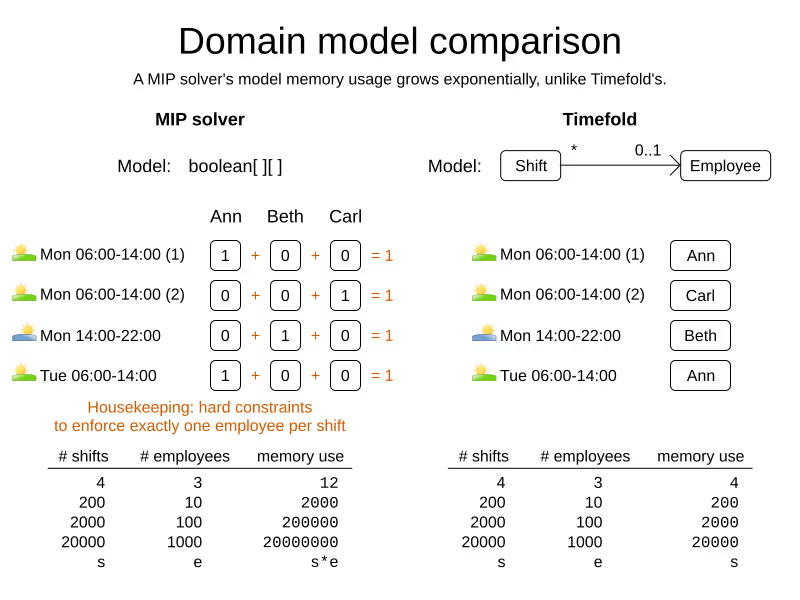
The Timefold model naturally enforces the one shift per employee hard constraint by design, the Gurobi model implements it.
Constraints
Both Gurobi and Timefold Solver have a rich API to define your constraints.
Gurobi
Gurobi constraints are implemented as mathematical equations.
For example, to assign at most one shift per day, you add an equation s1 + s2 + s3 <= 1 for all shifts on day 1, an equation s4 + s5 <= 1 for all shifts on day 2, and so forth:
for (int e = 0; e < employees.size(); e++) {
    for (int d = 0; d < dates.size(); d++) {
        Expression expr = ...
        for (int s = 0; s < shifts.size(); s++) {
            // If the shift is on the date
            if (shifts[s].date == dates[d])) {
                expr.addTerm(1.0, assignments[s][e]);
            }
        }
        model.addConstraint(expr, LESS_EQUAL, 1.0);
    }
}
Timefold Solver
Timefold Solver constraints are implemented as programming code.
For example, to assign at most one shift per day, select every pair of Shift instances that have the same date and the same employee, to penalize matching pairs as a hard constraint:
// For every shift ...
constraintFactory.forEach(Shift.class)
    // ... combined with any other shift ...
    .join(Shift.class,
        // ... on the same date ...
        equal(shift -> shift.date),
        // ... assigned to the same employee ...
        equal(shift -> shift.employee))
    // ... penalize one broken hard constraint per pair.
    .penalize(HardSoftScore.ONE_HARD)
    .asConstraint("One shift per day");
Timefold’s ConstraintStreams API uses a Functional Programming (FP) approach, so it can run delta calculations under the hood for maximum scalability and performance.
Constraints can reuse existing code. For example, because date is an instance of LocalDate (a Date and Time API), you can use LocalDate.isDayOfWeek() to select 2 shifts on the same day of week:
        // ... on the same day of week ...
        equal(shift -> shift.date.getDayOfWeek())
Date and times arithmetic is notoriously difficult, because of Daylight Saving Time (DST), timezones, leap years and other intricacies. Timefold allows you to directly use any 3th-party API (such as LocalDate) in your constraints.
Besides the equal() joiner, Timefold provides lessThan(), greaterThan(), lessThanOrEqual(), greaterThanOrEqual(), overlapping(), etc. It automatically applies indexing (hashtable techniques) on joiners for performance.
It has higher level abstractions. For example, select two overlapping shifts with the overlapping() joiner (even if they start or end at different times):
        // ... that overlap ...
        overlapping(shift -> shift.startDateTime, shift -> shift.endDateTime)
Besides the join() construct, Timefold supports filter(), groupBy(), ifExists(), ifNotExists(), map(), etc.
For example, allow employees that can work double shifts to work double shifts by filtering out all employees that work double shifts with a filter():
// For every shift ...
constraintFactory.forEach(Shift.class)
    // ... assigned to an employee that does not work double shifts ...
    .filter(shift -> !shift.employee.worksDoubleShifts)
    // ... combined with any other shift ...
    .join(Shift.class,
        equal(shift -> shift.date),
        // ... assigned to that same employee that does not work double shifts ...
        equal(shift -> shift.employee))
    .penalize(HardSoftScore.ONE_HARD)
    .asConstraint("One shift per day");
The groupBy() construct supports count(), sum(), average(), min(), max(), toList(), toSet(), toMap(), etc. You can also plug in custom collectors.
For example, don’t assign more than 10 shifts to any employee by counting their shifts with count():
constraintFactory.forEach(Shift.class)
    // Group shifts by employee and count the number of shifts per employee ...
    .groupBy(shift -> shift.employee, count())
    // ... if more than 10 shifts for one employee ...
    .filter((employee, shiftCount) -> shiftCount > 10)
    // ... penalize as a hard constraint ...
    .penalize(HardSoftScore.ONE_HARD,
            // ... multiplied by the number of excessive shifts.
            (employee, shiftCount) -> shiftCount - 10)
    .asConstraint("Too many shifts");
Timefold Solver has no linear limitations.
For example, avoid overtime and distribute it fairly by penalizing the number of excessive hours squared:
constraintFactory.forEach(Shift.class)
    // Group shifts by employee and sum the shift duration per employee ...
    .groupBy(shift -> shift.employee, sum(shift -> shift.getDurationInHours()))
    // ... if an employee is working more hours than his/her contract ...
    .filter((employee, hoursTotal) -> hoursTotal > employee.contract.maxHours)
    // ... penalize as a soft constraint of weight 1000 ...
    .penalize(HardSoftScore.ofSoft(1000),
            // ... multiplied by the number of excessive hours squared.
            (employee, hoursTotal) -> {
                    int excessiveHours = hoursTotal - employee.contract.maxHours;
                    return excessiveHours * excessiveHours;
            })
    .asConstraint("Too many shifts");
This penalizes outliers more. It automatically load balances overtime in fair manner across the employees, whenever possible.
Timefold Solver also supports positive constraints: use reward() instead of penalize(). You can mix positive and negative constraints.
Timefold Solver supports weighting constraints dynamically per dataset.
Scoring
Gurobi
Gurobi supports 2 score levels: hard constraints as constraints and soft constraints as an objective function that returns a floating point number.
Gurobi uses floating point arithmetic internally to solve. It minimizes rounding errors by ordering its arithmetic operations intelligently. By default, Gurobi tolerates going over hard constraints by margin of a 0.000001 to ignore compounded rounding errors.
Timefold Solver
Timefold Solver supports extra score levels beyond hard and soft constraints. For example, HardMediumSoftScore allows to prioritize medium operational constraints (such as assign all shifts) over soft financial constraints (such as reduce cost). Without resorting to multiplication with a big number.
Timefold Solver supports to weight constraints dynamically per dataset without rebuilding the entire model. For example to make the soft constraint fairness in dataset A twice as important as in dataset B.
Timefold Solver includes a Score Analysis API to break down a score per constraint.
Timefold Solver does not suffer from numerical instability because it doesn’t rely on floating point arithmetic internally for constraint validation.
Cloud and Integration
Gurobi
Gurobi Cloud offers a paid service to run models on Azure and AWS clouds.
Timefold Solver
Timefold Solver has integration modules for Spring, Quarkus and JSON (de)serialization. It supports native compilation for serverless use cases that need to start up in milliseconds.
Timefold (company) offers a paid Field Service Routing API and Employee Scheduling API, as well as a paid version of Timefold Solver with Enterprise Features such as Nearby Selection and Multi-Threading.
Page updated on 12th of November 2025 to beter differentiate between Timefold (the company) and Timefold Solver.

When scheduling works, everything works.
Less waste. More control. Teams that trust the plan.