Blog
Technician scheduling software in 2027: Essential capabilities for modern field service
What should technician scheduling software actually do? Nine essential capabilities, from skill matching and SLA priorities to real-time replanning, explainability, and API integration.
Technician scheduling software assigns field technicians to jobs and plans their days so that the right person, with the right skills, arrives within the promised window without wasting hours on the road.
The best tools do this automatically across hundreds or thousands of technicians, and they keep the plan valid as the day changes.
Most products in this category show a calendar and a map. The difference between them is what happens underneath: whether the software can weigh skills, time windows, SLAs, travel, and working-hour rules together, or whether it leaves those tradeoffs to a dispatcher.
This guide lists nine capabilities that separate modern technician scheduling from a digital whiteboard. It's written for operations leaders comparing tools and for product teams at field service software companies deciding what their own scheduling engine needs.
Why technician scheduling has become harder
Two pressures are pushing field service teams to rethink how they schedule.
- The first is labor. In the US HVAC trade alone, industry estimates put the technician shortage at around 110,000 open positions. When every skilled technician counts, a schedule that wastes an hour of their day on avoidable driving is a real capacity problem.
- The second is expectations. Customers expect narrow arrival windows, live updates, and a fix on the first visit. Nobody wants to be anticipating their technician coming in all day.
Both pressures land on the schedule.
Nine essential capabilities
1. Skill and certification matching
The software should know what each job requires and what each technician can do, including certifications, seniority, languages, and equipment access. Hard requirements (a gas-safe certificate) should never be violated. Softer preferences (a technician the customer has worked with before) should be encouraged but not forced.
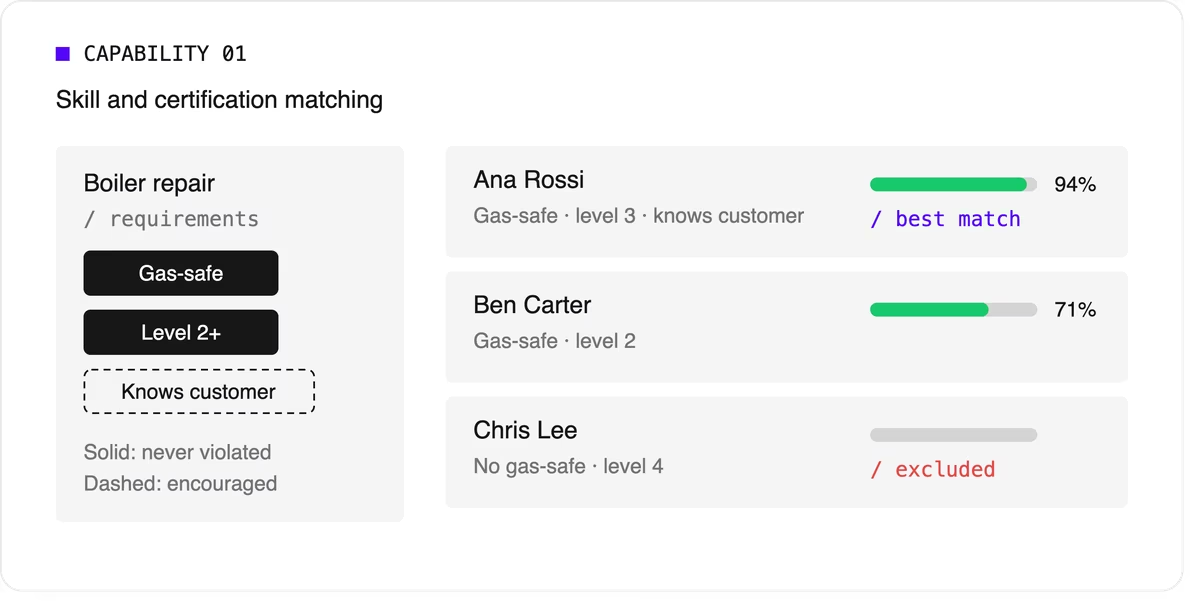
Look for support for skill levels and customer affinity in addition to simple yes-or-no skills. Matching the right skills is also one of the most direct ways to improve first-time fix rates.
2. Time windows and SLA priorities
Jobs come with customer availability windows, and many come with contractual deadlines.
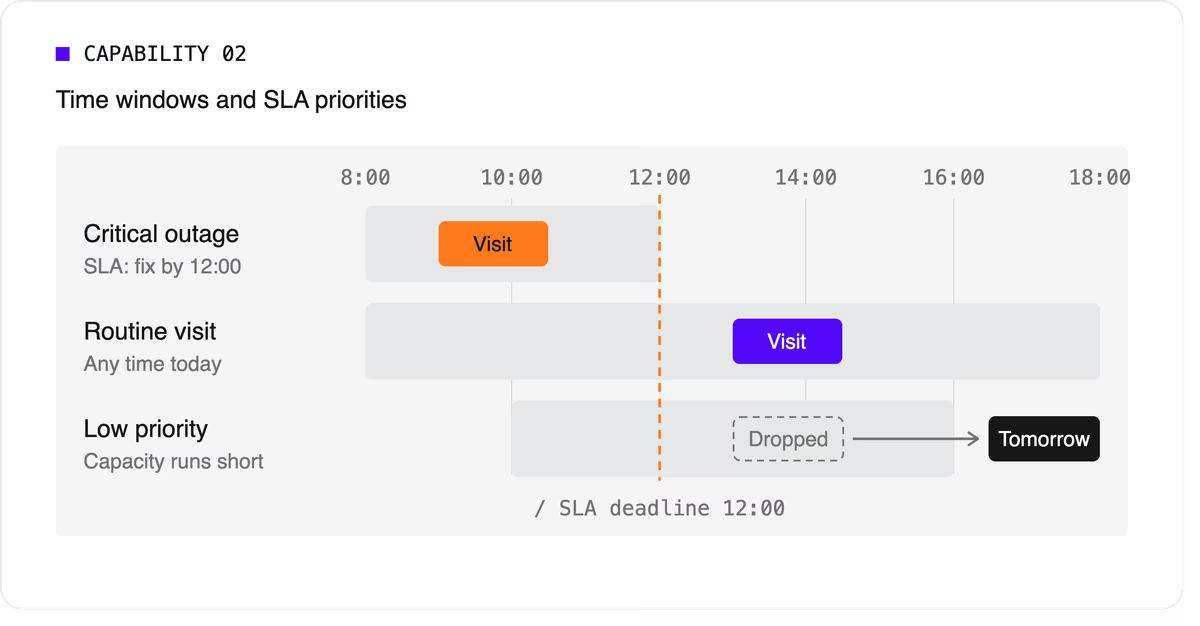
The software needs to treat a critical SLA differently from a routine visit that can move to tomorrow. That means supporting multiple time windows per job, priority levels, and deadlines that can push lower-priority work out of the plan when capacity runs short.
3. Travel-aware planning with real road data
A schedule that assumes straight-line distances will fall apart on the road. Technician scheduling software should use real travel times, ideally with support for traffic patterns and your own map provider if you already have one.
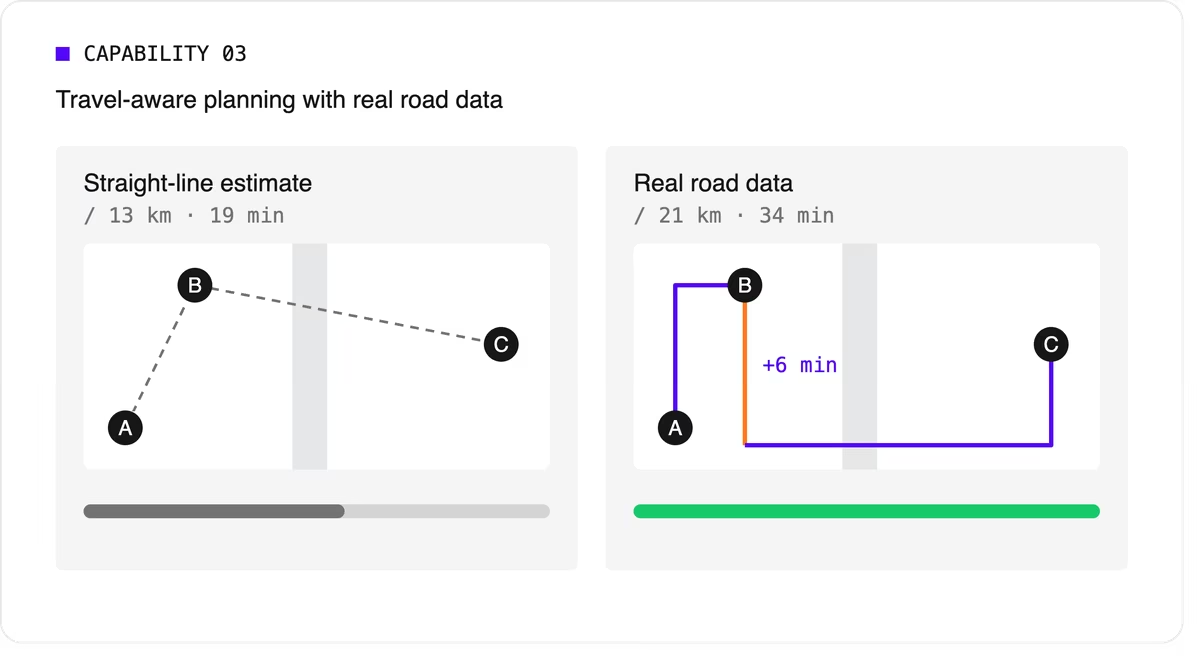
It should let you choose what to minimize, total travel time or total distance, because the two goals give different answers.
4. Multi-technician visits and job dependencies
Some jobs need two or more people on site at the same time for safety or lifting. Others must happen in order, sometimes with a delay: isolate the power before rewiring, or let a surface dry before painting.
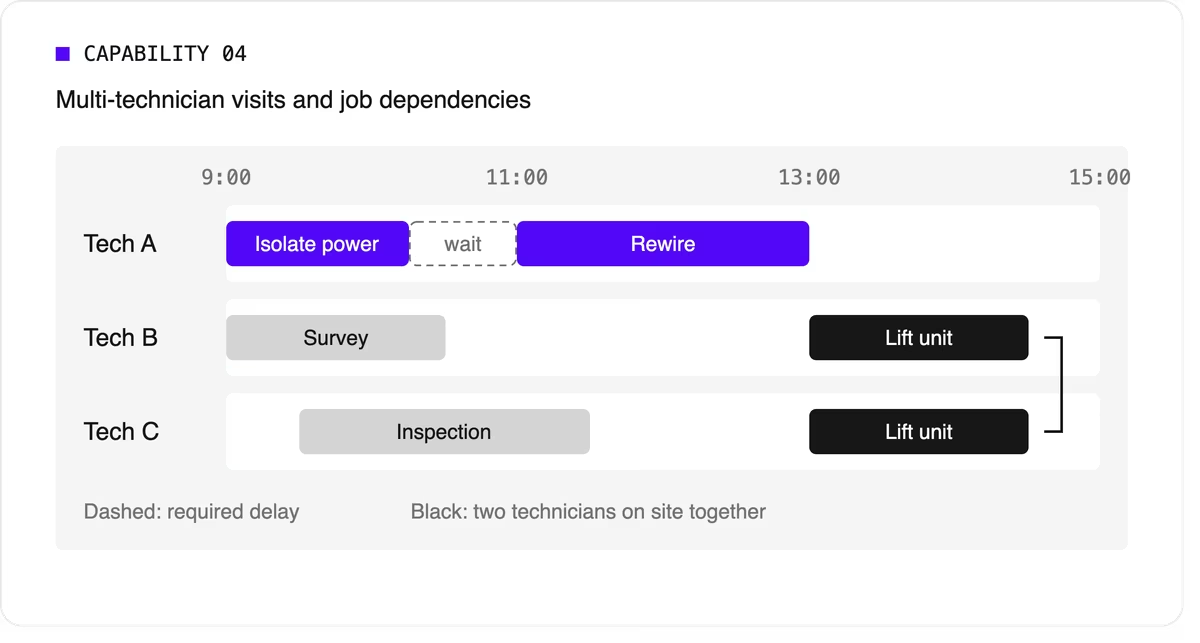
Many tools can't express these rules, so dispatchers track them by hand. If your operation has them, this capability is non-negotiable.
5. Working hours, breaks, and fairness
The plan has to respect shift start and end times, mandatory breaks, maximum working hours, and overtime rules. It should also spread work fairly so the same technicians don't always get the long days or the difficult jobs. Fairness affects retention, and retention matters more when technicians are hard to replace.
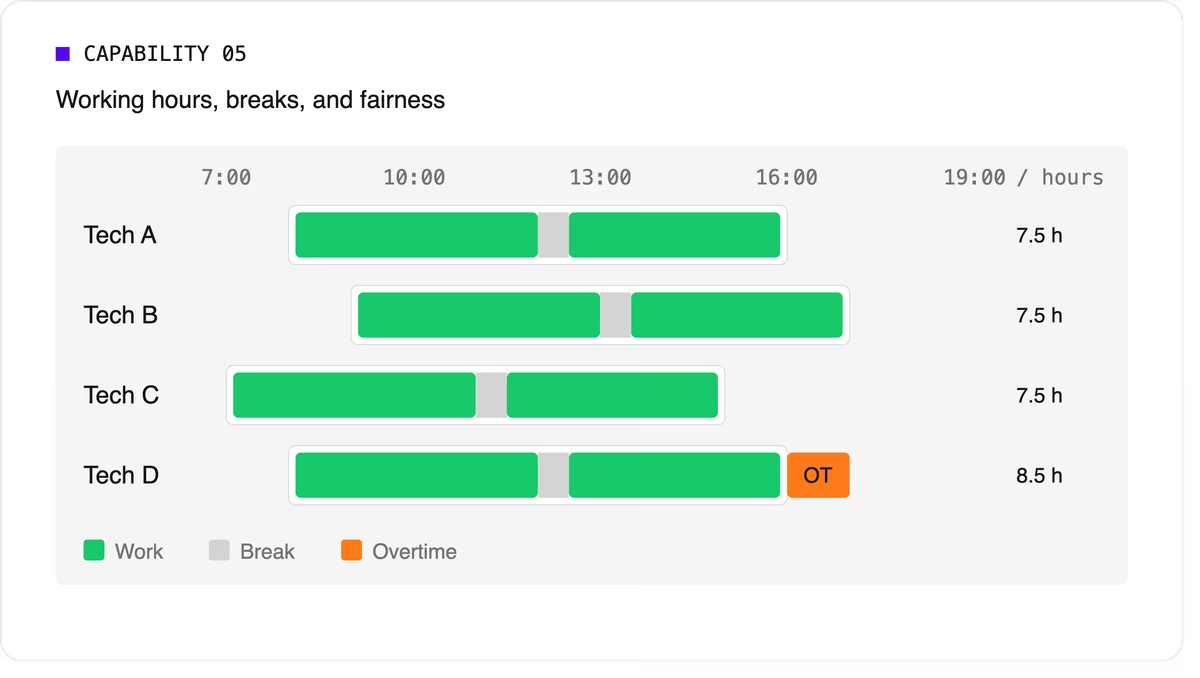
Scheduling software can support labor-law-style rules as constraints, but your organization remains responsible for verifying compliance with the regulations that apply to you.
6. Real-time replanning
Every schedule meets reality by mid-morning. A technician calls in sick, a job overruns, or an urgent call comes in. The software should replan quickly while changing as little as possible for everyone else. It should also let dispatchers lock (pin) jobs that are already in progress or confirmed with the customer.
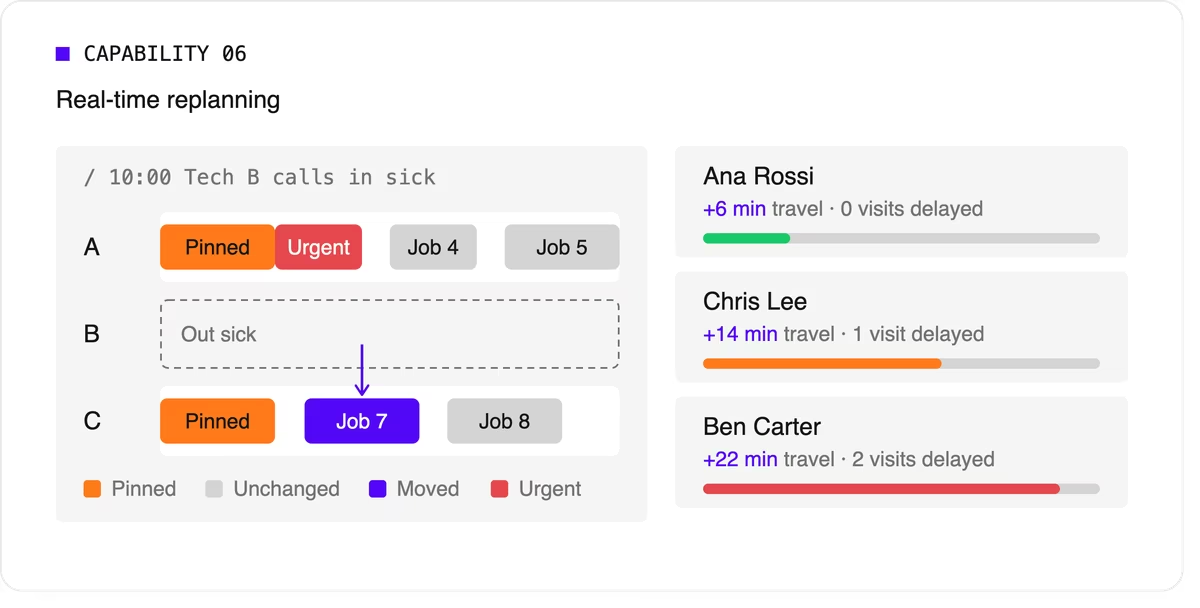
A strong version of this capability also recommends options. When a new urgent job arrives, the dispatcher should see which technicians could take it and what each choice would cost in travel or delayed work.
7. Explainability
Dispatchers and managers won't trust a plan they can't understand. Good technician scheduling software shows why a job was assigned the way it was, which rules were bent, and why some jobs couldn't be scheduled at all.
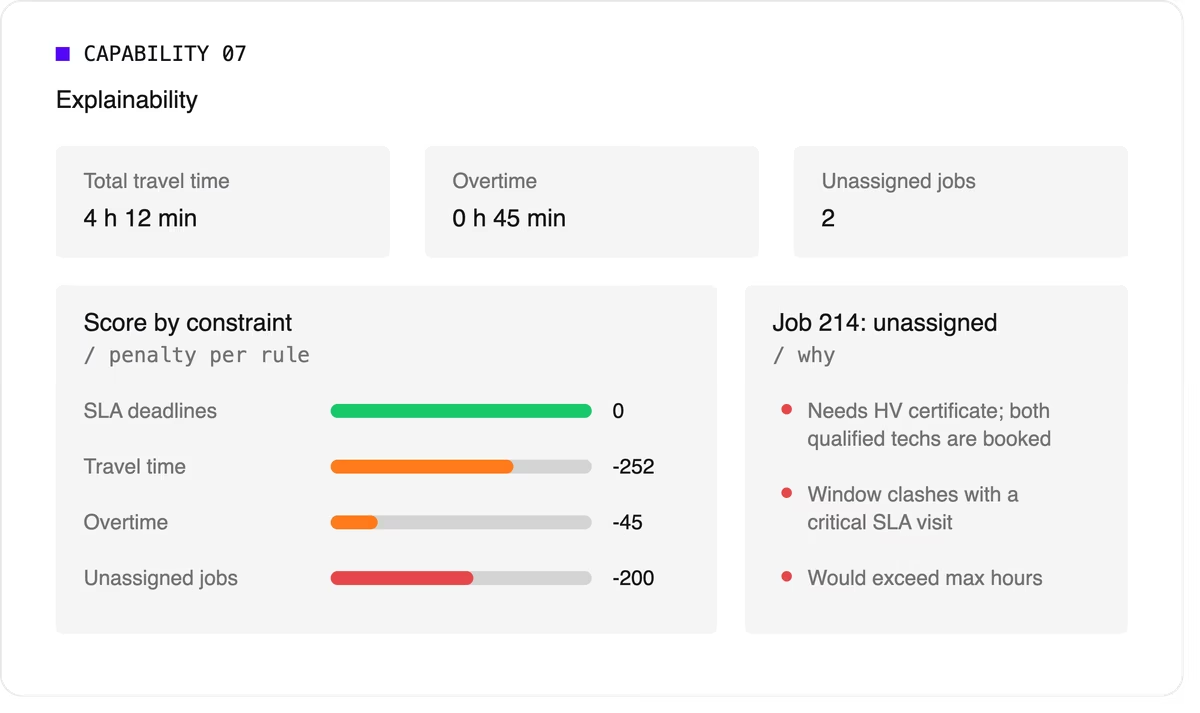
Look for a breakdown by constraint and clear metrics such as total travel time, overtime, and unassigned jobs.
8. Configurable priorities
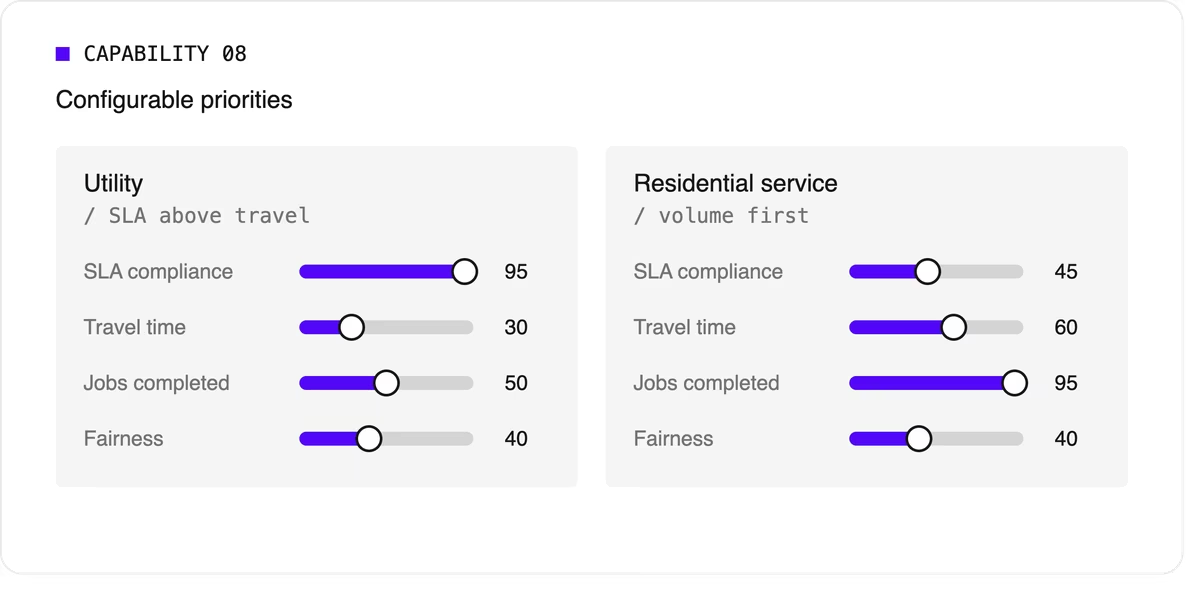
Every operation weighs its goals differently. A utility may put SLA compliance far above travel savings, while a residential service company may care most about completing as many jobs as possible per day. The software should let you adjust the relative weight of each goal without rewriting the underlying logic.
9. Integration and scale
Scheduling doesn't live on its own. It needs job data from your FSM or work order system, technician data from HR or workforce tools, and a way to push the finished plan to mobile apps. An API-first design makes this far easier than a closed tool with a separate interface.
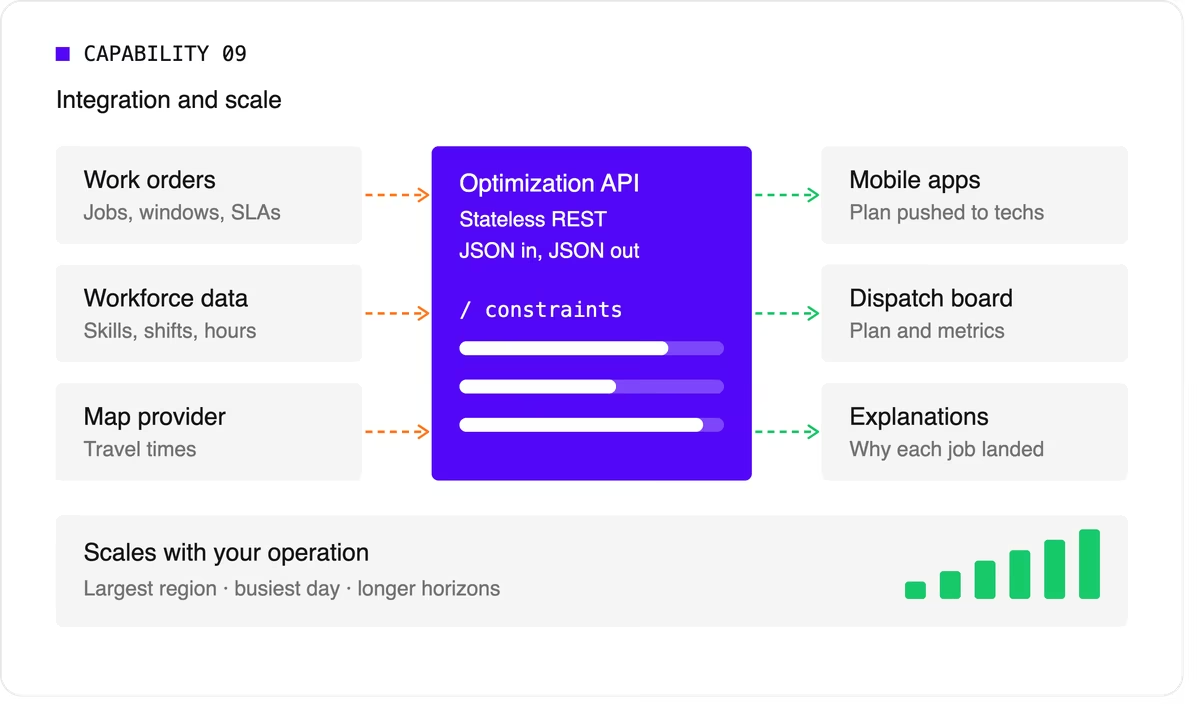
Scale matters too. The software should handle your largest region on your busiest day, and it should keep up as you add technicians, regions, or longer planning horizons.
A quick evaluation checklist
Use this table when comparing technicians scheduling software options or reviewing your own engine.
Scheduling software, FSM platform, or optimization engine?
When people search for technician scheduling software, they find three kinds of product.
- FSM platforms with a built-in scheduler cover the full workflow: work orders, mobile apps, invoicing, and scheduling. Their scheduling depth varies widely, from drag-and-drop boards to real optimization.
- Standalone scheduling tools focus on the dispatch board and often add basic auto-assignment. They're quick to adopt but can struggle with complex constraints.
- Optimization engines sit behind a user interface and do the heavy lifting. They don't manage work orders or invoices. Instead, they take in jobs, technicians, and rules, and return an optimized plan through an API. FSM vendors often embed one to strengthen their own scheduling, and large enterprises use one to add optimization to systems they already run.
Where Timefold fits
Timefold is an optimization engine in the third group. The Timefold Field Service Routing model covers the capabilities above: skill and seniority matching, customer time windows, visit dependencies with delays, multi-technician visits, working hours and fairness, and real-time replanning with recommendations. It ships with 50+ pre-configured constraints with adjustable weights, and every plan comes with metrics that show the tradeoffs it made.

It connects through a stateless REST API, so it fits alongside the FSM or work order system you already use. To see how this applies to field teams specifically, read about route optimization for field technicians. If you're preparing to integrate, the data foundations of efficient field service walks through the data you'll need.
FAQ
What does technician scheduling software do?
It assigns jobs to technicians and plans each technician's day, taking skills, time windows, travel, and working hours into account. More advanced tools optimize the whole plan at once and replan automatically when things change.
What's the difference between technician scheduling and dispatching?
Technician scheduling creates the plan ahead of time. Dispatching sends technicians to jobs and manages changes during the day. Modern software blends the two by replanning continuously.
Do I need technician scheduling software if I have an FSM platform?
It depends on how deep your FSM's scheduling goes. If dispatchers still spend hours adjusting assignments by hand, or your FSM can't express rules like dependencies or multi-technician visits, an optimization engine behind your FSM can close the gap.
How many technicians do I need before scheduling software is worth it?
There's no fixed number. Complexity matters more than headcount. A team of 20 with several skill types, tight SLAs, and multi-technician jobs can benefit as much as a team of 200 with simple, uniform work.


Google OR-Tools versus Timefold comparison
Google OR-Tools and Timefold Solver are open source mathematical optimization solvers. Both are fast and scalable solvers, used across the globe by a large user base in production. They have similarities, but also differences.
This comparison is written by the Timefold team to guide you through the fundamental differences in these technologies. We aim to present correct and truthful information. However, it’s important to acknowledge our natural bias towards Timefold.
Number of solvers
OR-Tools
OR-Tools has individual solvers for Constraint Programming (CP), Mixed-Integer Programming (MIP), Vehicle Routing (VRP) and Graph Algorithms. Each solver has its own API, tailored to a specific set of use cases.
OR-Tools comes with a set of examples for each of these solvers to learn the different APIs easily.
Timefold Solver
Timefold Solver is one solver, with a unified API that handles any use case with any combination of constraints. It can solve hybrid problems, such as Vehicle Routing with a constraint to distribute the workload fairly across drivers (a typical constraint of Employee Rostering).
Timefold Solver comes with a GitHub quickstarts repo that provides a starting point for each use case, such as Vehicle Routing with Time Windows.
Define a model
Define a model (non vehicle routing)
Both OR-Tools CP and Timefold Solver require you to define your model with optimization variables, so the mathematical optimization software knows which decisions it needs to make.
OR-Tools CP
OR-Tools’s CP solver supports 3 types of optimization variables: booleans, integers and floating point numbers. You can define your planning model in those types.
For example, you can use model.newBoolVar() to model the assignment of a particular employee to a particular shift:
// Input
CpModel model = ...
IntVar[][] assignments = new IntVar[shifts.size()][employees.size()];
for (int s = 0; s < shifts.size(); s++) {
    for (int e = 0; e < employees.size(); e++) {
        assignments[s][e] = model.newBoolVar(...);
    }
}
... // Add constraints to enforce no shift is assigned to multiple employees

// Solve
solver.solve(model);

// Output
for (int s = 0; s < shifts.size(); s++) {
    for (int e = 0; e < employees.size(); e++) {
        if (value(assignments[s][e]) == 1L) {
            print(shifts[s] + " is assigned to " + employees[e]);
        }
    }
}
Timefold Solver
Timefold Solver supports any type of optimization variables, including your custom classes (Employee, Vehicle, …) and standard classes (Integer, BigDecimal, LocalDate, …). You typically define your planning model in your own domain classes.
For example, you can use @PlanningVariable on your Shift.employee field to model the assignment of an employee to a shift:
@PlanningEntity
class Shift { // User defined class
    ... // Shift id, date, start time, required skills, ...

    @PlanningVariable
    Employee employee;
}

class Employee { // User defined class
  ... // Name, skills, ...
}

@PlanningSolution
class TimeTable { // User defined class
    List<Employee> employees;
    List<Shift> shifts;
}

// Input
Timetable timetable = new Timetable(shifts, employees);

// Solve
timetable = Solver.solve(timetable);

// Output
for (Shift shift : timetable.shifts) {
    print(shift + " is assigned to " + shift.employee);
}
None of these classes (Shift, Employee and Timetable) exist in Timefold Solver itself: you define and shape them. Your code naturally represents employees as instances of the Employee class, shifts as instances of the Shift class, and so forth.
Timefold Solver supports Object-Oriented Programming (OOP) input, including polymorphism.
Search space comparison
In the code above for employee scheduling, OR-Tools uses boolean variables and Timefold Solver uses employee variables.
This has an effect on the search space:
- OR-Tools’s CP solver creates a
booleanvariable for every(shift, employee)combination. Given2000shifts and100employees, that’s an array of200 000elements. - On the other hand, Timefold Solver creates an
Employeevariable for everyShift. Given2000shifts and100employees, that’s an array of2000elements.
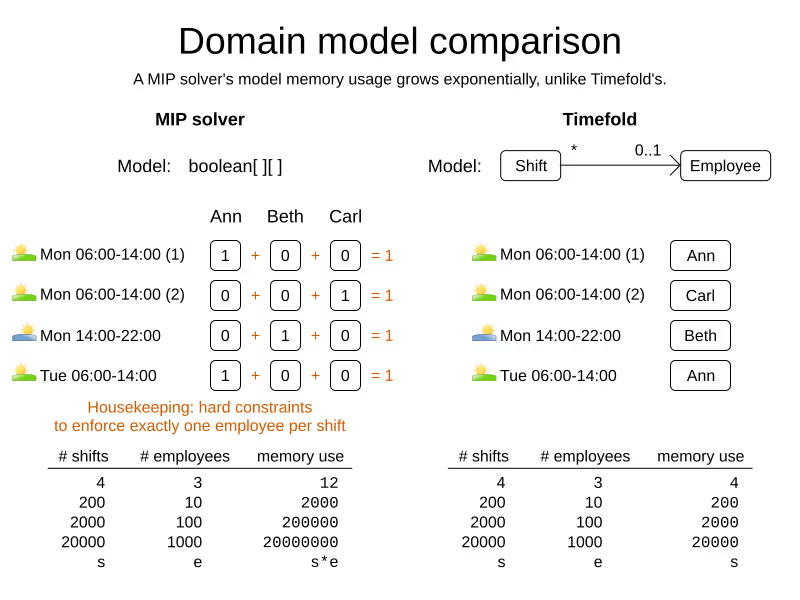
The Timefold Solver model naturally enforces the one shift per employee hard constraint by design, the OR-Tools CP model implements it.
Define a vehicle routing model
OR-Tools Vehicle Routing
OR-Tools has a separate API for Vehicle Routing based on OR-Tools’s RoutingModel class which comes with a fixed number of constraints out-of-the-box:
// Input
RoutingIndexManager manager = new RoutingIndexManager(locationListSize, vehicleListSize, 0);
RoutingModel routingModel = new RoutingModel(manager); // OR-Tools defined class
routingModel.setArcCostEvaluatorOfAllVehicles(...);
routingModel.addDimensionWithVehicleCapacity(...);

// Solve
Assignment assignment = routingModel.solve();

// Output
for (int i = 0; i < vehiclesCount; i++) {
    long index = routingModel.start(i);
    print("Vehicle " + i + ": ");
    while (!routing.isEnd(index)) {
      print(manager.indexToNode(index) + ", ");
      index = solution.value(routing.nextVar(index));
    }
}
Timefold Solver
Timefold Solver solves Vehicle Routing like any other planning problem, but provides building blocks for Vehicle Routing, such as list variables (and shadow variables to calculate the arrival time):
@PlanningEntity
class Vehicle { // User defined class
    ... // start time, start location, capacity, skills, ...

    @PlanningListVariable
    List<Visit> visits;
}

class Visit { // User defined class
    ... // location, demand, time window(s), ...
}

// Input
VehicleRoutePlan plan = new VehicleRoutePlan(vehicles, visits);

// Solve
plan = Solver.solve(plan);

// Output
for (Vehicle vehicle : plan.vehicles) {
    print(vehicle + ": " + vehicle.visits);
}
On the base model, you can add complex constraints, such as floating lunch breaks, multi-vehicle visits and any other custom constraint.
Constraints
OR-Tools CP
OR-Tools’s CP solver constraints are implemented as mathematical equations.
For example, to assign at most one shift per day, you add an equation s1 + s2 + s3 <= 1 for all shifts on day 1, an equation s4 + s5 <= 1 for all shifts on day 2, and so forth:
for (int e = 0; e < employees.size(); e++) {
    for (int d = 0; d < dates.size(); d++) {
        IntVar[] vars = new IntVar[...];
        int i = 0;
        for (int s = 0; s < shifts.size(); s++) {
            // If the shift is on the date
            if (shifts[s].date == dates[d])) {
                vars[i++] = assignments[s][e];
            }
        }
        model.addLessOrEqual(LinearExpr.sum(vars), 1);
    }
}
OR-Tools Vehicle Routing
OR-Tool’s VRP solver comes with a fixed number of constraints out-of-the-box, such as time windows. You can find all the available constraints on the RoutingModel class.
Timefold Solver
Timefold Solver constraints are implemented as programming code.
For example, to assign at most one shift per day, select every pair of Shift instances that have the same date and the same employee, to penalize matching pairs as a hard constraint:
// For every shift ...
constraintFactory.forEach(Shift.class)
    // ... combined with any other shift ...
    .join(Shift.class,
        // ... on the same date ...
        equal(shift -> shift.date),
        // ... assigned to the same employee ...
        equal(shift -> shift.employee))
    // ... penalize one broken hard constraint per pair.
    .penalize(HardSoftScore.ONE_HARD)
    .asConstraint("One shift per day");
Timefold’s ConstraintStreams API uses a Functional Programming (FP) approach, so it can run delta calculations under the hood for maximum scalability and performance.
Constraints can reuse existing code. For example, because date is an instance of LocalDate (a Date and Time API), you can use LocalDate.isDayOfWeek() to select 2 shifts on the same day of week:
        // ... on the same day of week ...
        equal(shift -> shift.date.getDayOfWeek())
Date and times arithmetic is notoriously difficult, because of Daylight Saving Time (DST), timezones, leap years and other intricacies. Timefold Solver allows you to directly use any 3th-party API (such as LocalDate) in your constraints.
Besides the equal() joiner, Timefold provides lessThan(), greaterThan(), lessThanOrEqual(), greaterThanOrEqual(), overlapping(), etc. It automatically applies indexing (hashtable techniques) on joiners for performance.
It has higher level abstractions. For example, select two overlapping shifts with the overlapping() joiner (even if they start or end at different times):
        // ... that overlap ...
        overlapping(shift -> shift.startDateTime, shift -> shift.endDateTime)
Besides the join() construct, Timefold Solver supports filter(), groupBy(), ifExists(), ifNotExists(), map(), etc.
For example, allow employees that can work double shifts to work double shifts by filtering out all employees that work double shifts with a filter():
// For every shift ...
constraintFactory.forEach(Shift.class)
    // ... assigned to an employee that does not work double shifts ...
    .filter(shift -> !shift.employee.worksDoubleShifts)
    // ... combined with any other shift ...
    .join(Shift.class,
        equal(shift -> shift.date),
        // ... assigned to that same employee that does not work double shifts ...
        equal(shift -> shift.employee))
    .penalize(HardSoftScore.ONE_HARD)
    .asConstraint("One shift per day");
The groupBy() construct supports count(), sum(), average(), min(), max(), toList(), toSet(), toMap(), etc. You can also plug in custom collectors.
For example, don’t assign more than 10 shifts to any employee by counting their shifts with count():
constraintFactory.forEach(Shift.class)
    // Group shifts by employee and count the number of shifts per employee ...
    .groupBy(shift -> shift.employee, count())
    // ... if more than 10 shifts for one employee ...
    .filter((employee, shiftCount) -> shiftCount > 10)
    // ... penalize as a hard constraint ...
    .penalize(HardSoftScore.ONE_HARD,
            // ... multiplied by the number of excessive shifts.
            (employee, shiftCount) -> shiftCount - 10)
    .asConstraint("Too many shifts");
Timefold Solver has no linear limitations.
For example, avoid overtime and distribute it fairly by penalizing the number of excessive hours squared:
constraintFactory.forEach(Shift.class)
    // Group shifts by employee and sum the shift duration per employee ...
    .groupBy(shift -> shift.employee, sum(shift -> shift.getDurationInHours()))
    // ... if an employee is working more hours than his/her contract ...
    .filter((employee, hoursTotal) -> hoursTotal > employee.contract.maxHours)
    // ... penalize as a soft constraint of weight 1000 ...
    .penalize(HardSoftScore.ofSoft(1000),
            // ... multiplied by the number of excessive hours squared.
            (employee, hoursTotal) -> {
                    int excessiveHours = hoursTotal - employee.contract.maxHours;
                    return excessiveHours * excessiveHours;
            })
    .asConstraint("Too many shifts");
This penalizes outliers more. It automatically load balances overtime in fair manner across the employees, whenever possible.
Timefold Solver also supports positive constraints: use reward() instead of penalize(). You can mix positive and negative constraints.
Scoring
OR-Tools CP
OR-Tools’s CP solver supports 2 score levels: hard constraints as constraints and soft constraints as an objective function that returns a floating point number.
OR-Tools Vehicle Routing
OR-Tools’s Vehicle Routing solver only supports the hard and soft constraints in the RoutingModel class.
Timefold Solver
Timefold Solver supports extra score levels beyond hard and soft constraints. For example, HardMediumSoftScore allows to prioritize medium operational constraints (such as assign all shifts) over soft financial constraints (such as reduce cost). Without resorting to multiplication with a big number.
Timefold Solver supports to weight constraints dynamically per dataset without rebuilding the entire model. For example to make the soft constraint fairness in dataset A twice as important as in dataset B.
Timefold Solver includes a Score Analysis API to break down a score per constraint.
Timefold Solver does not suffer from numerical instability because it doesn’t rely on floating point arithmetic internally for constraint validation.
Cloud and Integration
Both OR-Tools and Timefold Solver run on Linux, Mac and Windows. Both can run locally and in the cloud.
OR-Tools
Google Research offers a paid Operations Research API in the cloud based on OR-Tools.
Timefold Solver
Timefold Solver has integration modules for Spring, Quarkus and JSON (de)serialization. It supports native compilation for serverless use cases that need to start up in milliseconds.
Timefold (company) offers a paid Field Service Routing API and Employee Scheduling API, as well as a paid version of Timefold Solver with Enterprise Features such as Nearby Selection and Multi-Threading.
License, support and community
Both OR-Tools and Timefold Solver Community are open source software under the Apache License, which allows free usage in commercial software. In both cases, the code is open on GitHub.
OR-Tools
OR-Tools is developed by a small team at Google with help from the open source community.
To get started, go the OR-Tools website and follow the get started guide.
Timefold Solver
Timefold Solver is developed by Timefold BV with help from the open source community. Timefold BV is a company that lives and breathes planning optimization.
To get started, read the docs or clone the quickstarts repo on GitHub.
This comparison covered only the features in the free, open source edition.
Page updated on 12th of November 2025 to beter differentiate between Timefold (the company) and Timefold Solver.

Timefold Solver 1.4.0 brings explainable score
Have you ever received a solution from the Solver and wondered what -3hard/-11softactually means? Or had to explain it to your end-users? Now, you can just show it to them. In Timefold Solver 1.4.0, you can break down the score of a solution into constraints and constraint matches, to make it understandable for your end-users.
Let’s take a closer look and find out what’s new in another exciting monthly release of Timefold Solver.
Break down the score per constraint
We expand on our existing functionality by making score explanations easier to use than ever before. Here’s how you start using this new feature:
// First, we get some solution from the solver. Nothing new here, business as usual.
SolverJob<Timetable, ...> solverJob = solverManager.solve(...);
Timetable timetable = solverJob.getFinalBestSolution();

// Now that we have the timetable, we can analyze the score.
ScoreAnalysis<HardSoftScore> scoreAnalysis = solutionManager.analyze(timetable);
The ScoreAnalysis object holds the total score of the analyzed solution, and a breakdown of the score per constraints. This allows you to easily see which constraints are impacting your solution the most.
System.out.println("Total score: " + scoreAnalysis.score());
scoreAnalysis.constraintMap().forEach((constraint, constraintAnalysis) -> {
   System.out.println("              Constraint: " + constraint);
   System.out.println("Score for the constraint: " + constraintAnalysis.score());
});
You can break the score down even further, by going deeper into the ConstraintAnalysis object. Each such object contains a list of matches, which are the individual violations of the constraint. This allows you to see which planning entities or values are causing the constraint to be violated. also called a justification.
for (MatchAnalysis<HardSoftScore> match: constraintAnalysis.matches()) {
    System.out.println("        Match score: " + match.score());
    System.out.println("Match justification: " + match.justification());
}
With this data structure, you have the full overview of your planning solution and how it was scored by Timefold Solver. But we did not stop there!
Score analysis is JSON-friendly
In today’s world, what good are excellent backend APIs if you cannot send the results over the wire to the frontend? We’ve got you covered. The ScoreAnalysis object is JSON-friendly, which means you can easily serialize it and send it over the wire. In Quarkus and Spring Boot, the ScoreAnalysis object will automatically serialize to JSON such as this:
{
  "score" : "0hard/4soft",
  "constraints" : [ {
    "package" : "org.acme.schooltimetabling.domain",
    "name" : "Teacher time efficiency",
    "score" : "0hard/5soft",
    "matches" : [ {
      "score" : "0hard/1soft",
      "justification" : {
        "lessonId1": 5,
        "lessonId2": 17,
        "teacher": "I. Jones"
      },
      ... ] }
    }, {
    "package" : "org.acme.schooltimetabling.domain",
    "name" : "Student group subject variety",
    "score" : "0hard/-1soft",
    "matches" : [ ... ]
    } ]
}
We see the score is made up of two constraints here, each with their own score and matches. The frontend can then easily display the score breakdown to the user, such as this:
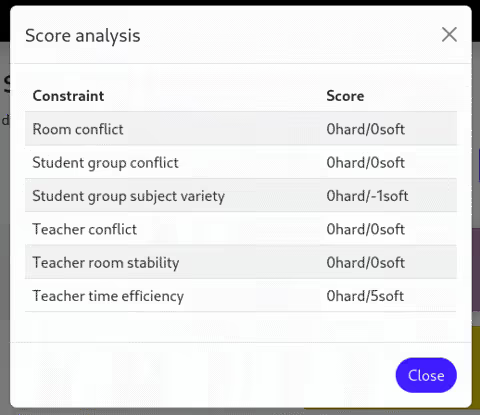
Note that in this case, we have chosen not to display the individual constraint matches to make the visualization simpler. In a more detail-oriented view, you may choose to display the individual matches as well.
See it in action
The code snippets above are taken from the School Timetabling quickstart in the Timefold Quickstarts Github repository. You can run the quickstart locally by following a few short steps. Clone it today and experience Timefold Solver for yourself!
Comparing solutions to one another
In addition to the new score explanation functionality, we have also made it easier to compare two solutions to one another. You can use the same score analysis functionality above to compare two solutions.
The ScoreAnalysis object has a diff(ScoreAnalysis otherScoreAnalysis) method which, when called, returns a new ScoreAnalysis object. This object holds the differences between the two solutions. It shows the difference in score and the difference in individual constraints, down to every single constraint match.
Check out our docs to learn everything there is about understanding the score.
What else is new?
Besides the features above, we have brought the usual battery of bug fixes and performance improvements. With Timefold Solver 1.4.0, you can enjoy slightly faster Constraint Streams and an even more stable experience. We also upgraded Quarkus, Spring and other dependencies to their latest versions.
We are also happy to have been included in Spring Initializr, making your getting started experience with Spring Boot and Timefold Solver even easier!
Conclusion
Timefold Solver continues full steam ahead. The new explainable score functionality is a great addition, and a feature much requested by our users. Upgrade now to get the best release yet!

Fueling Planning Optimization in Spring Boot
In the world of Java and Kotlin development, Spring Boot is often the go-to choice for building a wide range of applications. Now, imagine if this reliable companion could also handle complex planning problems like Vehicle Routing, Shift Scheduling, Order Picking, Assembly Line scheduling, … Well, thanks to Timefold, it now can!
Spring Boot and start.spring.io: A Developer’s Paradise
For developers, starting a new project often involves a visit to start.spring.io. Creating Spring Boot projects with just a few clicks. It’s where innovation begins, and now, it’s where intelligent planning solutions come to life. With the integration of Timefold Solver, developers can effortlessly incorporate planning optimization into their Spring Boot projects.
Timefold Solver: Your planning solution
At its core, Timefold Solver is an embeddable code library tailor-made for planning problems. It’s not your typical off-the-shelf software; it’s a versatile engine that can be seamlessly integrated into your applications. Timefold Solver isn’t bound by a single use case; it adapts to your specific needs, making it the perfect companion for developers who demand flexibility and precision.
Solving the toughest Planning Problems
Planning challenges come in various forms and sizes, from optimizing vehicle routes to crafting complex schedules. Timefold tackles them all. It’s the trusted ally that developers turn to when they need to automate and streamline planning processes. With Timefold, you’re not just coding; you’re crafting intelligent solutions.
How to Get Started
- Visit start.spring.io: Begin your journey by creating a Spring Boot project. It’s the same trusted starting point you know and love, but now with an extra layer of intelligence.
- Add Timefold: In the project generation wizard, simply include Timefold as a dependency. This step will ensure that your Spring Boot application is equipped to handle intricate planning challenges.
- Coding with Timefold: Once your project is set up, dive into the code and explore the capabilities of Timefold. Create PlanningEntities and PlanningSolutions, and let Timefold do the heavy lifting when it comes to solving planning puzzles.
Visit our Spring Boot Java Quick Start Guide and solve complex planning problems such as vehicle routing, shift scheduling, school timetabling, etc.
Benefits Galore
- Integrating Timefold into Spring Boot brings a host of benefits to developers:
- Efficiency: Say goodbye to manual planning; Timefold automates the process.
- Precision: Solve complex optimization challenges with ease.
- Flexibility: Adapt Timefold to your specific planning needs.
- Time Savings: Let Timefold handle the intricacies while you focus on core development.
Conclusion: A Bright Future for Spring Boot Developers
With the addition of Timefold to the Spring Boot ecosystem, developers now have a powerful ally in solving intricate planning problems. Whether it’s optimizing routes, scheduling shifts, or crafting timetables, Timefold and Spring Boot together offer an intelligent, developer-friendly solution.

How fast is Java 21?
With the release of Java 21 just around the corner, you may be wondering how it compares to Java 17 and whether you should upgrade. Here at Timefold, so were we. Read on to find out how Timefold Solver performs on Java 21, compared to Java 17.
But first, let’s get some things out of the way.
What is Java 21 and how to get it
Java 21 is a new release of the Java platform, the trusty programming language that Timefold Solver is written in. It brings a bunch of new features, as well as the usual bugfixes and smaller improvements.
Java 21 will be generally available on September 19, 2023, but you can already try it out using the release candidate builds. We find that the easiest way to get started with Java 21 is to use SDKMAN, and that is what did as well. (See the end of this post for the specific versions and hardware used.)
Like Java 17 before it, Java 21 is a long-term support (LTS) release; it will stick around for quite a while. It is therefore a good idea to start using it as soon as possible and see if it works for you.
For Timefold Solver, that means making sure the entire codebase continues to work flawlessly on Java 21, as well as running some benchmarks to ensure our users can expect at least the same performance as before. Let’s get started on that.
Micro-benchmarks
We’ll start with score director micro-benchmarks, which we use regularly to establish the impact of various changes on the performance of Constraint Streams. These benchmarks do not run the entire solver; rather, they focus exclusively on the score calculation part of the solver.
They are implemented using Java Microbenchmark Harness (JMH), and they run in many Java Virtual Machine (JVM) forks and with sufficient warmup. This gives us a good level of confidence in the results. In fact, the margin of error on these numbers is only ± 2%.
Here is the Constraint Streams performance on Java 21 vs. Java 17:
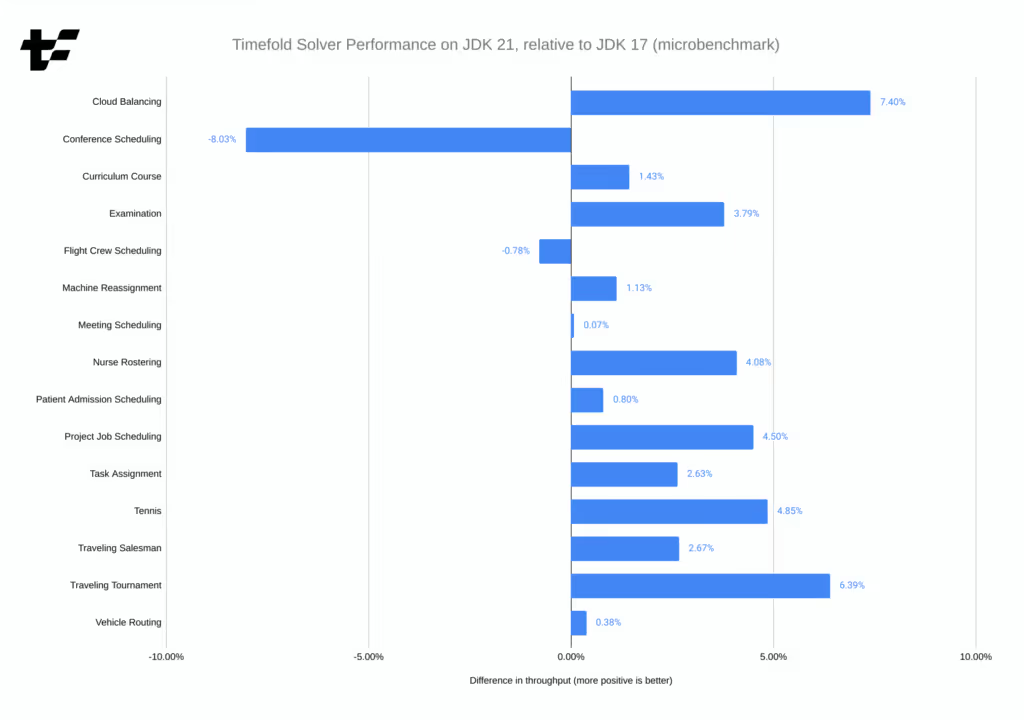
Most cases show a small performance improvement when switching to Java 21. The "Conference Scheduling" benchmark is the only outlier, and with some extra work on the solver we can likely get the performance of that benchmark to improve as well.
It should be noted that we ran these benchmarks with ParallelGC as the garbage collector (GC), instead of the default G1GC. Later in this post we’ll explain why.
Real-world benchmarks
Now that we’ve seen the micro-benchmarks, it’s time to compare them to real-world solver performance. This includes the entire solver, not just the score calculation part.
We ran the solver manually in 10 different JVM forks, and used the median score calculation speed. We selected a subset of the available benchmarks, to keep the run time short; the selection is representative of the entire benchmark suite in terms of heuristics used and code paths exercised. Once again, ParallelGC is used as the garbage collector. Here are the results:
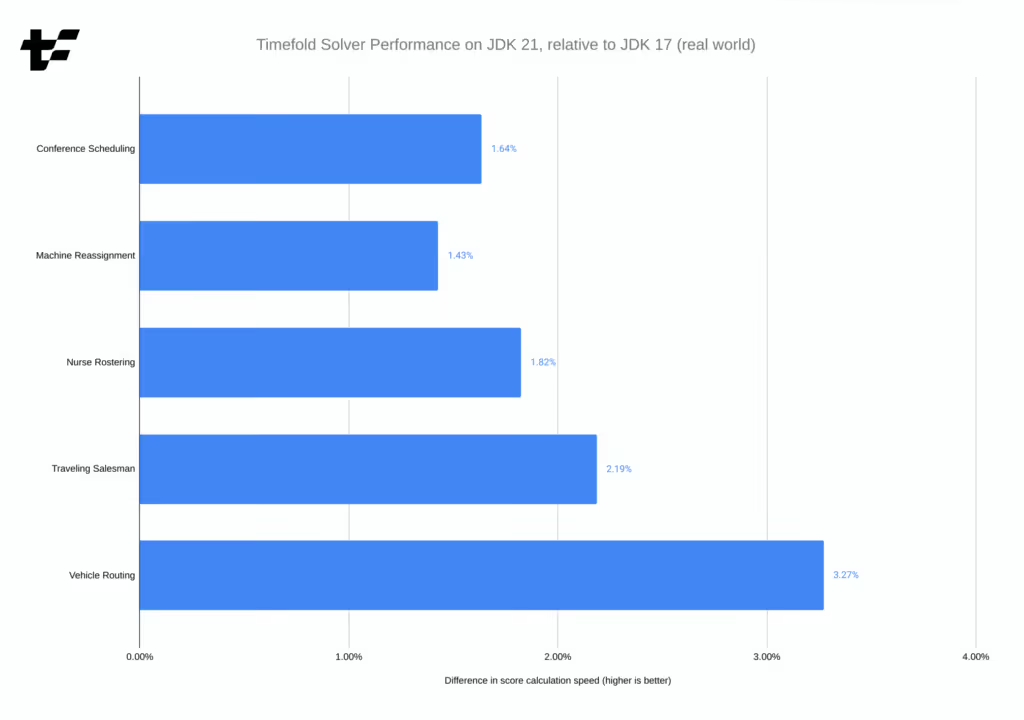
There are no surprises here. We see small performance improvements across the board, confirming the results of the micro-benchmarks. Compared to the micro-benchmarks, "Conference Scheduling" no longer registers as an outlier, which is interesting and will serve as another data point in our investigation into that possible regression.
Since we haven’t established a formal interval of confidence for these large benchmarks, we can’t say with certainty that the improvements are statistically significant. However, the fluctuations observed between runs have been small enough to give us confidence in the results.
Why ParallelGC?
In the years that we’ve been working with the Timefold Solver and its predecessor, OptaPlanner, we’ve found that ParallelGC is the best garbage collector for the solver. This should not be surprising - ParallelGC is tailored for high throughput, and the solver is 100 % CPU-bound. G1GC (the default garbage collector) is instead tailored for low latency, and that makes a considerable difference. However, things change and we occasionally need to challenge our assumptions. Is ParallelGC still the best GC for the solver?
The following chart shows the difference in performance between G1GC (the baseline) and ParallelGC. And since Java 21 introduced generational ZGC, another GC aiming for low latency, we thought it would be interesting to include that as well.
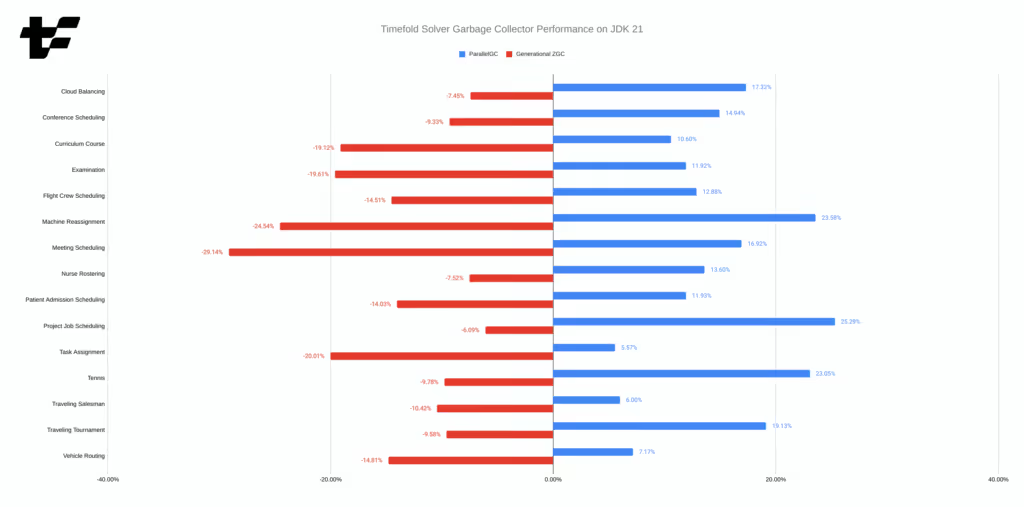
The results (obtained by the micro-benchmarks from earlier) are clear:
ParallelGCcontinues to be the best GC for the solver.G1GCcomes second, but it’s considerably slower.- ZGC is by far the worst of the three.
The situation may change if we increased the heap size available to the JVM as ParallelGC does not scale well with large heaps, but with -Xmx1G, it is the clear winner. (And 1GB of heap is more than enough for many use cases of Timefold Solver.)
Conclusion
In this post, we’ve shown that:
- Timefold Solver 1.1.0 works perfectly fine with Java 21, no changes are needed.
- Switching to Java 21 may bring a small performance improvement to your Timefold Solver application, but your mileage may vary slightly.
ParallelGCcontinues to be the best garbage collector for the solver.
We encourage you to try Java 21 and make the switch. It is free after all, and you’ll be able to enjoy the latest and greatest Java platform.
Appendix A: Reproducing the results
These benchmarks use Timefold Solver 1.1.0, the latest version at the time of writing.
All benchmarks were run on Fedora Linux 38, with Intel Core i7-12700H CPU and 32 GB of RAM. We used OpenJDK Runtime Environment Temurin-17.0.8+7 (build 17.0.8+7) (available as 17.0.8-tem on SDKMAN) and OpenJDK Runtime Environment (build 21+35-2513) (available as 21.ea.35-open on SDKMAN).
Source code of the micro-benchmarks can be found in my own personal repository. The real-world benchmarks were run using timefold-solver-benchmark, this configuration and a simple script. (You’ll need timefold-solver-examples on the classpath.) All data used for the charts can be found in this spreadsheet.

Solve the vehicle routing problem with time windows
The vehicle routing problem (VRP) is a popular academic optimization problem with numerous variants.
While you can map the vehicle routing problem to real-world tasks like planning deliveries or optimizing itineraries for field service technicians, very often you have to deal with at least one additional constraint: customers' availabilities.
This post will show you how to solve the vehicle routing problem using Timefold Solver.
VRP with time windows
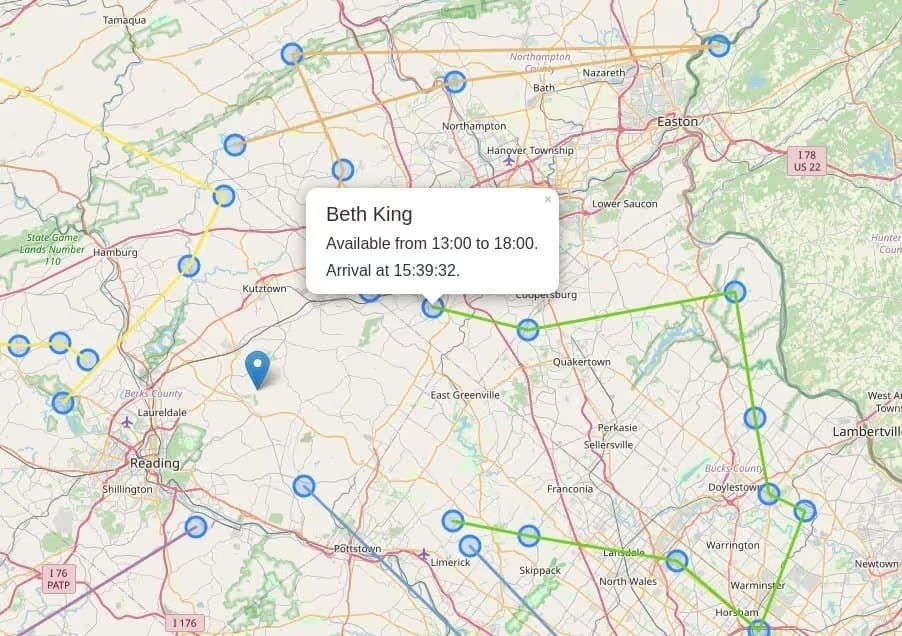
Let’s start by defining the problem. Same as the vanilla VRP, the task is to plan routes of N vehicles to visit M customers to minimize the driving time. The additional complexity comes from customers' availability in limited time windows. If the vehicle arrives at the destination too early, it has to wait, which is suboptimal. If it arrives too late, it’s even worse as the planned visit has to be rescheduled to some other day and all the mileage driven comes in vain.
Domain model
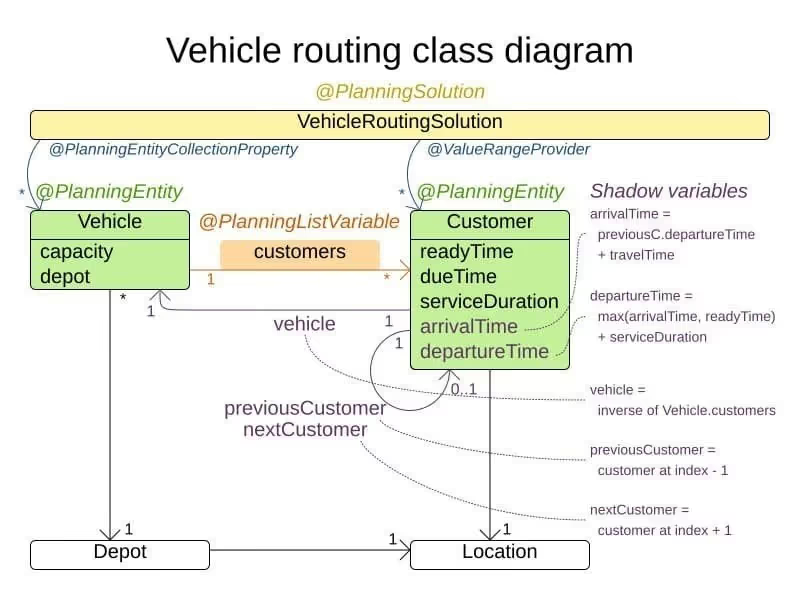
The domain model takes advantage of the @PlanningListVariable: the Vehicle is the @PlanningEntity with a list of Customer instances to visit. The @PlanningListVariable enables the use of a few build-in shadow variables:
@InverseRelationShadowVariablethat points from theCustomerto the assignedVehicle.@PreviousElementShadowVariableand@NextElementShadowVariablethat point to the previous and the next customer in the list respectively.
To calculate the arrival time at each customer, the model relies on the arrivalTimeshadow variable that is updated by the ArrivalTimeUpdatingVariableListener every time the previousCustomer or the vehicle changes.
Constraints
The constraints are implemented using the Constraint Streams API and you can see them in the VehicleRoutingConstraintProvider.java.
Service must be finished in time
Providing the service to the customer also takes time, expressed by the serviceDuration. Of course, the service duration counts towards the customer’s availability. This is a hard constraint.
protected Constraint serviceFinishedAfterDueTime(ConstraintFactory factory) {
    return factory.forEach(Customer.class)
            .filter(Customer::isServiceFinishedAfterDueTime)
            .penalizeLong(HardSoftLongScore.ONE_HARD,
                    Customer::getServiceFinishedDelayInMinutes)
            .asConstraint("serviceFinishedAfterDueTime");
}
Minimize travel time
This is a soft constraint that penalizes the time spent driving per every vehicle, knowing the distances between individual locations.
protected Constraint minimizeTravelTime(ConstraintFactory factory) {
    return factory.forEach(Vehicle.class)
            .penalizeLong(HardSoftLongScore.ONE_SOFT,
                    Vehicle::getTotalDrivingTimeSeconds)
            .asConstraint("minimizeTravelTime");
}
Wait a second, where do we make sure we don’t arrive too early? The serviceFinishedAfterDueTime constraint does it for us, just indirectly. The more time vehicles spend waiting, the fewer customers they can visit without arriving too late.
Try for yourself
git clone [email protected]:timefoldai/timefold-quickstarts.gitcd timefold-quickstarts/use-cases/vehicle-routingmvn quarkus:dev- Open a browser and navigate to http://localhost:8080
- Click on the solve button
If you want to try your own dataset, use the REST API. Click the Guide in the top-level menu to learn how to get started.
Conclusion
The vehicle routing with time windows is a more practical variation of VRP, which we might translate to domains like field service technician or last mile delivery. You can solve all these using Timefold Solver.

Timefold Solver 1.0 is taking shape
The work on Timefold Solver 1.0.0 is progressing well. We intend to release in early July. This post will give you a sneak peek of what’s coming.
Brand new benchmark report
The solver benchmark report has been completely redesigned and modernized. It now fits nicely on all kinds of screens, from mobile phones to desktops.
Importantly, every chart in the report is now interactive, allowing you to filter the data points to only show those you want to see.
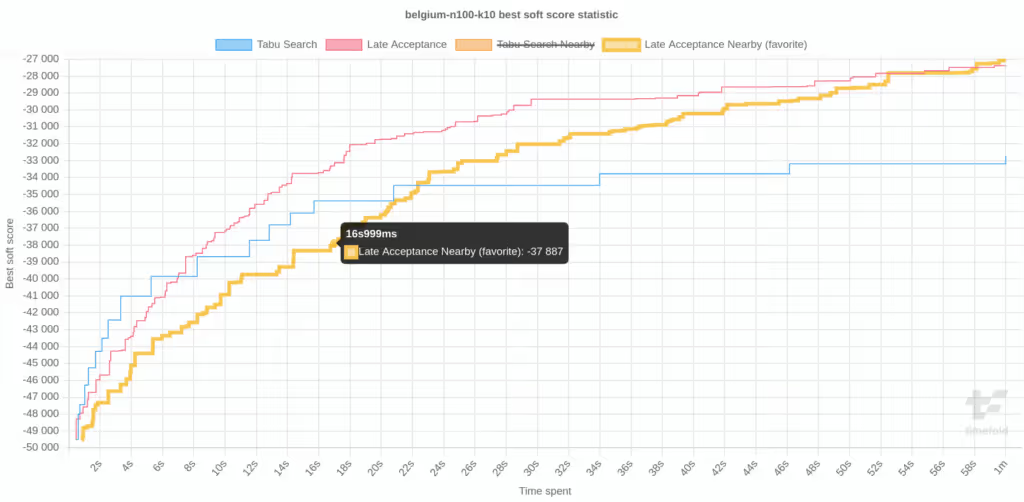
Static pictures don’t do it justice, you need to see it to believe it. Did you know you can build the solver locally to get access to the latest developments before they’re generally available?
Constraint Streams improvements
Constraint Streams are a powerful way to express constraints in a declarative way. In Timefold Solver 1.0.0, they will become even more powerful by introducing the expand()building block. Consider the following constraint:
Constraint speakerRequiredRoomTags(ConstraintFactory factory) {
    return factory.forEach(Talk.class)
        .filter(talk -> talk.missingSpeakerRequiredRoomTagCount() > 0)
        .penalizeConfigurable(talk -> talk.missingSpeakerRequiredRoomTagCount() * talk.getDurationInMinutes())
        .asConstraint(SPEAKER_REQUIRED_ROOM_TAGS);
}
Note that the method missingSpeakerRequiredRoomTagCount() is called twice; once to filter Talk instances and the second time to penalize every one of them. This is not ideal, and it becomes even worse when you realize that under the hood, this method does some heavy lifting to compute the missing tags. The end result is that this constraint is not very efficient. With the new expand() building block, we can rewrite it as follows:
Constraint speakerRequiredRoomTags(ConstraintFactory factory) {
    return factory.forEach(Talk.class)
            .expand(Talk::missingSpeakerRequiredRoomTagCount)
            .filter((talk, missingTagCount) -> missingTagCount > 0)
            .penalizeConfigurable((talk, missingTagCount) -> missingTagCount * talk.getDurationInMinutes())
            .indictWith((talk, missingTagCount) -> Collections.singleton(talk))
            .asConstraint(SPEAKER_REQUIRED_ROOM_TAGS);
}
Notice that the expand() building block caches the computation and propagate it downstream.
We use the not-so-well-known indictWith() building block, which allows us to indicate which facts are responsible for the constraint violation. Since missingTagCountis a plain integer without any semantics, it doesn’t help us to explain the score and therefore it is removed.
Performance improvements and bugfixes
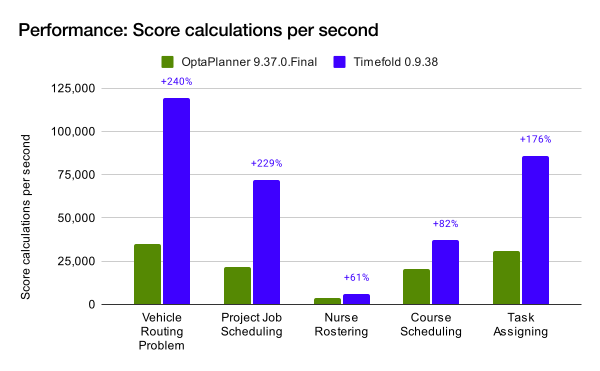
Behind the scenes, we continue to work tirelessly to improve the performance of our solution. With Timefold Solver 1.0.0, users of Constraint Streams will see performance improvements of up to 15% in some cases. And that is on top of the significant speedup that Timefold already brings over OptaPlanner!
Conclusion
Timefold moves ahead at an ever increasing pace. Migrate to Timefold today, and enjoy the benefits of a modern, fast and powerful constraint solver.

OptaPlanner continues as Timefold
OptaPlanner is an Open Source project used globally to optimize operational planning. Every day, it saves thousands of organizations time, money and resources.
On May 2nd, 2023, OptaPlanner entered a new chapter.
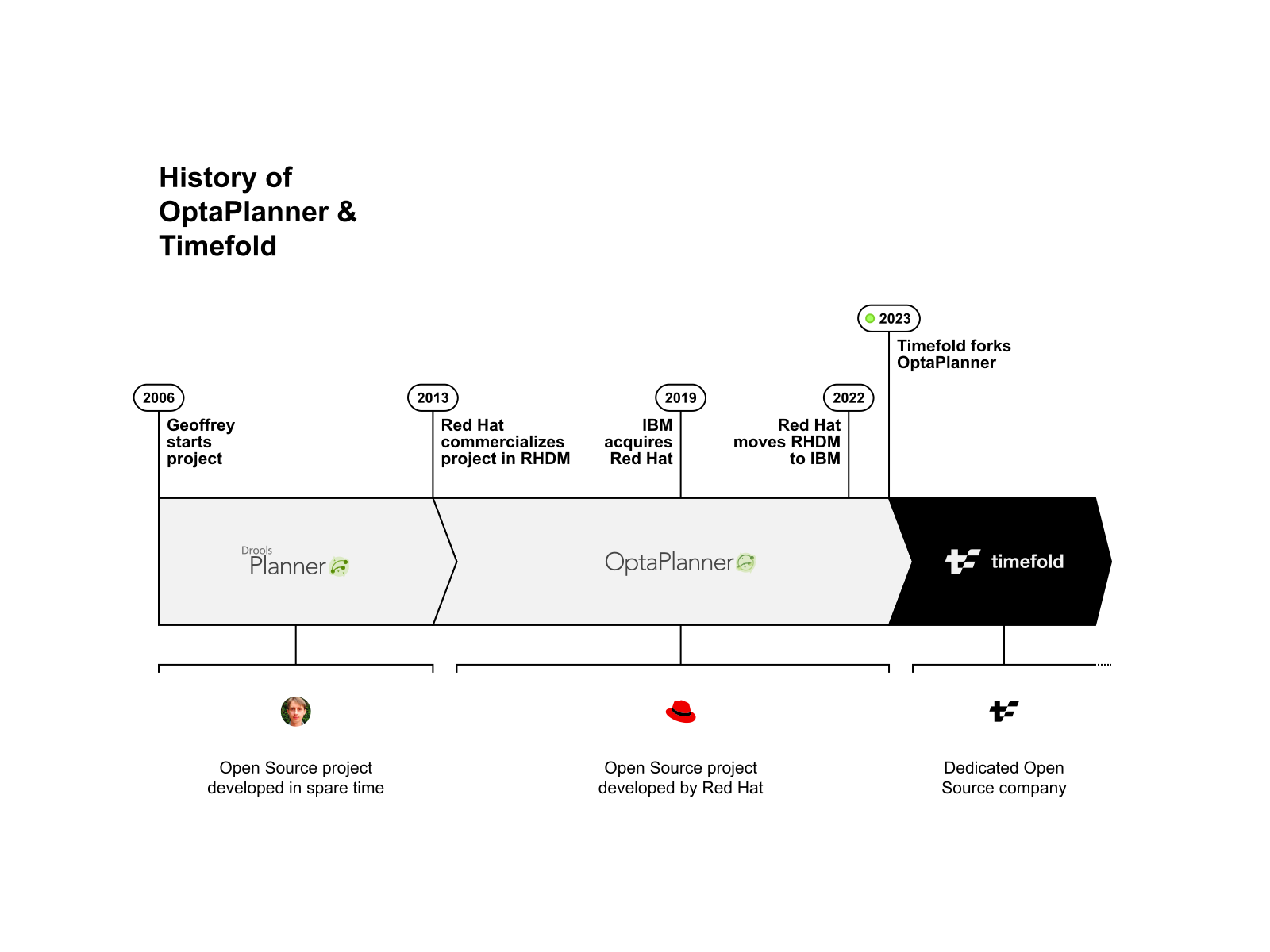
The project we worked on for seventeen years has matured under Red Hat’s wings for the past ten years. In 2022, when Red Hat’s strategy changed, it became apparent that the project needed a new, sustainable future. Therefore, we founded a company around it. A company that lives and breathes planning optimization, to further nurture the Open Source project to its fullest potential, under a new name. Timefold is the continuation of OptaPlanner.
Timefold Solver Community Edition is an Apache-licensed Open Source solver for operational planning optimization. It’s a fork of OptaPlanner, and it is already faster, lighter and better documented than OptaPlanner. Timefold has added features and fixed many bugs that still reside in OptaPlanner.
The Timefold Solver project is supported by Timefold BV, a professional Open Source company founded by Maarten Vandenbroucke (CEO) and Geoffrey De Smet (the OptaPlanner creator, CTO), with funding from Smartfin, an Open Source minded VC that fully supports our vision. The OptaPlanner team (Lukáš Petrovický, Radovan Synek, and Christopher Chianelli) have joined Timefold. We sell an Enterprise subscription with professional support and high-scalability features, to pay for the continued development of the free Open Source project.
Our mission is to free the world from wasteful scheduling. Our vision is to make Planning Optimization easy to use and simple to build. If you want to learn everything there is to know about planning optimization, follow us on YouTube, LinkedIn or Twitter.
Timefold is committed to be the world’s most powerful, versatile, and easy-to-use planning optimization solver. We combine our advanced AI solver algorithms with constraint models written in Java or Kotlin to be our main differentiator from other solvers. We remain Open Source which ensures a no-barrier entry for every team that wants to start using Timefold. We are hiring the brightest and most creative engineers to explore how we can make planning optimization even more accessible!
FAQ
We understand this message may be unsettling at first, especially if you use OptaPlanner extensively. We apologize for the short-term disruption, but we believe it is necessary to continue the project.
To address all potential concerns, we have compiled a list of Frequently Asked Questions. If you have any other concerns, don’t hesitate to contact us.
Why would I switch from OptaPlanner to Timefold?
Because it’s better:
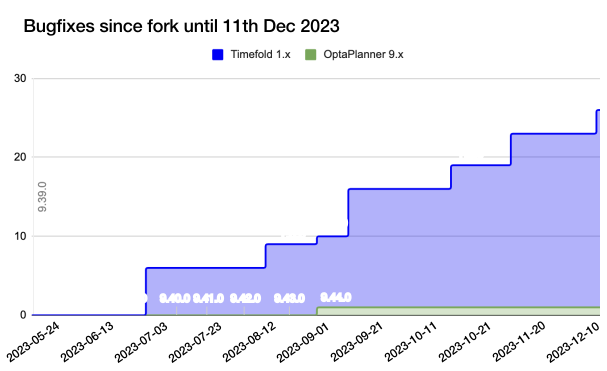
- Continuity, responsiveness, know-how and stability: The entire Timefold company is focused on building the best possible planning optimization software and helping you succeed with it. Timefold Solver has many bugfixes and security fixes since it forked from OptaPlanner. We also added powerful new features and enhancements.
- Performance: Timefold is twice as fast as OptaPlanner out-of-the-box.
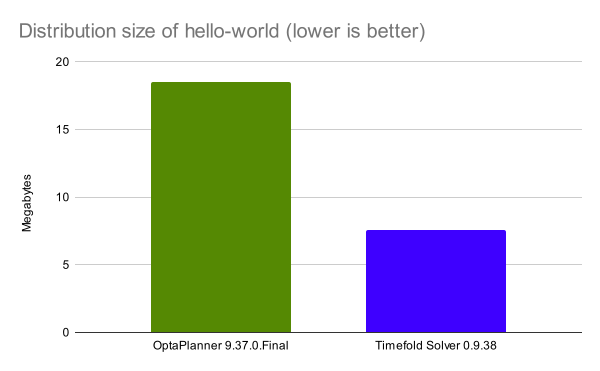
- Distribution size: Cloud deployments love lightweight components. Timefold has all the features of OptaPlanner, but a
jar-with-dependenciesassembly of the sameHello World program is 41% smaller:
- Timefold Solver has fewer dependencies. This also speeds up your Maven or Gradle build.
- Documentation: We are constantly improving the documentation and fine-tuning the quickstarts. It’s easier to get started with Timefold than with OptaPlanner.
Why did you fork OptaPlanner if you created it?
Geoffrey De Smet: "OptaPlanner is my life’s work. As the creator and lead of OptaPlanner, I wrote most of the code (85% according to github - take that with a grain of salt). First seven years in my spare time. Then nine years for Red Hat. I am grateful to each contributor and every user. And I loved working at Red Hat for all those years. Together, we’ve built a wonderful community and a rock-solid project with a strong reputation.
But the work is far from finished. OptaPlanner has a lot more potential.
After the IBM acquisition, Red Hat’s company strategy changed. Business Automation was no longer a priority. Early 2022, Red Hat Decision Manager (the support subscription that paid for my team) moved to IBM, without OptaPlanner. By late 2022, I no longer saw a sustainable future for OptaPlanner’s development within Red Hat.
I could not just let OptaPlanner perish. So I resigned. And over the past few months, I’ve worked on a way to continue and grow the open source project. To build a company around it. An open source company dedicated to planning optimization. Luckily, I met the right people. So I could continue the project.
Over the summer of 2023, Lukáš Petrovický, Radovan Synek, and Christopher Chianelli - the core OptaPlanner engineers - joined Timefold. With their expertise we are able to accelerate the future of Planning Optimization.
So why fork OptaPlanner? I don’t own the DNS name (the optaplanner.org URL) and it’s debatable who owns the trademark. Both are required to build a sustainable business. To rescue OptaPlanner, I had no other option than to fork it."
Is Timefold 100% open source? What’s your business model?
A professional Open Source project needs a viable Open Source business model. Without paying customers, a professional Open Source project cannot survive. Great software developers don’t write code and documentation for free. Not full-time. Not as a team. Everyone needs to eat.
Red Hat sold a support subscription on OptaPlanner. Despite OptaPlanner’s world-wide usage, it struggled commercially. It’s hard to sell support on stable software. Big corporations used OptaPlanner to schedule 10k+ employees in mission critical systems, and often didn’t pay for it.
Therefore, Timefold has an Open Core model. We offer 2 editions:
- Timefold Solver Community Edition (free, Open Source, Apache License 2.0): a comprehensive, well-documented solver for any planning optimization use case. It has no built-in restrictions.
- Timefold Solver Enterprise Edition (paid): A thin layer of additional high-scalability features on top of Timefold Solver Community Edition, specifically to solve large datasets in mission-critical systems far more efficiently. It comes with full enterprise support.
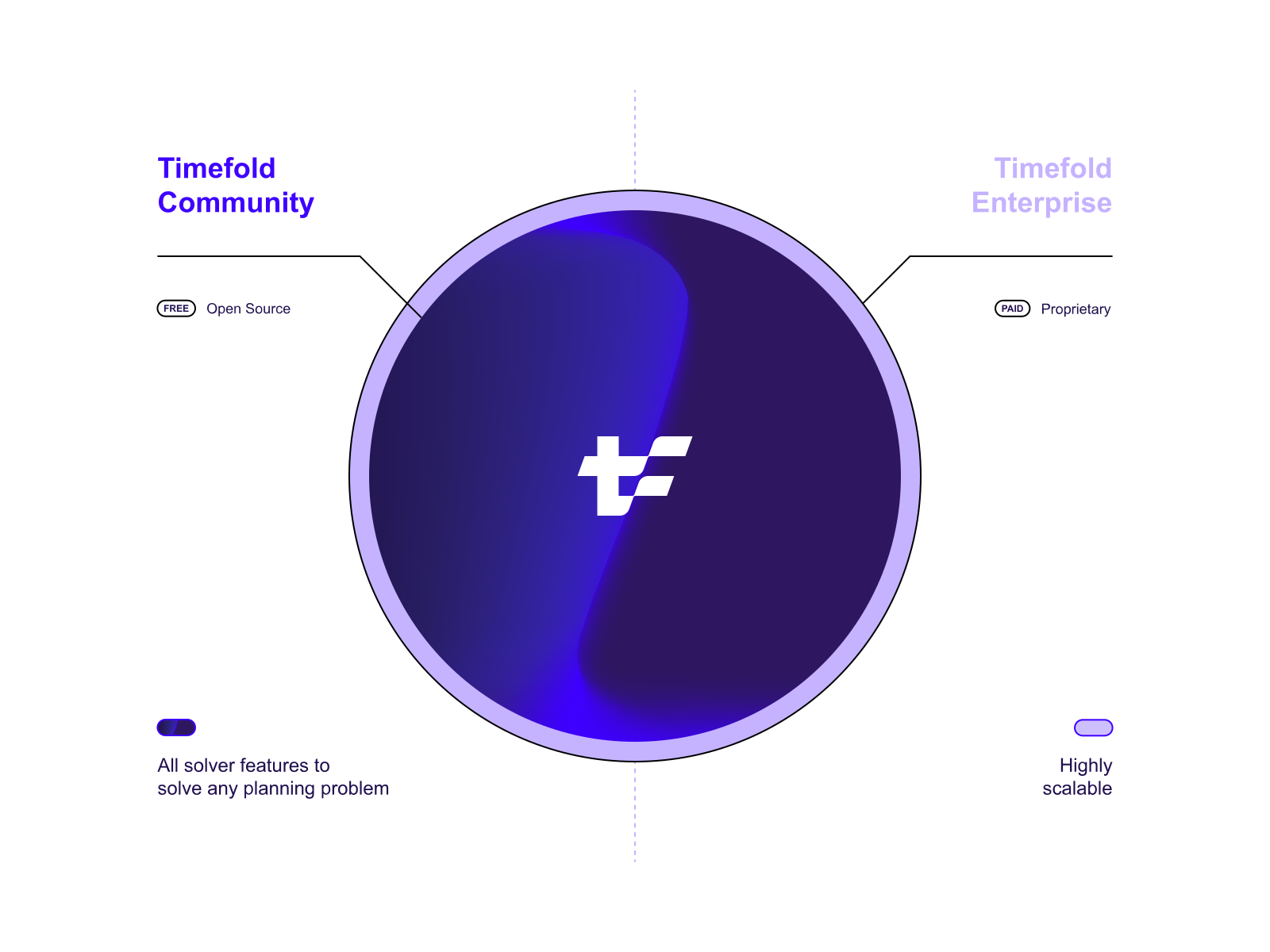
We are committed to Open Source. It is a fundamental part of our company mission. Our future is to actively develop the Community Edition alongside the Enterprise Edition. The revenue of Timefold Solver Enterprise Edition pays for Timefold Solver Community Edition.
New solver features go to Community Edition, except for high-scalability features. The same logic applied during the fork of OptaPlanner: All OptaPlanner features are part of Community Edition, except for Multithreaded Solving and Nearby Selection. Those are part of Enterprise Edition. 90% of OptaPlanner users don’t use either of these. They are pure high-scalability features. Check if this change affects you, by searching for use of moveThreadCount or NearbyDistanceMeter in your code.
How do the OptaPlanner and Timefold versions relate?
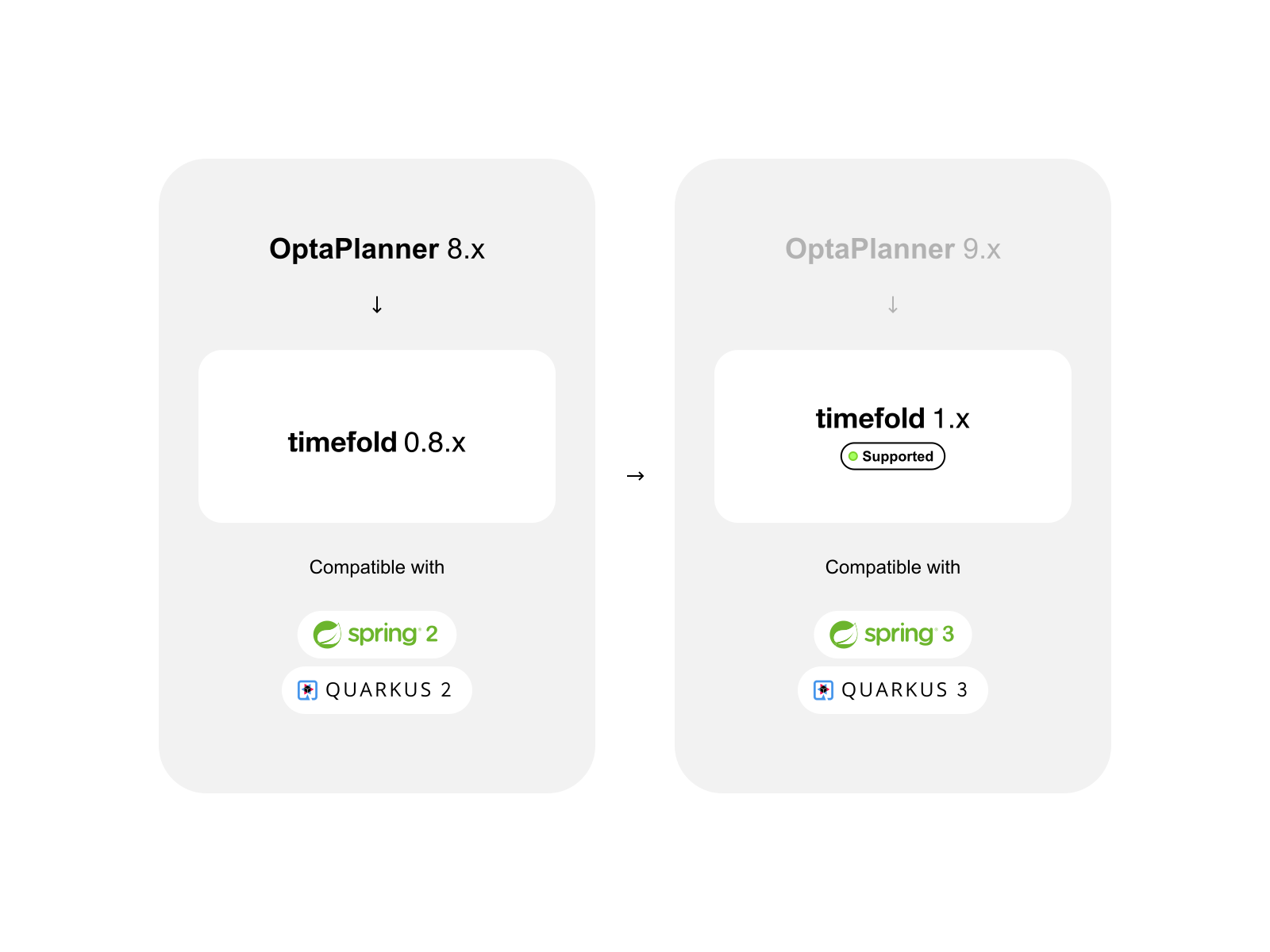
- Timefold 0.8.x is a replacement for OptaPlanner 8. It supports Java 11, Java 17, Spring Boot 2, Quarkus 2 and Java EE 8. It has reached its End of Life and is no longer supported.
- Timefold 1.x is a replacement for OptaPlanner 9. It supports Java 17+, Spring Boot 3, Quarkus 3 and Jakarta EE 10.
Is Timefold Backward Compatible with OptaPlanner?
Yes, except for the branding changes.
Run timefold-migration to automatically change all your code locally. It’s a quick, single command for Maven or Gradle. Then test those changes and commit them. Alternatively, apply the following changes manually.
Timefold Solver 1.x is backward compatible with OptaPlanner 8.x, except that:
- Minimum Java 17 (LTS). Java 21 (LTS) and the latest Java version are also supported.
- The Maven/Gradle GAVs changed:
- The groupId changed from
org.optaplannertoai.timefold.solver. - The artifactIds changed from
optaplanner-*totimefold-solver-*. - ArtifactIds containing
peristence-changed fromoptaplanner-persistence-*totimefold-solver-*.- For example,
optaplanner-persistence-jacksonchanged totimefold-solver-jackson.
- For example,
- The groupId changed from
- The import statements changed accordingly:
import org.optaplanner…;changed toimport ai.timefold.solver…;.import org.optaplanner.persistence…;changed toimport ai.timefold.solver…;too.
- The JEE dependencies changed from
javaxtojakartato accommodate Spring 3 and Quarkus 3.- This is the same difference as between OptaPlanner 8.x and OptaPlanner 9.x.
- The
OptaPlannerJacksonModuleclass is now calledTimefoldJacksonModule. - The deprecated
scoreDRLsupport is removed, because Drools with its transitive dependencies have been removed entirely. - The unsecure module
persistence-xstreamis removed, because of old, unresolved CVEs in XStream. - The deprecated, undocumented
ScoreHibernateTypehas been removed because of Jakarta. Use JPA’sScoreConverterinstead.
All other deprecated code remains, to make upgrading easy.
What else has changed in Timefold?
- Issue tracking: GitHub issues instead of JIRA.
- You can now easily submit an issue for us to fix.
- Discussion list: GitHub discussions instead of Google Groups.
- Continuous Integration: GitHub Actions instead of a private Jenkins instance.
- Our CI jobs are now open to the community.
- Releases are now automated with JReleaser.
- Security and bugs: Hotfix releases for Timefold Community are now released to Maven Central, immediately.
- Version numbering: The
.Finalsuffix is removed. It had no use. - Customer response time: Our team replies swiftly on support, sales or other inquiries.
What stays the same?
- High quality
- Regular releases
- Backwards Compatibility guarantees on the API, following Semantic Versioning.
- Our engineers answer questions on Stack Overflow.
- Open culture. Talk to us on GitHub discussions!
Why did you name it Timefold?
Because we fold time and space to plan your operations.
How do I upgrade from OptaPlanner to Timefold?
Upgrade from OptaPlanner to Timefold Solver Community Edition today. It only takes 2 minutes.
Run the command below to upgrade your code automatically. Do a test run of the solver and commit the changes. If it doesn’t work, just revert it instead and submit an issue. We’ll fix it with the highest priority.
MavenGradle
mvn org.openrewrite.maven:rewrite-maven-plugin:6.2.3:run -Drewrite.recipeArtifactCoordinates=ai.timefold.solver:timefold-solver-migration:1.20.0 -Drewrite.activeRecipes=ai.timefold.solver.migration.ToLatest
Timefold Solver 1.x does not support scoreDRL, nor is it upgraded automatically. If you’re still using scoreDRL from OptaPlanner 7.x, please upgrade to Constraint Streams first.
How do I upgrade from OptaPlanner to Timefold?
Upgrade from OptaPlanner to Timefold Solver Community Edition today. It only takes 2 minutes.
Run the command below to upgrade your code automatically. Do a test run of the solver and commit the changes. If it doesn’t work, just revert it instead and submit an issue. We’ll fix it with the highest priority.
MavenGradle
mvn org.openrewrite.maven:rewrite-maven-plugin:6.15.0:run -Drewrite.recipeArtifactCoordinates=ai.timefold.solver:timefold-solver-migration:1.25.0 -Drewrite.activeRecipes=ai.timefold.solver.migration.ToLatest
Note: this command is not actively updated. Check our documentation for the command with the latest version numbers.
Timefold Solver 1.x does not support scoreDRL, nor is it upgraded automatically. If you’re still using scoreDRL from OptaPlanner 7.x, please upgrade to Constraint Streams first.
Why would I switch from OptaPlanner to Timefold?
Because it’s better:
- Continuity, responsiveness, know-how and stability: The entire Timefold company is focused on building the best possible planning optimization software and helping you succeed with it. Timefold Solver has many bugfixes and security fixes since it forked from OptaPlanner. We also added powerful new features and enhancements.
- Performance: Timefold is twice as fast as OptaPlanner out-of-the-box.
- Distribution size: Cloud deployments love lightweight components. Timefold has all the features of OptaPlanner, but a
jar-with-dependenciesassembly of the same Hello World program is 41% smaller:
- Documentation: We are constantly improving the documentation and fine-tuning the quickstarts. It’s easier to get started with Timefold than with OptaPlanner.
How do the OptaPlanner and Timefold versions relate?
- Timefold 0.8.x is a replacement for OptaPlanner 8. It supports Java 11, Java 17, Spring Boot 2, Quarkus 2 and Java EE 8. It has reached its End of Life and is no longer supported.
- Timefold 1.x is a replacement for OptaPlanner 9. It supports Java 17+, Spring Boot 3, Quarkus 3 and Jakarta EE 10.
Is Timefold Backward Compatible with OptaPlanner?
Yes, except for the branding changes.
Run timefold-migration to automatically change all your code locally. It’s a quick, single command for Maven or Gradle. Then test those changes and commit them. Alternatively, apply the following changes manually.
Timefold Solver 1.x is backward compatible with OptaPlanner 8.x, except that:
- Minimum Java 17 (LTS). Java 21 (LTS) and the latest Java version are also supported.
- The Maven/Gradle GAVs changed:
- The groupId changed from
org.optaplannertoai.timefold.solver. - The artifactIds changed from
optaplanner-*totimefold-solver-*. - ArtifactIds containing
persistence-changed fromoptaplanner-persistence-*totimefold-solver-*.- For example,
optaplanner-persistence-jacksonchanged totimefold-solver-jackson.
- For example,
- The groupId changed from
- The import statements changed accordingly:
import org.optaplanner…;changed toimport ai.timefold.solver…;.import org.optaplanner.persistence…;changed toimport ai.timefold.solver…;too.
- The JEE dependencies changed from
javaxtojakartato accommodate Spring 3 and Quarkus 3.- This is the same difference as between OptaPlanner 8.x and OptaPlanner 9.x.
- The
OptaPlannerJacksonModuleclass is now calledTimefoldJacksonModule. - The deprecated
scoreDRLsupport is removed, because Drools with its transitive dependencies have been removed entirely. - The unsecure module
persistence-xstreamis removed, because of old, unresolved CVEs in XStream. - The deprecated, undocumented
ScoreHibernateTypehas been removed because of Jakarta. Use JPA’sScoreConverterinstead.
All other deprecated code remains, to make upgrading easy.

Timefold: the next chapter in operational planning optimization
Timefold, a new company co-founded by OptaPlanner creator Geoffrey De Smet and Maarten Vandenbroucke, is excited to announce the fork of the popular open-source project, OptaPlanner. This marks the beginning of a new era in the operational planning optimization space, with Timefold Community offering enhanced performance, reduced distribution size, and improved documentation over its predecessor.
OptaPlanner, used by thousands of organizations worldwide, has matured over seventeen years, including a decade under Red Hat’s guidance. However, when Red Hat changed strategy last year, the project needed a new, sustainable future. Timefold was created to address this need and help the open-source project reach its full potential.
Timefold Community is an Apache-licensed open-source solver that optimizes operational planning. Backed by Timefold BV, a professional open-source company, the project offers a subscription with professional support and high-scalability features to fund the continued development of the free, open-source project. Timefold has received funding from Smartfin, an open-source minded venture capital firm that fully supports the company’s vision.
With a mission to free the world from wasteful scheduling, Timefold is dedicated to making planning optimization easy to understand and use. The platform leverages advanced AI solver algorithms and code programmable constraint models in Java, Python, and Kotlin, setting it apart from other solvers in the market. Timefold remains committed to being open-source, ensuring no barrier to entry for any team wishing to use the software.
As Timefold continues to grow, the company is actively engineers and experts to explore ways to make planning optimization even more accessible. To stay up to date with the latest developments, follow Timefold on Twitter or LinkedIn.
For more information about Timefold, visit timefold.ai or learn more about why we forked OptaPlanner.

When scheduling works, everything works.
Less waste. More control. Teams that trust the plan.