Blog
Technician scheduling software in 2027: Essential capabilities for modern field service
What should technician scheduling software actually do? Nine essential capabilities, from skill matching and SLA priorities to real-time replanning, explainability, and API integration.
Technician scheduling software assigns field technicians to jobs and plans their days so that the right person, with the right skills, arrives within the promised window without wasting hours on the road.
The best tools do this automatically across hundreds or thousands of technicians, and they keep the plan valid as the day changes.
Most products in this category show a calendar and a map. The difference between them is what happens underneath: whether the software can weigh skills, time windows, SLAs, travel, and working-hour rules together, or whether it leaves those tradeoffs to a dispatcher.
This guide lists nine capabilities that separate modern technician scheduling from a digital whiteboard. It's written for operations leaders comparing tools and for product teams at field service software companies deciding what their own scheduling engine needs.
Why technician scheduling has become harder
Two pressures are pushing field service teams to rethink how they schedule.
- The first is labor. In the US HVAC trade alone, industry estimates put the technician shortage at around 110,000 open positions. When every skilled technician counts, a schedule that wastes an hour of their day on avoidable driving is a real capacity problem.
- The second is expectations. Customers expect narrow arrival windows, live updates, and a fix on the first visit. Nobody wants to be anticipating their technician coming in all day.
Both pressures land on the schedule.
Nine essential capabilities
1. Skill and certification matching
The software should know what each job requires and what each technician can do, including certifications, seniority, languages, and equipment access. Hard requirements (a gas-safe certificate) should never be violated. Softer preferences (a technician the customer has worked with before) should be encouraged but not forced.
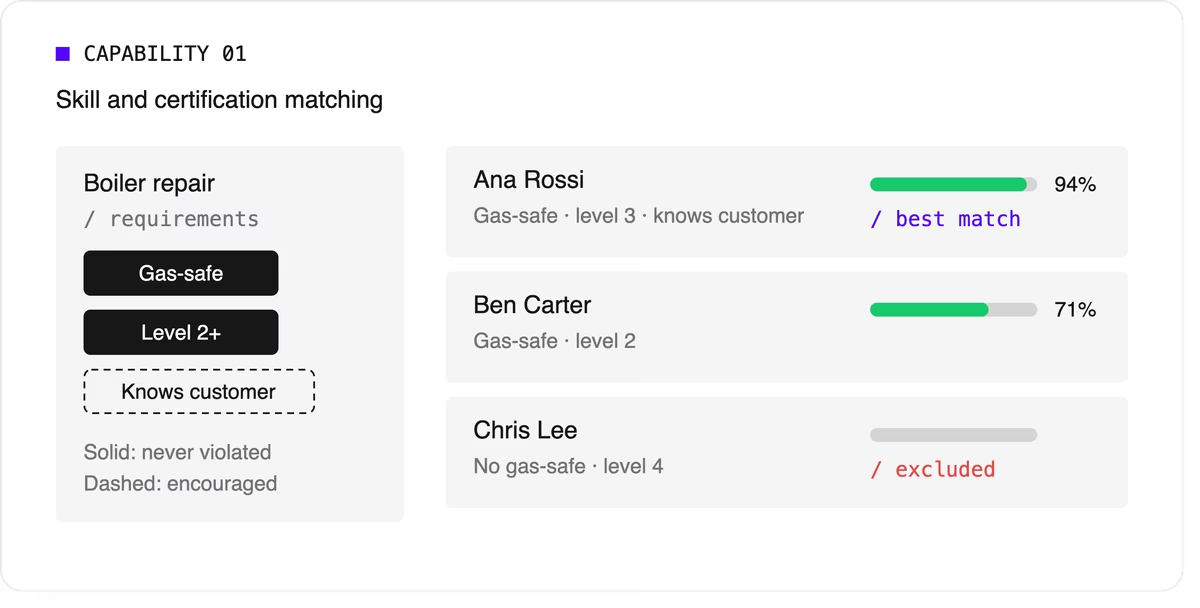
Look for support for skill levels and customer affinity in addition to simple yes-or-no skills. Matching the right skills is also one of the most direct ways to improve first-time fix rates.
2. Time windows and SLA priorities
Jobs come with customer availability windows, and many come with contractual deadlines.
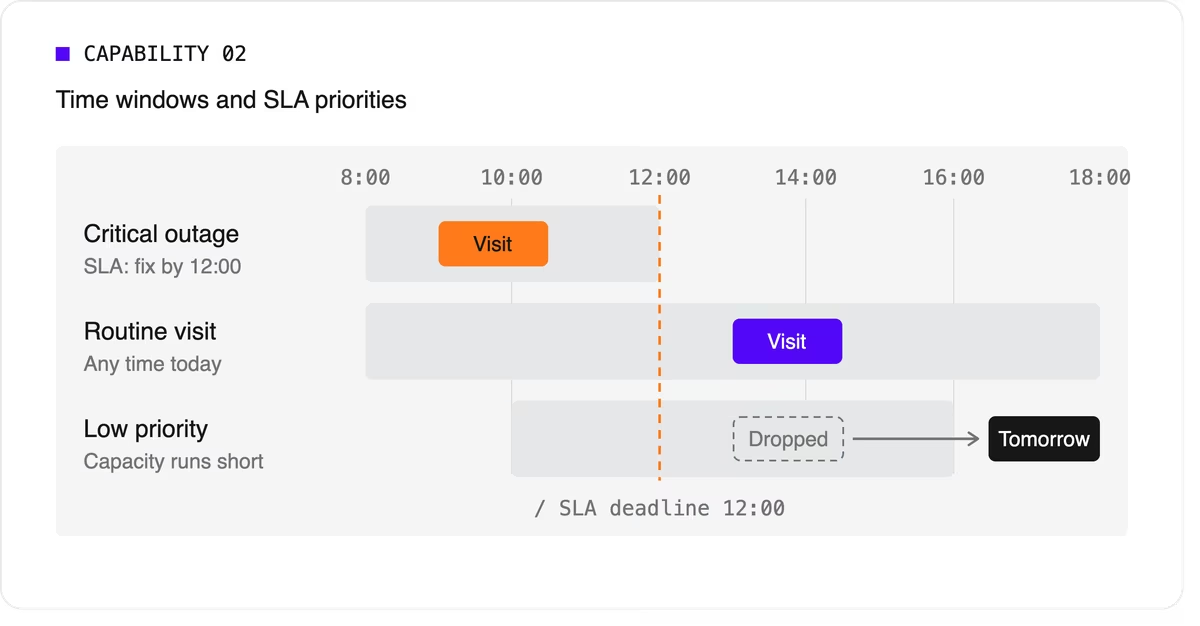
The software needs to treat a critical SLA differently from a routine visit that can move to tomorrow. That means supporting multiple time windows per job, priority levels, and deadlines that can push lower-priority work out of the plan when capacity runs short.
3. Travel-aware planning with real road data
A schedule that assumes straight-line distances will fall apart on the road. Technician scheduling software should use real travel times, ideally with support for traffic patterns and your own map provider if you already have one.
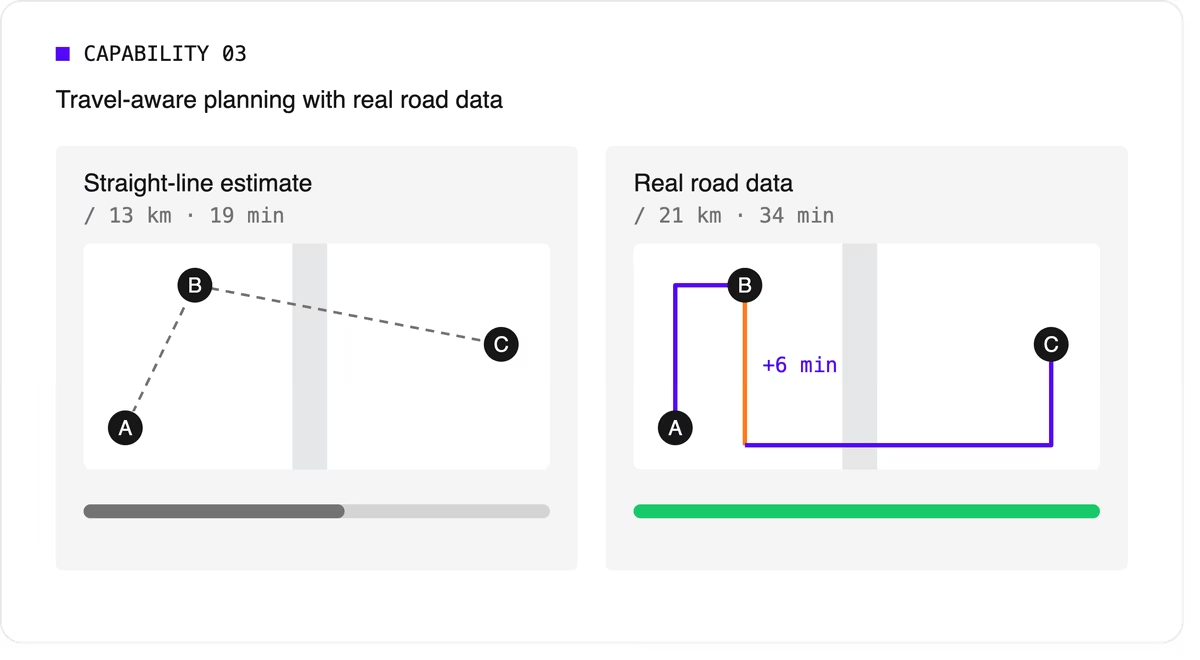
It should let you choose what to minimize, total travel time or total distance, because the two goals give different answers.
4. Multi-technician visits and job dependencies
Some jobs need two or more people on site at the same time for safety or lifting. Others must happen in order, sometimes with a delay: isolate the power before rewiring, or let a surface dry before painting.
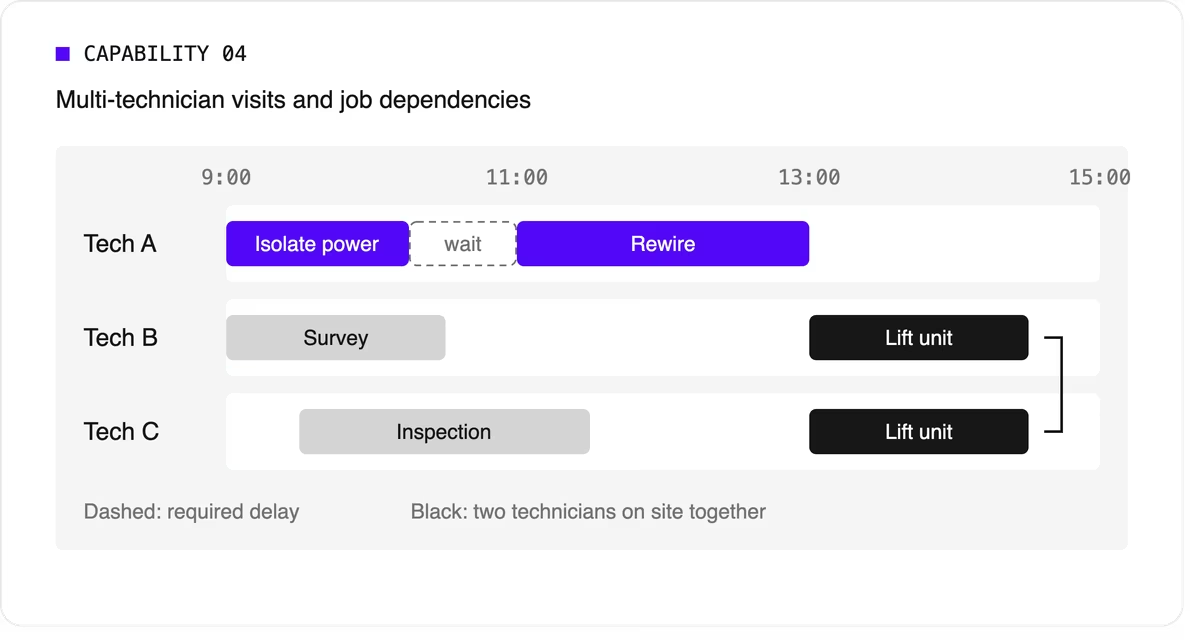
Many tools can't express these rules, so dispatchers track them by hand. If your operation has them, this capability is non-negotiable.
5. Working hours, breaks, and fairness
The plan has to respect shift start and end times, mandatory breaks, maximum working hours, and overtime rules. It should also spread work fairly so the same technicians don't always get the long days or the difficult jobs. Fairness affects retention, and retention matters more when technicians are hard to replace.
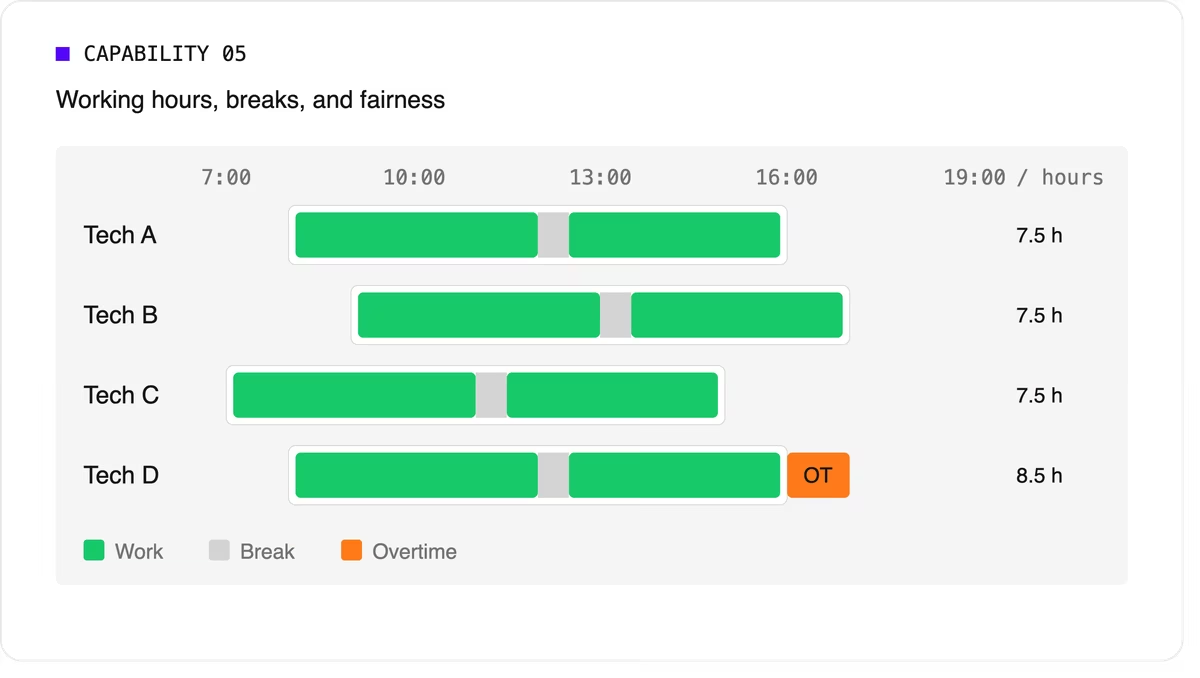
Scheduling software can support labor-law-style rules as constraints, but your organization remains responsible for verifying compliance with the regulations that apply to you.
6. Real-time replanning
Every schedule meets reality by mid-morning. A technician calls in sick, a job overruns, or an urgent call comes in. The software should replan quickly while changing as little as possible for everyone else. It should also let dispatchers lock (pin) jobs that are already in progress or confirmed with the customer.
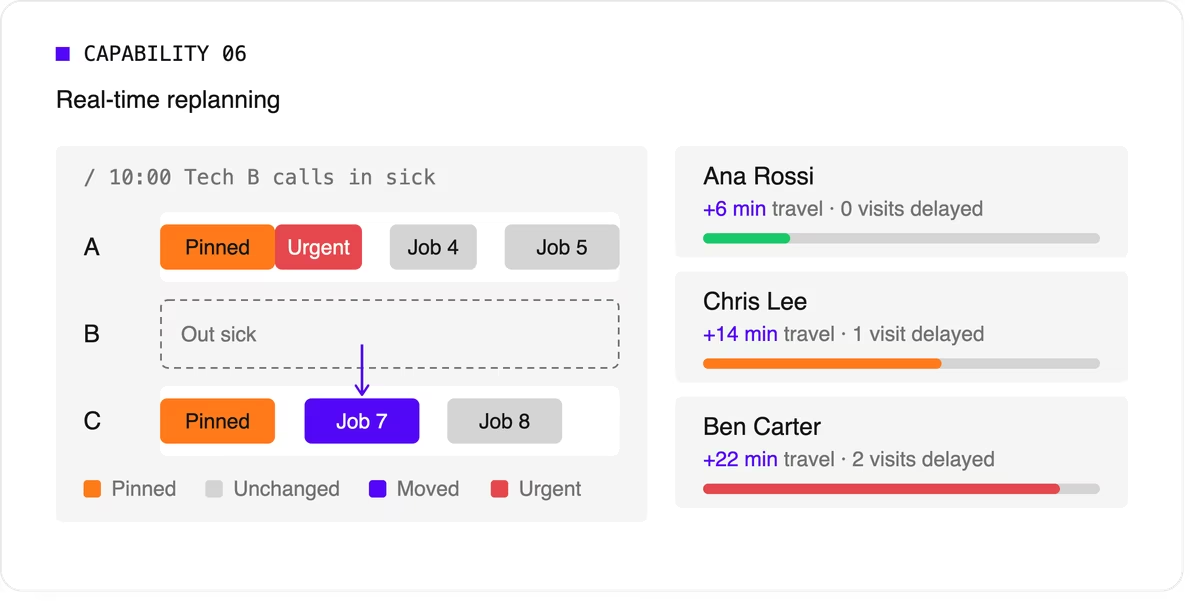
A strong version of this capability also recommends options. When a new urgent job arrives, the dispatcher should see which technicians could take it and what each choice would cost in travel or delayed work.
7. Explainability
Dispatchers and managers won't trust a plan they can't understand. Good technician scheduling software shows why a job was assigned the way it was, which rules were bent, and why some jobs couldn't be scheduled at all.
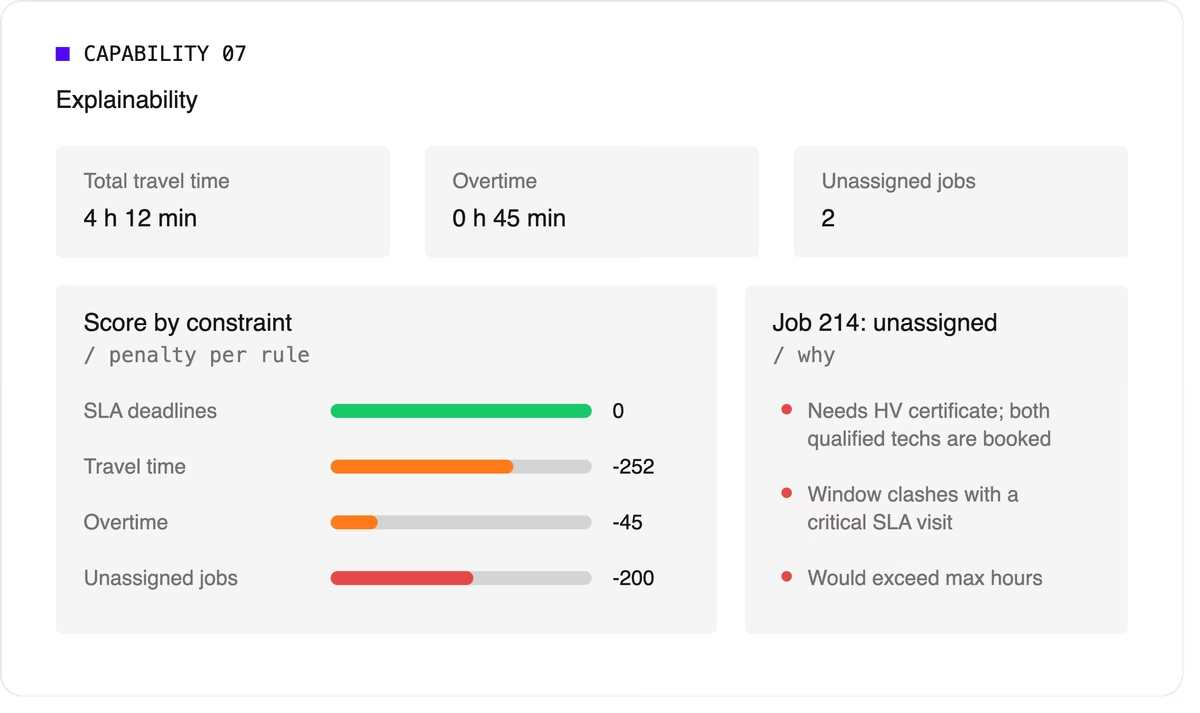
Look for a breakdown by constraint and clear metrics such as total travel time, overtime, and unassigned jobs.
8. Configurable priorities
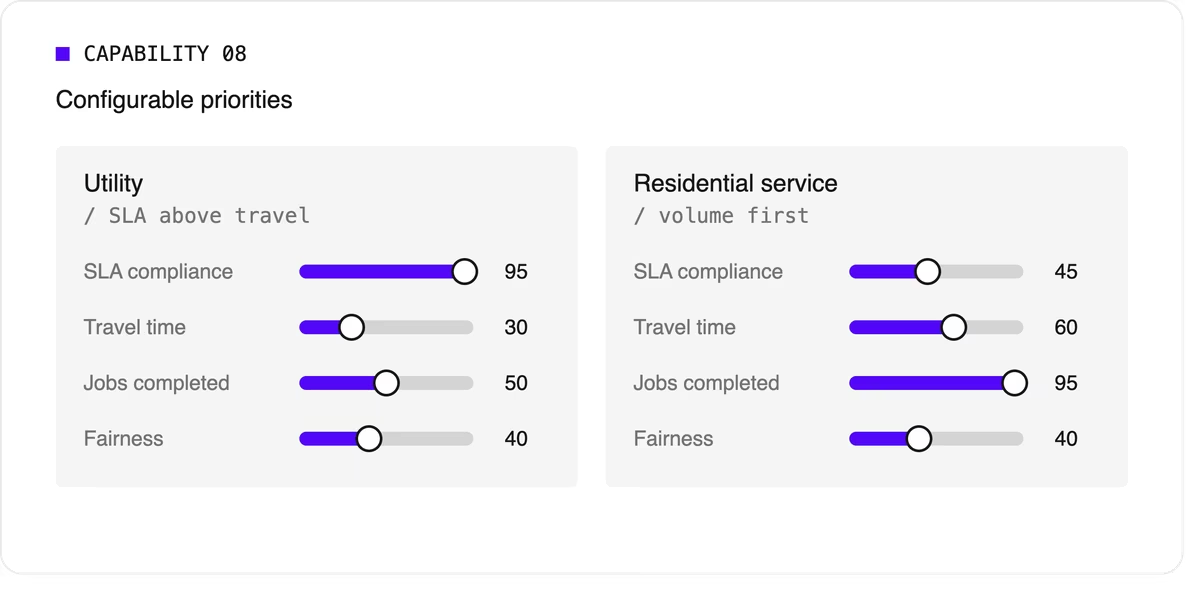
Every operation weighs its goals differently. A utility may put SLA compliance far above travel savings, while a residential service company may care most about completing as many jobs as possible per day. The software should let you adjust the relative weight of each goal without rewriting the underlying logic.
9. Integration and scale
Scheduling doesn't live on its own. It needs job data from your FSM or work order system, technician data from HR or workforce tools, and a way to push the finished plan to mobile apps. An API-first design makes this far easier than a closed tool with a separate interface.
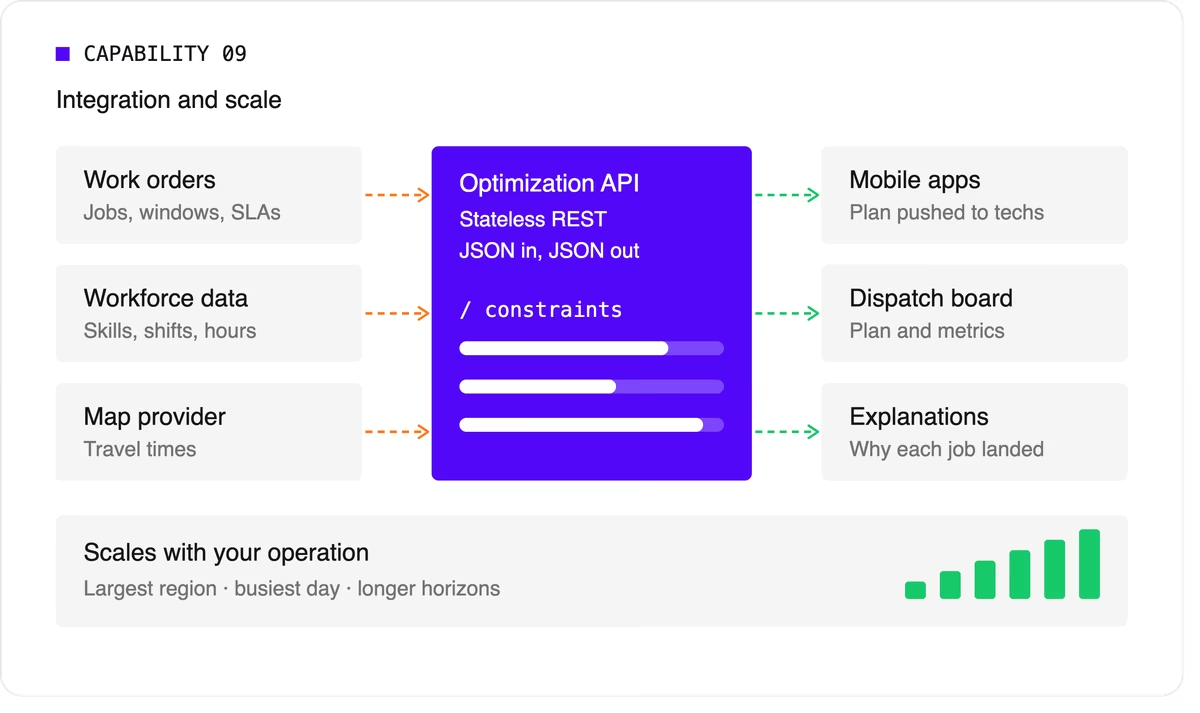
Scale matters too. The software should handle your largest region on your busiest day, and it should keep up as you add technicians, regions, or longer planning horizons.
A quick evaluation checklist
Use this table when comparing technicians scheduling software options or reviewing your own engine.
Scheduling software, FSM platform, or optimization engine?
When people search for technician scheduling software, they find three kinds of product.
- FSM platforms with a built-in scheduler cover the full workflow: work orders, mobile apps, invoicing, and scheduling. Their scheduling depth varies widely, from drag-and-drop boards to real optimization.
- Standalone scheduling tools focus on the dispatch board and often add basic auto-assignment. They're quick to adopt but can struggle with complex constraints.
- Optimization engines sit behind a user interface and do the heavy lifting. They don't manage work orders or invoices. Instead, they take in jobs, technicians, and rules, and return an optimized plan through an API. FSM vendors often embed one to strengthen their own scheduling, and large enterprises use one to add optimization to systems they already run.
Where Timefold fits
Timefold is an optimization engine in the third group. The Timefold Field Service Routing model covers the capabilities above: skill and seniority matching, customer time windows, visit dependencies with delays, multi-technician visits, working hours and fairness, and real-time replanning with recommendations. It ships with 50+ pre-configured constraints with adjustable weights, and every plan comes with metrics that show the tradeoffs it made.

It connects through a stateless REST API, so it fits alongside the FSM or work order system you already use. To see how this applies to field teams specifically, read about route optimization for field technicians. If you're preparing to integrate, the data foundations of efficient field service walks through the data you'll need.
FAQ
What does technician scheduling software do?
It assigns jobs to technicians and plans each technician's day, taking skills, time windows, travel, and working hours into account. More advanced tools optimize the whole plan at once and replan automatically when things change.
What's the difference between technician scheduling and dispatching?
Technician scheduling creates the plan ahead of time. Dispatching sends technicians to jobs and manages changes during the day. Modern software blends the two by replanning continuously.
Do I need technician scheduling software if I have an FSM platform?
It depends on how deep your FSM's scheduling goes. If dispatchers still spend hours adjusting assignments by hand, or your FSM can't express rules like dependencies or multi-technician visits, an optimization engine behind your FSM can close the gap.
How many technicians do I need before scheduling software is worth it?
There's no fixed number. Complexity matters more than headcount. A team of 20 with several skill types, tight SLAs, and multi-technician jobs can benefit as much as a team of 200 with simple, uniform work.


Timefold secures a 2 million euro investment from Smartfin VC
Brussels, Belgium - Timefold, a Belgian-based commercial open source software startup focused on planning optimization through AI, announced today that it has raised 2 million euro in funding from Smartfin VC. The investment will enable Timefold to expand the technology, make it even easier to use, and extend its services to clients worldwide.
Timefold’s AI technology has been used to solve real-world planning problems, resulting in significant economic and ecological benefits. In several cases around the world involving up to tens of thousands of vehicles, Timefold has been able to reduce driving time by 25%. The technology has been applied to complex and high-scale cases where many other solvers have failed, setting Timefold apart from its competitors.
"We are delighted to have Smartfin VC as our investor." said Maarten Vandenbroucke, co-founder of Timefold. "Smartfin VC shares our vision of using AI to solve complex planning problems and create a positive impact in the world. They have been a great help in introducing Geoffrey and I as founders and have provided us with valuable insights into open source venture building."
Smartfin VC is an internationally connected fund that invests in early-stage startups with disruptive technologies. The fund focuses on investing in companies that have the potential to drastically impact markets or industries.
"We are excited to partner with Timefold." said Thomas Depuydt, general partner at Smartfin VC. "Timefold has demonstrated impressive results with its technology in the past, solving planning problems where other technologies have failed. We believe that Timefold has the potential to change the way we approach planning optimization and the usage of resources, and we look forward to working closely with them to achieve their goals."
For more information about Timefold and its AI-powered Open Source planning optimization technology, visit their website at https://timefold.ai.

Designing the Timefold logo
Every new company needs a logo. So does Timefold. When starting a company, one of the most fun tasks is creating the logo. Far more exciting than VAT accounting, I can tell you.
Of course, a good logo is important: It’s hard to change. It must be able to stand the test of time. It should fit on a variety of media. So we hired a professional to help us: Ivo Blomme, a digital and brand designer with years of experience. He took us through the process of creating a good logo. Based on our input, he created these:

The left one is based on the rectangles of a physical calendar. The right one, with a fold in it, is based on a fold in space and time. Which logo would you have picked?
It was a though call, but we ended going for the second one. It’s loosely based on the idea of folding space and time:

Our designer even showed us how it would look on digital devices:

Now, we don’t have any plans to create a mobile app. But it would look good, wouldn’t it?

Bavet - A faster score engine for OptaPlanner
Drools is an extremely fast rule engine. Under the hood, OptaPlanner has used Drools as a score engine for ages. Today, we’re announcing a faster, lightweight alternative: Bavet.
Bavet is a feature of OptaPlanner. It is not a rule engine. It is a pure, single-purpose, incremental score calculation implementation of the ConstraintStreams API. Bavet is feature complete as of OptaPlanner 8.27.0.Final. You can switch from Drools to Bavet in a single line of code.
Twice as fast score calculation. Zero API changes.
Faster
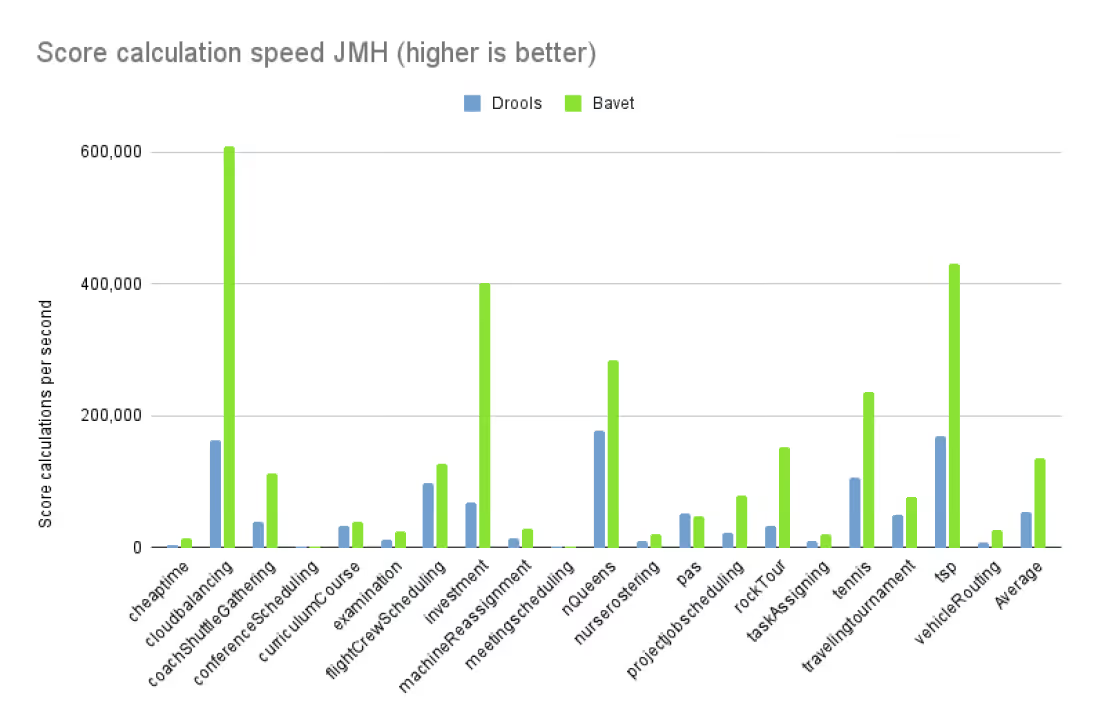
For 20 diverse use cases, we compared Bavet and Drools for OptaPlanner score calculation. We ran JMH benchmarks on OpenJDK 17 (ParallelGC, Xmx1G) on a stable benchmark machine (Intel® Xeon® Silver (12 cores total / 24 threads) and 128 GiB RAM memory) without any other computational demanding processes running.
On average, Bavet is twice as fast as Drools for score calculation. In the Vehicle Routing Problem, Bavet is even three times as fast as Drools:
Use caseDroolsBavetSpeed upAverage:53,644136,765+132%cheaptime4,34914,543+234%cloudbalancing162,820608,204+274%coachShuttleGathering38,543111,991+191%conferenceScheduling1,0721,264+18%curriculumCourse32,27238,933+21%examination11,82125,712+118%flightCrewScheduling97,020126,563+30%investment68,935401,806+483%machineReassignment13,38428,619+114%meetingscheduling2,2912,158-6%nQueens177,528285,268+61%nurserostering10,65721,090+98%pas50,97147,551-7%projectjobscheduling23,71578,291+230%rockTour33,997152,472+348%taskAssigning10,53120,680+96%tennis106,172236,437+123%travelingtournament49,42877,143+56%tsp169,125430,384+154%vehicleRouting8,24726,187+218%Table 1. Score calculation speed on different use cases
Bavet is faster than Drools for 90% of the use cases. Of course, your mileage may vary. Turn on Bavet and if it’s not faster in your use case, let us know.
Drools and Bavet are both still improving. This performance race is far from over.
Scaling
Does Bavet scale well?
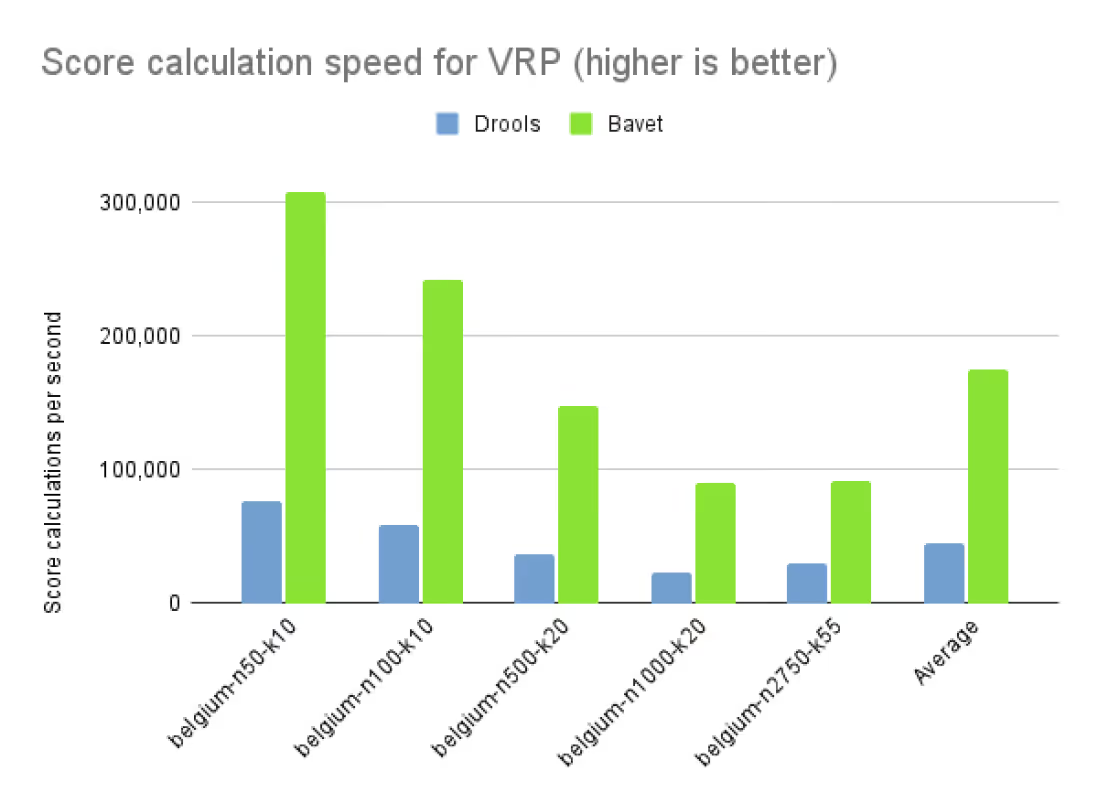
On commodity hardware, we ran a 5 minutes VRP benchmark on different dataset sizes, to compare how Drools and Bavet scale up:
belgium-n50-k10belgium-n100-k10belgium-n500-k20belgium-n1000-k20belgium-n2750-k55AverageDrools76,919/s58,365/s36,609/s23,394/s29,770/s45,011/sBavet307,290/s242,400/s147,595/s89,850/s91,115/s175,650/sSpeed up+299.50%+315.32%+303.17%+284.07%+206.06%+290.24%Table 2. Score calculation speed on different dataset sizes of VRP
Same story, but the performance gap does close as the scale goes up.
Not a rule engine
Bavet is not a rule engine. It deliberately doesn’t support inference, nor Complex Event Processing (CEP), nor other common business rule engine features:
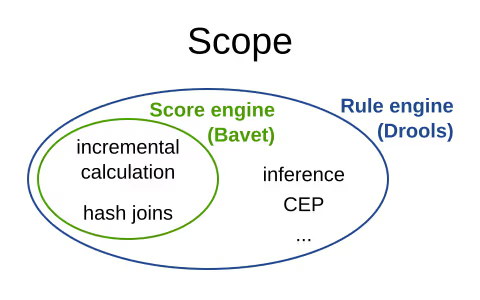
OptaPlanner only requires a score engine. Its Drools implementation only uses a small subset of Drools’s features. Bavet on the other hand, is a score engine tailored to OptaPlanner. It’s part of OptaPlanner. It has no use outside of OptaPlanner.
For incremental score calculation, Bavet borrows techniques from the RETE algorithm and Drools’s Phreak algorithm. For example, the JoinNode in Bavet contains insert(), update() and retract() methods. But below the surface, it’s a very different implementation. Compare it with the method signatures of similar methods in the JoinNode in Drools.
History and naming
I created Bavet as a POC in 2019 and added it into OptaPlanner as an experimental, fast, incomplete feature. There it sat frozen. For 3 years. Until recently, when Lukáš Petrovický and me completed all missing features and refactored it to the performance sensation is today.
Naming wise, bavet is a Flemish (Dutch) slang word for a bib. Very useful if your baby is drooling. I came up with that name when we were eating with our kids at a spaghetti restaurant called Bavet, while facing this mural:

Ok, maybe I didn’t put much effort into that.
But it doesn’t really need a good name. It’s just one of OptaPlanner’s score calculation options. An implementation detail, really.
Stability
We believe Bavet is very stable. We successfully run our 48+ hours stress tests on Bavet regularly. These stress tests stomp out score corruption by solving a lot of datasets across many use cases.
More lightweight
In OpenShift and Kubernetes clouds, the size of pods matter. By using Bavet, you can slim down OptaPlanner’s classpath to exclude the Drools dependencies. The Bavet jar is 400 KB.
On the OptaPlanner hello-world quickstart, a Maven assembly of jar-with-dependencies with only Bavet included is 10 MB smaller:
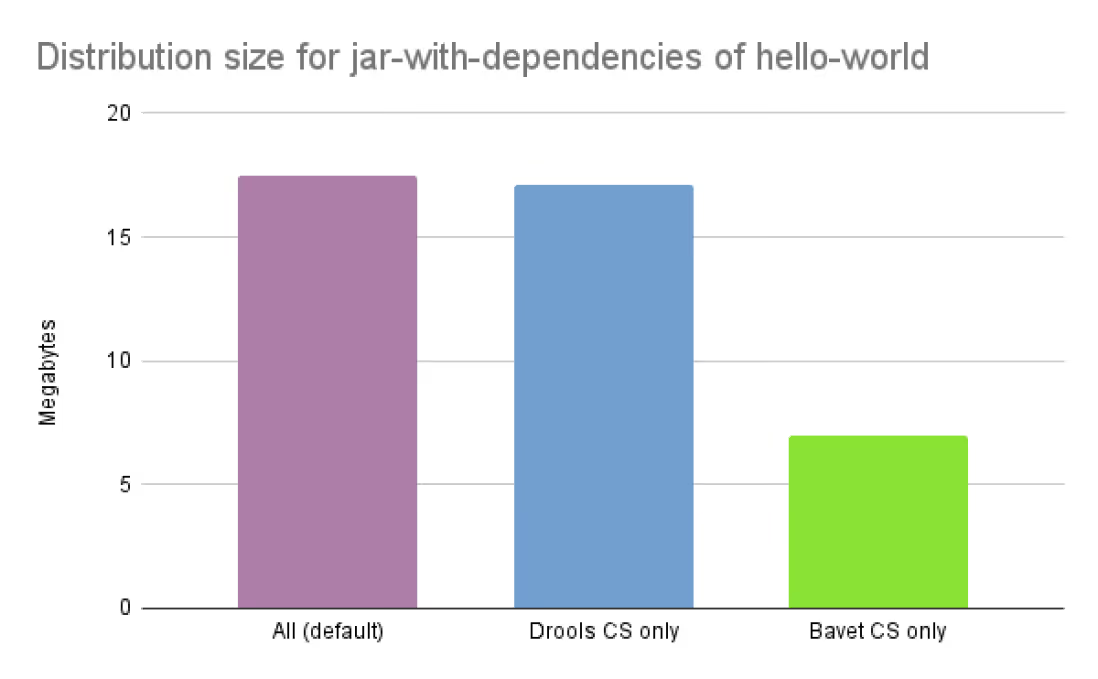
Core dependenciesSizeReductionCore exclusionsAll (default)17.5 MB0%noneDrools CS only17.1 MB-2%optaplanner-constraint-drl, optaplanner-constraint-streams-bavetBavet CS only7.0 MB-60%optaplanner-constraint-drl, optaplanner-constraint-streams-droolsTable 3. Distribution size of jar-with-dependencies on OptaPlanner’s hello-world
By default, optaplanner-core includes both Drools and Bavet, so you have to explicitly exclude it in Maven or Gradle:
    <dependency>
      <groupId>org.optaplanner</groupId>
      <artifactId>optaplanner-core</artifactId>
      <exclusions>
        <exclusion>
          <groupId>org.optaplanner</groupId>
          <artifactId>optaplanner-constraint-drl</artifactId>
        </exclusion>
        <exclusion>
          <groupId>org.optaplanner</groupId>
          <artifactId>optaplanner-constraint-streams-drools</artifactId>
        </exclusion>
      </exclusions>
    </dependency>
This reduces optaplanner-core from 42 to 17 transitive dependencies. Specifically, all these jars are removed from your classpath:
\- org.optaplanner:optaplanner-constraint-streams-drools:...
   +- org.drools:drools-engine:...
   |  +- org.kie:kie-api:...
   |  +- org.kie:kie-internal:...
   |  +- org.drools:drools-core:...
   |  |  +- org.kie:kie-util-xml:...
   |  |  +- org.drools:drools-wiring-api:...
   |  |  +- org.drools:drools-wiring-static:...
   |  |  +- org.drools:drools-util:...
   |  |  \- commons-codec:commons-codec:...
   |  +- org.drools:drools-wiring-dynamic:...
   |  +- org.drools:drools-kiesession:...
   |  +- org.drools:drools-tms:...
   |  +- org.drools:drools-compiler:...
   |  |  +- org.drools:drools-drl-parser:...
   |  |  +- org.drools:drools-drl-extensions:...
   |  |  +- org.drools:drools-drl-ast:...
   |  |  +- org.kie:kie-memory-compiler:...
   |  |  +- org.drools:drools-ecj:...
   |  |  +- org.kie:kie-util-maven-support:...
   |  |  \- org.antlr:antlr-runtime:...
   |  +- org.drools:drools-model-compiler:...
   |  |  \- org.drools:drools-canonical-model:...
   |  \- org.drools:drools-model-codegen:...
   |     +- org.drools:drools-codegen-common:...
   |     +- com.github.javaparser:javaparser-core:...
   |     +- org.drools:drools-mvel-parser:...
   |     \- org.drools:drools-mvel-compiler:...
   \- org.drools:drools-alphanetwork-compiler:...
Bavet (optaplanner-constraint-streams-bavet) has no transitive dependencies (except for optaplanner-constraint-streams-common).
Try it out
First upgrade to OptaPlanner 8.27.0.Final or later, if you haven’t already. If you’re using the deprecated scoreDRL approach, migrate from scoreDRL to constraint streams first.
By default, OptaPlanner still uses Drools for constraint streams. To use Bavet instead, explicitly switch the ConstraintStreamImplType to BAVET:
Plain Java
Switch to Bavet in either your *.java file:
SolverFactory<TimeTable> solverFactory = SolverFactory.create(new SolverConfig()
        ...
        .withConstraintStreamImplType(ConstraintStreamImplType.BAVET)
        ...);
or in your solverConfig.xml:
  <scoreDirectorFactory>
    ...
    <constraintStreamImplType>BAVET</constraintStreamImplType>
  </scoreDirectorFactory>
Quarkus
Switch to Bavet in src/main/resources/application.properties:
quarkus.optaplanner.solver.constraintStreamImplType=BAVET
Spring
Switch to Bavet in src/main/resources/application.properties:
optaplanner.solver.constraintStreamImplType=BAVET
Share your results
Help us out. Try Bavet and let us know here how your score calculation speed changes. Look for the score calculation speed in the INFO log: it’s part of the Solving ended message.
How much faster is Java 17?
Java 17 (released yesterday) comes with many new features and enhancements. However, most of those require code changes to benefit from. Except for performance. Simply switch your JDK installation and you get a free performance boost. But how much? Is it worth it? Let’s find out by comparing the benchmarks of JDK 17, JDK 16 and JDK 11.
Benchmark methodology
- Hardware: A stable machine without any other computational demanding processes running and with
Intel® Xeon® Silver 4116 @ 2.1 GHz (12 cores total / 24 threads)and128 GiBRAM memory, runningRHEL 8 x86_64. - JDKs (used to both compile and run):
- JDK 11
- openjdk 11.0.12 2021-07-20 OpenJDK Runtime Environment Temurin-11.0.12+7 (build 11.0.12+7) OpenJDK 64-Bit Server VM Temurin-11.0.12+7 (build 11.0.12+7, mixed mode)
- JDK 16
- openjdk 16.0.2 2021-07-20 OpenJDK Runtime Environment (build 16.0.2+7-67) OpenJDK 64-Bit Server VM (build 16.0.2+7-67, mixed mode, sharing)
- JDK 17 (downloaded 2021-09-06)
- openjdk 17 2021-09-14 OpenJDK Runtime Environment (build 17+35-2724) OpenJDK 64-Bit Server VM (build 17+35-2724, mixed mode, sharing)
- JVM options:
-Xmx3840Mand explicitly specify a garbage collector:-XX:+UseG1GCfor G1GC, the low latency garbage collector (the default in all three JDKs).-XX:+UseParallelGCfor ParallelGC, the high throughput garbage collector.
- Main class:
org.optaplanner.examples.app.GeneralOptaPlannerBenchmarkAppfrom the moduleoptaplanner-examplesin OptaPlanner8.10.0.Final.- Each run solves 11 planning problems with OptaPlanner, such as employee rostering, school timetabling and cloud optimization. Each planning problem runs for 5 minutes. Logging is set to
INFO. The benchmark starts with a 30 second JVM warm up which is discarded. - Solving a planning problem involves no IO (except a few milliseconds during startup to load the input). A single CPU is completely saturated. It constantly creates many short-lived objects, and the GC collects them afterwards.
- The benchmarks measure the number of scores calculated per second. Higher is better. Calculating a score for a proposed planning solution is non-trivial: it involves many calculations, including checking for conflicts between every entity and every other entity.
- Each run solves 11 planning problems with OptaPlanner, such as employee rostering, school timetabling and cloud optimization. Each planning problem runs for 5 minutes. Logging is set to
- Runs: Each JDK and each garbage collector combination is run 3 times sequentially. The results below is the average of those 3 runs.
Results
Java 11 (LTS) and Java 16 versus Java 17 (LTS)
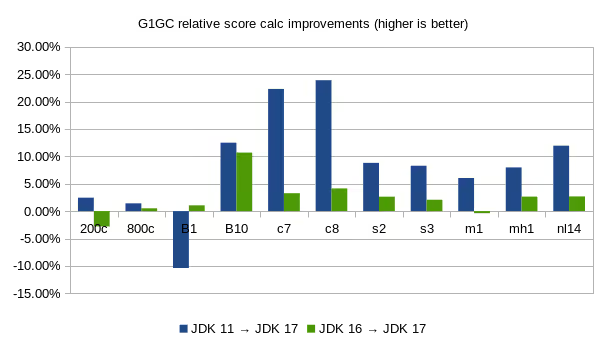
AverageCloud balancingMachine reassignmentCourse schedulingExam schedulingNurse rosteringTraveling TournamentDataset 200c800cB1B10c7c8s2s3m1mh1nl14JDK 11 103,60696,700274,10337,42111,77913,66014,3548,9823,5853,3355,019JDK 16 109,20397,567243,09638,03113,95016,25115,2189,5283,8173,5085,472JDK 17 106,14798,069245,64542,09614,40616,92415,6199,7263,8023,6015,61811 → 178.66%2.45%1.42%-10.38%12.49%22.30%23.90%8.81%8.28%6.05%7.98%11.95%16 → 172.41%-2.80%0.51%1.05%10.69%3.27%4.14%2.63%2.08%-0.39%2.65%2.67%Table 1. Score calculation count per second with G1GC on different JDKs
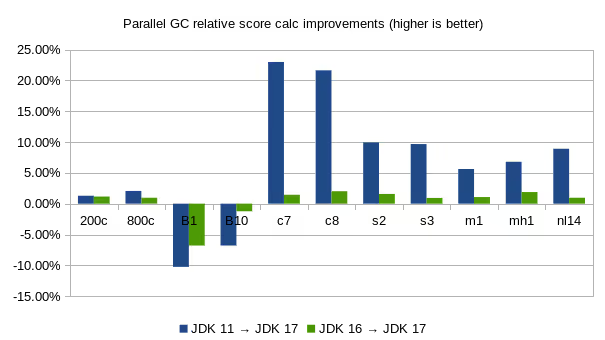
AverageCloud balancingMachine reassignmentCourse schedulingExam schedulingNurse rosteringTraveling TournamentDataset 200c800cB1B10c7c8s2s3m1mh1nl14JDK 11 128,553121,974292,76148,33913,39715,54016,3929,8874,4094,1486,097JDK 16 128,723123,314281,88245,62216,24318,52817,74210,7444,6084,3486,578JDK 17 130,215124,498262,75345,05816,47918,90418,02310,8454,6584,4306,64111 → 176.54%1.29%2.07%-10.25%-6.79%23.00%21.64%9.95%9.68%5.63%6.80%8.92%16 → 170.37%1.16%0.96%-6.79%-1.24%1.45%2.03%1.59%0.94%1.08%1.89%0.96%Table 2. Score calculation count per second with ParallelGC on different JDKs
NoteLooking at the raw data of the 3 individual runs (not shown here), the Machine Reassignment numbers (B1 and B10) fluctuate a lot between runs on the same JDK and GC. Often by more than 10%. The other numbers don’t suffer from this unreliability.
It’s arguably better to ignore the Machine Reassignment numbers. But to avoid cherry-picking data concerns, these results and averages do include them.
G1GC versus ParallelGC on Java 17
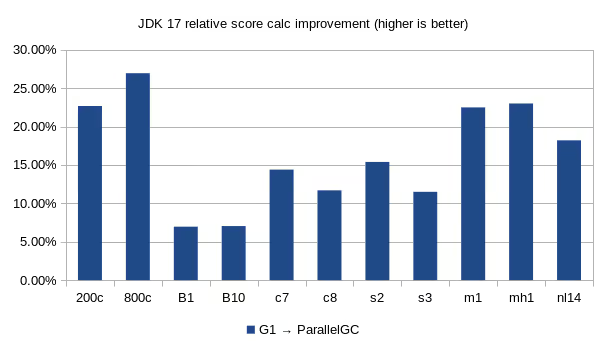
AverageCloud balancingMachine reassignmentCourse schedulingExam schedulingNurse rostering.Traveling TournamentDataset 200c800cB1B10c7c8s2s3m1mh1nl14G1GC 106,14798,069245,64542,09614,40616,92415,6199,7263,8023,6015,618ParallelGC 130,215124,498262,75345,05816,47918,90418,02310,8454,6584,4306,641G1 → ParallelGC16.39%22.67%26.95%6.96%7.04%14.39%11.69%15.39%11.50%22.50%23.01%18.20%Table 3. Score calculation count per second on JDK 17 with different GCs
Executive summary
On average, for OptaPlanner use cases, these benchmarks indicate that:
- Java 17 is 8.66% faster than Java 11 and 2.41% faster than Java 16 for G1GC (default).
- Java 17 is 6.54% faster than Java 11 and 0.37% faster than Java 16 for ParallelGC.
- The Parallel Garbage Collector is 16.39% faster than the G1 Garbage Collector.
No big surprises here: the latest JDK is faster and the high throughput garbage collector is faster than the low latency garbage collector.
Wait a minute here…
When we benchmarked JDK 15, we saw that Java 15 was 11.24% faster than Java 11. Now, the gain of Java 17 over Java 11 is less. Does that mean that Java 17 is slower than Java 15?
Well, no. Java 17 is faster than Java 15 too. Those previous benchmarks were run on a different codebase (OptaPlanner 7.44 instead of 8.10). Don’t compare apples and oranges.
Conclusion
In conclusion, the performance gained in the JDK17 version is well worth the upgrade - at least for these use cases.
In addition, the fastest garbage collector for these use cases is still ParallelGC, instead of G1GC (the default).
Writing fast constraints with OptaPlanner: the secret recipe
Do you want OptaPlanner to run faster? Do you want to increase your score calculation speed, reaching great solutions sooner? Let me show you how to optimize your Constraint Streams constraints for performance and scalability. Turns out you only need to remember one advice:
Do less
The key to well-performing constraints is limiting the amount of data that flows through your Constraint Streams, which starts with joins. Consider a school timetabling problem, where a teacher must not have two overlapping lessons. This is how the lesson could look in Java:
    @PlanningEntity
    class Lesson {

        ...

        Teacher getTeacher() { ... }

        boolean overlaps(Lesson anotherLesson) { ... }

        boolean isCancelled() { ... }

        ...

    }
The simplest possible Constraint Stream we could write to penalize all overlapping lessons would then look like:
    constraintFactory.from(Lesson.class)
        .join(Lesson.class)
        .filter((leftLesson, rightLesson) ->
            !leftLesson.isCancelled()
	        && !rightLesson.isCancelled()
            && leftLesson.getTeacher()
                .equals(rightLesson.getTeacher())
            && leftLesson.overlaps(rightLesson))
        .penalize("Teacher lesson overlap", HardSoftScore.ONE_HARD)
What this Constraint Stream does is:
- It creates all possible pairs of Lessons from the planning solution.
- Then it filters out all the lessons that are cancelled, where the teachers do not match, or which do not overlap.
- It penalizes all the remaining lesson pairs.
Do you see the problem here? The join creates a cross product between lessons, producing a match (also called a tuple) for every possible combination of two lessons, even though we know that many of these matches will not be penalized. This shows the problem in numbers:
| 10 | 100 |
|---|---|
| Number of lessons | Number of possible pairs |
| 100 | 10 000 |
| 1 000 | 1 000 000 |
In order to process a thousand lessons, our constraint first creates a cross product of 1 million pairs, only to throw away pretty much all of them before penalizing! If we can reduce the size of the cross product by half, only half of the time will be spent processing it. This is where the original advice comes into play: do less, by avoiding unrestricted cross product. Here’s how.
Filter before joining
As you can see from the first example, cancelled lessons are eventually filtered out after the join. Let’s see if we can remove them from the cross product instead. For the first lesson in the join (also called “left”), this is straightforward; we simply bring the cancellation check before the join like so:
    constraintFactory.from(Lesson.class)
        .filter(lesson -> !lesson.isCancelled())
        .join(Lesson.class)
        .filter((leftLesson, rightLesson) ->
            !rightLesson.isCancelled()
            && leftLesson.getTeacher() == rightLesson.getTeacher()
            && leftLesson.overlaps(rightLesson))
        .penalize("Teacher lesson overlap", HardSoftScore.ONE_HARD)
The cancelled lessons are no longer coming in from the left, which reduces the cross product. However, some cancelled lessons are still coming in from the right through the join. Here, we will use a little trick and join not with a Lesson class, but with a filtered nested Constraint Stream instead:
    constraintFactory.from(Lesson.class)
        .filter(lesson -> !lesson.isCancelled())
        .join(
            constraintFactory.from(Lesson.class)
                .filter(lesson -> !lesson.isCancelled()))
        .filter((leftLesson, rightLesson) ->
            leftLesson.getTeacher() == rightLesson.getTeacher()
            && leftLesson.overlaps(rightLesson))
        .penalize("Teacher lesson overlap", HardSoftScore.ONE_HARD)
As you can see, we’ve created a new Constraint Stream from Lesson, filtering before it entered our join. We have now applied the same improvement on both the left and right sides of the join, making sure it only creates a cross product of lessons which we care about. But we can still do better!
Prefer Joiners to filters
Filters are just a simple check if a tuple matches a predicate. If it does, it is sent downstream, otherwise the tuple is removed from the Constraint Stream. Each tuple needs to go through this check, and that means every pair of lessons will be evaluated. When a Lesson changes, all pairs with that Lesson will be re-evaluated, but not anymore:
    constraintFactory.from(Lesson.class)
        .filter(lesson -> !lesson.isCancelled())
        .join(
            constraintFactory.from(Lesson.class)
                .filter(lesson -> !lesson.isCancelled()),
	        Joiners.equal(Lesson::getTeacher))
        .filter((leftLesson, rightLesson) ->
			leftLesson.overlaps(rightLesson))
        .penalize("Teacher lesson overlap", HardSoftScore.ONE_HARD)
Notice that the Teacher equality check moved from the final filter to something called a Joiner. We are still saying the same thing - a Lesson pair will only be sent downstream if the Lessons share the same Teacher. Unlike the filter, this brings the performance benefit of indexing. Now when a Lesson changes, only the pairs with the matching Teacher will be re-evaluated. So even though the cross-product remains the same, we are doing much less work processing it.
The final filter now only performs one operation on the final cross product, and the Lesson pairs that get this far are already trimmed down in the most efficient way possible.
Remove more, earlier
In some cases, you may have an option to pick the order of your Joiners. In these situations, you should put first the Joiner that will remove more tuples than the others. This will reduce the size of your cross products faster.
Consider a new situation, where lessons also have rooms in which they happen. Although there are possibly dozens of teachers, there are only three rooms. Therefore the join should look like this:
    constraintFactory.from(Lesson.class)
        .join(Lesson.class,
            Joiners.equal(Lesson::getTeacher),
            Joiners.equal(Lesson::getRoom))
    ...
This way, we first create “buckets” for each of the many teachers, and these buckets will only contain a relatively small number of lessons per room. If we did it the other way around, there would be a small amount of large buckets, leading to much more iteration every time a lesson changes.
For that reason, it is generally recommended putting Joiners based on enum fields or boolean fields last.
Conclusion
The key to efficient constraints is the reduction of cross product. There are three main ways of reducing cross product in Constraint Streams:
- Filtering before joining.
- Preferring Joiners earlier to filtering later.
- Applying the more restrictive Joiners first.
There are other optimization techniques as well, and we will discuss some of them in the future, but none of them will give as big a benefit as reducing the size of cross products.
The path to OptaPlanner enlightenment starts in the logs
Do you want to understand what OptaPlanner is doing while it is solving? Which decisions it makes? When? And why? Do you want to open the box and take a look inside? If so, keep reading.
The Age of Enlightenment centered on the use of reason and the evidence of the senses. Similarly, OptaPlanner enlightenment starts with the use of reason and the evidence in the logs.
OK. That’s enough philosophy for this article… It’s time to open the box. Take a look at the log for the school timetabling AI quickstart:
12:18:04 INFO Solving started: time spent (196), best score (-38init/0hard/0soft), environment mode (REPRODUCIBLE), move thread count (NONE), random (JDK with seed 0).
12:18:04 INFO Construction Heuristic phase (0) ended: time spent (330), best score (0hard/-11soft), score calculation speed (4358/sec), step total (19).
12:18:34 INFO Local Search phase (1) ended: time spent (30000), best score (0hard/10soft), score calculation speed (12786/sec), step total (26654).
12:18:34 INFO Solving ended: time spent (30000), best score (0hard/10soft), score calculation speed (12663/sec), phase total (2), environment mode (REPRODUCIBLE), move thread count (NONE).
This is a lot of information, even on the INFO level. Let’s investigate each nugget of information in there, one by one:
When did the solver run?
The log shows when the solver started and when it ended:
12:18:04 INFO Solving started ... ... 12:18:34 INFO Solving ended ...
That’s useful in complex applications with other log lines intertwined.
What is the solver doing?
It also displays what the solver did while solving:
12:18:04 INFO Solving started ... 12:18:04 INFO Construction Heuristic phase (0) ended ... 12:18:34 INFO Local Search phase (1) ended ... 12:18:34 INFO Solving ended ...
It ran two algorithm phases sequentially:
- Phase 0: a Construction Heuristic to provide an initial solution for the problem
- Phase 1: a Local Search to improve the solution further
Here’s an illustration of those phases on the N-Queens and the Cloud Balancing examples:
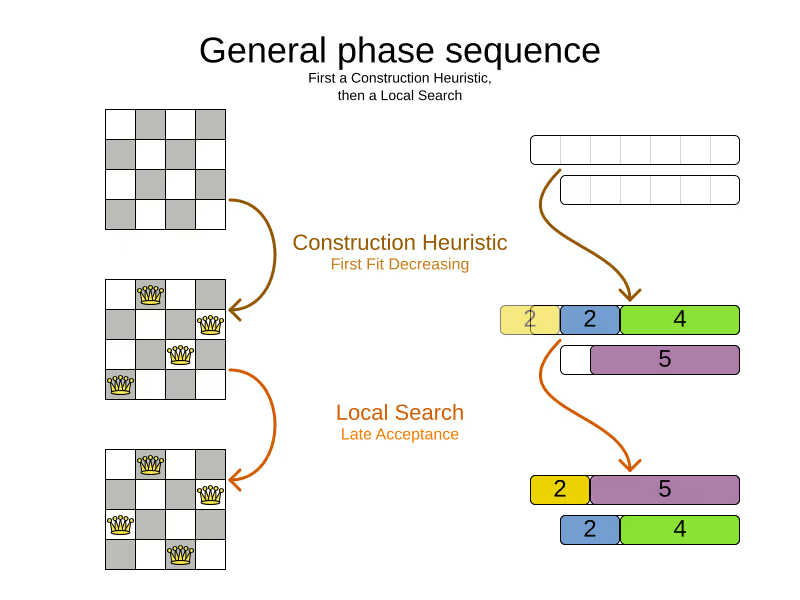
If the Local Search log line is missing (after the solver ends), the Construction Heuristic did not have enough time to initialize the entire solution, leaving no time for the Local Search algorithm. That returns an incomplete or infeasible solution.
Time spent
The log also exhibits how long each of those phases took, in milliseconds, relevant to the start of the solver:
12:18:04 INFO Solving started time spent (196) ...
12:18:04 INFO Construction Heuristic ended ... time spent (330) ...
12:18:34 INFO Local Search ended ... time spent (30000) ...
12:18:34 INFO Solving ended time spent (30000), ...
- The Solver initialization took
196milliseconds. - The Construction Heuristic took
330 - 196=134milliseconds.- For big datasets, if the CH takes more than one minute, it’s worth investigating why, even if the solver runs for hours.
- The Local Search took
30000 - 330=29670milliseconds.- LS gets the lion’s share of the time, as it should be.
Score quality
The log also reveals the solution quality after each algorithm:
INFO Solving started ... best score (-38init/0hard/0soft) ...
INFO Construction Heuristic ended ... best score (0hard/-11soft) ...
INFO Local Search ended ... best score (0hard/10soft) ...
INFO Solving ended ... best score (0hard/10soft) ...
- The starting score
-38init/0hard/0softindicates there are 38 unassigned planning variables. That’s because there are 19 lessons, each with 2 planning variables to initialize. - The Construction Heuristic ends with a solution of score
0hard/-11soft, which is already feasible (no hard constraints broken). That’s not always the case. - The Local Search improves the score further to score
0hard/10soft. That’s a difference of+21softin 29 seconds.
Performance
There’s also performance information to discover in the log. First ensure it’s an apples-to-apples comparison:
12:18:04 INFO Solving started ... environment mode (REPRODUCIBLE), move thread count (NONE) ...
...
12:18:34 INFO Solving ended ... environment mode (REPRODUCIBLE), move thread count (NONE).
- If the environment mode is any
ASSERTmode, performance is irrelevant, because the extra assertions are very expensive performance wise. - The move thread count indicates how many extra CPU cores it can consume.
NONEmeans all move calculations happen inside the solver’s thread, so only 1 CPU is exploited.
Both of these affect the score calculation speed, which shows how many moves were evaluated, normalized per second, for the solver entirely, but also each phase separately:
12:18:04 INFO Solving started ...
12:18:04 INFO Construction Heuristic ended ... score calculation speed (4358/sec) ...
12:18:34 INFO Local Search ... score calculation speed (12786/sec) ...
12:18:34 INFO Solving ended ... score calculation speed (12663/sec) ...
- The Construction Heuristic evaluated over 4000 moves per second.
- That’s actually pretty low, but it only ran for 134 milliseconds, so the overhead weighs in too much, lowering the number significantly. It should be run with a bigger dataset instead.
- Normally, the score calculation speed of the Construction Heuristic is higher than that of the Local Search, because it’s faster to calculate the score when half of the entities aren’t initialized yet.
- The Local Search evaluated over 12000 moves per second.
- That’s good. The LS score calculation speed should always be above 10 000 per second, even for big datasets.
- Do note that it ran for 29 seconds and a JVM can take a minute to warm up.
Keep an eye on the score calculation when adding/editing constraints, running the solver for same amount of time (typically 1 minute), to discover performance bottlenecks early. For more accurate performance investigations, use optaplanner-benchmark which supports warming up.
Steps
In essence, both the Construction Heuristic phase and Local Search phase run a double loop:
   for (Step step : steps) { // Outer loop
       for (Move move : moves) { // Inner loop
           // Evaluate move
       }
       // Take step
   }
The outer, step loop executes the best move found by the inner, move loop. Of course, this is a gross simplification: there are dozens of orthogonal AI subsystems on top of it. It’s only the tip of the iceberg. But it’s an honest simplification.
The INFO log shows how many of these outer loop iterations both phases did:
...
12:18:04 INFO Construction Heuristic ended ... step total (19).
12:18:34 INFO Local Search ended ... step total (26654).
...
- The Construction Heuristic did 19 steps. That’s because there are 19 lessons in the dataset. Each step assigns one lesson.
- The Local Search did over 26 000 steps. It continues iterating until the termination condition is hit. Each step modifies (often improves) the current solution.
Turn on DEBUG logging to get a log line per step too:
INFO  Solving started: time spent (619), best score (-38init/0hard/0soft), environment mode (REPRODUCIBLE), move thread count (NONE), random (JDK with seed 0).
DEBUG     CH step (0), time spent (650), score (-36init/0hard/0soft), selected move count (30), picked move ([Biology(18) {null -> Room A}, Biology(18) {null -> MONDAY 09:30}]).
DEBUG     CH step (1), time spent (661), score (-34init/0hard/0soft), selected move count (30), picked move ([Chemistry(28) {null -> Room A}, Chemistry(28) {null -> MONDAY 10:30}]).
DEBUG     CH step (2), time spent (672), score (-32init/0hard/0soft), selected move count (30), picked move ([Chemistry(17) {null -> Room A}, Chemistry(17) {null -> MONDAY 13:30}]).
...
DEBUG     CH step (17), time spent (741), score (-2init/0hard/-10soft), selected move count (30), picked move ([Spanish(22) {null -> Room B}, Spanish(22) {null -> TUESDAY 10:30}]).
DEBUG     CH step (18), time spent (744), score (0hard/-11soft), selected move count (30), picked move ([Spanish(23) {null -> Room B}, Spanish(23) {null -> TUESDAY 14:30}]).
INFO  Construction Heuristic phase (0) ended: time spent (768), best score (0hard/-11soft), score calculation speed (3910/sec), step total (19).
DEBUG     LS step (0), time spent (790), score (0hard/-5soft), new best score (0hard/-5soft), accepted/selected move count (1/1), picked move (Physics(27) {Room B, MONDAY 08:30} <-> Math(14) {Room A, MONDAY 08:30}).
DEBUG     LS step (1), time spent (791), score (0hard/-7soft),     best score (0hard/-5soft), accepted/selected move count (1/2), picked move (Spanish(33) {Room B -> Room C}).
...
DEBUG     LS step (19071), time spent (29996), score (0hard/7soft),     best score (0hard/10soft), accepted/selected move count (1/25), picked move (Geography(30) {Room C -> Room B}).
DEBUG     LS step (19072), time spent (30000), score (0hard/5soft),     best score (0hard/10soft), accepted/selected move count (0/25), picked move (English(20) {Room A, MONDAY 10:30} <-> Math(14) {Room A, MONDAY 14:30}).
INFO  Local Search phase (1) ended: time spent (30000), best score (0hard/10soft), score calculation speed (7927/sec), step total (19073).
INFO  Solving ended: time spent (30000), best score (0hard/10soft), score calculation speed (7858/sec), phase total (2), environment mode (REPRODUCIBLE), move thread count (NONE).
Again, this is a lot of information to digest.
The DEBUG lines display when a Local Search step improves the best solution:
INFO  Construction Heuristic ... best score (0hard/-11soft) ...
DEBUG     LS step (0) ... score (0hard/-5soft), new best score (0hard/-5soft) ...
DEBUG     LS step (1) ... score (0hard/-7soft),     best score (0hard/-5soft) ...
- LS step 0 improved the best solution from
-11softto-5soft. - LS step 1 didn’t improve the best solution of
-5soft.- It actually accepted a worse solution of
-7soft, which is mechanism to escape local optima, to improve the best solutions in later steps.
- It actually accepted a worse solution of
The DEBUG log even shows the winning move:
DEBUG LS step (0) ... picked move (Physics(27) {Room B, MONDAY 08:30} <-> Math(14) {Room A, MONDAY 08:30}).
This move swapped the Physics lesson with the Math lesson. The toString() method of your domain classes should return a short string (typically a name and/or ID) to keep the logs readable.
Moves
The DEBUG log reveals the number of moves selected per step, which is the number of inner loop iterations:
...
DEBUG     CH step (17) ... selected move count (30) ...
DEBUG     CH step (18) ... selected move count (30) ...
INFO  Construction Heuristic ended ...
DEBUG     LS step (0) ... accepted/selected move count (1/1) ...
DEBUG     LS step (1) ... accepted/selected move count (1/2) ...
...
INFO  Local Search phase (1) ended
...
Turn on TRACE logging to get a log line per move too, which exposes the score of each move evaluation:
INFO  Construction Heuristic ... time spent (395), best score (0hard/-11soft) ...
TRACE         Move index (0), score (0hard/-5soft) ...
DEBUG     LS step (0) ... score (0hard/-5soft), new best score (0hard/-5soft) ...
TRACE         Move index (0), score (-2hard/-6soft) ...
TRACE         Move index (1), score (0hard/-7soft) ...
DEBUG     LS step (1) ... score (0hard/-7soft),     best score (0hard/-5soft) ...
TRACE         Move index (0), score (-3hard/-7soft) ...
TRACE         Move index (1) not doable, ignoring move ...
TRACE         Move index (2), score (-2hard/-9soft) ...
TRACE         Move index (3), score (-2hard/-6soft) ...
TRACE         Move index (4), score (-2hard/-7soft) ...
TRACE         Move index (5), score (-1hard/-8soft) ...
TRACE         Move index (6), score (0hard/-4soft) ...
DEBUG     LS step (2) ... score (0hard/-4soft), new best score (0hard/-4soft)
...
Again, each TRACE line also shows the selected move:
TRACE Move index (0) ... move (Chemistry(28) {Room C -> Room A}).
This move changed the room of the Chemistry lesson.
Get started
Get started on your OptaPlanner enlightenment path today!
Turn on logging in:
- Plain Java: Add a dependency on
logback-classicand thelogback.xmlfile: <configuration>
<logger name="org.optaplanner" level="debug"/>
</configuration>- Or instead, add a dependency on an
slf4jbridge to your favorite logging system. - Quarkus: Add this line in
application.properties: quarkus.log.category."org.optaplanner".level=DEBUG- Spring Boot: Add this line in
application.properties: logging.level.org.optaplanner=DEBUG
The log is your friend! It tells you what OptaPlanner (now Timefold) is doing. Keep an eye on it.
Constraint Streams - Modern Java constraints without the Drools Rule Language
Traditionally, to scale out with OptaPlanner (now Timefold), you had to learn DRL. No more. With the new Constraints Streams API, inspired by Java 8 Streams and SQL, you can now write your constraints in Java (or Kotlin or Scala) and still benefit from incremental calculation.
Underneath, Constraints Streams (CS) still use the powerful Drools engine. We also still fully support score DRLs too. They are not deprecated.
Let’s start with an example. In nurse rostering, to avoid assigning shifts to employee Ann, you would write this constraint in DRL:
rule "Don't assign Ann"
    when
        Shift(getEmployee().getName() == "Ann")
    then
        scoreHolder.addSoftConstraintMatch(kcontext, -1);
end
This is the same constraint in Java using Constraint Streams:
Constraint constraint = constraintFactory
        .from(Shift.class)
        .filter(shift -> shift.getEmployee().getName().equals("Ann"))
        .penalize("Don't assign Ann", HardSoftScore.ONE_SOFT);
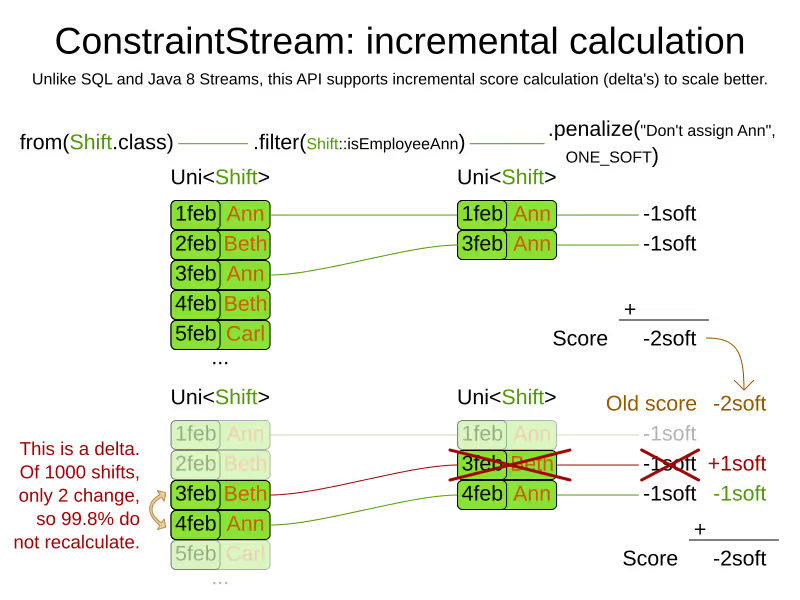
If you’re familiar with SQL or Java 8 streams, this should look familiar. Given a potential solution with four shifts (two of which are assigned to Ann), those shifts flow through the Constraint Stream like this:
This new approach to writing constraints has several benefits:
Incremental calculation
First off, unlike an EasyScoreCalculator, Constraint Streams still apply incremental score calculation to scale out, just like DRL. For example, when a move swaps the employee of two shifts, only the delta is calculated. That’s a huge scalability gain:
Indexing
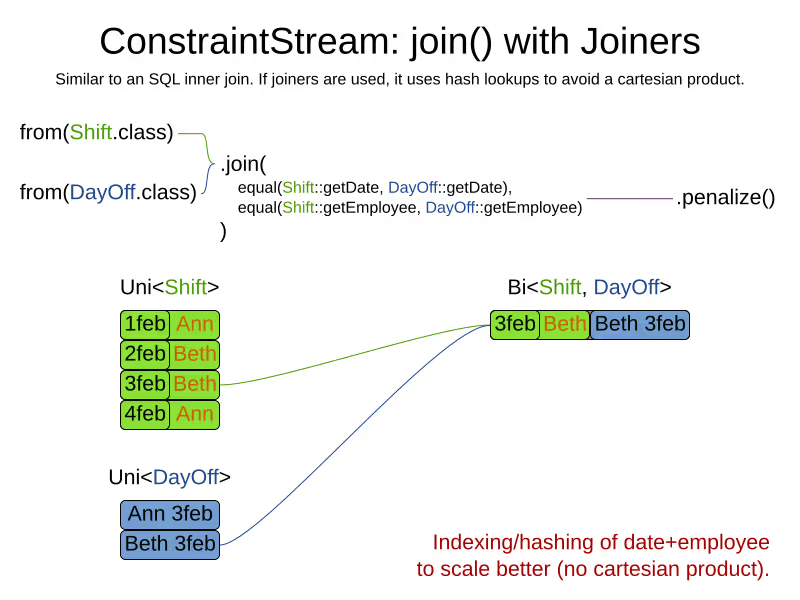
When joining multiple types, just like an SQL JOIN operator, Constraint Streams apply hash lookups on indexes to scale better:
IDE support
Because ConstraintsStreams are written in the Java language, they piggy-back on very strong tooling support.
Code highlighting, code completion and debugging just work:
Code highlighting
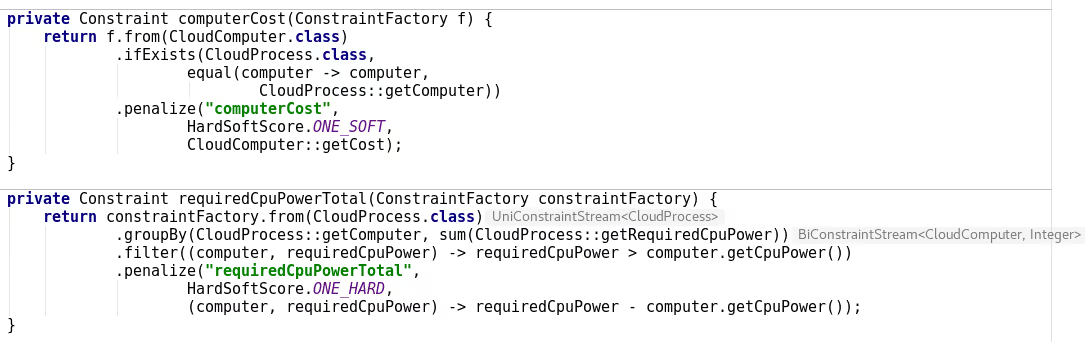
DRL code in IntelliJ IDEA Ultimate:
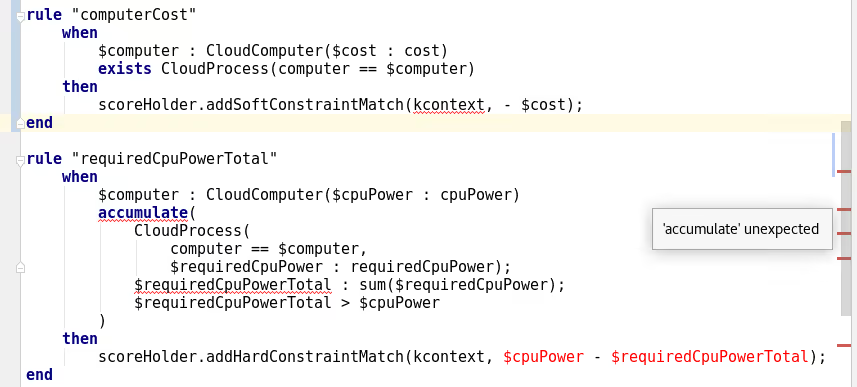
Java code using Constraint Streams in IntelliJ IDEA Ultimate, for the same constraints:
Code completion
Code completion for Constraint Streams:
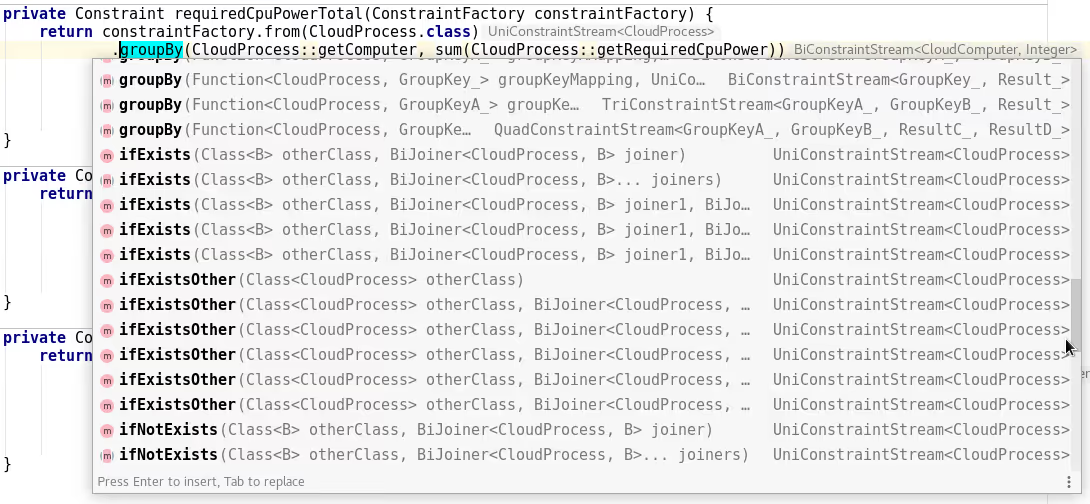
Of course, all API methods have Javadocs.
Debugging
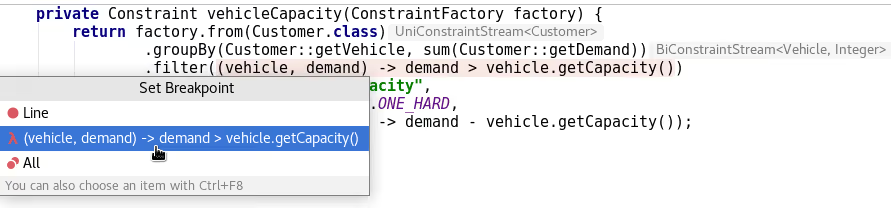
Add a breakpoint in ConstraintStream’s filter():
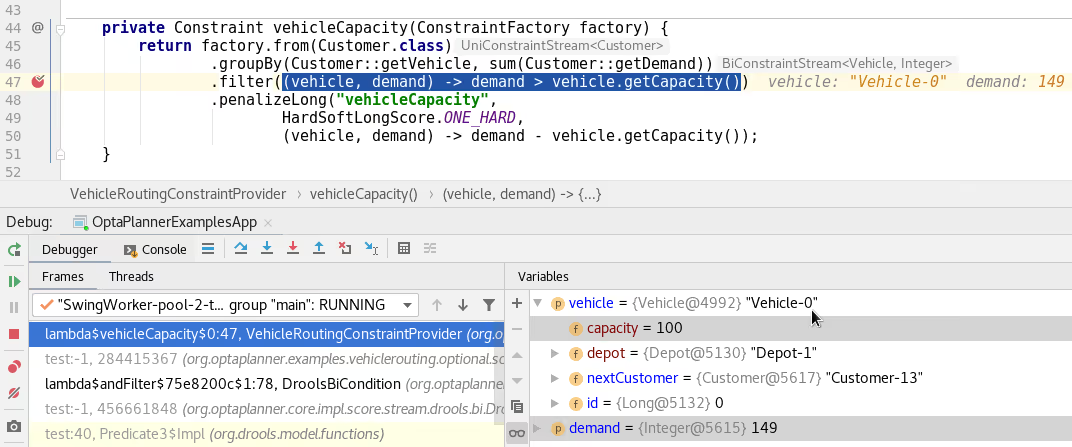
To diagnose issues while debugging:
Java syntax
Constraints written in Java with Constraint Streams follow the Java Language Specification (JLS), for good or bad. Similar logic applies when using Constraint Streams from Kotlin or Scala.
When migrating between DRL and Constraint Streams, be aware of some differences between DRL and Java:
- A DRL’s
==operator translates toequals()in Java. - Besides getters, DRL also allows MVEL expressions that translate into getters in Java.
For example, this DRL has name and ==:
rule "Don't assign Ann"
    when
        Employee(name == "Ann")
    then ...
end
But the Java variant for the exact same constraint has getName() and equals() instead:
constraintFactory.from(Employee.class)
        .filter(employee -> employee.getName().equals("Ann"))
        .penalize("Don't assign Ann", ...);
Advanced functions
The Constraint Streams API allows us to add syntactic sugar and powerful new concepts, specifically tailored to help you build complex constraints.
Just to highlight one of these, let’s take a look at the powerful groupBy method:
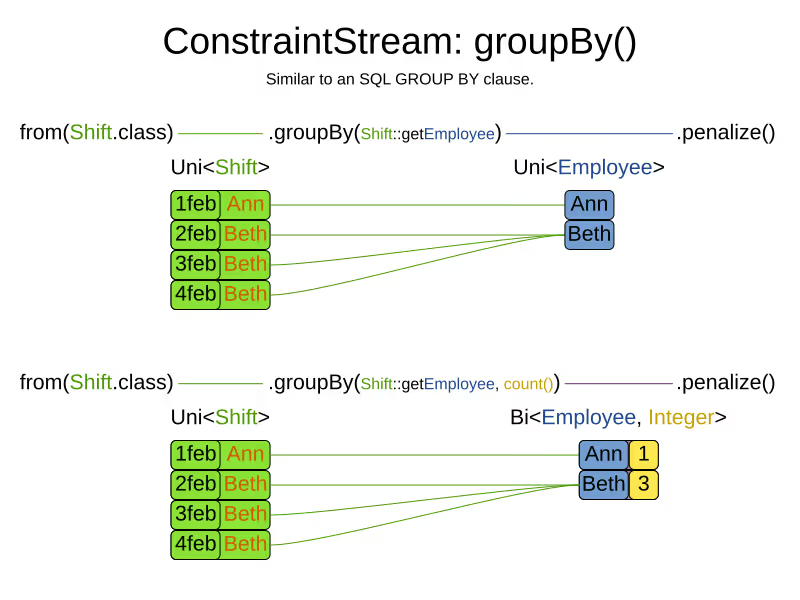
Similar to an SQL GROUP BY operator or a Java 8 Stream Collector, it supports sum(), count(), countDistinct(), min(), max(), toList() and even custom functions, again without loss of incremental score calculation.
Future work for Constraint Streams
First off, a big thanks to Lukáš Petrovický for all his work on Constraints Streams!
But this is just the beginning. We envision more advanced functions, such as load balancing/fairness methods to make such constraints easier to implement.
Right now, our first priority is to make it easier to unit test constraints in isolation. Think Test Driven Design. Stay tuned!
Java Reflection, but much faster
What is the fastest way to read a getter from a Java class without knowing the class at compilation time? Java frameworks often do this. A lot. And it can directly influence their performance. So let’s benchmark different approaches, such as reflection, method handles and code generation.
The use case
Presume we have a simple Person class with a name and an address:
public class Person {
   ...
   public String getName() {...}
   public Address getAddress() {...}
}
and we want to use frameworks such as:
- XStream, JAXB or Jackson to serialize instances to XML or JSON.
- JPA/Hibernate to store persons in a database.
- OptaPlanner to assign addresses (in case they’re tourists or homeless).
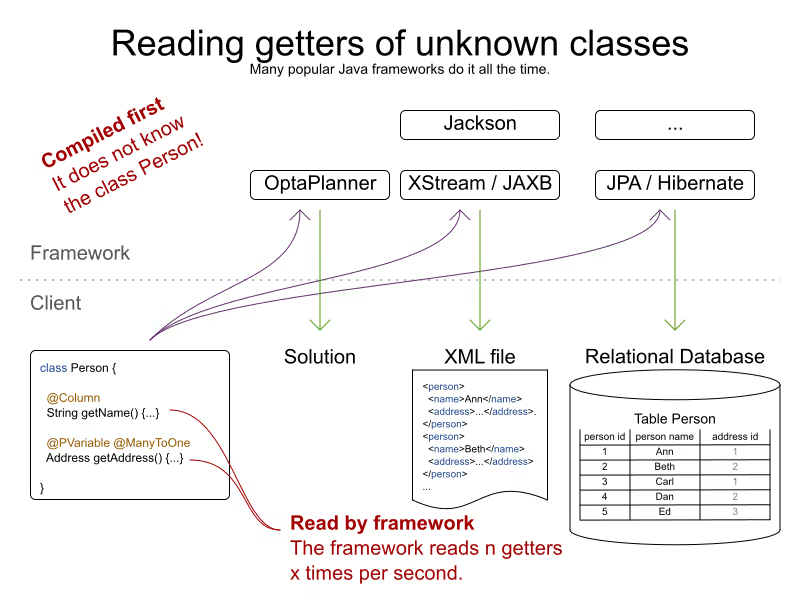
None of these frameworks know the Person class. So they can’t simply call person.getName():
   // Framework code
   public Object executeGetter(Object object) {
      // Compilation error: class Person is unknown to the framework
      return ((Person) object).getName();
   }
Instead, the code uses reflection, method handles or code generation.
But such code is called an awful lot:
- If you insert 1000 different persons in a database, JPA/Hibernate probably calls such code 2000 times:
- 1000 calls to
Person.getName() - another 1000 calls to
Person.getAddress()
- 1000 calls to
- Similarly, if you write 1000 different persons to XML or JSON, there are likely 2000 calls by XStream, JAXB or Jackson.
Obviously, when such code is called x times per second, its performance matters.
The benchmarks
Using JMH, I ran a set of micro benchmarks using OpenJDK 1.8.0_111 on Linux on a 64-bit 8-core Intel i7-4790 desktop with 32GB RAM. The JMH benchmark ran with 3 forks, 5 warmup iterations of 1 second and 20 measurement iterations of 1 second. All warmup costs are gone: increasing the length of an iteration to 5 seconds has little or no impact on the numbers reported here.
The source code of that benchmark is in this GitHub repository.
The TL;DR results
- Java Reflection is slow. (*)
- Java MethodHandles are slow too. (*)
- Generated code with
javax.tools.JavaCompileris fast. (*) - LambdaMetafactory is pretty fast. (*)
(*) On the use cases I benchmarked with the workload I used. Your mileage may vary.
So the devil is in the details. Let’s go through the implementations, to confirm I applied typical magical tricks (such as setAccessible(true)).
Implementations
Direct access (baseline)
I’ve used a normal person.getName() call as the baseline:
public final class MyAccessor {
    public Object executeGetter(Object object) {
        return ((Person) object).getName();
    }
}
This takes about 2.6 nanoseconds per operation:
Benchmark           Mode  Cnt  Score   Error  Units
===================================================
DirectAccess        avgt   60  2.590 ± 0.014  ns/op
Direct access is naturally the fastest approach at runtime, with no bootstrap cost. But it imports Person at compilation time, so it’s unusable by every framework.
Reflection
The obvious way for a framework read that getter at runtime, without knowing it in advance, is through Java Reflection:
public final class MyAccessor {
    private final Method getterMethod;
    public MyAccessor() {
        getterMethod = Person.class.getMethod("getName");
        // Skip Java language access checking during executeGetter()
        getterMethod.setAccessible(true);
    }
    public Object executeGetter(Object bean) {
        return getterMethod.invoke(bean);
    }
}
Adding setAccessible(true) call makes these reflection calls faster, but even then it takes 5.5 nanoseconds per call.
Benchmark           Mode  Cnt  Score   Error  Units
===================================================
DirectAccess        avgt   60  2.590 ± 0.014  ns/op
Reflection          avgt   60  5.275 ± 0.053  ns/op
Reflection is 104% slower than direct access (so about twice as slow). It also takes longer to warm up.
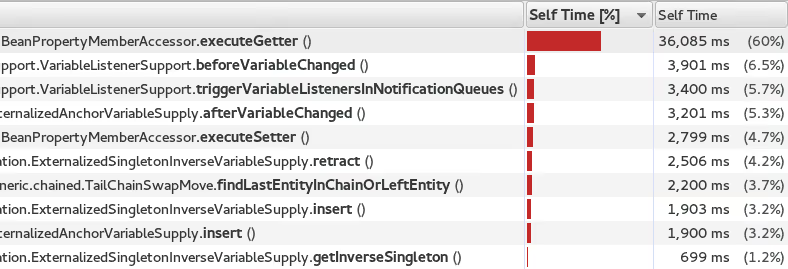
This wasn’t a big surprise to me, because when I profile (using sampling) an artificially simple Traveling Salesman Problem with 980 cities in OptaPlanner (now Timefold), the reflection cost sticks out like a sore thumb:
MethodHandles
MethodHandle was introduced in Java 7 to support invokedynamic instructions. According to the Javadoc, it’s a typed, directly executable reference to an underlying method. Sounds fast, right?
public final class MyAccessor {
    private final MethodHandle getterMethodHandle;
    public MyAccessor() {
        MethodHandles.Lookup lookup = MethodHandles.lookup();
        // findVirtual() matches signature of Person.getName()
        getterMethodHandle = lookup.findVirtual(Person.class, "getName", MethodType.methodType(String.class))
            // asType() matches signature of MyAccessor.executeGetter()
            .asType(MethodType.methodType(Object.class, Object.class));
    }
    public Object executeGetter(Object bean) {
        return getterMethodHandle.invokeExact(bean);
    }
}
Well unfortunately, MethodHandle is even slower than reflection in OpenJDK 8. It takes 6.1 nanoseconds per operation, so 136% slower than direct access.
Benchmark           Mode  Cnt  Score   Error  Units
===================================================
DirectAccess        avgt   60  2.590 ± 0.014  ns/op
Reflection          avgt   60  5.275 ± 0.053  ns/op
MethodHandle        avgt   60  6.100 ± 0.079  ns/op
Using lookup.unreflectGetter(Field) instead of lookup.findVirtual(…) has no notable difference. I do hope that MethodHandle will become as fast as direct access in future Java versions.
Static MethodHandles (update on 2018-01-11)
I also ran a benchmark with MethodHandle in a static field. The JVM can do more magic with static fields, as explained by Aleksey Shipilёv. Aleksey and John O’Hara correctly pointed out that the original benchmark didn’t use static fields correctly, so I fixed that. Here are the amended results:
Benchmark           Mode  Cnt  Score   Error  Units
===================================================
DirectAccess        avgt   60  2.590 ± 0.014  ns/op
MethodHandle        avgt   60  6.100 ± 0.079  ns/op
StaticMethodHandle  avgt   60  2.635 ± 0.027  ns/op
Yes, a static MethodHandle is as fast as direct access, but it’s still useless, unless we want to write code like this:
public final class MyAccessors {
    private static final MethodHandle handle1; // Person.getName()
    private static final MethodHandle handle2; // Person.getAge()
    private static final MethodHandle handle3; // Company.getName()
    private static final MethodHandle handle4; // Company.getAddress()
    private static final MethodHandle handle5; // ...
    private static final MethodHandle handle6;
    private static final MethodHandle handle7;
    private static final MethodHandle handle8;
    private static final MethodHandle handle9;
    ...
    private static final MethodHandle handle1000;
}
If our framework deals with a domain class hierarchy with 4 getters, it would fill up the first 4 fields. However, if it deals with 100 domain classes with 20 getters each, totaling 2000 getters, it will crash due to a lack of static fields.
Besides, if I wrote code like this, even first year students would come tell me that I am doing it wrong. Static fields shouldn’t be used for instance variables.
Generated code with javax.tools.JavaCompiler
In Java, it’s possible to compile and run generated Java code at runtime. So with the javax.tools.JavaCompiler API, we can generate the direct access code at runtime:
public abstract class MyAccessor {
    // Just a gist of the code, the full source code is linked in a previous section
    public static MyAccessor generate() {
        final String String fullClassName = "x.y.generated.MyAccessorPerson$getName";
        final String source = "package x.y.generated;\n"
                + "public final class MyAccessorPerson$getName extends MyAccessor {\n"
                + "    public Object executeGetter(Object bean) {\n"
                + "        return ((Person) object).getName();\n"
                + "    }\n"
                + "}";
        JavaFileObject fileObject = new ...(fullClassName, source);
        JavaCompiler compiler = ToolProvider.getSystemJavaCompiler();
        ClassLoader classLoader = ...;
        JavaFileManager javaFileManager = new ...(..., classLoader)
        CompilationTask task = compiler.getTask(..., javaFileManager, ..., singletonList(fileObject));
        boolean success = task.call();
        ...
        Class compiledClass = classLoader.loadClass(fullClassName);
        return compiledClass.newInstance();
    }
    // Implemented by the generated subclass
    public abstract Object executeGetter(Object object);
}
The full source code is much longer and available in this GitHub repository. For more information on how to use javax.tools.JavaCompiler, take a look at page 2 of this article or this article. In Java 8, it requires the tools.jar on the classpath, which is there automatically in a JDK installation. In Java 9, it requires the module java.compiler in the modulepath. Also, proper care needs to be taken that it doesn’t generate a classlist.mf file in the working directory and that it uses the correct ClassLoader.
Besides javax.tools.JavaCompiler, similar approaches can use ASM or CGLIB, but those infer maven dependencies and might have different performance results.
In any case, the generated code is as fast as direct access:
Benchmark           Mode  Cnt  Score   Error  Units
===================================================
DirectAccess        avgt   60  2.590 ± 0.014  ns/op
JavaCompiler        avgt   60  2.726 ± 0.026  ns/op
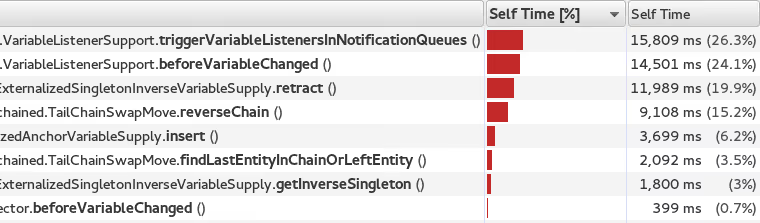
So when I ran that Traveling Salesman Problem again in OptaPlanner, this time using code generation to access planning variables, the score calculation speed was 18% faster overall. And the profiling (using sampling) looks much better too:
Note that in normal use cases, that performance gain will hardly be detectable, due to massive CPU needs of a realistically complex score calculation…
One downside of code generation at runtime is that it infers a noticeable bootstrap cost (as discussed later), especially if the generated code isn’t compiled in bulk. So I am still hoping that some day MethodHandles will get as fast as direct access, just to avoid that bootstrap cost and the dependency pain.
LambdaMetafactory (update on 2018-01-11)
On Reddit, I received an eloquent suggestion to use LambdaMetafactory:
Getting LambdaMetafactory to work on a non-static method turned out to be challenging (due to lack of documentation and StackOverflow questions), but it does work:
public final class MyAccessor {
    private final Function getterFunction;
    public MyAccessor() {
        MethodHandles.Lookup lookup = MethodHandles.lookup();
        CallSite site = LambdaMetafactory.metafactory(lookup,
                "apply",
                MethodType.methodType(Function.class),
                MethodType.methodType(Object.class, Object.class),
                lookup.findVirtual(Person.class, "getName", MethodType.methodType(String.class)),
                MethodType.methodType(String.class, Person.class));
        getterFunction = (Function) site.getTarget().invokeExact();
    }
    public Object executeGetter(Object bean) {
        return getterFunction.apply(bean);
    }
}
And it looks good: LambdaMetafactory is almost as fast as direct access. It’s only 33% slower than direct access, so much better than reflection.
Benchmark           Mode  Cnt  Score   Error  Units
===================================================
DirectAccess        avgt   60  2.590 ± 0.014  ns/op
Reflection          avgt   60  5.275 ± 0.053  ns/op
LambdaMetafactory   avgt   60  3.453 ± 0.034  ns/op
When I ran that Traveling Salesman Problem again in OptaPlanner, this time using LambdaMetafactory to access planning variables, the score calculation speed was 9% faster overall. However, the profiling (using sampling) still shows a lot of executeGetter() time, but less than with reflection.
The metaspace cost seems to be about 2kb per lambda in a non-scientific measurement and it gets garbage collected normally.
Bootstrap cost (update on 2018-01-25)
The runtime cost matters most, as it’s not uncommon to retrieve a getter on thousands of instances per second. However, the bootstrap cost matters too, because we need to create a MyAccessor for every getter in the domain hierarchy that we want to reflect over, such as Person.getName(), Person.getAddress(), Address.getStreet(), Address.getCity(), …
Reflection and MethodHandle have a neglectable bootstrap cost. For LambdaMetafactory it is still acceptable: my machine creates about 25k accessors per second. But for JavaCompiler it is not: my machine creates only about 200 accessors per second.
Benchmark                    Mode  Cnt        Score        Error  Units
=======================================================================
Reflection Bootstrap         avgt   60      268.510 ±     25.271  ns/op //    0.3µs/op
MethodHandle Bootstrap       avgt   60     1519.177 ±     46.644  ns/op //    1.5µs/op
JavaCompiler Bootstrap       avgt   60  4814526.314 ± 503770.574  ns/op // 4814.5µs/op
LambdaMetafactory Bootstrap  avgt   60    38904.287 ±   1330.080  ns/op //   39.9µs/op
This benchmark does not do caching or bulk complication.
Conclusion
In this investigation, reflection and (usable) MethodHandles are twice as slow as direct access in OpenJDK 8. Generated code is as fast as direct access, but it’s a pain. LambdaMetafactory is almost as fast as direct access.
Benchmark           Mode  Cnt  Score   Error  Units
===================================================
DirectAccess        avgt   60  2.590 ± 0.014  ns/op
Reflection          avgt   60  5.275 ± 0.053  ns/op // 104% slower
MethodHandle        avgt   60  6.100 ± 0.079  ns/op // 136% slower
StaticMethodHandle  avgt   60  2.635 ± 0.027  ns/op //   2% slower
JavaCompiler        avgt   60  2.726 ± 0.026  ns/op //   5% slower
LambdaMetafactory   avgt   60  3.453 ± 0.034  ns/op //  33% slower
Your mileage may vary.
Visualize the score and the constraints
So we solved the planning problem and found a best solution which has a score of 0hard/-123soft. Why -123soft? Where does that penalty come from? Which constraints are broken? Let’s see how we can break down the score and visualize the pain points in a UI.
Let’s approach this problem from two sides on the course scheduling example:
Break down score per constraint type
In the top-down approach, we split up the score per constraint type (so per score rule):
Constraint typeScore impactRoom capacity-100softRoom stability-40softCurriculum compactness-3softTotal-123soft
The room capacity constraint is broken the most: it causes for 81% (100/123) of the score loss. Maybe the school should invest in more classrooms?
Heat map with score impact per planning entity
In the bottom-up approach, we visualize the score impact per lecture:
- Red lectures impact hard constraints.
- Orange lectures impact only soft constraints. The higher the impact, the heavier the color.
- White lectures don’t impact the score.
As OptaPlanner, now continued as Timefold Solver, finds better and better solutions, there is less and less orange on the heat map. Looks like the history courses are particularly hard to schedule. Maybe the school should look for an additional history teacher?
(*) Notice that -1soft is shared by multiple lectures: 3 lectures break the room stability constraint together because two of them use a different room than the other one.
Show me the API
OptaPlanner 7 provides this information out of the box through the ConstraintMatch API:
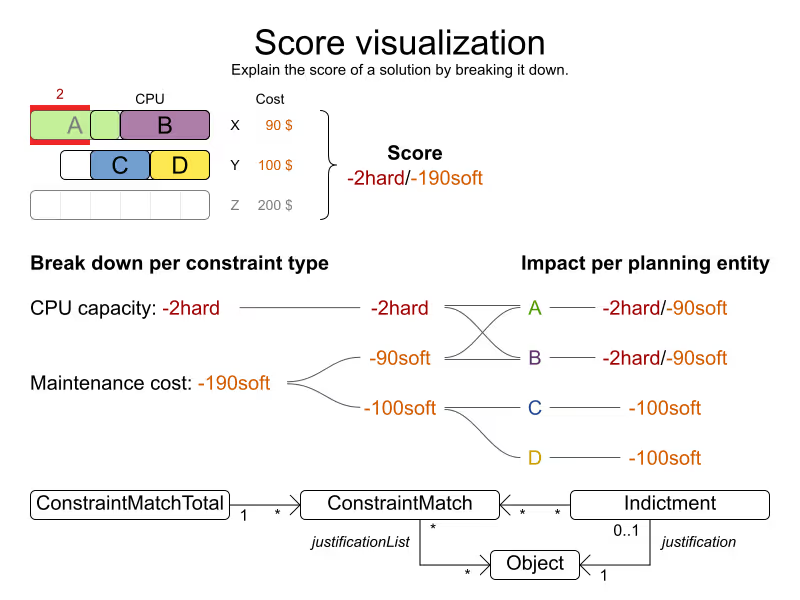
First build a ScoreDirector with Solver.getScoreDirectorFactory() and then:
- Break down the score per constraint type with
ScoreDirector.getConstraintMatchTotals(). EachConstraintMatchTotalrepresents one score rule and has its total score. - Determine the score impact per planning entity with
ScoreDirector.getIndictmentMap(). EachIndictmentholds the total score impact of one planning entity. Use that score to create the heat map in your UI.
Conclusion
Help the user make sense of the resulting score. Visualize which constraints and planning entities cause most harm.
Planned, planning education for real world stuff

When scheduling works, everything works.
Less waste. More control. Teams that trust the plan.