Blog
Technician scheduling software in 2027: Essential capabilities for modern field service
What should technician scheduling software actually do? Nine essential capabilities, from skill matching and SLA priorities to real-time replanning, explainability, and API integration.
Technician scheduling software assigns field technicians to jobs and plans their days so that the right person, with the right skills, arrives within the promised window without wasting hours on the road.
The best tools do this automatically across hundreds or thousands of technicians, and they keep the plan valid as the day changes.
Most products in this category show a calendar and a map. The difference between them is what happens underneath: whether the software can weigh skills, time windows, SLAs, travel, and working-hour rules together, or whether it leaves those tradeoffs to a dispatcher.
This guide lists nine capabilities that separate modern technician scheduling from a digital whiteboard. It's written for operations leaders comparing tools and for product teams at field service software companies deciding what their own scheduling engine needs.
Why technician scheduling has become harder
Two pressures are pushing field service teams to rethink how they schedule.
- The first is labor. In the US HVAC trade alone, industry estimates put the technician shortage at around 110,000 open positions. When every skilled technician counts, a schedule that wastes an hour of their day on avoidable driving is a real capacity problem.
- The second is expectations. Customers expect narrow arrival windows, live updates, and a fix on the first visit. Nobody wants to be anticipating their technician coming in all day.
Both pressures land on the schedule.
Nine essential capabilities
1. Skill and certification matching
The software should know what each job requires and what each technician can do, including certifications, seniority, languages, and equipment access. Hard requirements (a gas-safe certificate) should never be violated. Softer preferences (a technician the customer has worked with before) should be encouraged but not forced.
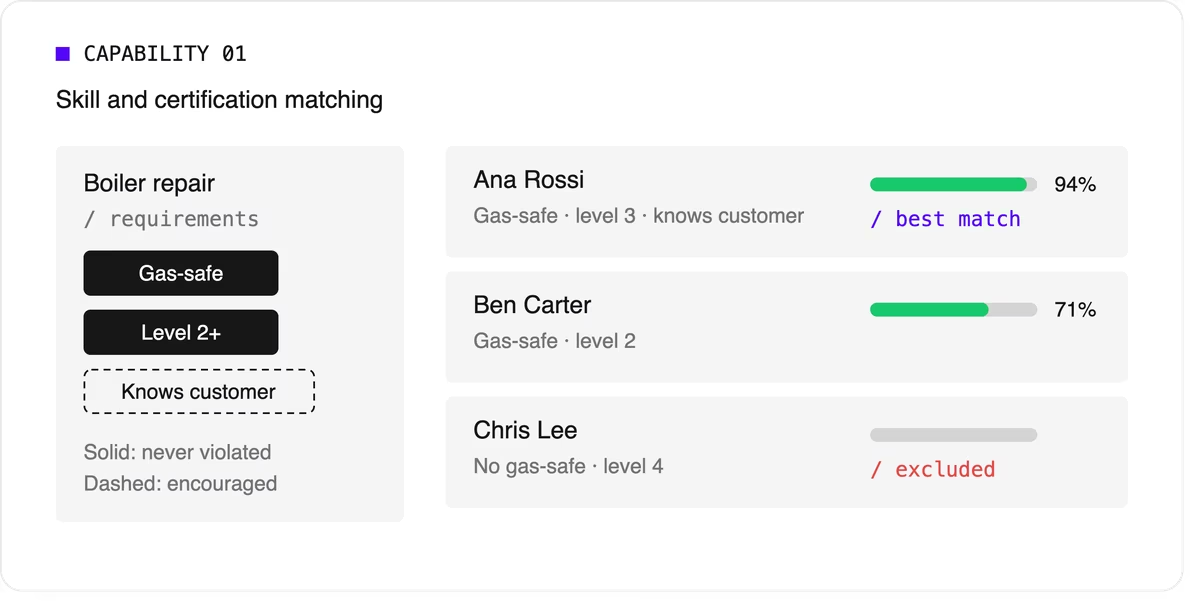
Look for support for skill levels and customer affinity in addition to simple yes-or-no skills. Matching the right skills is also one of the most direct ways to improve first-time fix rates.
2. Time windows and SLA priorities
Jobs come with customer availability windows, and many come with contractual deadlines.
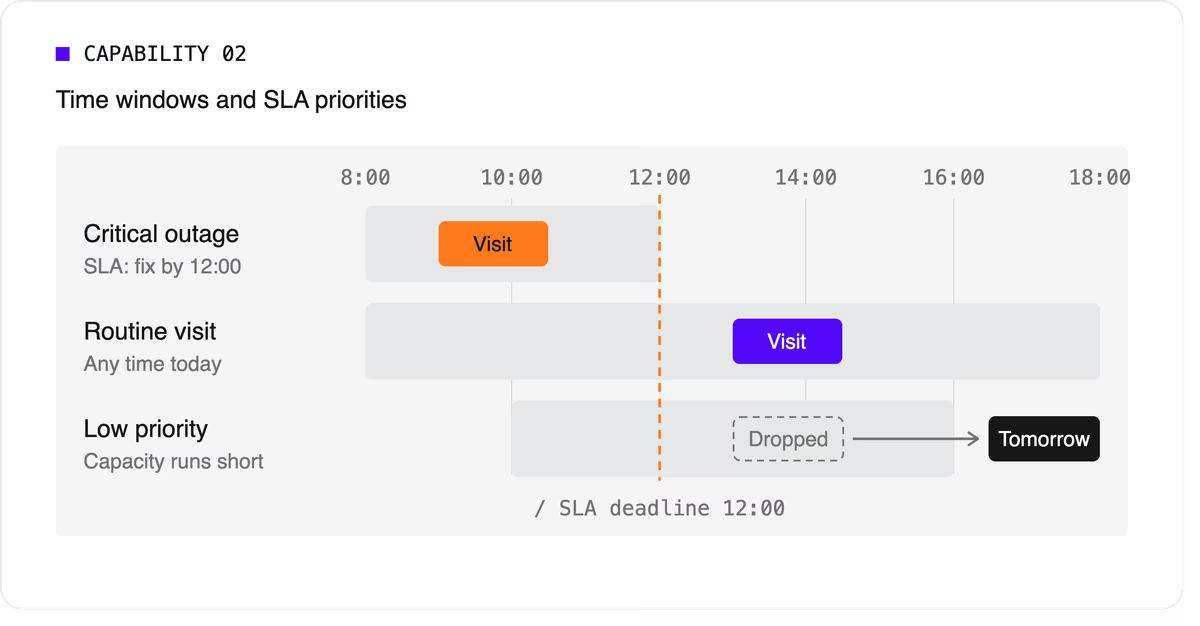
The software needs to treat a critical SLA differently from a routine visit that can move to tomorrow. That means supporting multiple time windows per job, priority levels, and deadlines that can push lower-priority work out of the plan when capacity runs short.
3. Travel-aware planning with real road data
A schedule that assumes straight-line distances will fall apart on the road. Technician scheduling software should use real travel times, ideally with support for traffic patterns and your own map provider if you already have one.
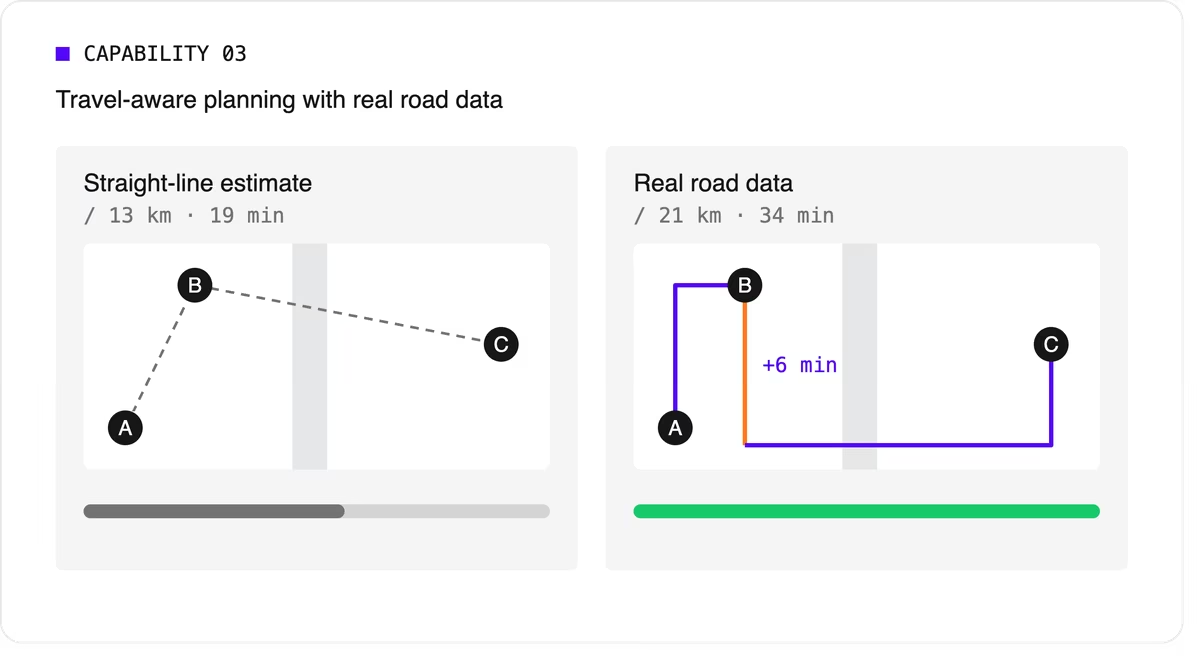
It should let you choose what to minimize, total travel time or total distance, because the two goals give different answers.
4. Multi-technician visits and job dependencies
Some jobs need two or more people on site at the same time for safety or lifting. Others must happen in order, sometimes with a delay: isolate the power before rewiring, or let a surface dry before painting.
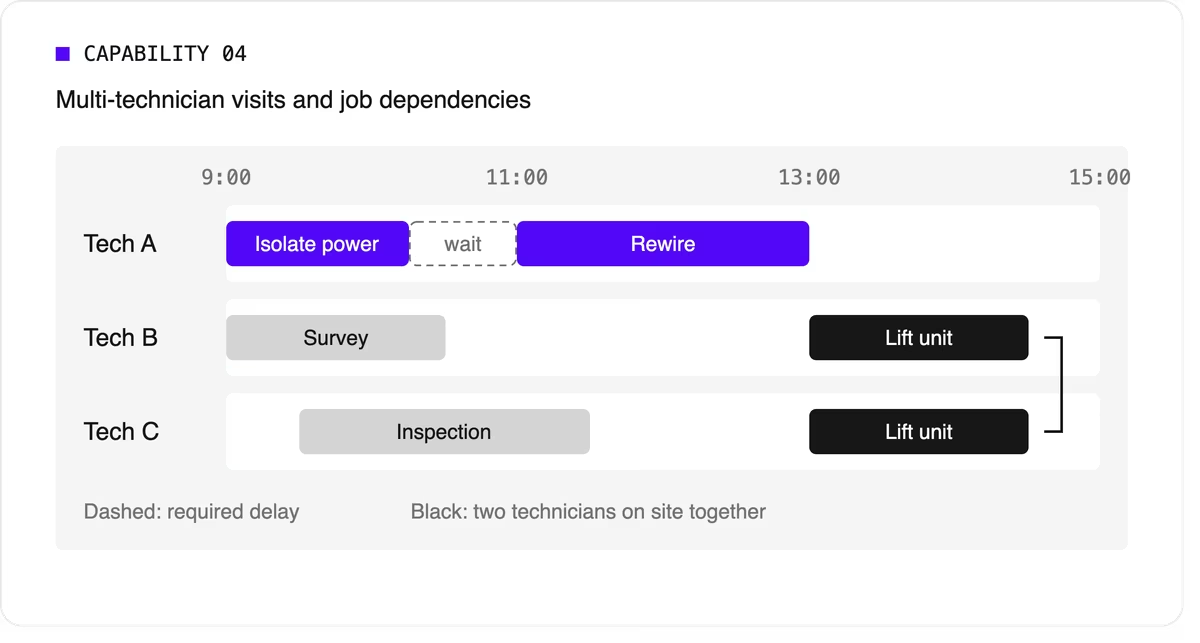
Many tools can't express these rules, so dispatchers track them by hand. If your operation has them, this capability is non-negotiable.
5. Working hours, breaks, and fairness
The plan has to respect shift start and end times, mandatory breaks, maximum working hours, and overtime rules. It should also spread work fairly so the same technicians don't always get the long days or the difficult jobs. Fairness affects retention, and retention matters more when technicians are hard to replace.
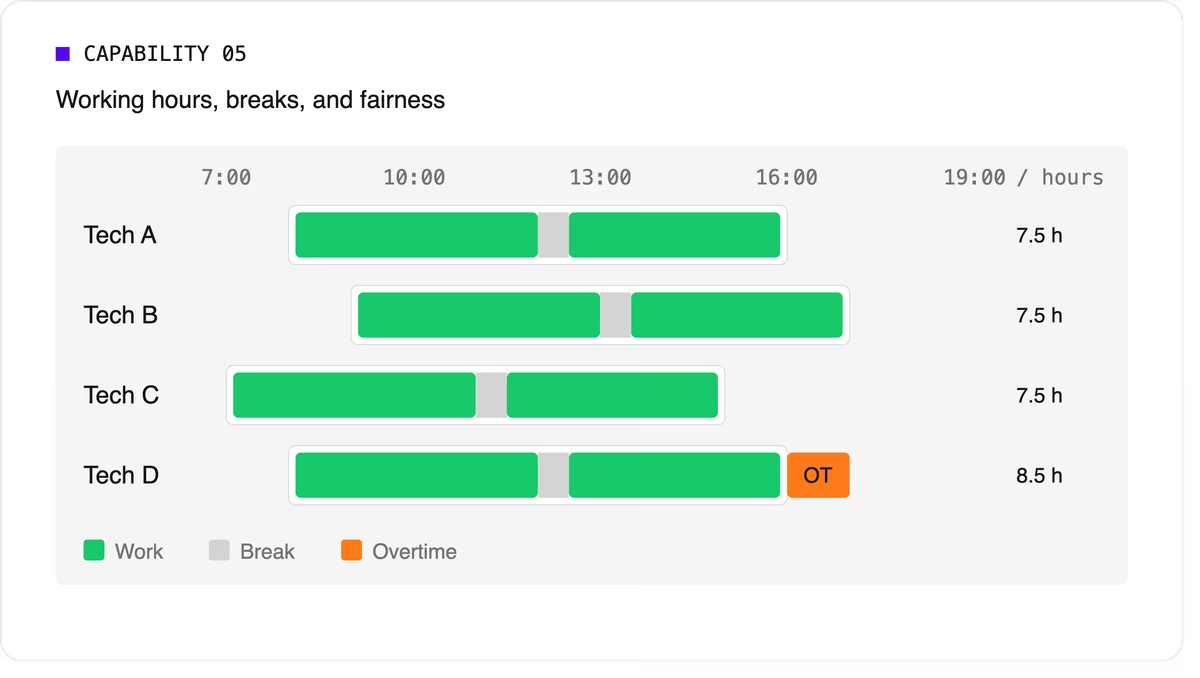
Scheduling software can support labor-law-style rules as constraints, but your organization remains responsible for verifying compliance with the regulations that apply to you.
6. Real-time replanning
Every schedule meets reality by mid-morning. A technician calls in sick, a job overruns, or an urgent call comes in. The software should replan quickly while changing as little as possible for everyone else. It should also let dispatchers lock (pin) jobs that are already in progress or confirmed with the customer.
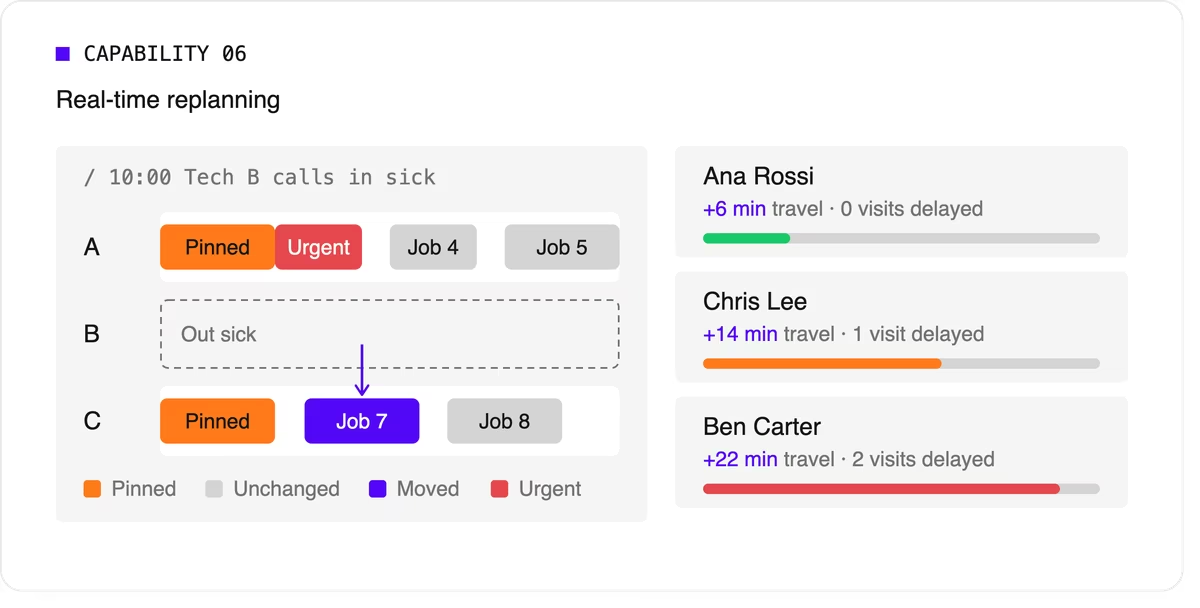
A strong version of this capability also recommends options. When a new urgent job arrives, the dispatcher should see which technicians could take it and what each choice would cost in travel or delayed work.
7. Explainability
Dispatchers and managers won't trust a plan they can't understand. Good technician scheduling software shows why a job was assigned the way it was, which rules were bent, and why some jobs couldn't be scheduled at all.
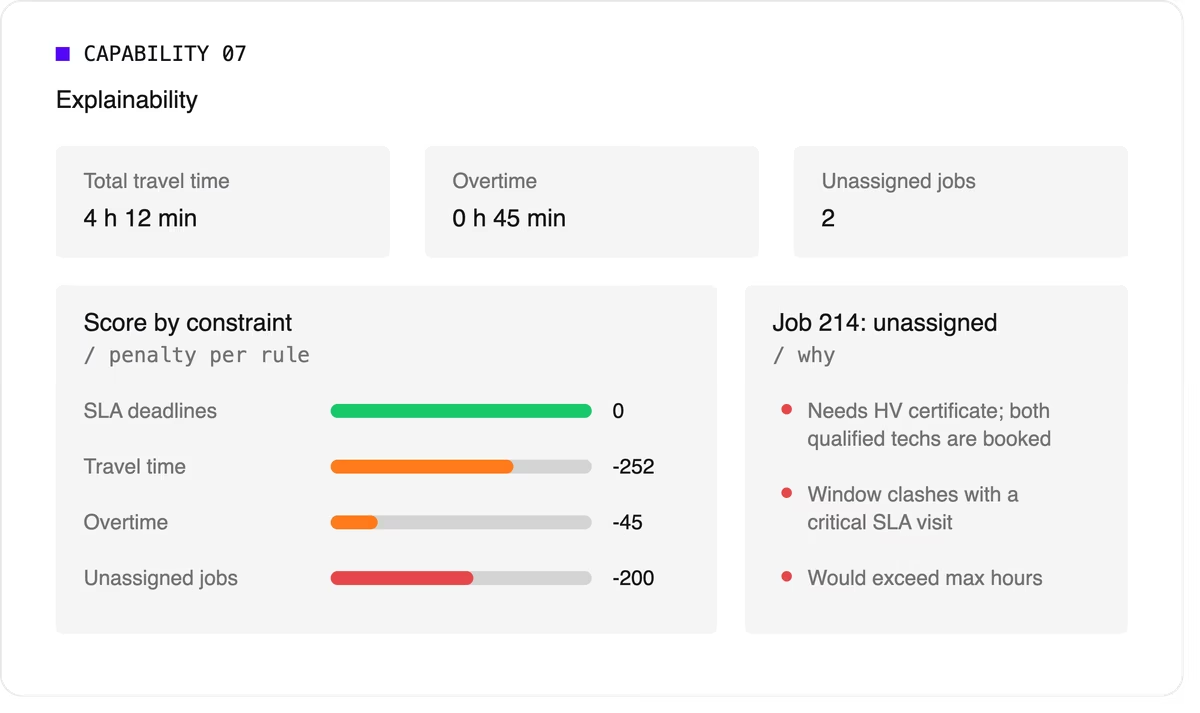
Look for a breakdown by constraint and clear metrics such as total travel time, overtime, and unassigned jobs.
8. Configurable priorities
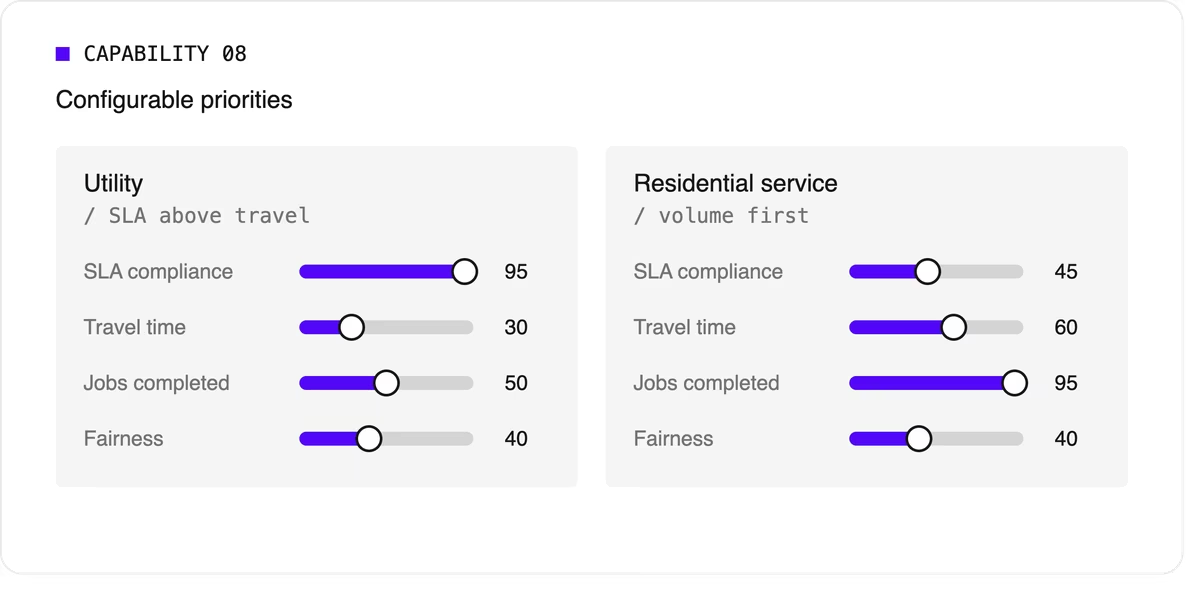
Every operation weighs its goals differently. A utility may put SLA compliance far above travel savings, while a residential service company may care most about completing as many jobs as possible per day. The software should let you adjust the relative weight of each goal without rewriting the underlying logic.
9. Integration and scale
Scheduling doesn't live on its own. It needs job data from your FSM or work order system, technician data from HR or workforce tools, and a way to push the finished plan to mobile apps. An API-first design makes this far easier than a closed tool with a separate interface.
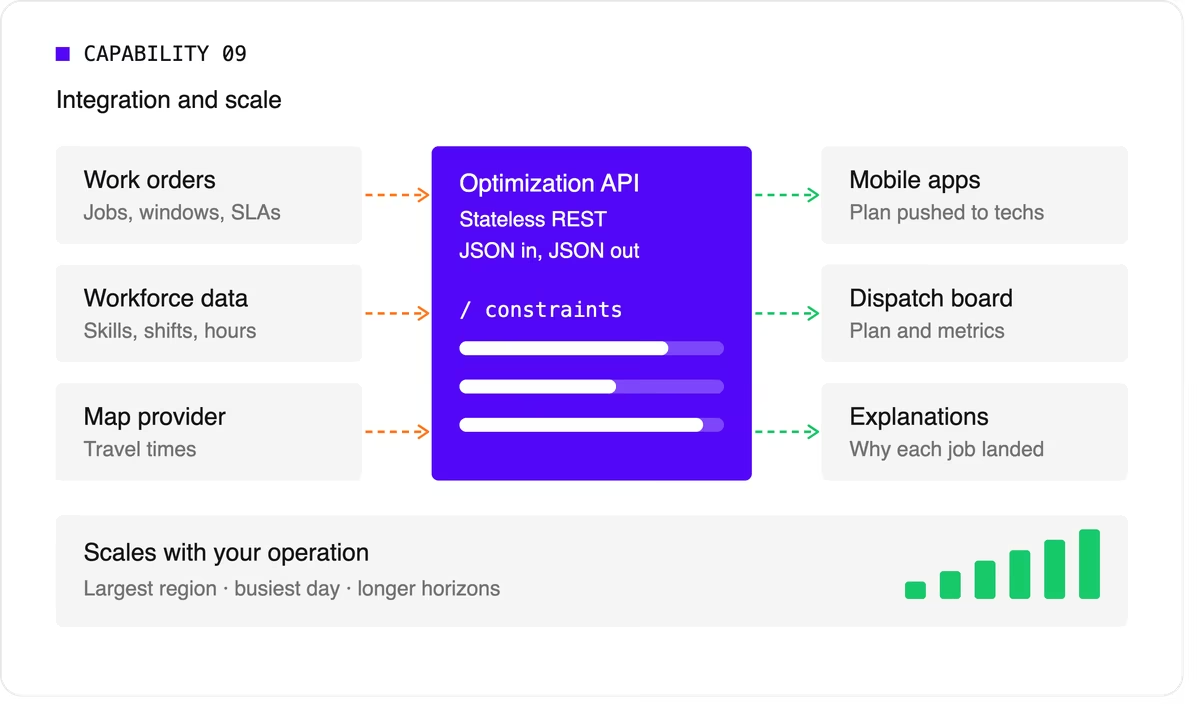
Scale matters too. The software should handle your largest region on your busiest day, and it should keep up as you add technicians, regions, or longer planning horizons.
A quick evaluation checklist
Use this table when comparing technicians scheduling software options or reviewing your own engine.
Scheduling software, FSM platform, or optimization engine?
When people search for technician scheduling software, they find three kinds of product.
- FSM platforms with a built-in scheduler cover the full workflow: work orders, mobile apps, invoicing, and scheduling. Their scheduling depth varies widely, from drag-and-drop boards to real optimization.
- Standalone scheduling tools focus on the dispatch board and often add basic auto-assignment. They're quick to adopt but can struggle with complex constraints.
- Optimization engines sit behind a user interface and do the heavy lifting. They don't manage work orders or invoices. Instead, they take in jobs, technicians, and rules, and return an optimized plan through an API. FSM vendors often embed one to strengthen their own scheduling, and large enterprises use one to add optimization to systems they already run.
Where Timefold fits
Timefold is an optimization engine in the third group. The Timefold Field Service Routing model covers the capabilities above: skill and seniority matching, customer time windows, visit dependencies with delays, multi-technician visits, working hours and fairness, and real-time replanning with recommendations. It ships with 50+ pre-configured constraints with adjustable weights, and every plan comes with metrics that show the tradeoffs it made.
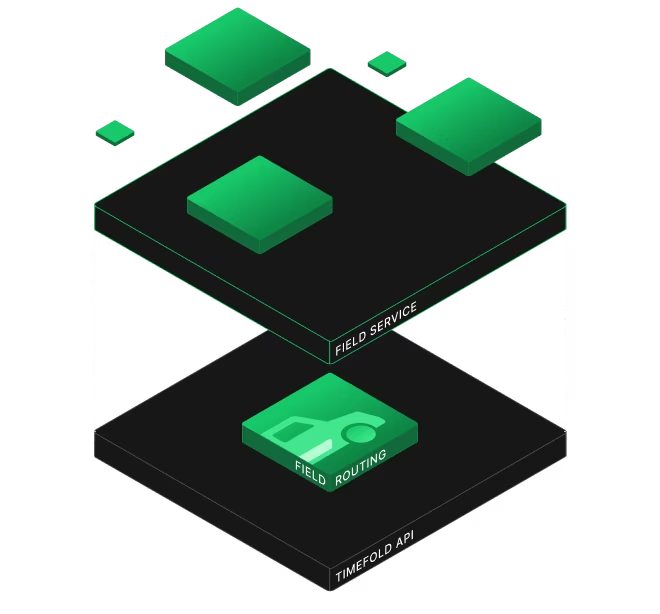
It connects through a stateless REST API, so it fits alongside the FSM or work order system you already use. To see how this applies to field teams specifically, read about route optimization for field technicians. If you're preparing to integrate, the data foundations of efficient field service walks through the data you'll need.
FAQ
What does technician scheduling software do?
It assigns jobs to technicians and plans each technician's day, taking skills, time windows, travel, and working hours into account. More advanced tools optimize the whole plan at once and replan automatically when things change.
What's the difference between technician scheduling and dispatching?
Technician scheduling creates the plan ahead of time. Dispatching sends technicians to jobs and manages changes during the day. Modern software blends the two by replanning continuously.
Do I need technician scheduling software if I have an FSM platform?
It depends on how deep your FSM's scheduling goes. If dispatchers still spend hours adjusting assignments by hand, or your FSM can't express rules like dependencies or multi-technician visits, an optimization engine behind your FSM can close the gap.
How many technicians do I need before scheduling software is worth it?
There's no fixed number. Complexity matters more than headcount. A team of 20 with several skill types, tight SLAs, and multi-technician jobs can benefit as much as a team of 200 with simple, uniform work.


Optimization: The hidden engine that moves the world?
When I studied in Finland almost a decade ago, our school visited the Rolls-Royce factory in Kokkola. The entire class was buzzing! Rolls-Royce! A household name for luxury cars and price tags that make my eyes water. It was a little bit suspicious though. How come such a luxury brand had a factory in the fairly unknown village where we were studying?

The answer became clear as soon as we arrived at the very unassuming factory. As it turns out, this factory was part of the Maritime department of Rolls Royce (not even the same legal entity as the car department), which created waterjet propulsion engines, the systems that make massive ships glide across oceans. Just the engines!
We were all a bit disappointed we weren’t going to see any of the legendary cars. But the more we learned, the more appreciation I got for these engines that made even the largest ships move. A sentiment I feel at Timefold all the time.
Optimization is the engine
Whenever I talk to people about the work we do at Timefold, and the possibilities in the wider field of Optimization, I am always greeted with excitement when talking about the results.
- “Wow, you can save that much money?”
- “You mean my workforce will spend 25% less time in their cars?”
- “How many million kilogram CO2 did you save?!?”
When they hear about these gains, people want to get started immediately, integrating these technologies into their pet projects, their business and their hobbies (a friend of mine is making a optimized Karaoke Machine… planning problems sure are everywhere ;)). I share their excitement.
But then come the follow-up questions:
- “So where do I manage my employees?”
- “Do you have a full user interface for that?”
- “Can I setup special rules for my specific use case?”
To which my retort usually is:
Do you need another system to do those things? Or do you already have something?
Quite often, the companies I talk to already invested a lot in the software they already have and are quite hesitant to drag in “yet another tool”. But that’s the great thing about this part of the tech industry:
Optimization isn’t a full product. It’s an engine.
It’s not a replacement for what you have already built, it’s an upgrade. It’s a high-performant engine that turns your existing systems into something faster, cheaper and more efficient.
Then who builds the rest of the boat?
Business processes are deeply specific. A logistics platform doesn’t look like a workforce management tool. A hospital’s scheduling needs have little in common with a retail warehouse.
Even multiple companies in the same sector might looks fairly different. That’s why vendors of optimization technology rarely build full user experiences. It’s almost impossible to design one that fits every scenario.

So then who builds the other things needed to make the business tick?
Either a business has a large IT department themselves, where they build the software they require. Or they buy existing software packages for Workforce Management (WFM), Field Service or any other use case.
Quite often, these IT people have all the knowhow they need to integrate optimization into an existing system. They know:
- Where the planning data lives: in CRMs, ERPs, spreadsheets, or the classic homegrown system that’s somehow still running after fifteen years.
- How to access it: through APIs, connectors, or custom integrations that already speak the organization’s language.
- How it should look: polished interfaces, dashboards, and workflows that make sense for their industry and users.
It is up to us, optimization experts and companies, to make integrating that engine as easy as possible.
We don’t build the ship, we make It fly across the water
I remember walking into that Rolls-Royce factory excited, but puzzled. “How can a company survive by building only engines?”
Now I get it. That’s exactly what we do with planning optimization.
We build what pushes businesses forward, even if no one ever sees it. Like those engines in Kokkola, our work lives mostly below the surface… it makes what people build around it move faster and more efficient than ever before.
Engines don’t cross oceans, they power the things that do.

The box that taught us to zoom out: Optimization lessons from container shipping
A few weekends ago, during the summer holiday, my wife and I had a little romantic getaway in Amsterdam. As hotels were a bit pricey in the city center, we decided to take a hotel in the harbor instead. On our walk back to the hotel one evening, I saw a container ship float by and I had one of my moments of childlike curiosity: “How did we end up using containers for shipping?”
As it turns out… “optimization” is a big part of the answer to that question.
Old days of shipping
Before shipping containers became a thing, shipping looked a lot different. Every item was shipped separately and stored on deck or in the cargo hold. While sometimes kegs or crates were used to keep items together, there was no single uniform shape.
In those days, there were also *optimization experts* called “stevedores”. Stevedores were responsible for loading and unloading cargo from boats. This wasn’t just a very physically intense job, but also one which required good insights into how to load the boat as efficiently as possible.

In essence, stevedores were solving giant 3D jigsaw puzzles to fill the boat to the max, except in this case, the puzzle pieces were all odd shapes, and the boat might capsize if they fail to balance the weight correctly.
Parents who go with their young children on a holiday know exactly what that puzzle game feels like. Minus the capsizing of course! 😊
Not only was this a difficult and dangerous job, it was also very slow. Every item had to be loaded and unloaded individually which sometimes caused them to spend more time docked than actually traveling at sea. It wasn’t much better for the rest of the logistics either, as the same inefficiencies were also present when transporting the goods by train or truck.
Despite all that, it felt “optimized” at that time, there just seemed to be no better way to transport items across the world. Especially not by adding big square boxes to the mix! That seemed like an awful idea. A square metal box couldn’t possibly compare to the artistry of a skilled stevedore who could wedge a piano next to a barrel of whiskey and three sacks of potatoes! Or could it?
Containers and throughput
What initially looked like inefficiency turned out to be revolutionary. After some early examples of containers failing to gain widespread adoption, Malcolm McLean, a US trucking entrepreneur dubbed the ‘father of containers’, came up with a prototype container in the 1950s which could be used across boats, trains, and trucks.
While the idea sounds simple, its innovation was because of its holistic approach. Where previously the focus was on *optimizing what can be loaded on a boat*, that focus shifted to *optimizing the throughput of goods.* From the narrow view of getting better at transporting items by boat to the holistic view of *transporting items as best as possible from origin to destination.*

At least initially, containers mainly reduced the transfer time between modes of transport. It wasn’t until some time later that those modes of transport began optimizing for transporting as many containers as they could in a single go, making transporting goods faster than ever before.
Optimization lessons contained in containers
The history of containers holds a simple truth about optimization: you rarely fix everything at once. In shipping, containers didn’t eliminate the stevedore’s Tetris problem, they just shrank it. Instead of balancing pianos with whiskey barrels and potato sacks on a whole ship, the challenge became fitting goods neatly into a 40-foot steel rectangle. Similar puzzle, smaller board.
And that was enough to change the world. By zooming out from “how do we cram more onto a single boat?” to “how do we move goods from origin to destination faster?”, containers unlocked opportunities across the entire supply chain.
The same applies today. You may not be able to optimize every process in your organization at once. But even tackling a small segment, a schedule, a route, a workflow, can free up time and resources that ripple outward in unexpected ways.
In the end, real innovation happens when we stop obsessing over micro-efficiencies and allow human ingenuity to focus on the bigger picture. Optimization isn’t about doing the same thing better, it’s about creating space for us to ask better questions.

Where models end, planners begin
I live about 2km away from “De Schorre” in Boom (Belgium), or as most people probably know it: the location where the Tomorrowland festival is hosted. It is genuinely one of the most beautiful festivals I’ve ever been to, and I remember thinking: “Wow, pulling all of this off must require a lot of planning”.
If there is something I love doing, it’s looking at these kinds of “close to home” (literally in this case!) planning problems and trying to figure out how I would model them. From the stage-builders, to the stewards and of course the artists and stages, everything needs a plan, a schedule to make it all work together like a symphony.
Stage and artist schedule planning
Modeling time! I don’t know a lot about organizing a festival or music concerts, so I limited my scope to just assigning artists to stages. These are a few of the constraints I came up with.
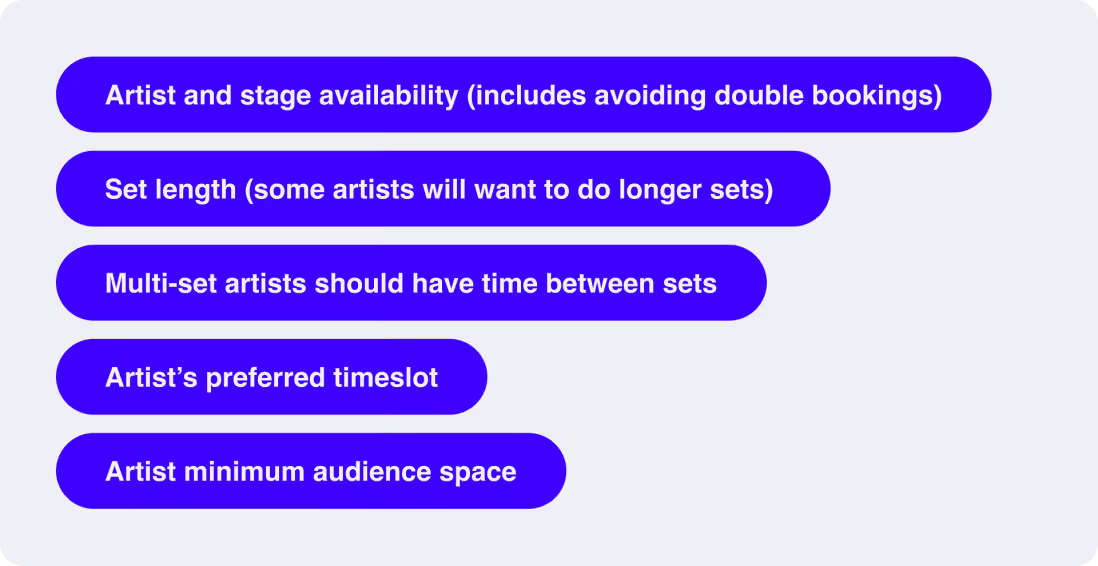
I thought this was pretty good already. I could build the model and ship it! That is, until I talked to a friend who knows a couple things about planning festivals and he made it very clear I was missing a few essential elements.
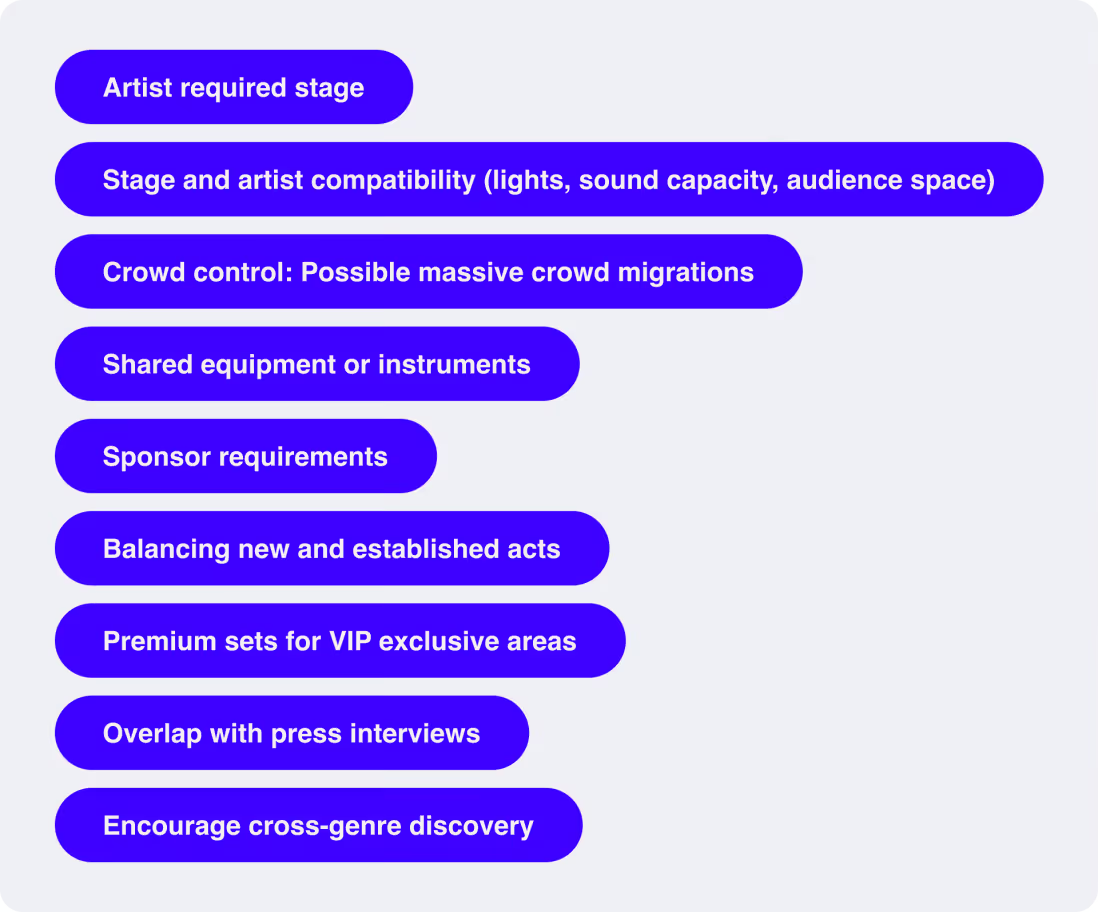
All of these make a lot of sense and I completely missed them! This is something I see a lot at Timefold. Whenever I speak to human planners, especially when it’s not a use case we’ve explored with our pre-built models, I often come back with some new or unexpected constraints.
This brings up an important point: You can’t build a good model without input and validation by the real heroes, the human planning experts. Essentially, modeling is embedding the expertise and know-how of human experts and making it scale beyond the planners own capacity.
When we create a new model, does that mean we can just talk to a human planner, “capture” their knowledge, and then produce a fully working planning system which can live without human interaction?
Balancing modeling vs human intuition
No matter how long you spend creating the ultimate model, even after talking to thousands of human experts, there will always be times when you hear the expression, “This plan doesn’t feel right.”
Quite often this means we are missing some hidden intangible constraint, perhaps something the human planner themselves can’t really put to words because it comes from a place of intuition and experience. This is a common yet tricky situation: either we figure out what’s missing, or the planner will get stuck with this feeling… and feelings are a powerful thing.
In the case of planning events (or festivals), I have heard the expression, “This doesn’t vibe well”. I have not yet figured out how to create the constraint to optimize for “vibes”.
However, while I believe feelings are always valid, they aren’t always rational. In planning, a schedule that feels better might actually be much worse if you look at it through the emotionless lens of the mathematical scoring function. Giving that young DJ a chance on a bigger stage, or putting 2 high intensity acts back-to-back might feel better but it could negatively affect the raw “score” of your schedule.
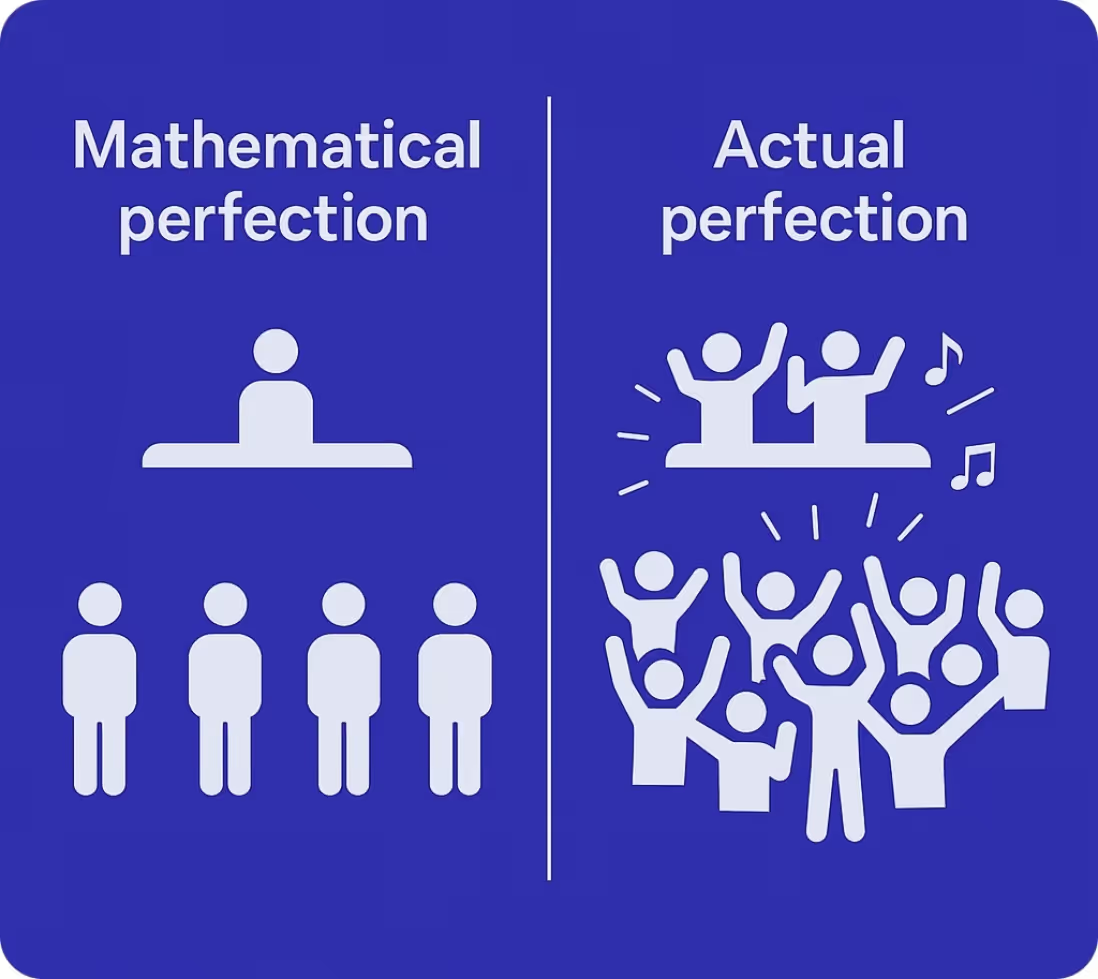
The real best solution, the golden path, is probably somewhere in between mathematically perfect and emotionally excellent. So even after using computers to optimize a plan, human planners improve the schedule further by embedding some empathy, emotion, and nuance into the schedule.
And that’s without the chaos of reality
People who have watched the news lately know where this is going. 2 days before opening the main stage at Tomorrowland, a real piece of art people work years to produce, burned down in a couple of hours. A real drama and any carefully crafted symphonic plan… well… not usable anymore.
Eventually, this happens to every plan, just to varying degrees. Whenever a plan meets reality, it’s almost never a 100% fit… and if it is, it doesn’t stay like that for long. Employees get sick. Delivery vehicles break down. Systems crash. Budgets get slashed.

The real challenge is not to plan, but to adapt when life throws a wrench into your schedule.
The Tomorrowland team quickly came up with 2 alternative solutions, but 1 of them sparked my interest the most. They had a stage at the camping ground and they could label that one “the main stage” and carry on. The problem is, the camping ground is pretty far away from the actual festival ground. The festival would essentially be split: main grounds and camping.
So what would have happened if I’d run it through my optimization algorithm? It would have probably moved some of the main stage artists to the festival ground due to the “artist minimal audience space” constraint. Without anything to avoid making too many changes (like an anti-disruption constraint) that would have been the mathematically more optimal solution.
Instead what they wanted to do was much more empathic: since the people on the camping ground would only have 1 stage, they would get all the main stage artists, aka most big names. From a planning perspective, it’s also easier as the schedule remains essentially the same. It just feels like a much better solution.
In the end, they didn’t even have to go for this solution as, due to acts that can only be described as “heroic”, they managed to clean up and build a new main stage with only a couple of hours delay.
Planning is human
Planning isn’t just about satisfying constraints or optimizing for the perfect score. It’s about translating human values, intuition, and adaptability into something machines can assist with but will probably never fully replace.
It’s clear that behind every great plan is a human making judgment calls that no algorithm can foresee. At its best, planning technology doesn’t replace the human expert, it amplifies them. It allows them to see and act on solutions they might not have seen on their own and gives them the freedom to shape those possibilities with empathy and insight.
So yes, let’s model, optimize, and automate where we can, but let’s never forget: planning is, and always will be, profoundly human.

Integrating Timefold with Bryntum: A practical guide
Intro
Whether you’re building a scheduling solution for employee rosters, field services, or machines, it should be visually intuitive and smart enough to handle constraints, preferences, and changes. Don't settle for building another simple planning tool when you can implement a system that optimizes plans, does more with the same resources, and adapts to shifting scenarios.
This is exactly what we help you achieve with our Timefold x Bryntum partnership.
Timefold is an AI-driven constraint solver for scheduling, shift planning, and routing. Bryntum Scheduler is a high-performance, drag-and-drop timeline UI component that renders interactive schedules. Together, they allow you to build optimized and attractive planners.
How it works: A technical overview
Timefold and Bryntum are both modular and technology-agnostic. You can plug them into any system architecture with minimal friction, whether it's a monolithic, microservices, or hybrid setup.
Timefold
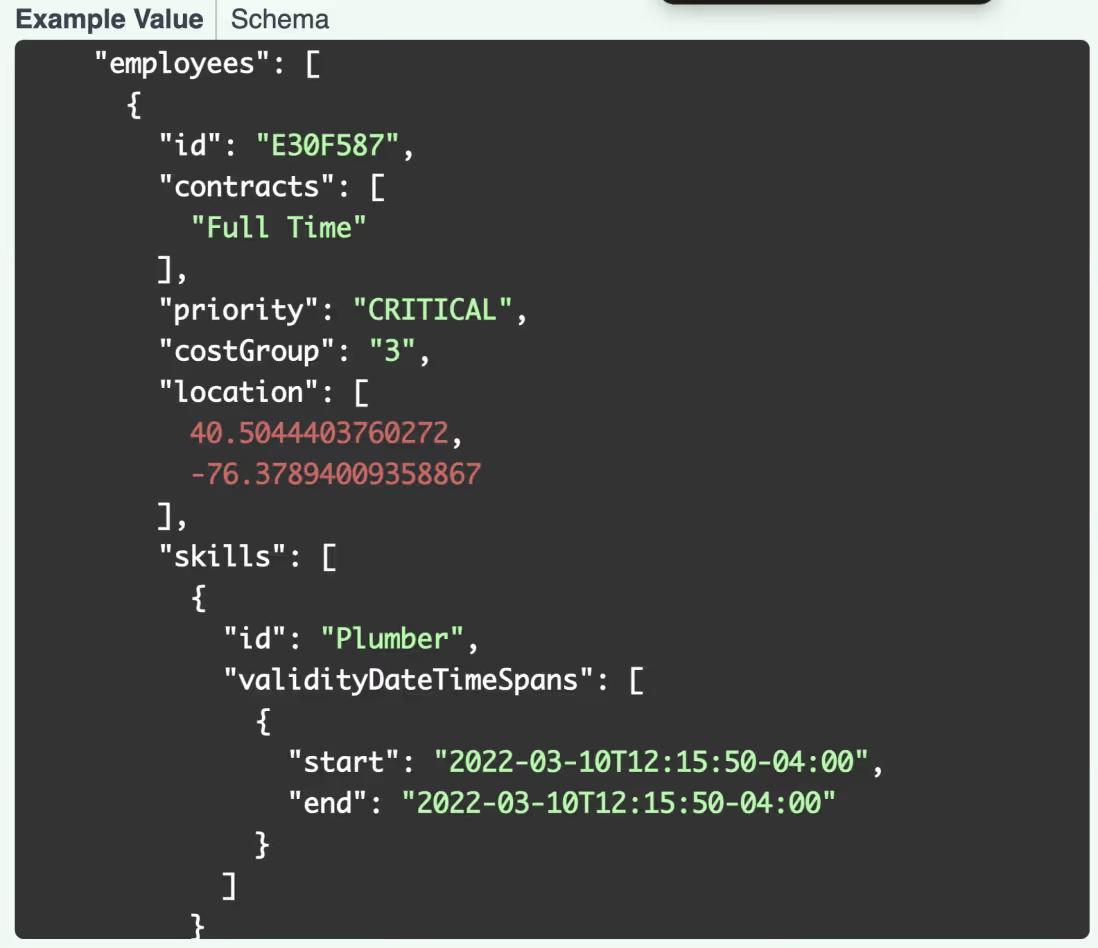
Timefold provides REST APIs that solve complex planning problems such as shift and job scheduling, enabling developers to offload constraint-heavy logic to a dedicated optimization engine. Once a scheduling request is submitted, Timefold returns an optimized solution in JSON format, making it easy to integrate with any system.
Bryntum Scheduler
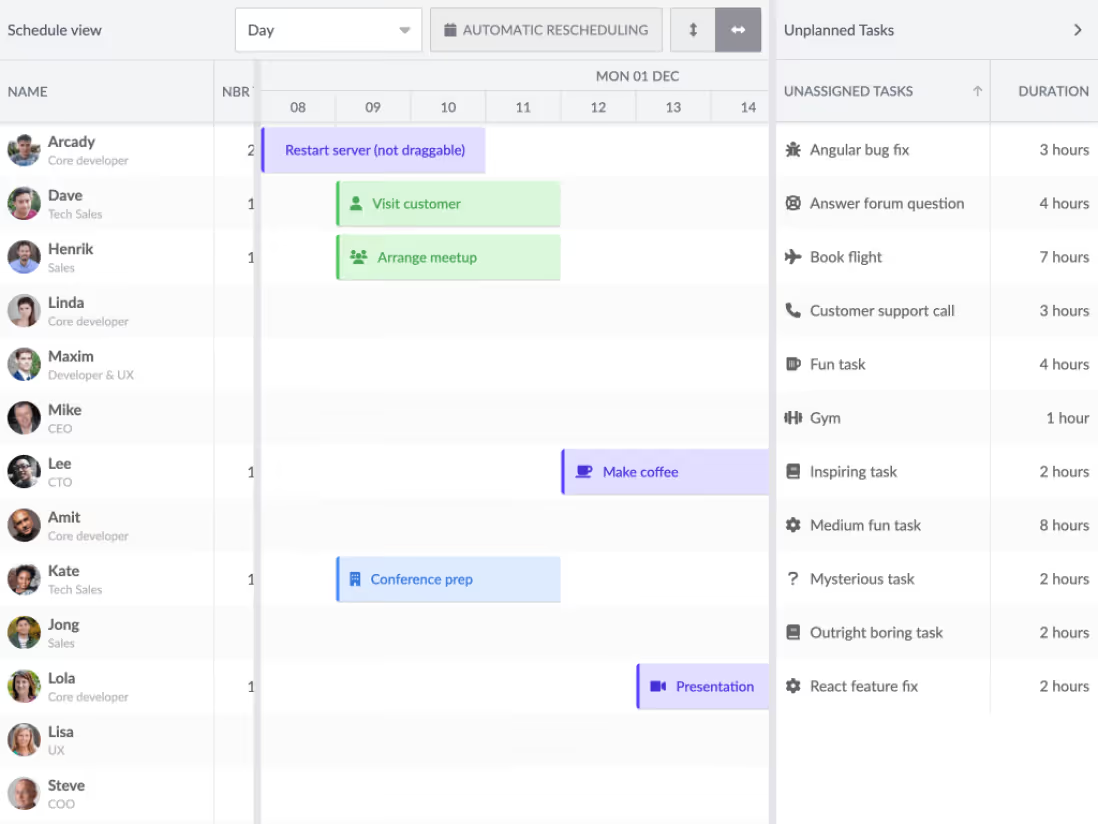
Bryntum Scheduler is a powerful UI component for intuitive task and resource management.
Fully framework-agnostic, Bryntum Scheduler slots easily into any frontend stack (React, Angular, Vue, or plain JavaScript), allowing developers to build responsive, user-friendly scheduling interfaces with minimal effort.
Integration flow
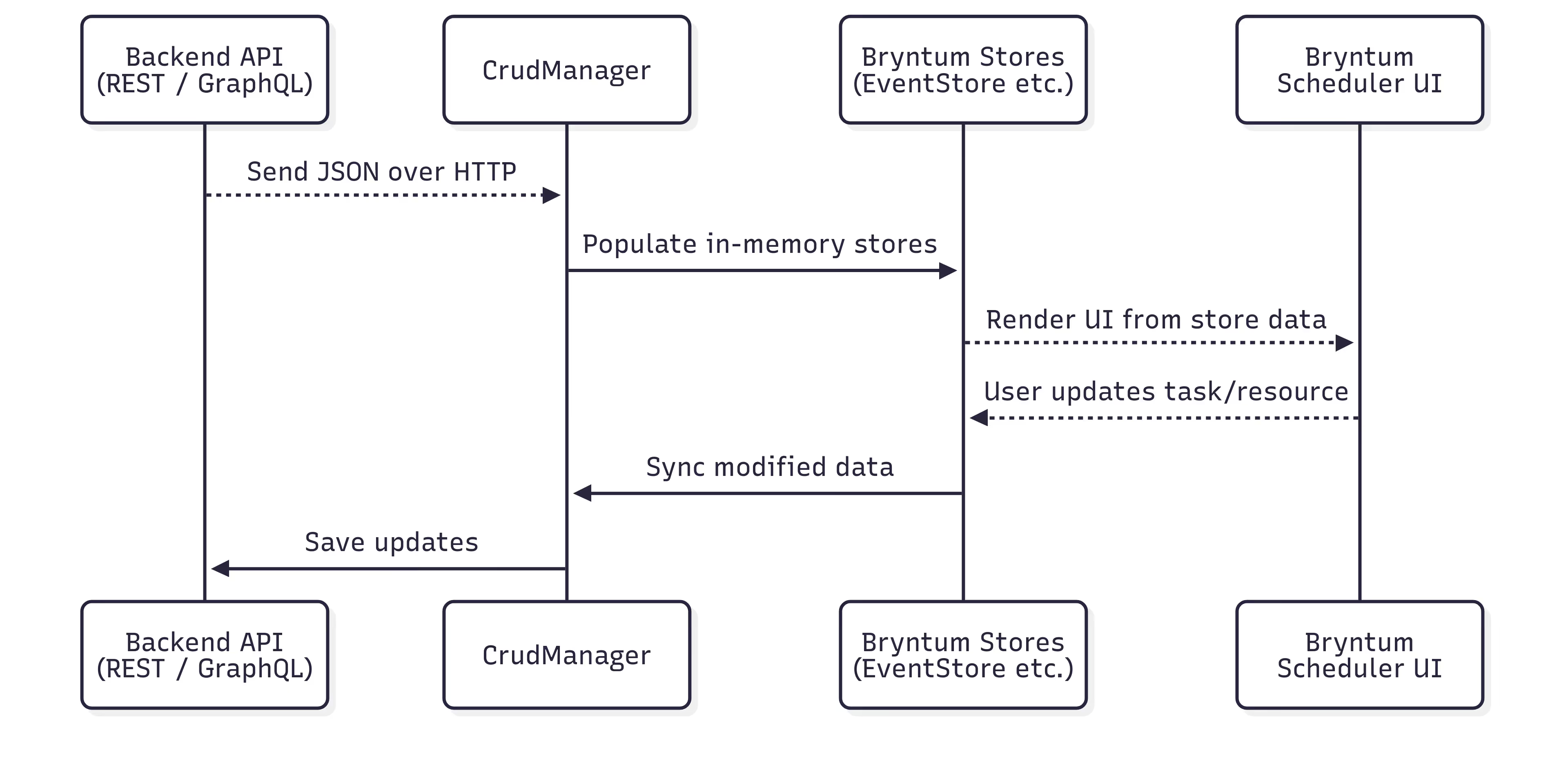
Your backend system serves as the single source of truth, so that you retain full ownership and control of your scheduler. Timefold and Bryntum are powerful tools for visualization and optimization, but they are not intended to function as data stores. Supplying Timefold and Bryntum with the necessary scheduling data from your own system ensures consistency, prevents duplication, and simplifies data management.
Display data in the Bryntum Scheduler
To display a schedule to your users, the necessary data must be available in your browser.
Bryntum components support various data-loading strategies. You can use the Crud Manager or load data directly into a specific store via a URL. The Crud Manager is especially handy for loading and saving data to and from your backend. You can also integrate WebSocket connections to enable real-time data exchanges between Bryntum components and your source-of-truth system.
Bryntum manages your data using stores, which are reactive, in-memory data repositories that:
- Load and hold scheduling data (in the form of tasks, resources, and assignments)
- Support sorting, filtering, syncing, and all CRUD operations
- Bind automatically to the UI, so that any changes to the stores are instantly reflected in the interface
Note: These stores are not related to the browser's local storage. Any unsaved or unsynchronized data will be lost when the browser is closed.
The data loaded by Bryntum Scheduler doesn’t need to be a complete plan. You can add unplanned events to the UI, so users can plan them manually with Bryntum's drag-and-drop functionality.
Optimize plans with the Timefold APIs
Available as JSON REST APIs, Timefold’s optimization models do the hard planning work for you. No matter the optimization model you use (employee shift scheduling, vehicle routing, or job scheduling), all Timefold APIs follow a similar integration pattern:
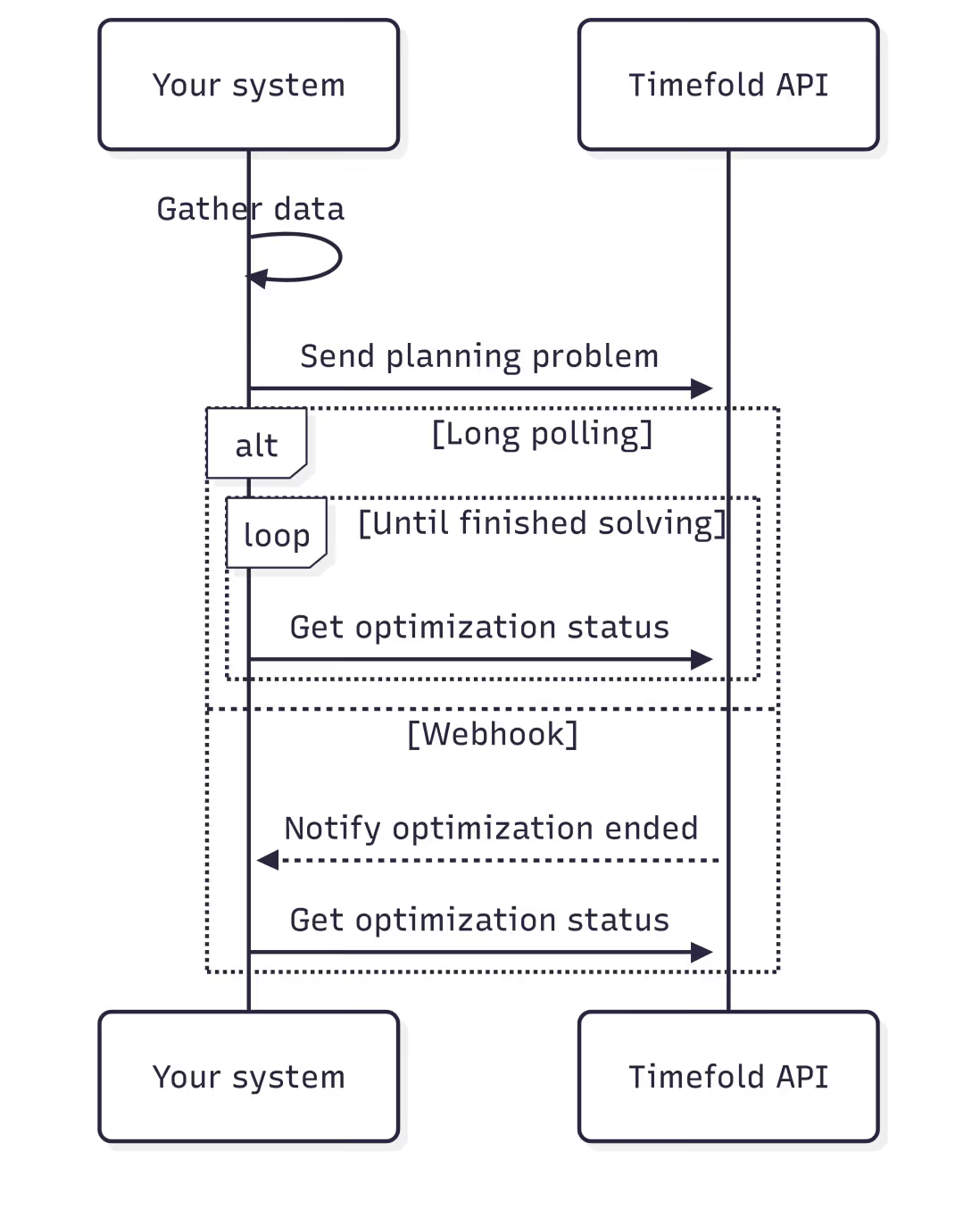
- Gather all relevant planning data: The data you need depends on your chosen optimization model and the constraints you want to enable. Timefold’s APIs only enable certain constraints if you provide the relevant data. The more data points you provide, the more constraints will be active. For example, when scheduling employees, employee costs are only taken into account when you provide the
costGroupof the employees. - Send that data to the Timefold API to start an optimization run: The Timefold Platform then optimizes the schedule so that it complies with all activated constraints, such as
employee availabilityandskill matching. - Monitor the progress of the optimization run by calling the Timefold API to retrieve its status: A single run can take anything from a few seconds to several hours, depending on the scale of the planning problem. The Timefold API always returns the current best solution found so far, along with the current status of the run.
You can implement long polling to continuously fetch updates until the optimization is complete. Alternatively, you can configure a webhook that is triggered when the optimization run finishes.
Customize your integration
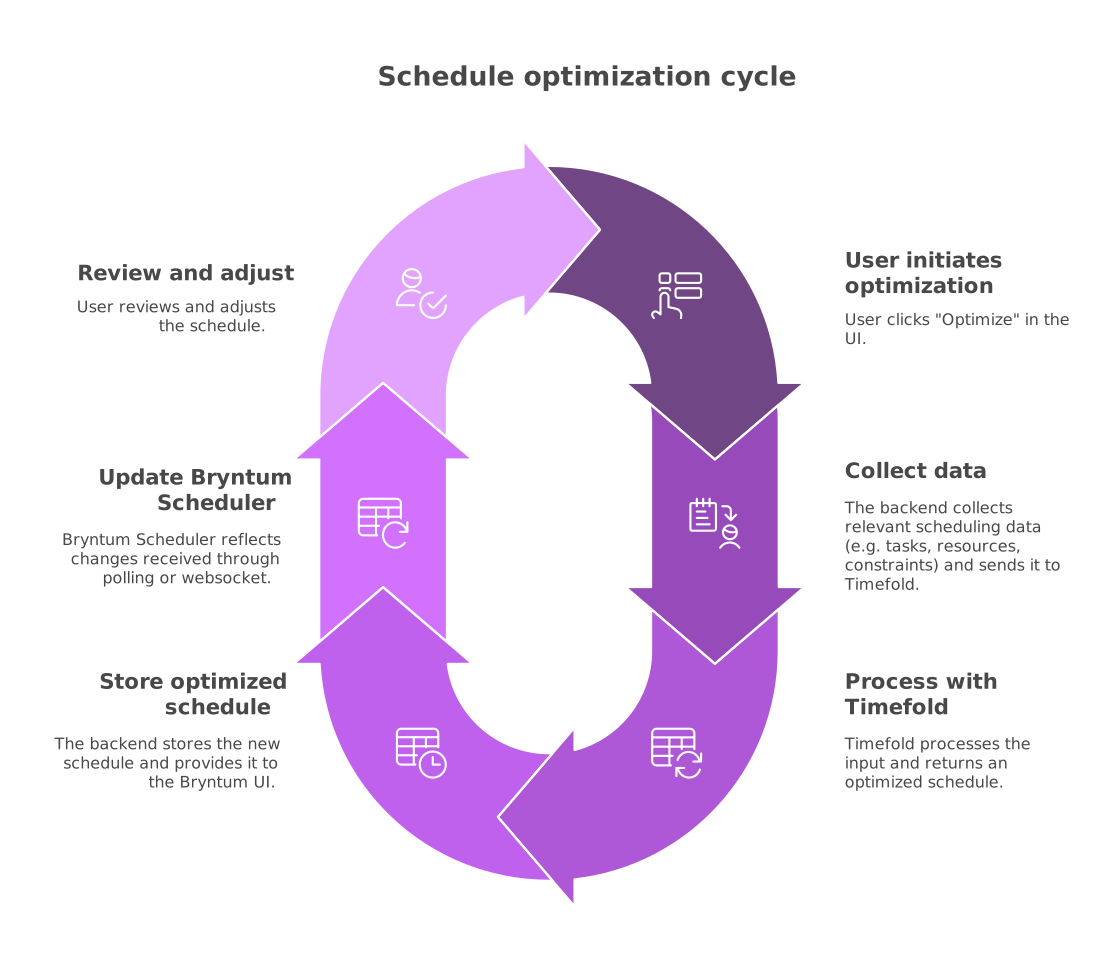
Timefold and Bryntum complement each other perfectly, and you can choose how far you want to integrate with either of them. Consider a basic example of backend integration:
- A user clicks Optimize in the Bryntum Scheduler UI.
- The backend collects relevant scheduling data (such as tasks, resources, or constraints), which it then sends to Timefold.
- Timefold processes the input and returns an optimized schedule.
- The backend stores the result and updates the Bryntum Scheduler with the new data.
- The user reviews the updated schedule in Bryntum, then manually adjusts the plan and persists their changes as needed.
Users also benefit from the following optional features:
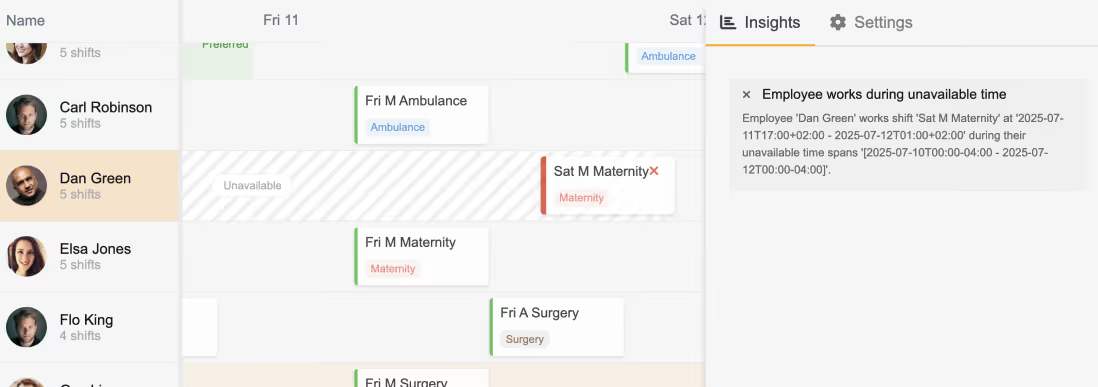
- Manual edits and score analyses: Use Timefold’s scoring API to analyze the impact of manual changes made in the Bryntum UI.
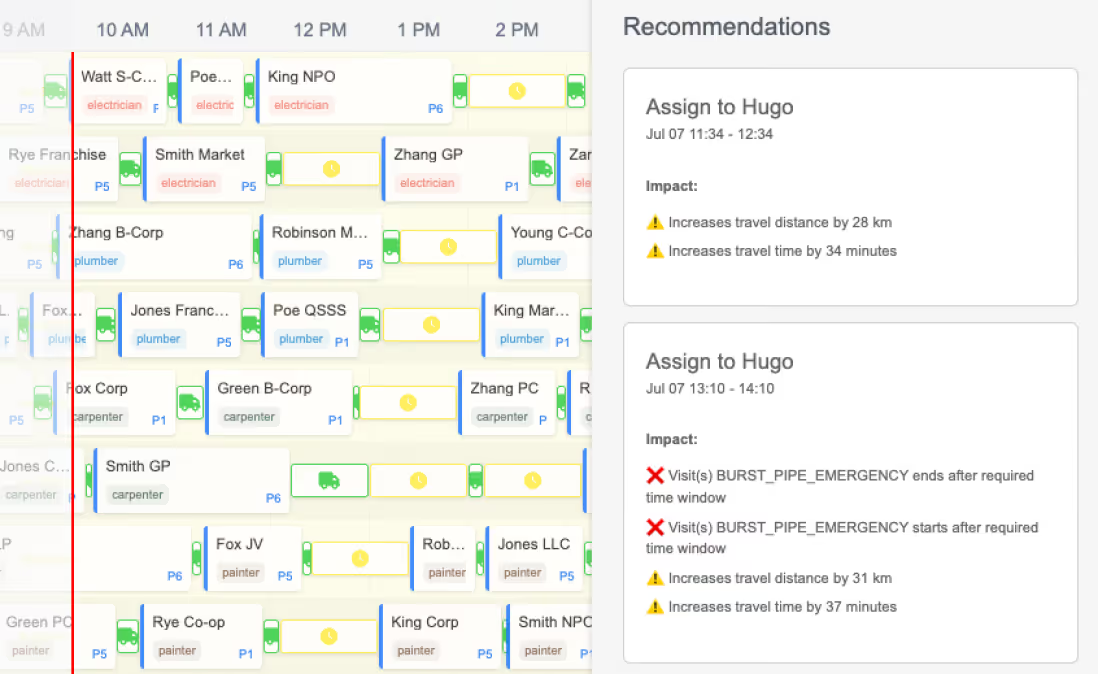
- AI-assisted recommendations: Let Timefold suggest the best match for a task, rather than leaving it up to manual guesswork.
Alternative: Frontend-only integration
An alternative approach is to call Timefold directly from the Bryntum UI. While this may at first seem easier for existing Bryntum users, it comes with some major downsides:
- The UI needs to gather all the data for the Timefold API, which is not always feasible. Sometimes, the dataset is too large to load in one go, or the data required for planning is not exposed to the frontend.
- Optimizations for large-scale planning problems can run for multiple minutes or even hours. Because your users won't be looking at the Bryntum UI for all that time, you need somewhere to store the component state.
- You would still require a proxy to check your application authorization and to hide the Timefold API keys from your end users.
Note: Frontend-only integration may be okay for demos or prototyping, but it is insufficient for robust systems.

How to build trust in optimization: Let’s do better than “BECAUSE I SAID SO”
Why trust matters
I love being a dad. It’s really amazing to see this little human learn and explore every day with that child-like curiosity. Kids are so full of “why” questions.
- "Why don’t fish drown?”
- “Why can’t I play on my video game console today?"
- “Why can’t I have ice cream for breakfast if it's made from milk?”
Sometimes we take our time to answer. Other times when parents are stressed, juggling four others things at the same time or are just plain tired, they sometimes whip out the universal catch-all answer: “Because I said so!”.
I don’t like that answer. It’s a shortcut. It ends the conversation. Worst of all, it shuts down curiosity and that is something we can’t afford to lose, especially in this age of ever-more complex systems. Yet, this is also what a lot of scheduling software does.
An algorithm spits out a schedule and the experts, human planners are left with questions:
- Why did Alina get her preferred shift but Myey didn’t?
- Why not fix Thomas’ electricity problem first before moving into the city for the other assignments?
- Why assign Pieter when Maarten lives closer?
When the only answer to those questions is “because the algorithm said so”, planners will not trust the solution. And without trust, they’ll toss the plans aside and will stick to the techniques they have been using before. Our solutions do not just need to find the best schedules… they need to be able to explain them as well.
From explainability to trust
If we want people to accept the output of our planning systems we should give them a system worthy of their trust. A big part in building a trustworthy system is being able to answer the questions mentioned above. It helps you move from blind trust to informed confidence.
In our experience building Timefold, explainability leads to 3 major benefits:
1. Clarity
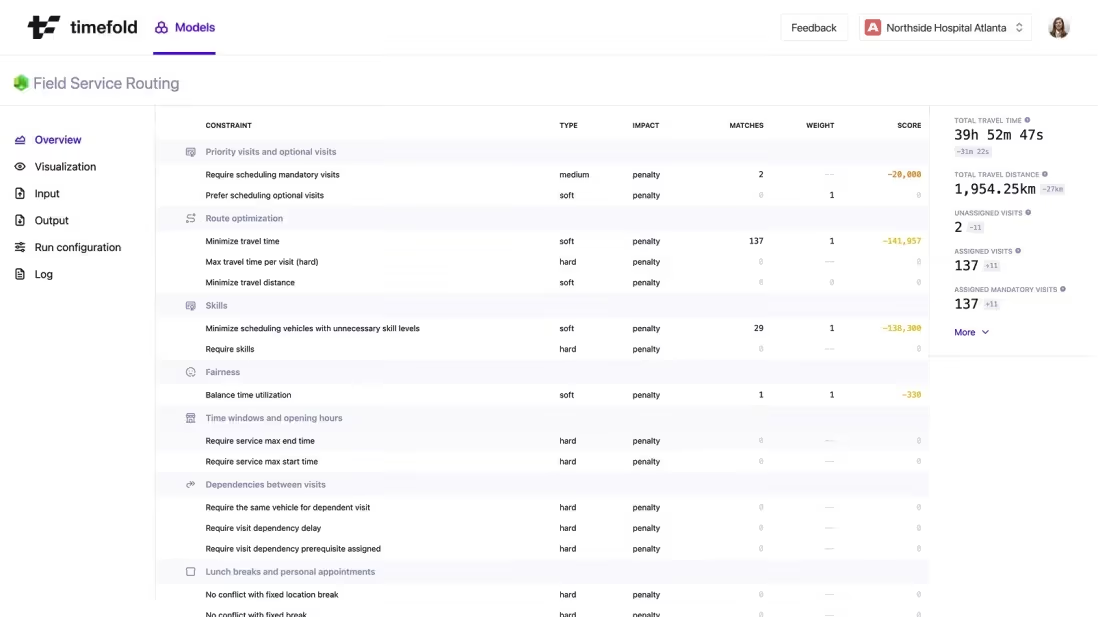
Giving planners answers to all their “why” brings clarity. They are able to understand why the schedule is what it is. They gain deep insights and are not forced to blindly accept a plan.
With our Timefold solutions, we track constraint violations, how much they affect the outcome, and which decisions caused them. This transparency helps planners understand the trade-offs. At a higher level we also transform these constraints into clear-cut KPIs, making it easier to reason about them.
2. Error backtracking
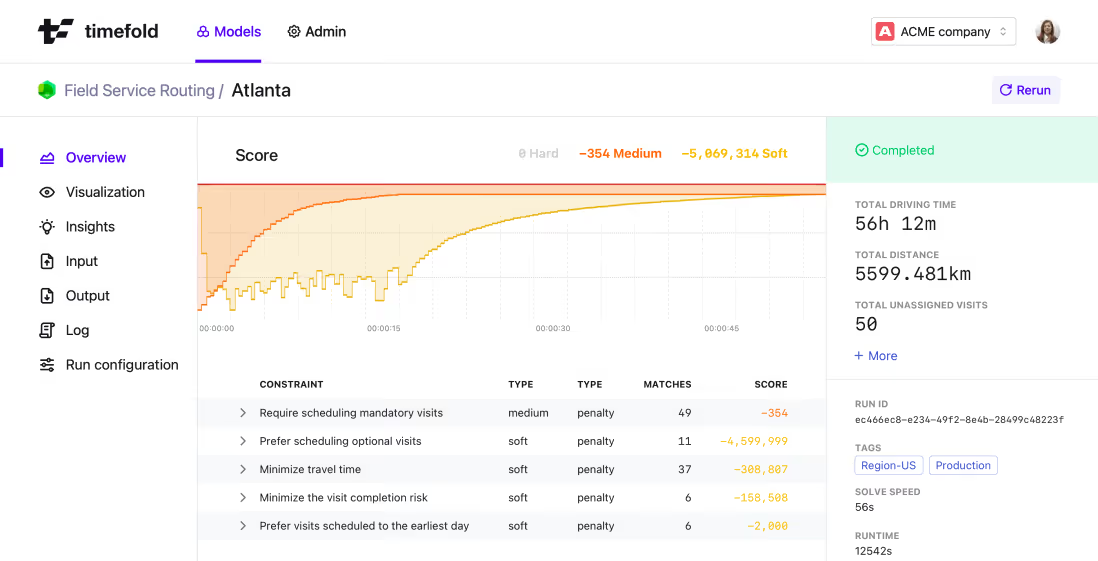
If something breaks in the real world, you need to know why. In optimization systems which operate like black boxes, it can be hard to figure out exactly where things went wrong.
We have captured this in our Score Analysis functionality which allows you to analyze any schedule, even when it’s not been created by Timefold. This gives planners a powerful tool to diagnose issues and avoid future errors.
3. Insightful adjustments
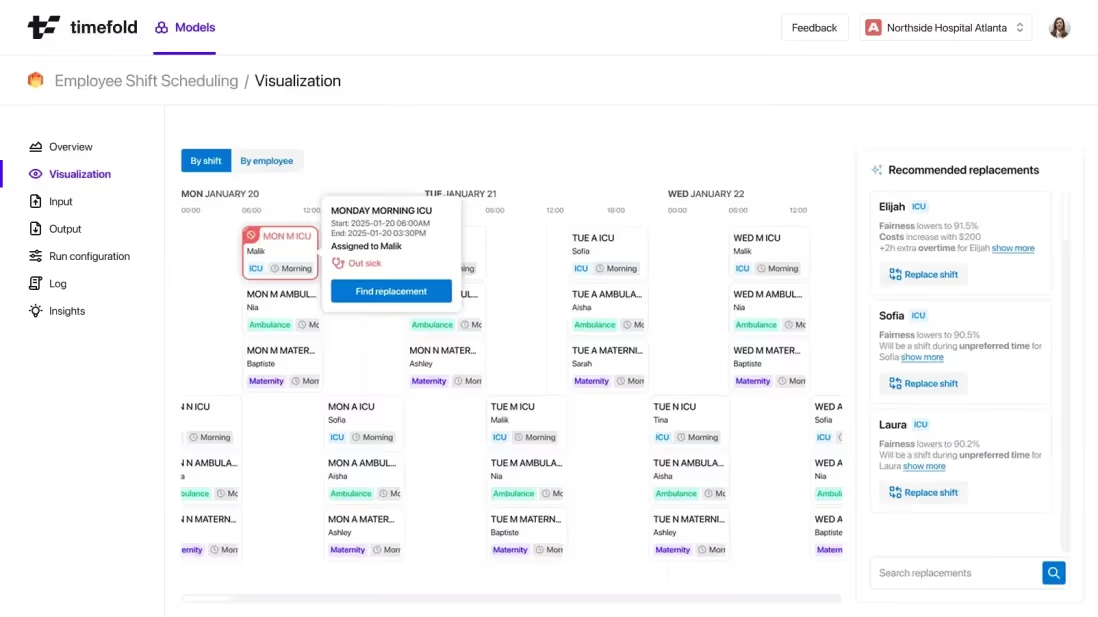
Planners often make tweaks based on gut instinct. They want to make changes and see the impact of those changes on the schedule.
Next to the Score Analysis mentioned above, Timefold allows you to compare two plans. If new work needs to be assigned to a resource Timefold’s Recommendations assist the planners in making an informed choice.
4. Strategic insights
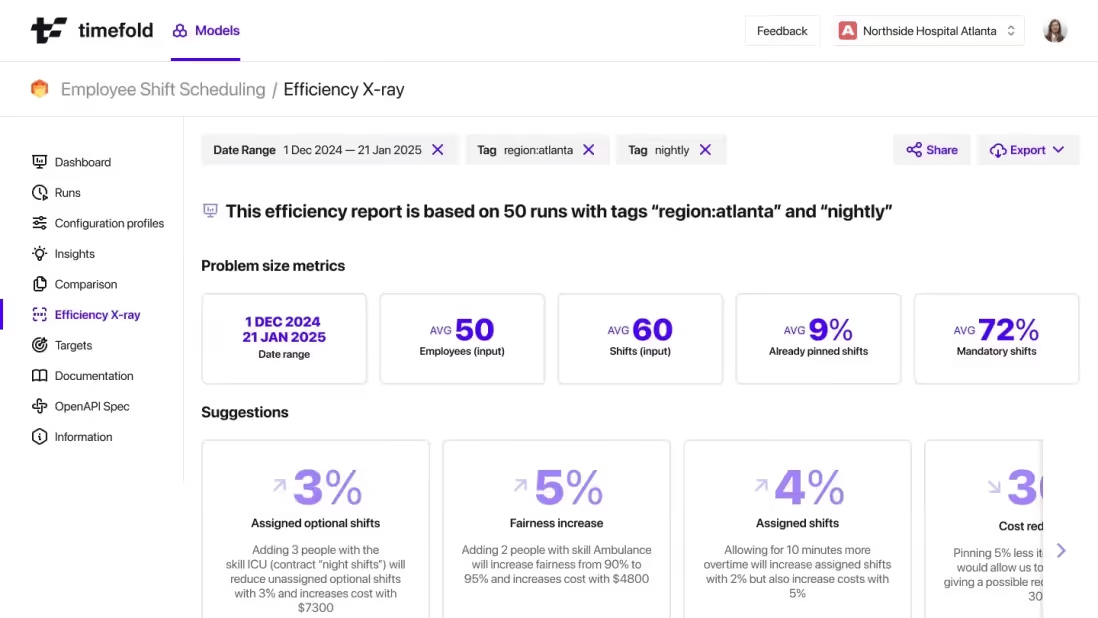
Explainability in planning systems benefits more than just end users. For decision-makers, they reveal actionable patterns that support strategic decision-making at the executive level.
We're building features in our platform that display operational imbalances and indicate room for improvement.
Clarity, Error Backtracking, Insightful adjustments, and Strategic insights all sprout from the core concept of explainability, and contribute to the trustworthiness of a system. Planners stop overriding schedules, collaborate with the planning tool and are able to solve larger problems with ease, while leaders can use the planning for better decision-making.
In short, they stop seeing PlanningAI as a threat and start seeing it as a planning partner.
Don’t let "Because I said so" kill your plans
We wouldn’t accept that answer from a parent. We shouldn’t expect people to accept it from a planning engine either. In fact, taking a moment to focus on explainability is just as important as finding the “best” possible schedule. A great schedule isn’t just optimal, it’s understandable.
So next time someone asks, “Why this schedule?”, make sure your system can answer with something better than “Because the algorithm said so?!?”.

Timefold partners up with Bryntum
Some things just belong together.
Timefold’s PlanningAI engine optimizes complex, large-scale scheduling problems in real time. Bryntum visualizes these into beautiful, interactive schedules that are ready to use. Put them together and you finally have the intelligent scheduling solution you always needed.
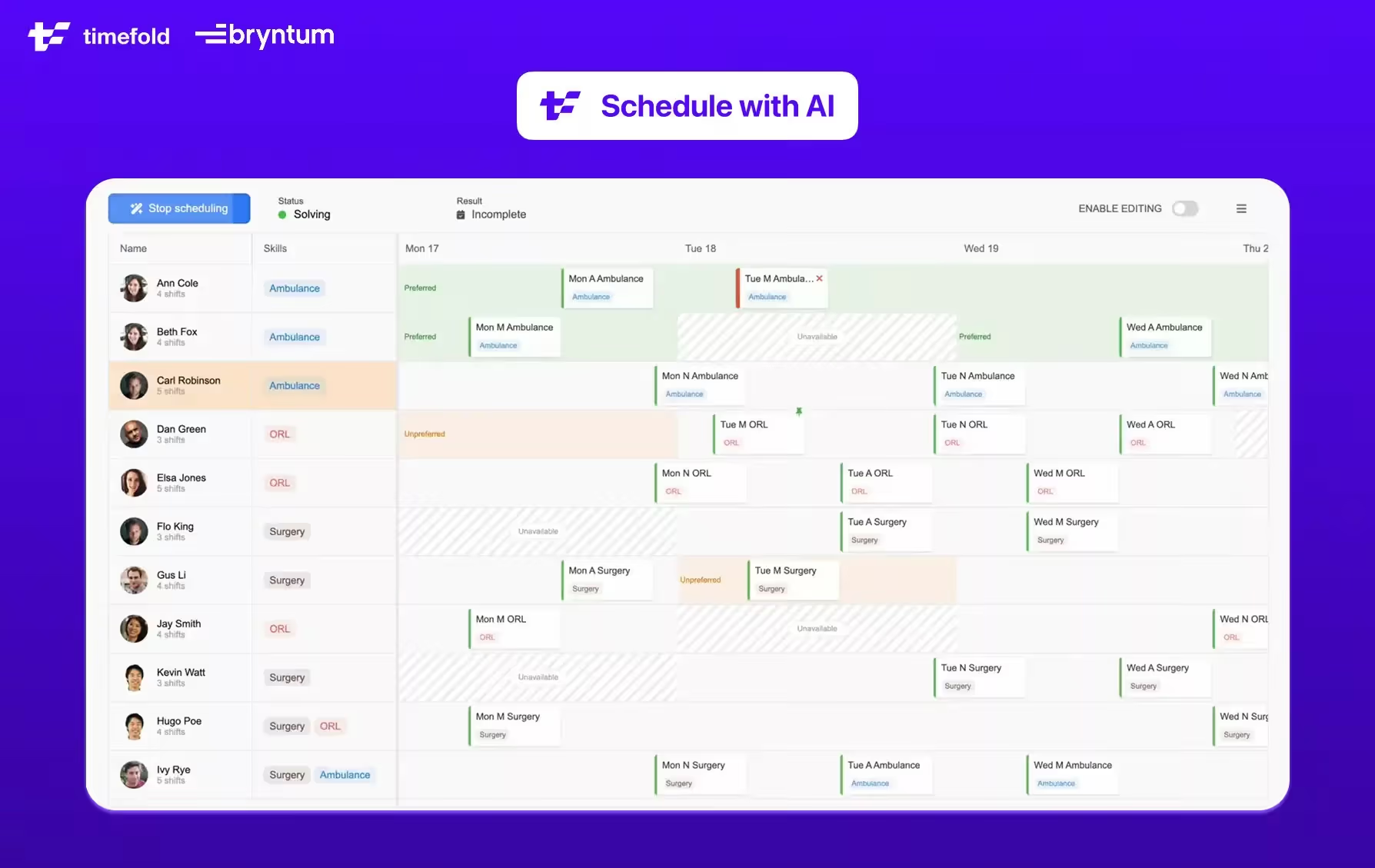
Why this partnership matters
- See the magic: When optimization becomes visible, it earns trust. Clear, interactive schedules show exactly what changed and why.
- Adopt at speed: Visualization democratizes the complexity of optimization, accelerating buy‑in across your organization.
- Deliver real‑world impact: Lower costs, a greener footprint and higher service levels, now with proof your stakeholders can watch unfold.
A mission, super‑charged
From day one, we set out to free the world from wasteful scheduling. Enterprises across the globe already rely on PlanningAI to slash overtime, cut driving time and delight customers. Yet the biggest barrier to scaling optimization has always been perception: “It’s too complex.” That ends here. With Bryntum’s polished components seamlessly wired to Timefold’s APIs, complexity becomes clarity.
Embed once, optimize forever
Whether you're managing a workforce, running logistics, or routing field teams, our optimization models drop straight into your system with a single API call. And if you add Bryntum, you get fast, clean and responsive Gantt charts, resource calendars, and task dependencies. While our engine handles hundreds of constraints, thousands of tasks, and real-time changes effortlessly, Bryntum brings the clarity.
For the real world
It’s time to pull planning optimization out of the specialists’ corner and put it in the hands of every team that needs it. Together, Timefold and Bryntum are turning algorithmic power into everyday productivity.
Want to learn more? Contact Bryntum, or talk to us!

The 4 levels of scheduling
Stuck in the past
Despite the billions poured into digital transformation, most companies still schedule the same way they did in the '90s. I’ve seen manufacturers, governments, hospitals,… with mission-critical operations still relying on Excel. Or worse: paper.
Really, I am not exaggerating. I’ve witnessed it firsthand multiple times. When they showed me their production scheduling, they:
- Handed me a stack of paper.
- Or showed me several Excel files, none of which actually visualize the schedule in a Gantt or timeline chart.
- Or introduced me to their chief planner, who spends 12 hours a day manually moving around post-its on a giant piece of paper until a feasible schedule magically appeared. This was the prime reason they couldn’t scale operations.
Madness.
And every time it gets to me: Automation is not a given, let alone optimization. Not even close. We have the technology to explore space, while some still haven’t reached the Cape of Good Hope. But in order to catch up, we need to understand the complete timeline.
I broke it down into 4 stages.
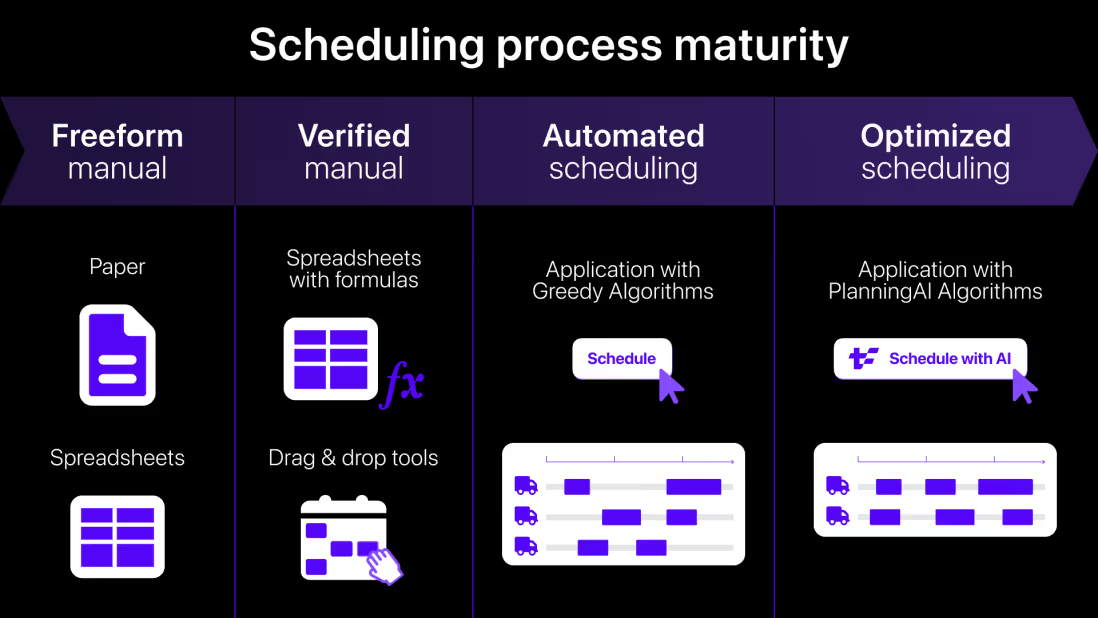
Level 1: Freeform manual scheduling
Planning on paper, or in spreadsheets. No guardrails, no validation. If someone assigns two tasks to the same person at the same time, or exceeds the capacity of a machine, it’s all good. Until it blows up in execution. Your schedule is only feasible because of the human planner behind it. When that planner leaves or goes on vacation? Chaos. Retirement? Disaster.
Level 2: Verified manual scheduling
This is the drag-and-drop utopia many ERP vendors promise: the planner does the thinking, and the software nods politely. It might scream when hard constraints are violated (“You can’t schedule John for two shifts at once!”), but it never lifts a finger to help assign the shifts itself. Your schedule is still only as efficient as the human planner behind it. And when they are absent, production efficiency noticeably decreases.
Level 3: Automated scheduling
This is the first real leap. Press a button, and the software assigns work. Sounds perfect until you realize it’s just a glorified greedy algorithm, assigning tasks one by one in isolation. It’s still only as good as your human planner. Or even worse. There’s no understanding of the true complexity. You’re still leaving a lot of money on the table.
Level 4: Optimized scheduling
Now we’re talking. This is where PlanningAI steps in. Instead of myopically assigning tasks one at a time, it takes a holistic approach. It juggles your hard constraints (skills, time windows, overtime limits) and your soft goals (fairness, fuel costs, customer satisfaction) to deliver a globally optimized schedule. All with one button.
And even then, real-world planning is messy. Some schedules still benefit from manual overrides. Or goal tweaking. That’s why our PlanningAI platform supports mixing and matching verification, automation, and optimization seamlessly. Because planning is not a one-size-fits-all operation. It’s a living, breathing process that needs to adapt in real time.
If you feel like it's time to level up, let's talk.

The only constant is change: How PlanningAI keeps schedules alive in real-time
Over the past few weeks, I’ve had a lot of great conversations with developers, planners, and other professionals at various conferences. Usually, they’re pretty impressed by what PlanningAI (and Operations Research in general) can do and has been doing for decades. However, there is one particular question which always bubbles up: “What if something happens and the plan no longer works?”
Excellent question!
One of my university professors imprinted the following quote into my brain: “Change is the only constant”, which is a quote often attributed to the Greek philosopher Heraclitus, who figured it out way back around 500 BC. Yes, dealing with change has been ruining carefully crafted plans since humans first tried organizing anything.
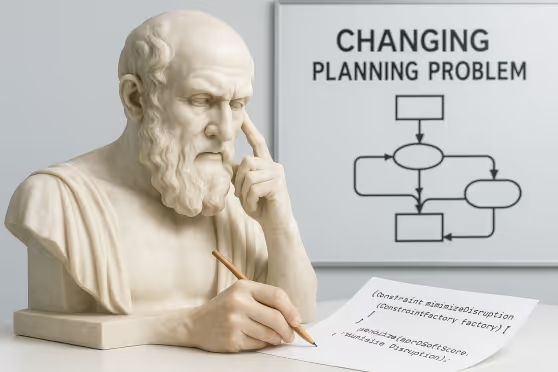
In the realm of planning and optimization, change can present itself in different ways: An employee calls in sick, a truck decides today is a great day for a breakdown, or a customer ghosts their appointment. Suddenly that beautifully optimized solution becomes irrelevant, sometimes before you’ve even finished your morning coffee.
We are forced to face reality: the real world doesn’t care about our perfectly optimized schedules. Or as another philosopher and occasional boxer put it: “Everyone has a plan 'til they get punched in the mouth” - Mike Tyson
Rolling with the punches
The quote “change is the only constant” isn’t just a sad pointing out of facts. It basically calls upon us to stay flexible in our plans and adapt to new circumstances, because change will come.
That sounds nice doesn’t it… “just adapt to change”. It’s a bit more involved than that.
The first thing we should do is an impact analysis: “What does a certain change mean for our business”? In the case of an employee getting sick, we should ask ourselves, “How critical is this employee?” and “What if we do not replace them?”
The simplest option is to not solve the problem at all, but that often isn’t a feasible path forward. Usually, the plan needs to be adapted, which leads us to the next question.
How much can the plan change?
When a plan is already in motion, abrupt changes can cause chaos. For example, if field technicians are out solving issues, you can't just send them racing off to handle emergencies every hour.
One approach to deal with this is to freeze a part of the plan and let a solver re-optimize the schedule. This will make sure that as much of the plan as possible stays the same. In the field technicians case, we might freeze any assignments for the next hour.
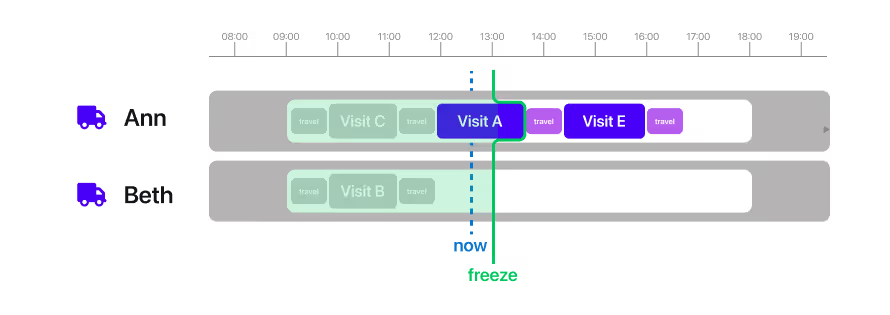
Freezing assignments isn’t always the best approach as it’s sometimes difficult to determine what should and should not be ignored when re-planning. Instead, we could use a Minimize Disruption Constraint. This constraint will compare any newly generated solution with the previous active plan and penalize that solution for each change. This approach nudges the solver to keep as much of the original plan intact as possible.
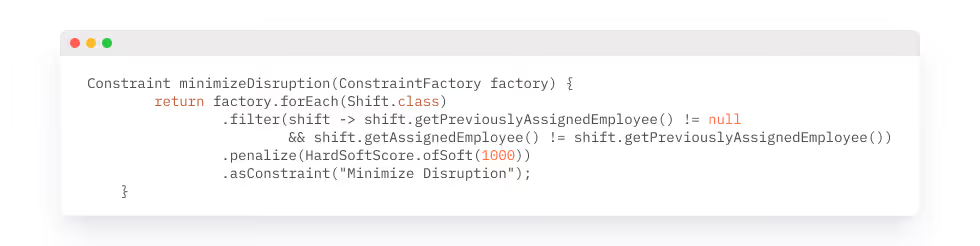
These disruption constraints can be flexible, penalizing immediate schedule changes more heavily than those further out. That means you can smoothly adapt schedules while keeping your team happy.
These two mechanisms, Freezing and Minimize Disruption Constraints, could also be used together, where you might freeze the next hour as you absolutely want no abrupt changes but do accept some disruption afterwards. This combines minimal immediate chaos and manageable long-term adjustments, the best of both worlds.
Communicating changes
Adapting the schedule is only the start. You still need to communicate the changes clearly to everybody involved. If you have on-call staff, the phone-call to come to work shouldn't be a surprise. If you need to call upon someone who normally wouldn’t be working, that’s another thing.
In these situations, 2 things are fundamentally different from regular planning.
- If people are unexpectedly going to be asked to work, you should probably call them first if they are ok with that before planning them in. They might be out of town or otherwise engaged.
- In these situations, achieving an optimal plan becomes secondary to maintaining clear communication and avoiding chaotic changes.
In Timefold Solver this use case is a first-class citizen. With the Assignment Recommendation capability, Timefold Solver combines a greedy algorithm with incremental score calculation to swiftly identify the best available options for fitting the change in the existing schedule.
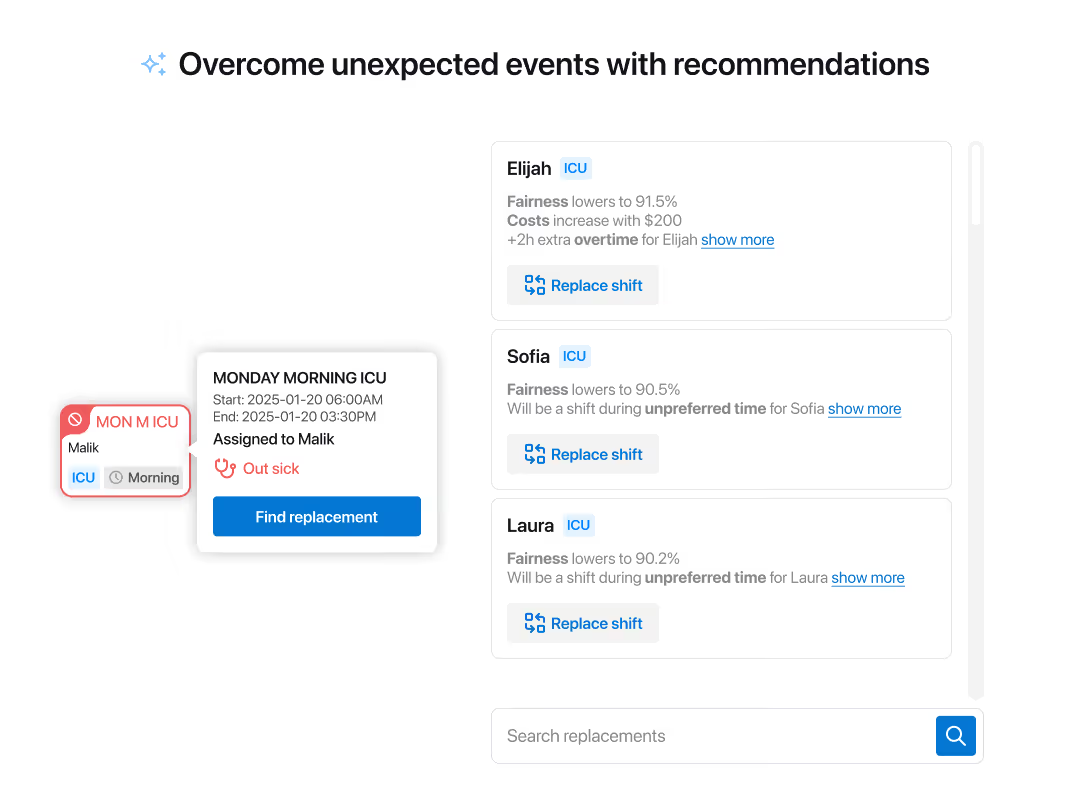
The recommendations also give some insight into the impact on the overall schedule, so a manager can make an informed decision on who to call into work. This human-in-the-loop approach brings together the power of AI with human intuition which is essential for successful planning.
After the crisis has been resolved the new plan could be re-optimized using the freezing and disruption minimizing constraints.
Embracing change
The move to real-time planning isn’t just technical. It’s philosophical. It means embracing change not as a problem to be avoided, but as a constant to be managed.
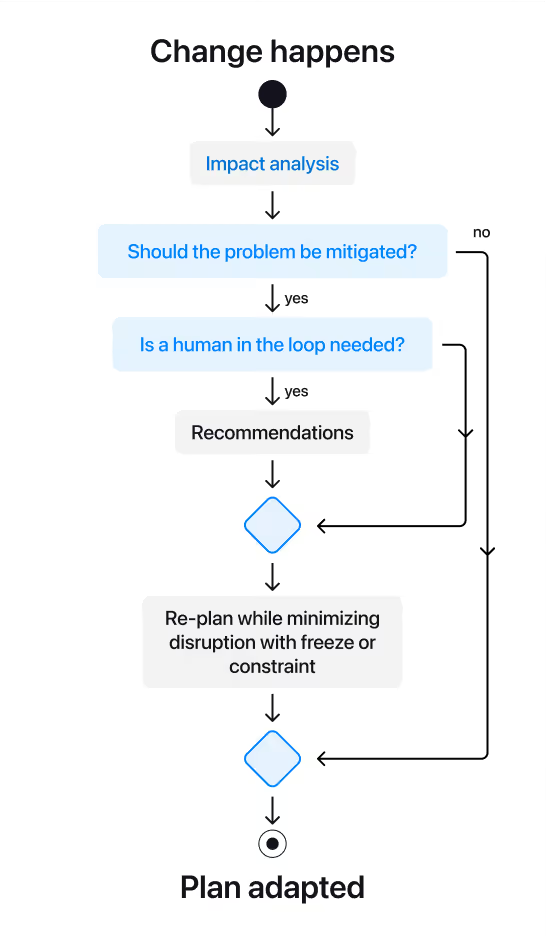
In a way, this is the real power of PlanningAI. Not just building smart plans but building resilient plans that stay smart, even when the world decides to punch you in the mouth.
Let’s make plans that adapt.

A lifeline for OR? Why PlanningAI is a blessing for Operations Research
Operations Research is, and has always been, about solving one of the world’s toughest challenges: planning problems. Finding the best way to allocate resources, schedule shifts, or route deliveries under an abundance of real-world constraints. It is widely accepted that optimizing those problems will make the world a better place, the potential value has never been in question. But the road to real-world adoption has been rough. With PlanningAI, we can alter the narrative.
[highlight]
What is PlanningAI?
PlanningAI is a reckoning for Operations Research. A much needed rejuvenation of the OR space driven by refocusing efforts towards solving real-world complexity at scale, fulfilling all business requirements. It’s a type of Artificial Intelligence that automates and optimizes complex planning, scheduling and routing problems for production use.
[highlight]
Why we believe PlanningAI is a blessing for Operations Research
The unfulfilled promise of OR
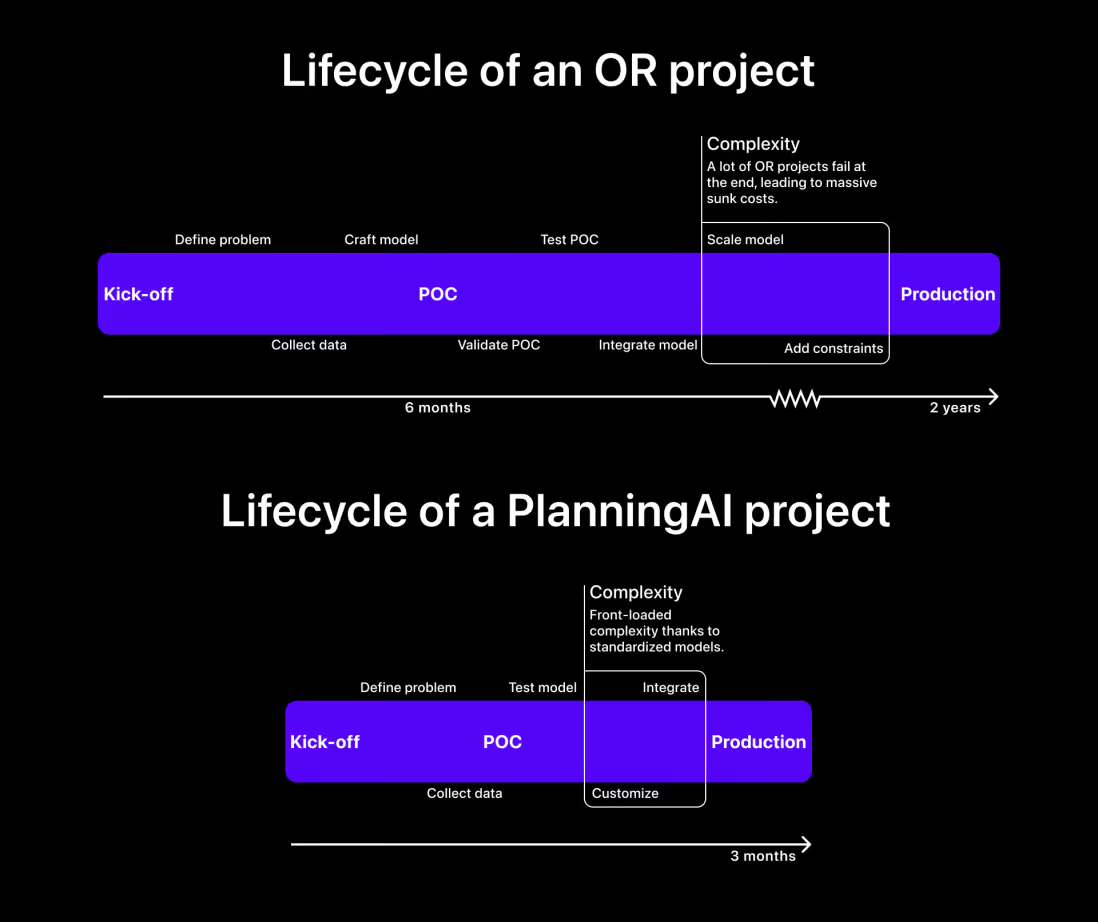
For decades, applying OR in practice has been slow, expensive, and risky. It requires niche expertise, complex code, and months to deliver a good POC, only to require some more months to integrate, customize and scale. Additionally, there’s onlly a small pool of hyper-specialized experts that can actually optimize complex planning problems.
Is it because of its sheer complexity, poor marketing, or lack of perceived value that a lot of businesses don’t even think about starting OR projects? We can only make assumptions.
Time to value
However, clarity on and proof of value has always been one of the obvious pain points of OR. PlanningAI solves that. In the first place by translating optimization gains into business KPIs, and in the second place by proving value early. With standardized models that factor in 95% of common constraints, the time-to-value PlanningAI offers is unprecedented. Integration becomes a glue-code job, not a multi-month POC/build/integration saga.
That’s what makes PlanningAI such a shift. It takes the deep rigor of Operations Research and makes it practical, scalable, and ready to plug into real operations.
Risk reduction
As mentioned above, traditional OR projects are long, complex, and expensive. On top of that, the biggest risks show up late. Businesses typically only find out near the end whether the model can actually handle the full set of constraints at scale. By then, you’ve already burned months of budget and resources, often amounting to millions of dollars.
PlanningAI flips that risk profile. Because it starts with prebuilt models that cover the common constraints, implementation is shorter and more predictable. Customization happens quickly, in weeks, so the technical risk is front-loaded. That means less uncertainty, faster validation, and a far lower chance of failure down the line.
Complexity without compromise
The time-to-value and risk-reduction don’t compromise the ability to handle complexity. On the contrary. PlanningAI doesn’t dilute the science but operationalizes it. It works across domains and scales with problem size. Whether you’re planning 50 or 50,000 deliveries, it handles complexity without compromise.
Replanning in real-time
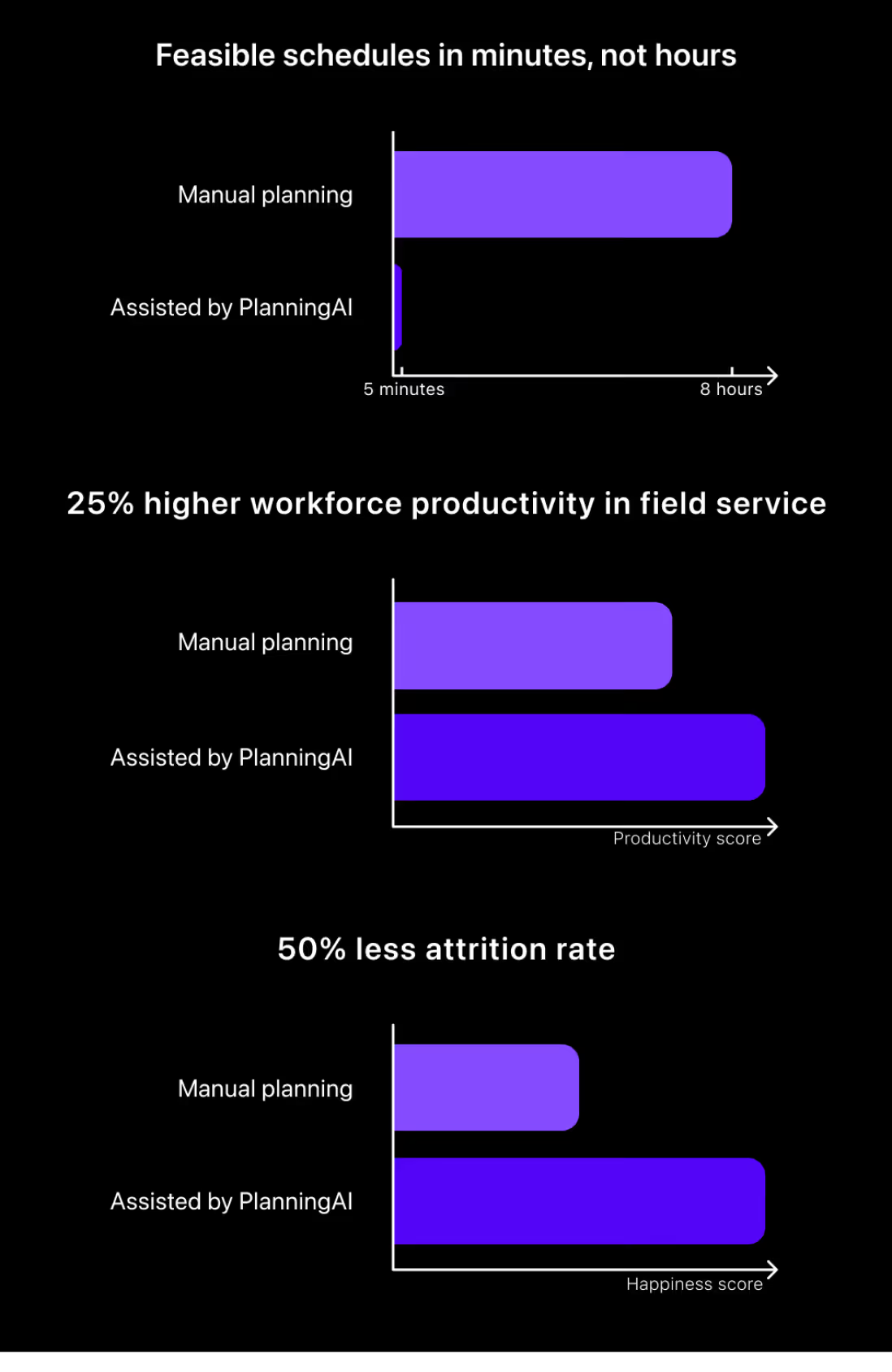
It brings automation where there used to be manual work, optimization where there used to be automation, and speed where there used to be delays. Planners can now generate optimized schedules in minutes, test different strategies, and adapt on the fly. Replanning becomes real-time, not rework.
Results, not in a distant future
Reduced costs, better resource utilization, lower emissions, and higher employee satisfaction… The results from a PlanningAI project are the same as from traditional OR projects. The difference is their accessibility. By using predefined constraints, enterprises can tweak their solution to reach their business KPIs. And importantly, gains show up across industries, from healthcare and logistics to manufacturing and government.
Planners empowered
And it’s more than better outcomes, it’s also about better tools for planners, dispatchers, or other people in charge of allocating resources. Human planners will gain superpowers. With PlanningAI, they can test ideas faster, adapt to last-minute changes, and deliver better plans in a fraction of the time. In some cases companies save hundreds of millions per year.
Democratization of OR
The results of PlanningAI are accessible, and so is the technology behind it. What used to be locked away in cryptic equations and niche academic papers is now packaged in standardized, production-ready models. PlanningAI translates optimization logic into readable, maintainable code, and makes it understandable in thorough documentation. That means teams no longer need a PhD in constraint programming to build or adapt a planning solution. Any developer can understand the model, tweak it, and deploy it. This shift democratizes OR. It opens the door to a much broader group of builders, even onboarding and support are straightforward.
Mature technology for production use
Unit tested, peer-reviewed, versioned, and production-ready. PlanningAI integrates cleanly with existing systems through a standard REST API, so no need for custom middleware or black-box magic. It fits into your architecture, not the other way around. Without the months-long consulting projects, enterprises go from idea to implementation fast. No brittle glue-code. Just powerful optimization, standardized and ready to plug in.
PlanningAI makes Operations Research operational
In short: PlanningAI delivers what OR always promised. It takes the crown jewels of academic optimization and puts them in the hands of the people running operations every day.

When scheduling works, everything works.
Less waste. More control. Teams that trust the plan.