Blog
Technician scheduling software in 2027: Essential capabilities for modern field service
What should technician scheduling software actually do? Nine essential capabilities, from skill matching and SLA priorities to real-time replanning, explainability, and API integration.
Technician scheduling software assigns field technicians to jobs and plans their days so that the right person, with the right skills, arrives within the promised window without wasting hours on the road.
The best tools do this automatically across hundreds or thousands of technicians, and they keep the plan valid as the day changes.
Most products in this category show a calendar and a map. The difference between them is what happens underneath: whether the software can weigh skills, time windows, SLAs, travel, and working-hour rules together, or whether it leaves those tradeoffs to a dispatcher.
This guide lists nine capabilities that separate modern technician scheduling from a digital whiteboard. It's written for operations leaders comparing tools and for product teams at field service software companies deciding what their own scheduling engine needs.
Why technician scheduling has become harder
Two pressures are pushing field service teams to rethink how they schedule.
- The first is labor. In the US HVAC trade alone, industry estimates put the technician shortage at around 110,000 open positions. When every skilled technician counts, a schedule that wastes an hour of their day on avoidable driving is a real capacity problem.
- The second is expectations. Customers expect narrow arrival windows, live updates, and a fix on the first visit. Nobody wants to be anticipating their technician coming in all day.
Both pressures land on the schedule.
Nine essential capabilities
1. Skill and certification matching
The software should know what each job requires and what each technician can do, including certifications, seniority, languages, and equipment access. Hard requirements (a gas-safe certificate) should never be violated. Softer preferences (a technician the customer has worked with before) should be encouraged but not forced.
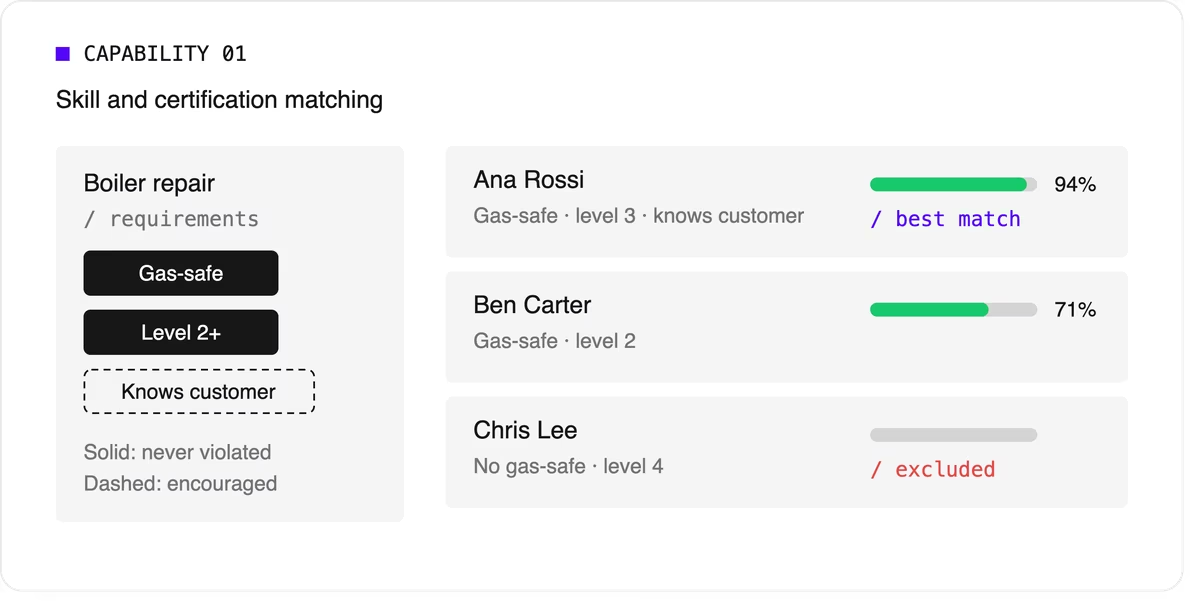
Look for support for skill levels and customer affinity in addition to simple yes-or-no skills. Matching the right skills is also one of the most direct ways to improve first-time fix rates.
2. Time windows and SLA priorities
Jobs come with customer availability windows, and many come with contractual deadlines.
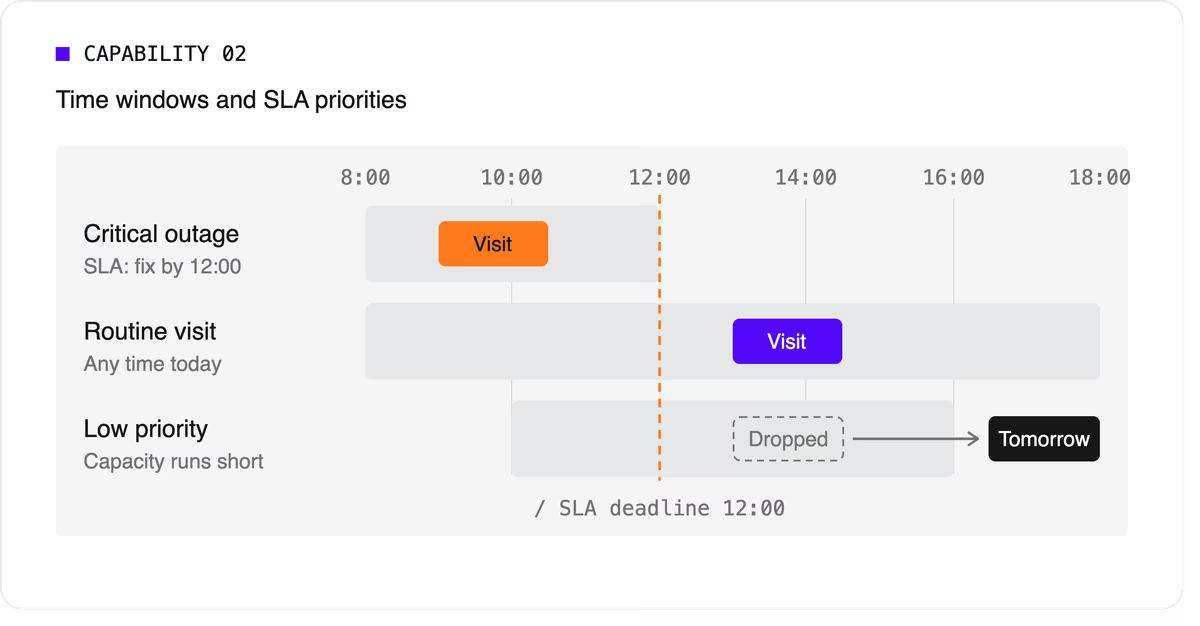
The software needs to treat a critical SLA differently from a routine visit that can move to tomorrow. That means supporting multiple time windows per job, priority levels, and deadlines that can push lower-priority work out of the plan when capacity runs short.
3. Travel-aware planning with real road data
A schedule that assumes straight-line distances will fall apart on the road. Technician scheduling software should use real travel times, ideally with support for traffic patterns and your own map provider if you already have one.
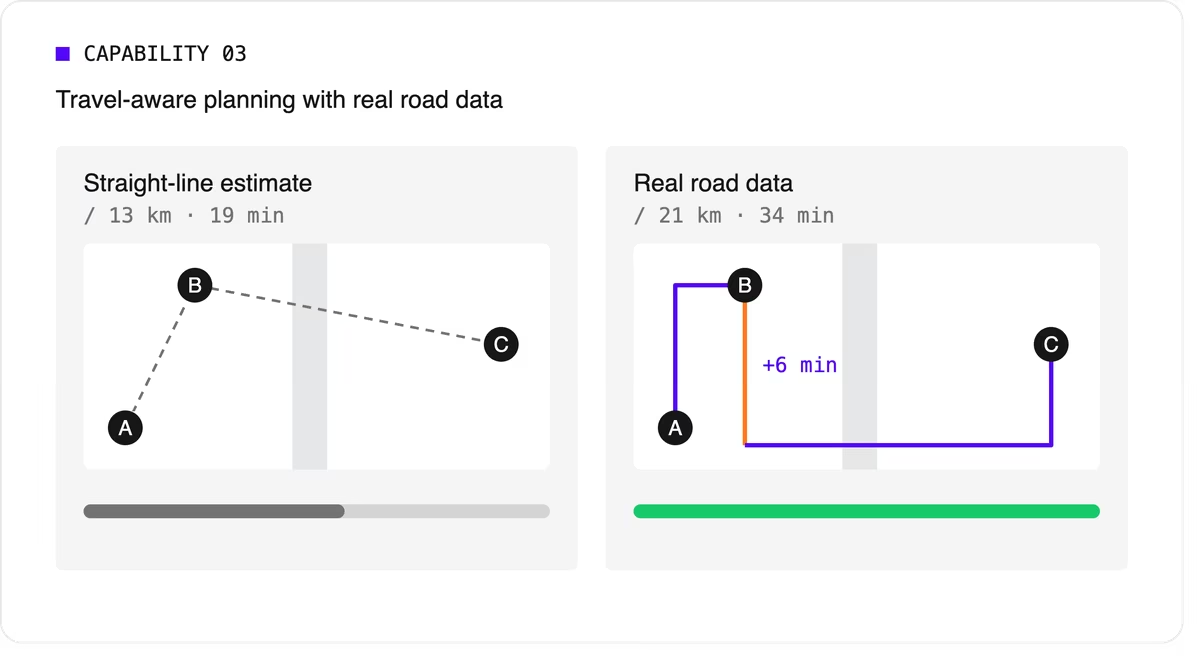
It should let you choose what to minimize, total travel time or total distance, because the two goals give different answers.
4. Multi-technician visits and job dependencies
Some jobs need two or more people on site at the same time for safety or lifting. Others must happen in order, sometimes with a delay: isolate the power before rewiring, or let a surface dry before painting.
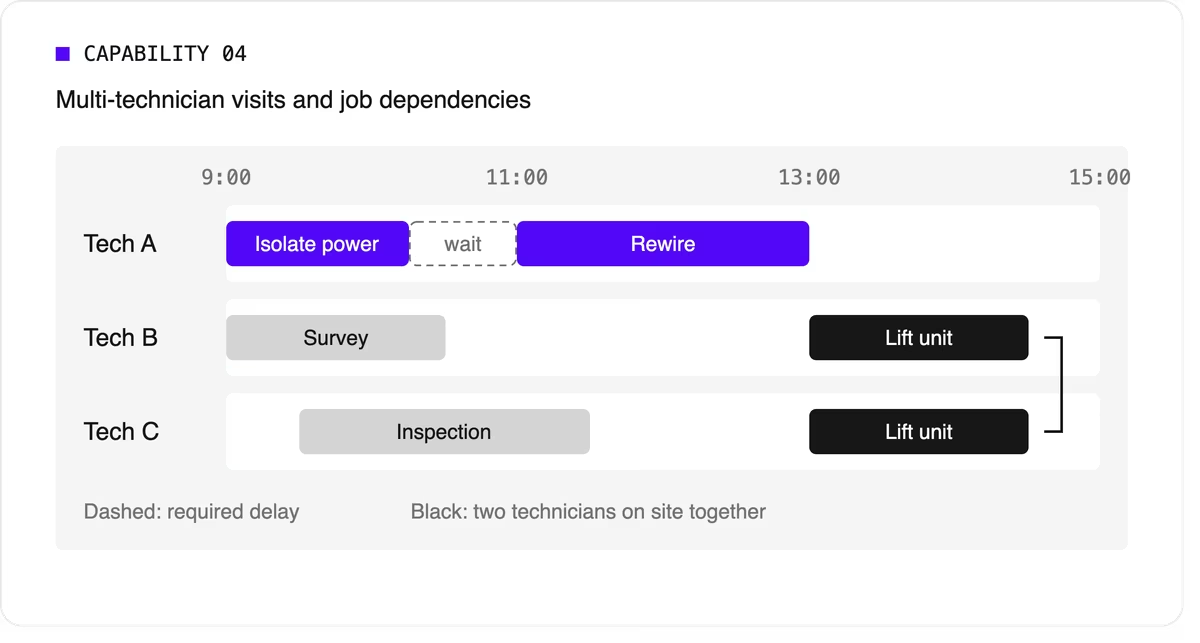
Many tools can't express these rules, so dispatchers track them by hand. If your operation has them, this capability is non-negotiable.
5. Working hours, breaks, and fairness
The plan has to respect shift start and end times, mandatory breaks, maximum working hours, and overtime rules. It should also spread work fairly so the same technicians don't always get the long days or the difficult jobs. Fairness affects retention, and retention matters more when technicians are hard to replace.
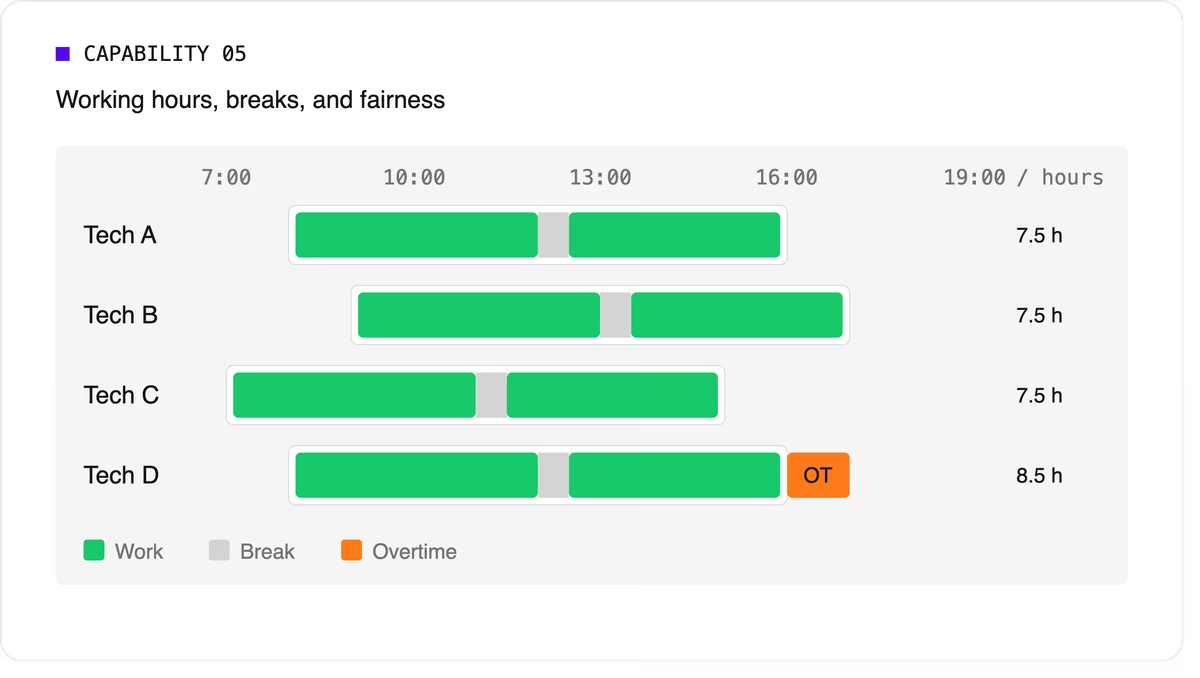
Scheduling software can support labor-law-style rules as constraints, but your organization remains responsible for verifying compliance with the regulations that apply to you.
6. Real-time replanning
Every schedule meets reality by mid-morning. A technician calls in sick, a job overruns, or an urgent call comes in. The software should replan quickly while changing as little as possible for everyone else. It should also let dispatchers lock (pin) jobs that are already in progress or confirmed with the customer.
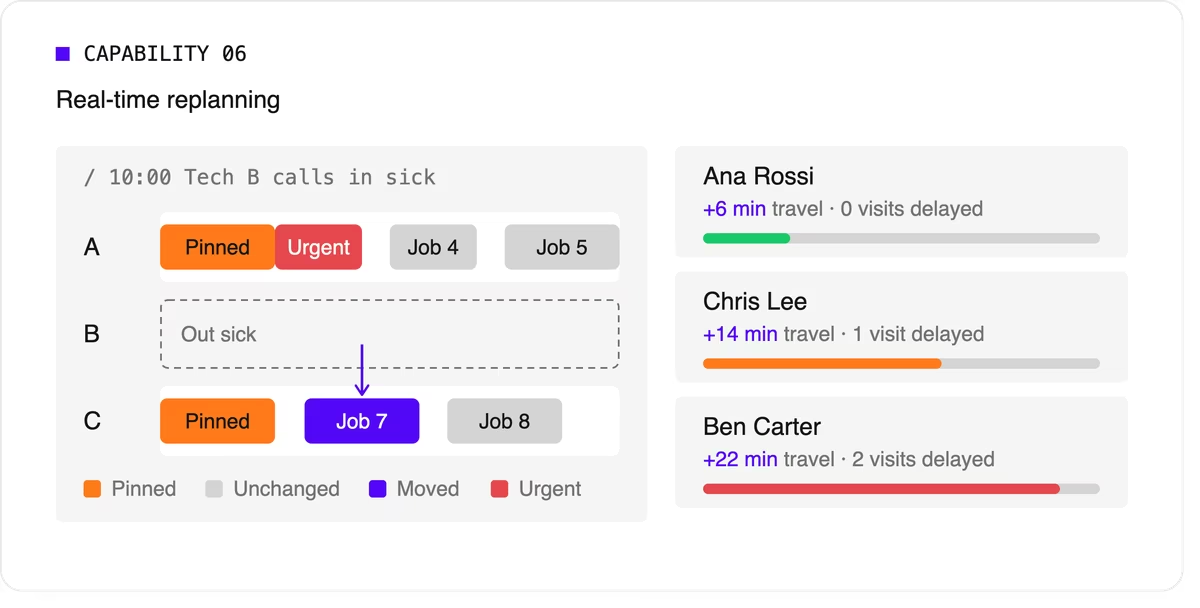
A strong version of this capability also recommends options. When a new urgent job arrives, the dispatcher should see which technicians could take it and what each choice would cost in travel or delayed work.
7. Explainability
Dispatchers and managers won't trust a plan they can't understand. Good technician scheduling software shows why a job was assigned the way it was, which rules were bent, and why some jobs couldn't be scheduled at all.
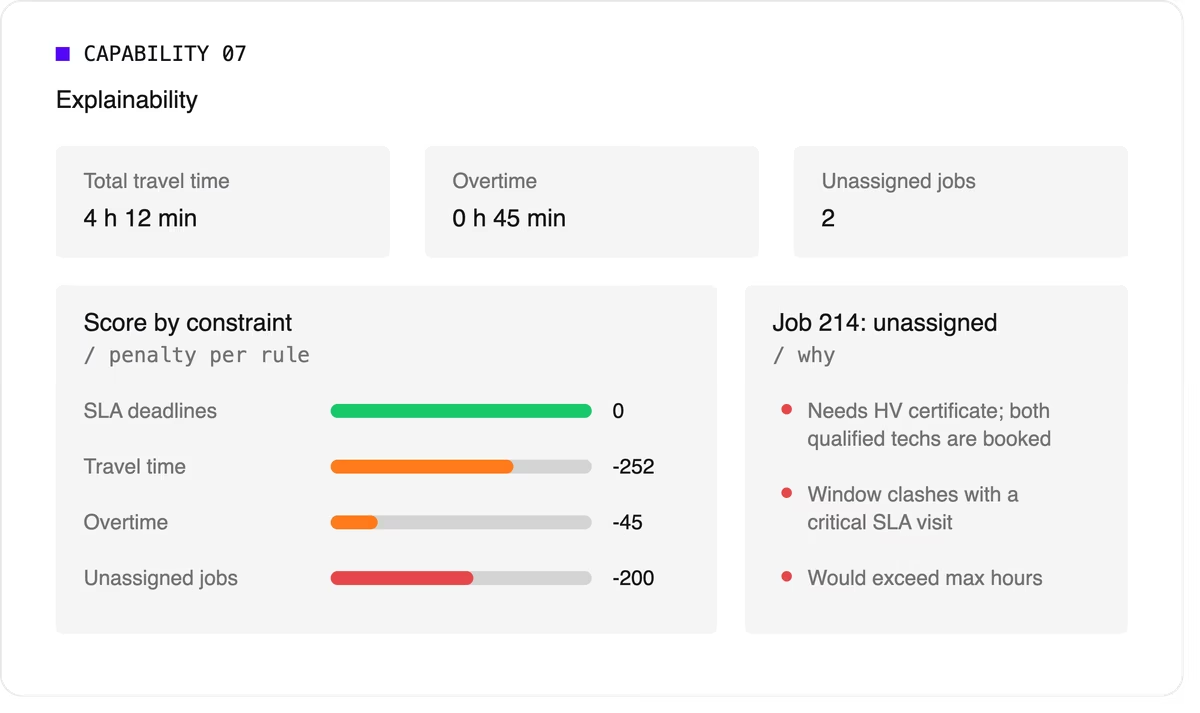
Look for a breakdown by constraint and clear metrics such as total travel time, overtime, and unassigned jobs.
8. Configurable priorities
Every operation weighs its goals differently. A utility may put SLA compliance far above travel savings, while a residential service company may care most about completing as many jobs as possible per day. The software should let you adjust the relative weight of each goal without rewriting the underlying logic.
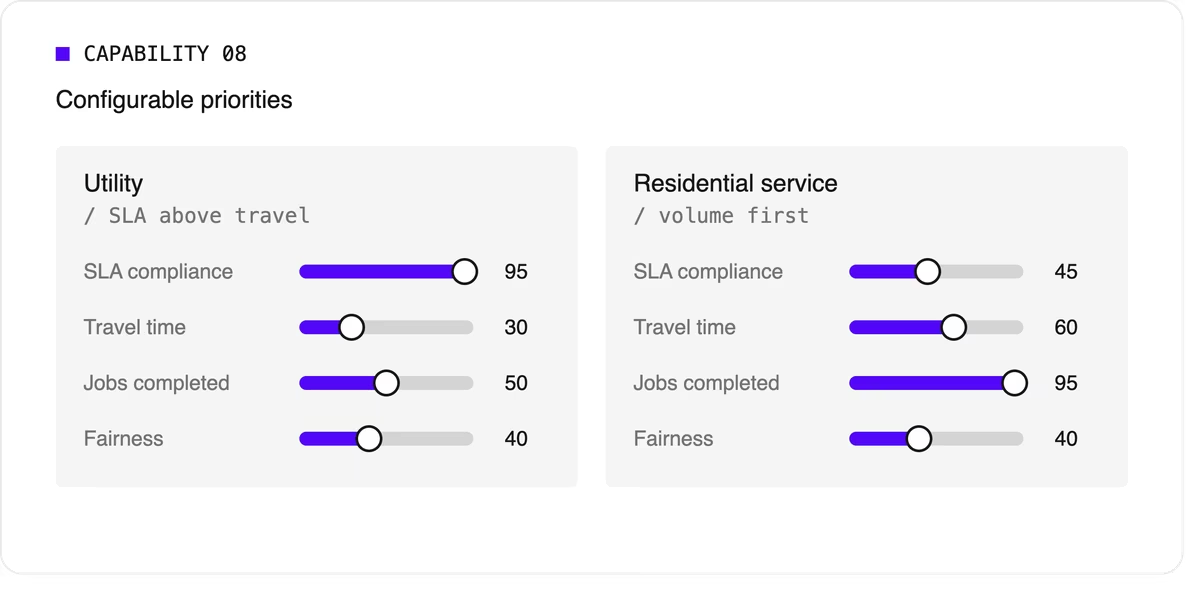
9. Integration and scale
Scheduling doesn't live on its own. It needs job data from your FSM or work order system, technician data from HR or workforce tools, and a way to push the finished plan to mobile apps. An API-first design makes this far easier than a closed tool with a separate interface.
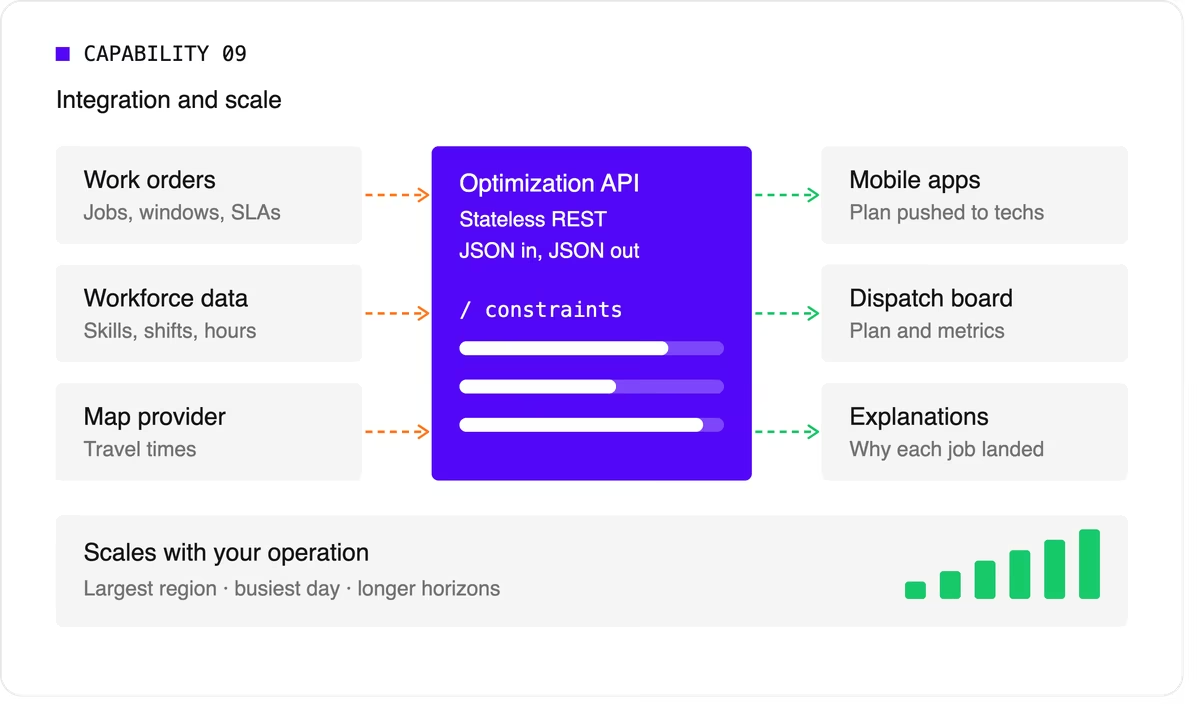
Scale matters too. The software should handle your largest region on your busiest day, and it should keep up as you add technicians, regions, or longer planning horizons.
A quick evaluation checklist
Use this table when comparing technicians scheduling software options or reviewing your own engine.
Scheduling software, FSM platform, or optimization engine?
When people search for technician scheduling software, they find three kinds of product.
- FSM platforms with a built-in scheduler cover the full workflow: work orders, mobile apps, invoicing, and scheduling. Their scheduling depth varies widely, from drag-and-drop boards to real optimization.
- Standalone scheduling tools focus on the dispatch board and often add basic auto-assignment. They're quick to adopt but can struggle with complex constraints.
- Optimization engines sit behind a user interface and do the heavy lifting. They don't manage work orders or invoices. Instead, they take in jobs, technicians, and rules, and return an optimized plan through an API. FSM vendors often embed one to strengthen their own scheduling, and large enterprises use one to add optimization to systems they already run.
Where Timefold fits
Timefold is an optimization engine in the third group. The Timefold Field Service Routing model covers the capabilities above: skill and seniority matching, customer time windows, visit dependencies with delays, multi-technician visits, working hours and fairness, and real-time replanning with recommendations. It ships with 50+ pre-configured constraints with adjustable weights, and every plan comes with metrics that show the tradeoffs it made.
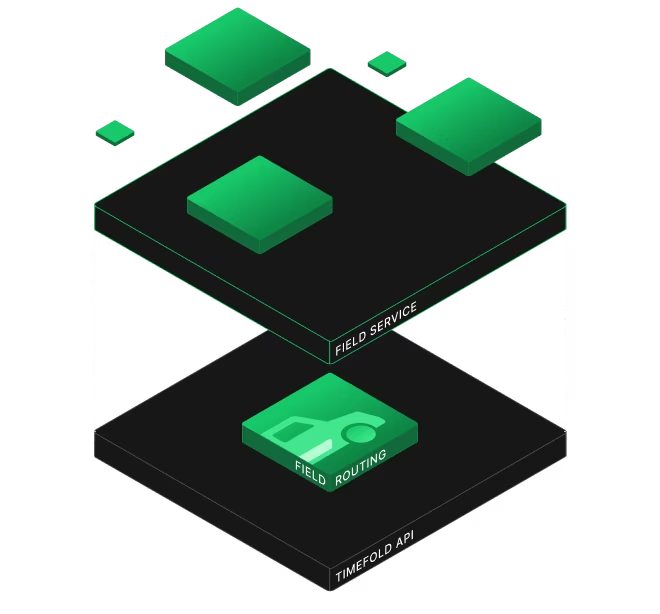
It connects through a stateless REST API, so it fits alongside the FSM or work order system you already use. To see how this applies to field teams specifically, read about route optimization for field technicians. If you're preparing to integrate, the data foundations of efficient field service walks through the data you'll need.
FAQ
What does technician scheduling software do?
It assigns jobs to technicians and plans each technician's day, taking skills, time windows, travel, and working hours into account. More advanced tools optimize the whole plan at once and replan automatically when things change.
What's the difference between technician scheduling and dispatching?
Technician scheduling creates the plan ahead of time. Dispatching sends technicians to jobs and manages changes during the day. Modern software blends the two by replanning continuously.
Do I need technician scheduling software if I have an FSM platform?
It depends on how deep your FSM's scheduling goes. If dispatchers still spend hours adjusting assignments by hand, or your FSM can't express rules like dependencies or multi-technician visits, an optimization engine behind your FSM can close the gap.
How many technicians do I need before scheduling software is worth it?
There's no fixed number. Complexity matters more than headcount. A team of 20 with several skill types, tight SLAs, and multi-technician jobs can benefit as much as a team of 200 with simple, uniform work.


From complex labor laws to scalable conditional constraints
I like labor laws, but holy cats, they're complex to implement. The people who formulated the labor laws wanted to ensure the well-being of employees, but forgot about the poor engineers who have to implement them.
Take a look at this scheduling constraint for example:
This is what we call a (headache) Conditional Constraint. Let me show you how I solved it.
Dealing with conditional constraints
The first step is to understand the requirement. "Every seven days" means that I need to group shifts in 7 day windows we call these “rolling windows”. "If they work a night shift" means that I need to count the night shifts in this group of shifts. "Work a Maximum of 40h" is what I need to evaluate and penalize in that same group of shifts, if I detected a night shift.
Next, I want to lay out how I want my constraint to look.
- I need to count the amount of shifts worked in a rolling window
- I also need to track the minutes worked in that same rolling window
- I want to filter shifts with certain tags, but independently for both previous rules, i.e. we want to count night shifts, and penalise the time worked of all shifts
- Everything should be high performance and scale up to at least 100.000 shifts
- The API should be minimal, clear, extensible, specific...
With the rules set, I can start working on this. Grouping the shifts for (1.) and (2.) can be difficult, but luckily I can just do a cheeky copy paste from our existing constraints. Combining them can also be pretty challenging, because I have to penalize a group of shifts, if the same group of shifts exists in the other stream.
But the answer lies in how you formulate the problem. "... if ... exists ..." is the perfect case to use the constraint node ifExists. A benefit of using ifExists in this case, is that we ensure scalability and performance.
API design
Another difficult step is creating an easily extensible, specific, easily understandable API. During our design meeting, we settled on:
{
 "rollingWindowRules": {
   "id": "max 36h worked if night shift is present",
   "window": 0,
   "minutesWorkedLimit": {
     "minutesWorkedMax": 2160 // 36 * 60 minutes
   },
   "condition": {
     "triggerLimit": 1,
     "type": "MIN_SHIFTS_WORKED",
     "includeShiftTags": [ "night shift" ],
     "shiftTagMatches": "ALL"
   }
 }
}
Let's see if it meets our requirements.
- minimal: yes, we only added the 'condition' field.
- extensible: yes, a type to specify what type of condition the triggerLimit will represent, for example MIN_SHIFTS_WORKED or MIN_MINUTES_WORKED. I only implemented these two, but we can easily add more.
- specific: yes, we allow the filtering of shifts with our includeShiftTags.
Conclusion
I'm proud of how the constraint turned out. I managed to create a design for a complex problem that makes full use of the constraint stream's performance capabilities and is still readable and extensible. Creating new conditions is super easy now. So if you're interested in having a condition like "if the time off exceeds 48h then ..." or "if the amount of consecutive shifts worked exceeds 3 then..." Please do contact us, and I'll be so glad to put my hard work to good use!

Humans are always the hardest part: The one thing in optimization you can't debug
Whenever I speak at a conference or just casually talk to people about what we do here at Timefold, I often get asked:
“What is the hardest part of solving the optimization problems?”.
My answer is always the same: “the human side”.
This usually leads to surprised faces. Surely, humans can’t be harder than solving an optimization problem with more possible solutions than there are atoms in the observable universe? And yet, when talking to other optimization experts, they will probably tell you the same.
The math is hard. The psychology is harder.
Cognitive Biases at Work
When we use Timefold to optimize a plan, that plan usually matches all the constraints and is by all formal definitions better than what a human planner would have created in a similar time. Yet, when shown to the stakeholders, the first things they see is usually something like:
- The one technician who now starts 20 minutes earlier.
- The one employee who has to work a different day.
Not the 98 improvements. The 2 changes. And they might hate it.
This is the status quo bias in full swing! Change feels risky, even when the plan is objectively better. “This is how we’ve always done it” is a powerful force. People tend to convince themselves that sticking with something worse but familiar is safer, until the problem grows to a scale the current problem can’t solve anymore.
Even before implementation, another bias creeps in. Stakeholders often say: “Let’s just improve what we have. It shouldn’t take long.”
That’s the planning fallacy. We consistently underestimate how long incremental fixes will take. “Just a few tweaks” turns into months of spreadsheet archaeology and fragile macros.
We underestimate the effort required to evolve a manual or semi-manual process because we imagine best-case scenarios not messy reality. That’s why software estimates quietly grow buffers. We’re compensating for our own optimism.
The planning fallacy often meets another one: the sunk cost fallacy. Instead of moving to a entirely novel way of planning their operations, they will try to improve their current solution, whether that is with some custom software development, or adding another bunch of macros to their Excel spreadsheets.
“We’ve put too much work into this to abandon it now.” So instead of moving forward, we keep patching yesterday’s solution.
Let’s say the optimized plan does go live. Drivers ignore the suggested route because “they know a faster way.” Planners manually override assignments because “this is how we usually do it.” That’s the well-travelled road effect at work. Familiar processes feel faster and better than they actually are.
People underestimate how long manual planning takes because they’ve done it for years. The friction has become invisible. And when it’s invisible, why would you ever deal with “change”?

Where Optimization Actually Breaks
None of these biases are irrational. They’re human.
Optimization is rarely blocked by math. It’s blocked by psychology.
The real constraints in planning projects are often:
- Fear of change
- Overconfidence in familiar workflows
- Emotional attachment to past investments
- Unrealistic timelines
So when people ask me what the hardest part of optimization is, I still give the same answer: “the human parts of the schedule”. An optimization tool can search millions of possibilities per second. But humans decide whether the result is accepted.
And honestly? That’s not a bug. It’s a reminder that planning education isn’t just about better models. It’s about better awareness of both the mathematical and human limitations.
Modeling hard constraints is easy. Modeling human behavior is not.

The definitive guide to Field Service Routing and Scheduling Optimization
[highlight]
TL;DR – Key takeaways
- Field service routing optimization automatically assigns technicians to jobs and sequences their daily routes by solving a variant of the Vehicle Routing Problem (VRP).
- It satisfies hard constraints (shift hours, skill requirements, SLAs) while minimizing soft objectives like total drive time, overtime, and operating cost.
- Organizations deploying AI-based routing optimization typically see 25 – 35% less drive time, more jobs completed per day, and measurable SLA improvement (Timefold deployment data).
- Manual scheduling and rule-based dispatch cannot solve this problem at scale: the number of possible schedules for 50 technicians and 200 jobs exceeds the atoms in the observable universe.
- Modern routing optimization is delivered as an API which field service management (FSM) platforms embed as a back-end engine, not a standalone tool.
[highlight]
What is Field Service Routing Optimization?
In practical terms, a field service operation starts each day with a set of jobs that need to be completed, a workforce of technicians with different skills, availability windows, and home locations, and a set of rules governing what is and isn't a valid schedule. Routing optimization is the process of computing the best possible solution to this assignment and sequencing problem. Automatically, at scale, and fast enough to update throughout the day as conditions change.
The term "routing optimization" is sometimes used interchangeably with "route planning" or "dispatch scheduling." These are related but distinct. Route planning (as offered by tools like Google Maps or traditional mapping APIs) determines how to travel between two known points. Routing optimization determines which technician should go to which job, in what order, accounting for hundreds of real-world constraints simultaneously. It is a fundamentally more complex problem.
Key distinction: Route planning answers "how do I get from A to B?" Routing optimization answers "who should go where, in what order, given all the constraints we operate under?" for an entire workforce, for the entire day/weeks/months, updated continuously.
Why Field Service Scheduling is hard
Consider a field service operation with 50 technicians and 200 jobs to schedule. The number of ways to assign those jobs to technicians - before even considering the sequencing of routes - exceeds 10300 possible combinations. For context, the estimated number of atoms in the observable universe is approximately 1080. No dispatcher, and no rule-based software, can evaluate more than a tiny fraction of the solution space.
This is why field service scheduling is classified as a variant of the Vehicle Routing Problem (VRP) one of the most studied optimization problems in operations research and first formulated in 1959. The VRP is NP-hard, meaning there is no known algorithm that can find the provably optimal solution in polynomial time for large instances. In practice, this means real-world field service operations use metaheuristic solvers: Algorithms that search intelligently through the solution space to find solutions that are near-optimal within practical time constraints.
Field service adds additional complexity on top of standard VRP because it must also handle:
- Skill requirements: not every technician can perform every job
- Customer time windows: jobs must start within a specific availability window
- Service level agreements: priority jobs carry contractual completion commitments
- Multi-day and multi-shift planning: some jobs span multiple days or require sequenced visits
- Real-time disruptions: urgent jobs, no-shows, and traffic changes require intraday re-optimization
- Fairness and labor compliance: schedules must distribute workload equitably and comply with shift and overtime rules
How Field Service Routing Optimization works
At its core, a routing optimization engine solves what is formally known as a Capacitated Vehicle Routing Problem with Time Windows and multiple side constraints (CVRPTW+). The process follows three stages:
1. Problem encoding
The engine encodes the scheduling problem as a formal optimization model. This involves defining planning entities (technicians, shifts, visits), decision variables (which technician is assigned to which visit, in what position in their route), and constraints (the rules that define a valid and good schedule).
2. Constraint evaluation and scoring
Constraints are separated into three categories based on their weight in the scoring system:
- Hard constraints
Must never be violated. Breaking a hard constraint makes the schedule infeasible. Examples: skill requirements, shift availability, required time windows. - Medium constraints
Should be satisfied where possible but can be relaxed when resources are insufficient. Example: maximizing the number of visits assigned in a day. - Soft constraints
Optimization targets that improve the quality of the schedule. Examples: minimize total travel time, minimize overtime, balance workload fairly across technicians. - Preferred constraints
Desirable but lower-priority preferences. Examples: preferred time windows, customer affinity (same technician as previous visit), coverage area alignment.
Each candidate schedule receives a score across hard, medium, and soft dimensions. A schedule that breaks zero hard constraints but has a soft score of −1,000,000 is always better than one that breaks even a single hard constraint, because the latter is simply not a valid schedule.
3. Solver search
The solver applies metaheuristic search algorithms (techniques like simulated annealing, tabu search, and large neighborhood search), to explore the solution space efficiently. Starting from an initial solution, the solver iteratively proposes modifications (moving a visit from one technician to another, swapping two visits in a route, inserting an unassigned visit) and accepts changes that improve the score. The result is a high-quality near-optimal schedule delivered within a configurable time budget.
The Constraint Model in Field Service
A complete field service constraint model covers six categories: visit dependencies, SLA compliance, shift hours and overtime, skill and seniority matching, fairness across technicians, and route optimization objectives. Each constraint group is independently configurable.
The practical value of a routing optimization engine is determined largely by the depth and accuracy of its constraint model. The following constraint categories are standard in a production field service scheduling system:
Timefold allows constraint weights to be configured, so that operators can express the relative priority of competing goals (e.g. "SLA compliance is more important than travel minimization") without modifying the underlying model.
What results to expect: Benchmark data
Organizations deploying constraint-based routing optimization typically achieve 25-35% reductions in technician drive time, higher visit throughput with the same workforce, and measurable improvements in first-time fix rate due to better skill-to-job matching.
- 25-35% Reduction in technician drive time after optimization
- <2 mo Typical time-to-value when integrating via API (vs 15+ months for in-house builds)
- 1,000s Technicians schedulable simultaneously by a single optimization engine
A 25-35% reduction in drive time has compounding operational benefits. For a field service team with 100 technicians each spending an average of two hours per day driving, a 30% reduction recovers approximately 60 technician-hours per day - equivalent to gaining 7-8 additional technicians without hiring. Those hours can be converted into additional visits, reduced overtime, or earlier shift ends.
The improvement is achieved by simultaneously solving three problems that human dispatchers and rule-based tools handle in isolation: who goes where (assignment), in what order (sequencing), and how to respond when plans change (re-optimization). Human dispatchers are good at recognizing obviously bad schedules, but cannot hold thousands of interdependencies in mind simultaneously to find globally optimal ones.
On "the last 20%": Early-stage routing tools (basic nearest-neighbor algorithms) can capture roughly 60-70% of available efficiency gains with minimal setup. Reaching 90%+ of the theoretical optimum requires a proper constraint solver. The gap between a good greedy heuristic and a metaheuristic optimizer often represents 10-15% of total drive time, which is material at scale.
Manual scheduling vs Routing Optimization: A direct comparison
Manual scheduling by dispatchers is feasible for fleets of 10-20 technicians but degrades rapidly at scale. For operations with 50+ technicians, algorithmic optimization consistently outperforms manual dispatch on both efficiency and SLA compliance metrics.
It is worth noting that routing optimization does not eliminate the role of dispatchers. The technology empowers them to do more. Instead of spending the majority of their time constructing schedules manually, dispatchers in optimized operations review AI-generated plans, handle edge cases requiring human judgment, and manage customer escalations. The optimization engine handles the combinatorial work; humans handle the exceptions.
Real-time re-optimization
Real-time re-optimization automatically recalculates routes and assignments when disruptions occur (like urgent jobs, cancellations, traffic delays) producing an updated plan within seconds without requiring manual dispatcher intervention.
A static daily schedule, produced once in the morning, degrades throughout the day. Technicians run late, customers cancel, emergency jobs are called in. Without re-optimization, dispatchers manually insert changes and hope the rest of the schedule holds. In practice, a cascade of small disruptions can make an optimized morning schedule look like an unplanned afternoon.
Real-time re-optimization - sometimes called intraday re-scheduling - addresses this by treating the schedule as a continuously updated plan rather than a daily fixed output. When a trigger event occurs, the engine receives the current state of all ongoing and pending work, re-solves the assignment and routing problem for all unstarted visits, and returns an updated schedule. Visits already in progress are locked; the solver optimizes around them.
Key re-optimization triggers in production systems include:
- Insertion of a new urgent or emergency visit
- Technician becoming unavailable (sick, vehicle issue)
- Visit cancellation requiring workload redistribution
- Significant travel time deviation due to traffic
- Job overrun requiring subsequent visit rescheduling
The "Smart Reassignment" use case, where an unexpected technician absence triggers automatic identification of the best available backup, is a direct application of real-time re-optimization. Rather than requiring a dispatcher to manually review availability and skills, the engine re-solves the affected portion of the schedule and surfaces a recommended replacement with full route and timing context.
How Routing Optimization is delivered: The API model
Field service routing optimization is delivered via REST API. An FSM platform submits a dataset describing jobs, technicians, and constraints to the optimization engine, which returns a complete optimized route plan, typically within seconds to minutes. Timefold's Field Service Routing API can handle up to 30,000 visits in one optimization run.
Routing optimization is not a standalone application, it is an engine embedded within a broader field service management platform. FSM software handles the user interface, job management, customer communication, and mobile workflows. The routing optimization engine handles the mathematical scheduling problem as a back-end service.
The integration pattern is straightforward. The FSM platform sends a POST request to the optimization API endpoint with a JSON dataset describing the planning problem: vehicles (technicians and their shifts), visits (jobs and their constraints), and configuration parameters. The engine processes the dataset and returns an optimized route plan, the specific assignment of visits to vehicle shifts, with arrival times and route sequences for each technician.
For FSM product teams evaluating routing optimization engines, the key integration considerations are:
- Constraint coverage - does the engine's model support the specific constraints your customers operate under?
- Re-optimization latency - how quickly can the engine respond to intraday trigger events?
- Scale - what is the tested performance at the fleet sizes your enterprise customers operate?
- Deployment flexibility - is the engine available as a managed cloud service, on-premise, or both?
- Integration timeline - how long does it take to go from API access to a production-grade integration?
Frequently Asked Questions
What is the difference between routing optimization and GPS navigation?
GPS navigation determines the fastest path between two known points. Routing optimization determines the best assignment of work to a fleet of technicians and sequences their routes to minimize travel time across all technicians simultaneously, while satisfying all scheduling constraints. These are different problems: one is pathfinding, the other is combinatorial optimization.
Can routing optimization handle jobs that span multiple days?
Yes. Multi-day planning windows are a standard feature of production routing optimization models. The engine treats each technician shift as a separate planning unit and can handle jobs that require sequential visits across days, jobs with delayed dependencies (e.g. a visit that cannot happen until 48 hours after a prior visit), and rolling planning horizons that extend weeks into the future.
What happens when a technician doesn't have the required skill for an urgent job?
The constraint model enforces skill requirements as hard constraints by default. This means the engine will not assign a job to a technician who lacks the required skill, regardless of proximity or availability. When an urgent job cannot be covered by any available technician with the required skill, the engine surfaces this as an unassigned visit so the dispatcher can take manual action (e.g. calling in a specialist or escalating to an external contractor).
How does routing optimization handle customer time windows?
Time windows can be encoded as hard constraints (the visit must start within the window and violations make the schedule infeasible) or soft/preferred constraints (the visit should start within the window where possible, but can be scheduled outside it to maintain overall schedule feasibility). The engine honors the window type specified and minimizes any deviations from preferred windows when hard constraints make full compliance impossible.
Is routing optimization the same as FSM software?
No. Field Service Management (FSM) software is a broad category covering job management, mobile workforce apps, customer portals, invoicing, and reporting. Routing optimization is a specific computational capability (the scheduling and routing engine) that is typically embedded within an FSM platform. Some FSM platforms build this engine themselves; others integrate specialized routing optimization APIs to provide this capability without the internal development burden.

Introducing Timefold Solver 2.0
We are pleased to announce we are working on the next major release of Timefold Solver 2.0. This release represents a substantial evolution of the solver, focused on:
- delivering a cleaner API
- improved maintainability
What’s coming in Timefold Solver 2.0
1. A streamlined, future-ready API
When Timefold continued OptaPlanner, we kept a number of legacy and deprecated APIs to ensure a smooth transition for early adopters. Today, those legacy constructs limit our ability to innovate.
With Solver 2.0, we will remove all deprecated functionality. This will:
- Simplify and modernize the developer experience
- Reduce ambiguity and technical debt
- Unlock future improvements in performance, stability, and usability
2. Significant ease of use improvements
Over the past year, we’ve introduced several enhancements to reduce complexity and speed up model development, including:
- Custom Shadow Variables (replacing most custom VariableListener implementations)
- @PlanningListVariable (now fully equivalent in capability to chained variables)
Solver 2.0 continues this process by removing:
- Classic VariableListener implementations
- Chained planning variables
- Additional legacy constructs that no longer provide value, many of which have been deprecated for years.
These changes make Timefold Solver easier to adopt and significantly reduces the learning curve for new engineers.
[highlight]
Introducing Enterprise license keys
Disclaimer: Only for Timefold Enterprise Clients
Beginning with Timefold Solver Enterprise 2.0, enterprise customers will be required to configure a Timefold Enterprise license key.
This ensures:
- Proper activation and compliance for enterprise deployments
- Access to enterprise-grade features and support
Configuration is straightforward and will be documented clearly in the migration guide. The new license key mechanism is designed to minimize operational overhead while aligning with industry-standard enterprise software practices.
[highlight]
A clear and guided upgrade path
To make the transition to Solver 2.0 as smooth as possible, we will provide:
- A comprehensive migration guide outlining every required change
- OpenRewrite recipes to automate the majority of updates
- A structured plan for larger changes that cannot be automated
Our goal is to reduce risk and ensure predictable upgrade timelines for enterprise teams.
Long-term support for Timefold Solver 1.x
We recognize the importance of stability and predictability in enterprise environments.
- Timefold Solver Enterprise Edition 1.x will continue to be supported in line with support clauses in contracts and released versions will remain available from our repository.
- Timefold Solver Community Edition 1.x will be maintained throughout 2026 with quarterly bug-fix releases and security updates.
This gives organizations ample flexibility in planning their migration window. In the case these timelines would be troublesome for your organization, please reach out to us so we can understand your situation and find alternative solutions.
How to start preparing today
You can begin preparing your codebase for Solver 2.0 now:
- Upgrade to the latest 1.x release using our OpenRewrite migration assistance
- Remove usage of all deprecated APIs
- Begin migrating larger components if they are used:
- Custom Variable Listeners → Declarative Shadow Variables
- @PlanningVariable(type = CHAINED) → @PlanningListVariable
Proactively adopting these changes will make the final upgrade significantly easier.
What’s next
Upon release, we will:
- Publish the full list of changes, including details about license key configuration
- Keep the migration guide continuously updated
Thank you for your partnership and continued trust. We are excited to bring you the next generation of Timefold Solver. If you have any questions, don’t hesitate to reach out to us through your enterprise contact.

You Can’t Opt Out of Decisions
Despite being children of television, internet and smartphones ourselves, my wife and I are extra protective towards our 2 year old son. We’d much rather he play outside or with his toys than watch television. To make sure we stay aligned when television is allowed, we came up with a simple decision diagram.
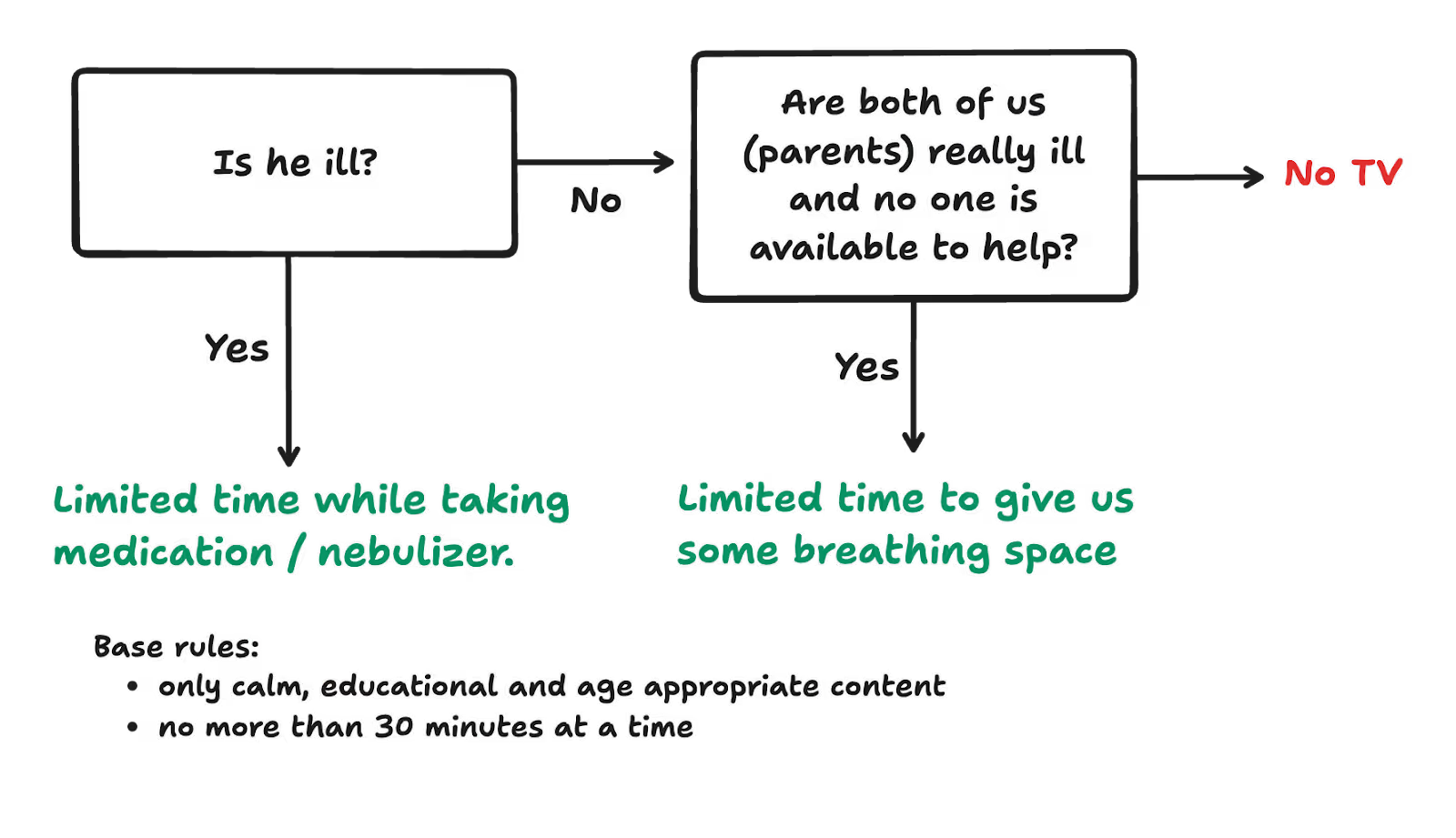
Raising a kid turns out to be a never-ending stream of decisions. We don’t have a diagram like this for everything. Being intentional takes time and energy, so we reserve it for the decisions that really matter.
Parenting isn’t special in that sense. Decisions are everywhere. In a restaurant, someone decides who gets served first. A manager decides who works late. A system decides what comes next in the queue.
Decisions need to be made all the time. You can’t opt out. Even not deciding is a decision.
Decision Heuristics!
Making decisions all day is exhausting. So we take shortcuts. We rely on what is called decision heuristics, simple rules of thumb that help us move fast without thinking too hard. Most of the time, they show up as “just the way we do things”.
“First-come-first-served (FCFS)” is one of these rules. It feels fair. But is it?
At a frituur (yes, the Belgian fries place, but replace this with any take-out restaurant), is it reasonable that someone ordering a single pack of fries waits half an hour because the person in front placed a party-sized order?
First-come-first-served assumes all requests are equally important. We ignore urgency, impact, or downstream cost. All for the sake of “easier to plan and execute”.
Another classic default is alphabetical ordering. Many of us experienced this in school. If your last name starts with an A, chances are you were often called on first to present your work or to answer questions. This “decision” has lingering effects. Students later in the alphabetical order often receive lower grades and get fewer chances to take the lead, which has a long term impact on their development and job opportunities.
In some parts of academia, authors are listed in alphabetical order (and not by size of their contribution), which disincentivises people later in the alphabet to co-author, as their name will be swallowed by their arch nemesis: “et al.”
These are just two decision heuristics. Others include hard-coded priorities in software systems, automatic functions in spreadsheets nobody understands anymore and the king of accidental decisions: “We’ve always done it this way”.
From Accidental to Intentional
The real risk of sticking with accidental decisions isn’t that they’re wrong. It’s that they quietly block better options. For some critical decisions, we need to become more intentional. Deliberate. Just starting with planning optimization forces clarity. It’s a thinking tool, and with it, you can no longer dodge the hard questions:
- What do we want to optimize for?: Employee happiness? Throughput? Endless heaps of $$$?
- What constraints do we have?: Availability? Maximum capacity of our warehouses and vehicles?
- What trade-offs are we willing to make?: e.g. Do we accept more overtime, if that enables us to give people more days off?
Simply answering these questions already improves the quality of your decisions.
Second, a good planning optimization tool unlocks scenarios that are otherwise practically impossible to reason about with pen and paper or a thousand post it notes.
- A take-out service optimized for lower average wait time can prevent a single large order from blocking many small orders.
- Work rosters that respect employee preferences (in addition to availability) suddenly become manageable.
These options often get ignored not because they lack value, but because they’re too hard to reason about.
Decision Intelligence, Not Decision Delegation
Becoming more intentional doesn’t mean handing decisions over to algorithms. It means refusing to hide behind them.
The role of a good planning optimization tool isn’t to replace human judgment, but to support it. By making trade-offs visible, constraints explicit, and alternatives comparable, it turns vague instincts into conscious choices.
Not just delivering a solution, but providing the context needed to question it, adjust it, and ultimately stand behind it.
Accidental decisions have a kind of gravity. Once in place, they keep pulling everything back to “this is how we do things.”
Decision intelligence gives us the leverage to push back against that gravity so we can decide deliberately, instead of drifting by default.

Cooking is an integration project
Life recently threw a wrench in the well-oiled machine that is my household. Due to some health issues, my partner needs to rest, meaning the domestic duties that usually land on her plate have shifted to mine.
This includes my nemesis: Cooking.
Give me the "dirty jobs": Taking out the trash, changing diapers and I’m content. But making dinner? That does not spark joy for me. My partner is the chef; I’m usually just the guy who eats the result.
I am stepping up now (like any good partner should)! As she was guiding me through a complex recipe the other day, I had an epiphany: this feels a lot like an integration project… and I’ve seen many of those in my career!
Let me explain.
Shopping (data hunt)
When you cook, you need ingredients. In the AFK world, you walk into one supermarket, buy everything, and leave. Integrating a planning solution should work the same way. Ideally, your data is neatly stored in a single database, or ERP, ready to be used.
In reality however, your "ingredients" are scattered across a logistical nightmare of many different locations.
- The Grocery Store: Your main ERP.
- The Specialty Shop: That legacy HR system from 1998.
- The Garden: Sticky notes on a monitor.
- Foraging in the Woods: The brain of that one planner who "just knows" which trucks have maintenance issues.
Just like you can’t make a stew without finding the beef, you can’t run an optimization without locating your data. Even if it’s currently living on a piece of paper in someone’s back pocket.
Mis-en-place (data prep)
After you’ve gathered your ingredients, any good chef (this includes my darling wife) knows what comes next: mis-en-place: Washing vegetables, chopping onions…. putting everything in its place. It’s the quiet work that pays off later, sparing you from stress when the kitchen gets hot.

The biggest issues I had while cooking came from a lack of preparation, I’d just started cooking, then suddenly read “peel 8 potatoes and slice them into bits” while I already had 2 other pans on the stove.
When integrating systems, mis-en-place is the stage where you gather, clean, standardize, and reshape your data before your optimizer even touches it!
Quite often, you’ll want to:
- Resolve Formats: Is 2026-02-01 February 1st or January 2nd? (You usually don’t know until you find a row saying 2026-01-31).
- Validate Constraints: Ensure birthdates aren’t in the future and Country Codes are actually ISO standard.
- Map Identifiers: ensuring CC in one system matches CREDIT_CARD in the other.
This step isn’t fancy or flashy, but it’s essential. Without it, you are making the job much harder for yourself. Just like trying to cook while searching for the garlic you swear you chopped ten minutes ago.
Sizzling pans and boiling water!
Now comes the part everyone thinks of when they hear “cooking”: the pots, the pans, the boiling water transforming sticks into spagethi. This is where raw ingredients become dinner.

In planning solutions, this is the solving phase. The point where your planning solution takes all that carefully curated data and actually computes something meaningful. Where the chaos of real-world requirements gets melted into a delicious soup of possibilities and solutions.
When things come together, it’s a special feeling. When running an optimization on our Timefold Platform, I sometimes can’t help but stare at our score graph as the solution gets slowly better, burning away all the excessive fat and leaving just the good parts.
Serving / plating
A meal isn’t done when it leaves the pan; it’s done when it hits the plate in a way that makes people want to pick up a fork. Presentation matters. Feedback matters. And ideally, whoever eats the dish walks away happy.
Similarly, after you have a solved planning problem, you need to present it clearly. Whether you use dashboards, reports, visualizations, or API responses, stakeholders need to understand what changed, why it changed, and what actions they should take.
Basically, you conduct a taste test. This is where reality hits. You serve the plan, and the stakeholder takes a bite.
- “This is great, but…”
- “Bob can’t drive that truck, he’s allergic to manual transmissions.”
- “We actually need this delivered by 4 PM, not 5 PM.”
Just like seasoning a sauce, you take that feedback, adjust the constraints, and iterate. The first plan, like the first pancake, is rarely perfect. But by iterating, the system becomes sharper, smarter, and tastier.
The takeaway
(the lesson-y one, not the food-y one)
As I’ve been cooking more meals, it’s been clear to me there are so many similarities with integrating software. None of the phases listed above stand alone. The shopping, the prep, the cooking, the plating… each one sets up the next, each one depends on the last.
Planning systems work the same way. Good data unlocks good optimization, good optimization doesn’t say that much without clear presentation, and clear presentation fuels better feedback and iteration. When all those pieces support each other, the result feels less like a sequence of chores.

How to win in Field Service: The best routing and scheduling software
Why Field Service Scheduling and Routing is so hard to get right in 2025
Field service operations look simple from the outside: take jobs, match them to technicians, schedule routes, and send people out into the world. But anyone who has managed real field service teams knows the reality:
- Technician calendars are fragmented with “white-space gaps.”
- Travel time variation destroys efficiency.
- Skill mismatches cause failed visits.
- Strict customer time windows restrict route flexibility.
- Jobs appear, cancel, or shift constantly throughout the day.
- Dispatchers often handle far too many variables manually.
Even well-run teams lose 20-40% productivity from avoidable travel, idle time, and inefficient assignment patterns. Fuel costs, overtime, and missed SLAs compound quickly.
The core reason?
Routing + scheduling in field service is a complex optimization problem (stemming from the Vehicle Routing Problem and the Traveling Salesman Problem). It's far beyond simple “map routing” or “drag-and-drop calendar management.” It requires mathematical optimization that can balance constraints, and respond instantly to real-world changes.
This is why FSM vendors increasingly embed a high-performance routing engine like Timefold directly into their platforms.
What is a Field Service Route Scheduling API?
What does a Field Service Route Scheduling API engine actually do?
A routing & scheduling API engine is a back-end system that calculates the best possible assignment and route order for technicians. It:
- Ingests job data (location, duration, skills needed, time windows).
- Understands technician attributes (skills, shift times, home base, capacity).
- Computes optimized route plans that minimize travel, maximize utilization, and meet SLAs.
- Automatically re-optimizes schedules as jobs are added, canceled, or delayed.
- Generates technician-by-technician itineraries and ETAs.
It’s not a map, and it’s not just a calendar. It’s an optimization system that continuously balances constraints across the entire fleet.
How is a Field Service API different from typical routing software?
Traditional route planning tools were built for logistics or delivery. Field service adds complexity:
- Skills and certifications
- Parts or equipment constraints
- Customer SLA windows
- Technician familiarity or geography
- Variable job duration
- Dynamic job insertion
- Emergencies or other unforeseen circumstances
A specialized API like Timefold is built for these nuances and delivers real-time results at scale, integrated directly into your existing FSM UI or workflows.
Why Field Service Management tools embed Timefold's Field Service API
Field Service Management software companies choose Timefold because it strengthens their product without increasing their development burden. Timefold gives vendors a reliable scheduling engine they can integrate quickly, so they can enter new markets faster and compete more effectively. It helps product teams improve customer outcomes, reduce onboarding friction, and support larger and more complex field service operations with confidence.
By relying on Timefold for routing and scheduling, FSM providers can focus on what they do best: building the workflows, user experience, and industry-specific tools that set their platforms apart. Vendors gain a stronger value proposition, more upsell opportunities, and a clear performance advantage that helps them win and retain customers.
How to evaluate a Field Service Routing and Scheduling API
A practical vendor checklist.
Optimization quality
Look for:
- Reductions in travel distance (we see an average of about 25%)
- Balanced workload distribution
- Highly consistent on-time arrival rates
Real-time re-optimization
The engine should handle:
- New jobs dropped during the day
- Cancellations or overruns
- Emergency visits
- Technician absences or delays
APIs like Timefold re-optimizes in seconds, not minutes.
Scalability
Your API should comfortably handle:
- 100–500,000+ jobs per run
- Dozens to tens of thousands of technicians
- Complex constraints and multi-day scheduling
APIs like Timefold is engineered for enterprise-scale FSM platforms.
Constraint support
Field service needs more than basic routing. Key capabilities include:
- Skills + certifications
- Shift times and breaks
- Customer priority or SLA windows
- Time-dependent travel
- Parts or equipment constraints
- Mandatory follow-up visits
- Depot or hub rules
- Complex service durations
APIs like Timefold are is designed to encode all of these.
Performance and latency
Consider both:
- Job-to-route computation time
- Consistency under load
Developer experience
FSM vendors depend on integration speed. You might require:
- Clean REST API
- Elite documentation
- Enterprise-level support
- A clear and fast POC
Timefold’s Field Service Scheduling API at a glance
Timefold is a high-performance constraint-solving API engine that computes optimal technician schedules and routes for field service at any scale.
Differentiators
- Built on battle-tested solver technology.
- Designed specifically for API-ready product teams.
- Handles complex constraint logic better than generic routing systems.
- Performance-tuned for instant, repeated intraday optimization.
Real-world impact
FSM vendors using Timefold typically see:
- An average of 25% reduction in travel time
- 20–40% fewer missed SLAs
- 20-30% increase in technician utilization
- Happier dispatchers with dramatically reduced manual reconciliation
How Timefold compares to other routing approaches
Timefold vs. generic mapping APIs
Mapping APIs (like Google Maps routing) can compute a single route, but they cannot:
- Assign jobs across many technicians
- Respect complex skills or SLAs
- Rebalance workloads
- Produce multi-stop, multi-day plans
- Optimize across thousands of jobs
- Re-optimize continuously during the day
Timefold is an optimization engine, not a routing API in the mapping sense.
Timefold vs. legacy FSM suites
Legacy platforms often include simplistic route planners. They typically:
- Don’t scale well past a few dozen technicians
- Rely on drag-and-drop scheduling
- Struggle with complex constraints
- Have limited customization options
- Take minutes to recalculate
- Produce low-quality schedules
Timefold gives modern FSM vendors a best-in-class optimization layer without rebuilding the math internally.
What is the ROI of Timefold's Field Service Routing API
Consider a field service operation with 1,000 technicians. If each technician spends around two hours a day traveling, a 25% improvement in routing efficiency results in roughly half an hour saved per person per day. Across the full workforce, this adds up to about 500 hours saved every day, or more than 11,000 hours each month.
That volume of recovered time is equivalent to more than 1,300 technician-days every month. At typical U.S. technician wage levels, the annual impact is close to $4 million saved, which works out to roughly $4,000 in efficiency gains per technician per year.
These numbers highlight why routing optimization has become a major competitive factor for modern FSM platforms.
Savings compound with fewer missed SLAs, less overtime, CO2 emission reductions and higher throughput.
FAQ
What’s the difference between a routing API and an optimization engine?
Routing APIs find the best path between two points.
Optimization engines like Timefold assign many jobs to many technicians while respecting constraints, then compute entire route plans.
Can Timefold handle jobs without exact street addresses?
Yes. Coordinates, fuzzy locations, polygons, and grid references are all supported with longitude and latitude data.
How long does integration take?
Most FSM teams achieve a working prototype in days, and full integration in 2–4 weeks, depending on workflow complexity.
Can Timefold handle emergency jobs?
Yes. This is a core use case, Timefold excels at intraday re-optimization.
How secure is the data?
Timefold supports secure, enterprise-grade deployment models including cloud-hosted and self-managed environments.
Next Steps: Try Timefold in your own Field Service Management platform
Timefold gives FSM vendors a high-performance, API-first routing engine that handles the toughest scheduling problems with speed and precision.
Whether you’re scaling your existing platform, adding automated dispatching, or replacing a legacy planning module, Timefold gives you the optimization backbone your customers expect.
Ready to see it in action? Request a trial.
How Fast is Java 25
With the recent release of Java 25, we took our usual look at its performance when running the Timefold Solver. Read on to see how the solver performs on Java 25, compared to previous Java versions.
But first, a little context.
What is Java 25 and how to get it
Java 25 is the latest feature release of the Java platform, the language Timefold Solver is built on. It includes a fresh set of enhancements, previews, incubating features, and the usual reliability improvements. Read the full overview of included Java Enhancement Proposals (JEPs) here: https://openjdk.org/projects/jdk/25/
Java 25 became generally available in September 2025, and you can install it easily through SDKMAN, which is also how we like to manage our JDKs.
Along the way, we’ve created a powerful suite of benchmarking tools to easily compare Timefold Solver versions, configurations, and Java releases. In the rest of this post, we’ll share some of our insights with you when it comes to the performance of Java 25 with Timefold Solver.
Micro-benchmarks
We’ll start with score director micro-benchmarks, which we use regularly to establish the impact of various changes on the performance of Constraint Streams. These benchmarks do not run the entire solver; rather, they focus exclusively on the score calculation part of the solver.
They are implemented using Java Microbenchmark Harness (JMH), and they run in many Java Virtual Machine (JVM) forks and with sufficient warmup. This gives us a good level of confidence in the results. In fact, the margin of error on these numbers is only ± 2%.
As with our previous benchmarks, we configured the JVM with ParallelGC as the garbage collector (GC), instead of the default G1GC. ParallelGC has been the best GC for the solver in the past, as Timefold Solver is all about throughput and not latency.
Here is the Constraint Streams performance on Java 25 vs Java 21:
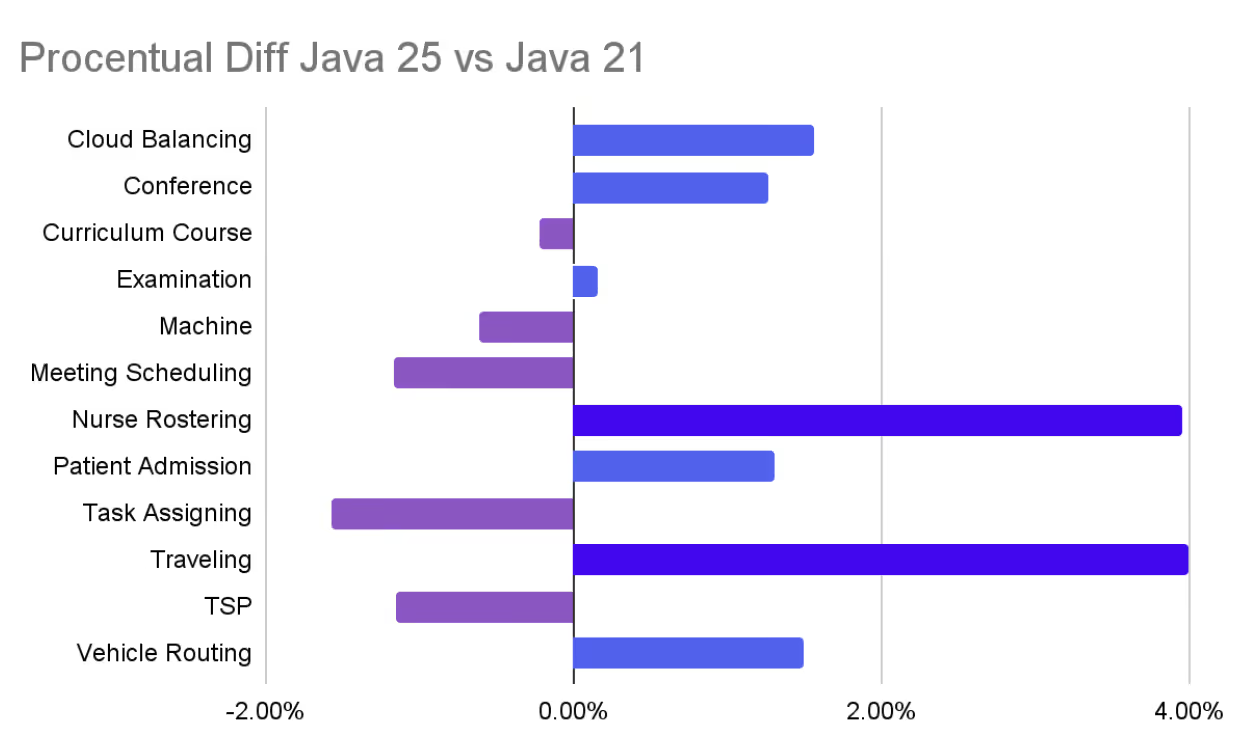
In all cases but 2, the difference between JDK 25 and 21 is within the margin of error (+/- 2%) for the benchmark. What that means is that we have observed no statistically significant change in performance between the two releases with these micro-benchmarks except for 2 cases, Nurse Rostering and Travel Tournament, where Java 25 performed around 4 percent better on these benchmarks.
We couldn’t really identify exactly why it’s better yet, but we aren’t too worried when the benchmarks return a “significantly better” result.
Real-world benchmarks
In addition to the micro-benchmarks above, we also run larger scoped applications, where we put the entire solver to work. For our benchmark, we use the median move calculation speed as our key metric.
Move calculation speed is the engine RPM of the solver. The higher it is, the faster the solver can try alternatives and converge toward a better solution. This makes it a good candidate for comparative benchmarking.
We ran the solver across 30 JVM forks. We selected a single benchmark which is a bit closer to a real application and ran it across a couple of Java versions. Once again, we used ParallelGC as the garbage collector of choice.
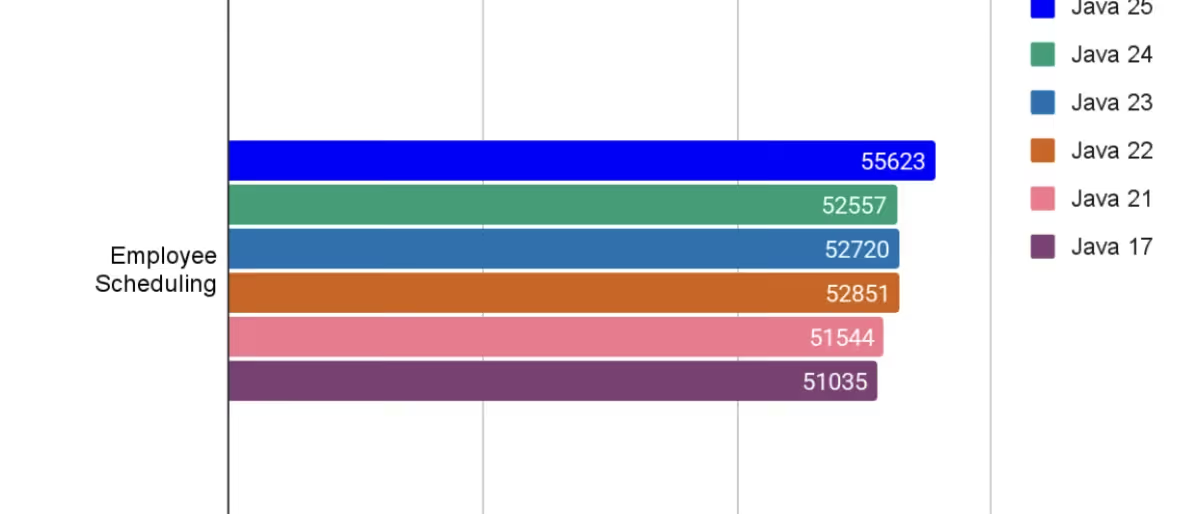
Here are the results:
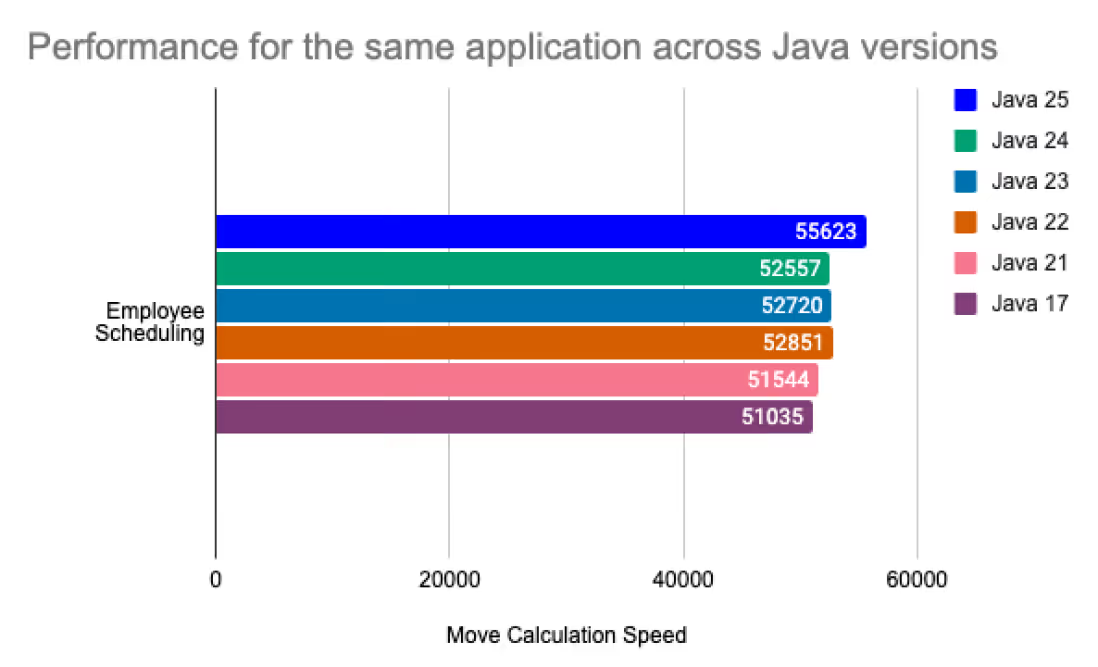
While we haven’t established strict confidence intervals, run-to-run variance was small enough to have confidence in the observed improvements.
In this benchmark, Java 25 is almost 8% faster when compared to Java 21!
All benchmarks with these different Java versions used the same JAR file. These results clearly show that by using a newer version of Java, you not only get new features, but also increased performance. This is just one of the reasons why we love updating our pre-built models on app.timefold.ai to a newer Java version.
Appendix A: Benchmark Details
These benchmarks use Timefold Solver 1.28.0, the latest version at the time of writing.
Machine specs:
Intel® Core™ i9-13900(limited to 3 dedicated CPUs for consistency)- 64GB ram available
Micro benchmarks:
- JDKs:
Temurin 21.0.9+10.0.LTSTemurin 25.0.1+8.0.LTS
- Flags: -XX:+UseParallelGC -Xms4g -Xmx4g
- Chart data: Micro Benchmarks
Real World example:
- JDKs:
Zulu 25.0.1+8Zulu 24.0.2+12Zulu 23.0.2+7Zulu 22.0.2+9Zulu 21.0.9+10Zulu 17.0.17+10
- Flags: -XX:+UseParallelGC -Xmx2g
- Chart data: Real World Benchmarks

Why every optimized plan needs an asterisk*
Every year, my wife and I go on a short weekend getaway with some of our university friends. Our friend group has stayed together for over a decade, and in that time, everyone got married (or is still procrastinating on the wedding itself), and most of us became parents. Despite all these life changes, our yearly trip has remained a sacred tradition. And while we genuinely enjoy each other’s company and do most activities together, there’s a funny paradox: none of us would ever say, “This was the perfect weekend.”
Why? Because “perfect” means something different to everyone.
What even is an Optimized Plan?
In any enterprise, we want to get the most out of our systems, people, and processes. “Optimized” then sounds like we’re squeezing the most juice out of a lemon. But here’s the twist: not everyone likes lemon juice. In the context of our trip, no matter how much we like each other, we all need different things. I might have had a busy conference week, so all I want is a good book and a sofa, while my desk-job friend Peter might dream of a very long walk in the forest.
For companies, this dynamic is very prevalent as well. The manager might want to schedule weekend shifts to boost revenue. Employees value their time off. Meanwhile, the sustainability officer wants to minimize travel, and HR wants everyone to stay sane and productive.

Given this dynamic, we should probably put an * next to the word “optimized”. Because while it might be optimized, the real question remains: *“Optimized for what?” Ask ten stakeholders and you’ll get twelve answers. That’s why I often say the hardest part of optimization isn’t the math: it’s stakeholder management. Or, put differently: figuring out what you’re actually optimizing for in the first place.
So my definition?: “An optimized plan is the best plan to achieve *, whatever * might be”.
It’s a balancing act
In academia, optimization problems are often boiled down to one clean function: a single objective, well-defined constraints, a clear answer. On the outside, it’s quite a bit more chaotic (going on a holiday with 5 couples and 8+ kids is kind of chaotic).
Nobody is going to fight over the basic necessities for a plan: the hard constraints. In the context of our trip, those include beds to sleep in, ample parking space, some sort of a playground nearby and preferably bedrooms far enough away from the living room so the parents can have some fun after the kids are asleep, but close enough that the baby monitors still work.
In an enterprise, we take into account things like employee availability, contracts, delivery time windows, and many others. Nobody cares about “optimized” if these hard constraints are not met, as that would mean the schedule is infeasible.

Then we get to the other constraints, the softer things different stakeholders will disagree on. On our trip, these include things like “who is going to cook which meal?” and “what activities will we do?”
For enterprises, this is where there will be different views on “optimality”. These differences could be profit-based, focus on employee happiness, support the company's “green” ambitions, or a mixed bag of all those and other priorities.
If it’s such a balancing act between all these different constraints… then how do we keep our balance?
How to deal with this?
There are no silver bullets to deal with this, but there are a few good habits to adopt.
- Try to improve the status quo for everyone. Optimization is a team sport. If your model improves your bottom line but is much worse for the people executing it, you’ve just automated resentment. Employees might even full-on reject the optimized schedule, as your plan broke a hard constraint you didn’t account for: “acceptance by all stakeholders”. Plans that aren’t accepted are doomed to fail.
- Don’t expect stakeholders to know what they want. Most people only realize what matters after seeing a plan that ignores it. Treat feedback not as a failure, but as calibration. Give detailed information on why the plan is what it is and iterate on the weight given to each constraint. Do this often and recalibrate when the business demands require it.
- Build for adaptability. The “optimized” plan today might be obsolete tomorrow. Markets shift, regulations change, people leave, and new priorities emerge. Being able to adapt quickly isn’t just a nice-to-have, it’s essential.
“Optimized” isn’t “Perfected”
In both business and friendship, there is no perfect plan. There are too many stakeholders for that with different concerns and priorities. There is no “one right answer”. The best we can really do is to find the trade-offs that lead to a better plan for everyone.
So the next time someone proudly announces they’ve got an “optimized plan,” don’t be distracted by the word. Ask them the only question that really matters: “Optimized for what?”

When scheduling works, everything works.
Less waste. More control. Teams that trust the plan.