Blog
Technician scheduling software in 2027: Essential capabilities for modern field service
What should technician scheduling software actually do? Nine essential capabilities, from skill matching and SLA priorities to real-time replanning, explainability, and API integration.
Technician scheduling software assigns field technicians to jobs and plans their days so that the right person, with the right skills, arrives within the promised window without wasting hours on the road.
The best tools do this automatically across hundreds or thousands of technicians, and they keep the plan valid as the day changes.
Most products in this category show a calendar and a map. The difference between them is what happens underneath: whether the software can weigh skills, time windows, SLAs, travel, and working-hour rules together, or whether it leaves those tradeoffs to a dispatcher.
This guide lists nine capabilities that separate modern technician scheduling from a digital whiteboard. It's written for operations leaders comparing tools and for product teams at field service software companies deciding what their own scheduling engine needs.
Why technician scheduling has become harder
Two pressures are pushing field service teams to rethink how they schedule.
- The first is labor. In the US HVAC trade alone, industry estimates put the technician shortage at around 110,000 open positions. When every skilled technician counts, a schedule that wastes an hour of their day on avoidable driving is a real capacity problem.
- The second is expectations. Customers expect narrow arrival windows, live updates, and a fix on the first visit. Nobody wants to be anticipating their technician coming in all day.
Both pressures land on the schedule.
Nine essential capabilities
1. Skill and certification matching
The software should know what each job requires and what each technician can do, including certifications, seniority, languages, and equipment access. Hard requirements (a gas-safe certificate) should never be violated. Softer preferences (a technician the customer has worked with before) should be encouraged but not forced.
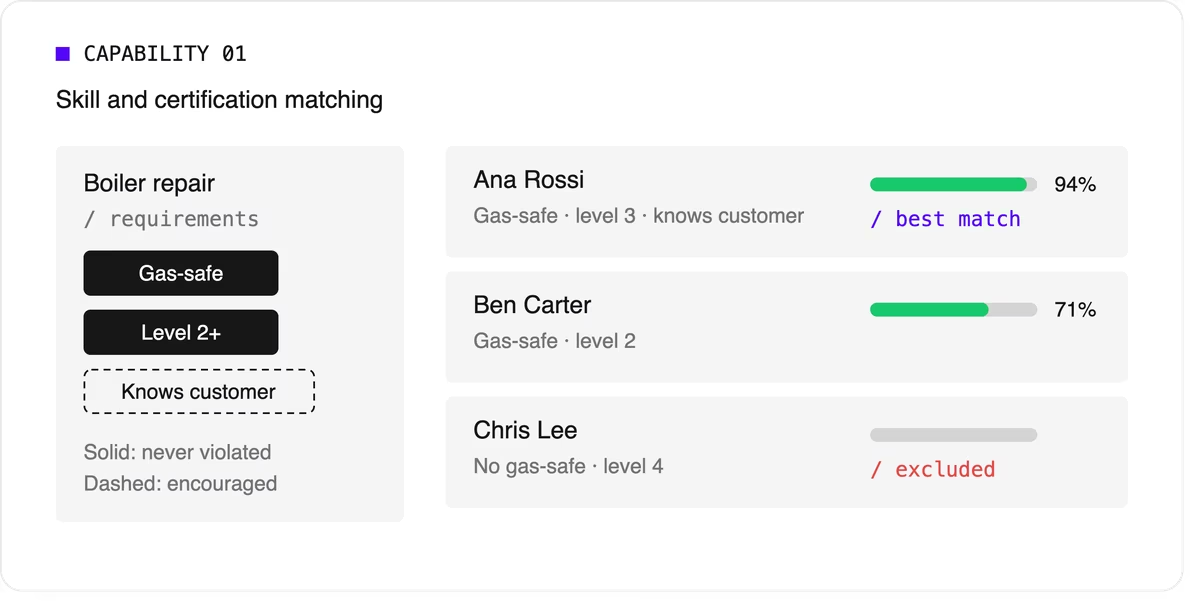
Look for support for skill levels and customer affinity in addition to simple yes-or-no skills. Matching the right skills is also one of the most direct ways to improve first-time fix rates.
2. Time windows and SLA priorities
Jobs come with customer availability windows, and many come with contractual deadlines.
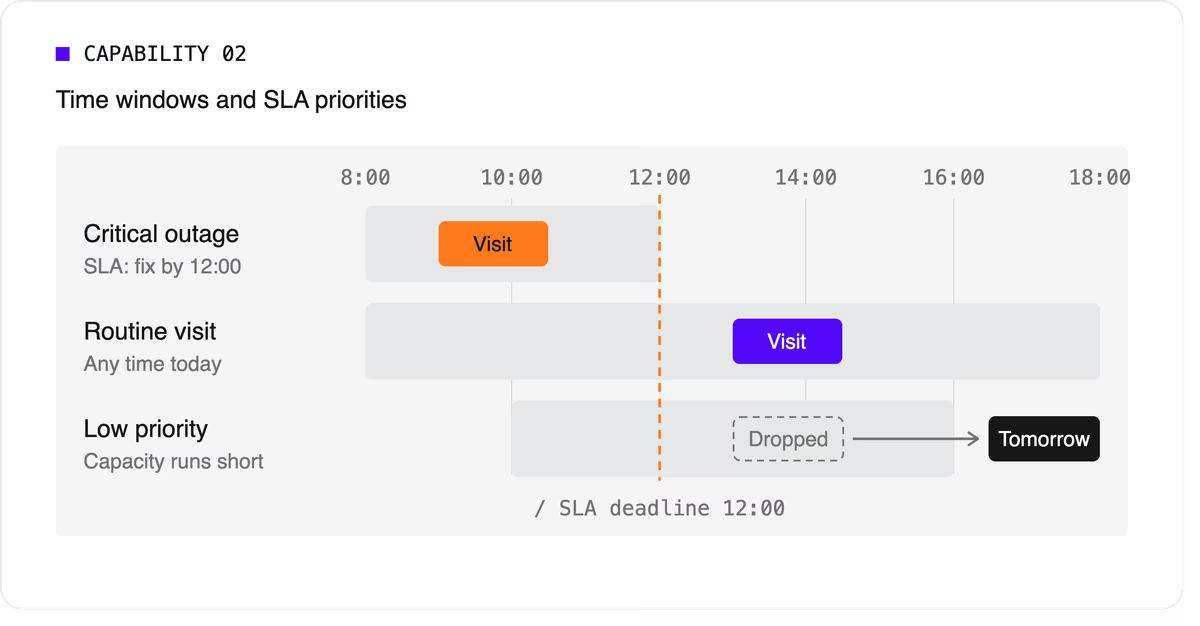
The software needs to treat a critical SLA differently from a routine visit that can move to tomorrow. That means supporting multiple time windows per job, priority levels, and deadlines that can push lower-priority work out of the plan when capacity runs short.
3. Travel-aware planning with real road data
A schedule that assumes straight-line distances will fall apart on the road. Technician scheduling software should use real travel times, ideally with support for traffic patterns and your own map provider if you already have one.
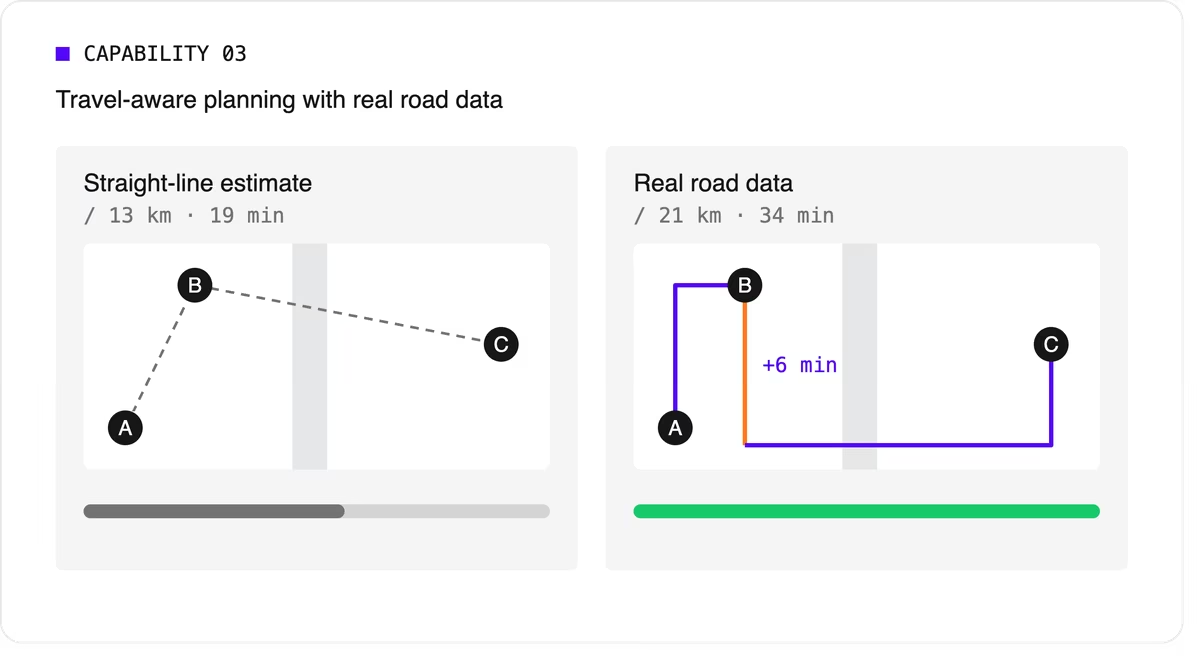
It should let you choose what to minimize, total travel time or total distance, because the two goals give different answers.
4. Multi-technician visits and job dependencies
Some jobs need two or more people on site at the same time for safety or lifting. Others must happen in order, sometimes with a delay: isolate the power before rewiring, or let a surface dry before painting.
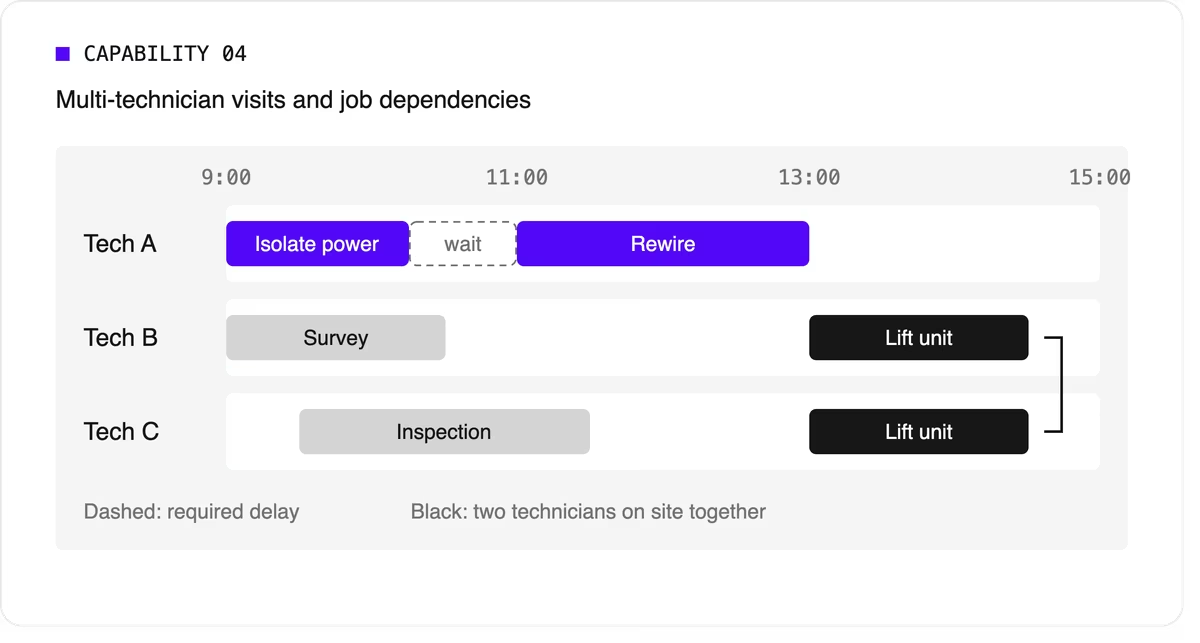
Many tools can't express these rules, so dispatchers track them by hand. If your operation has them, this capability is non-negotiable.
5. Working hours, breaks, and fairness
The plan has to respect shift start and end times, mandatory breaks, maximum working hours, and overtime rules. It should also spread work fairly so the same technicians don't always get the long days or the difficult jobs. Fairness affects retention, and retention matters more when technicians are hard to replace.
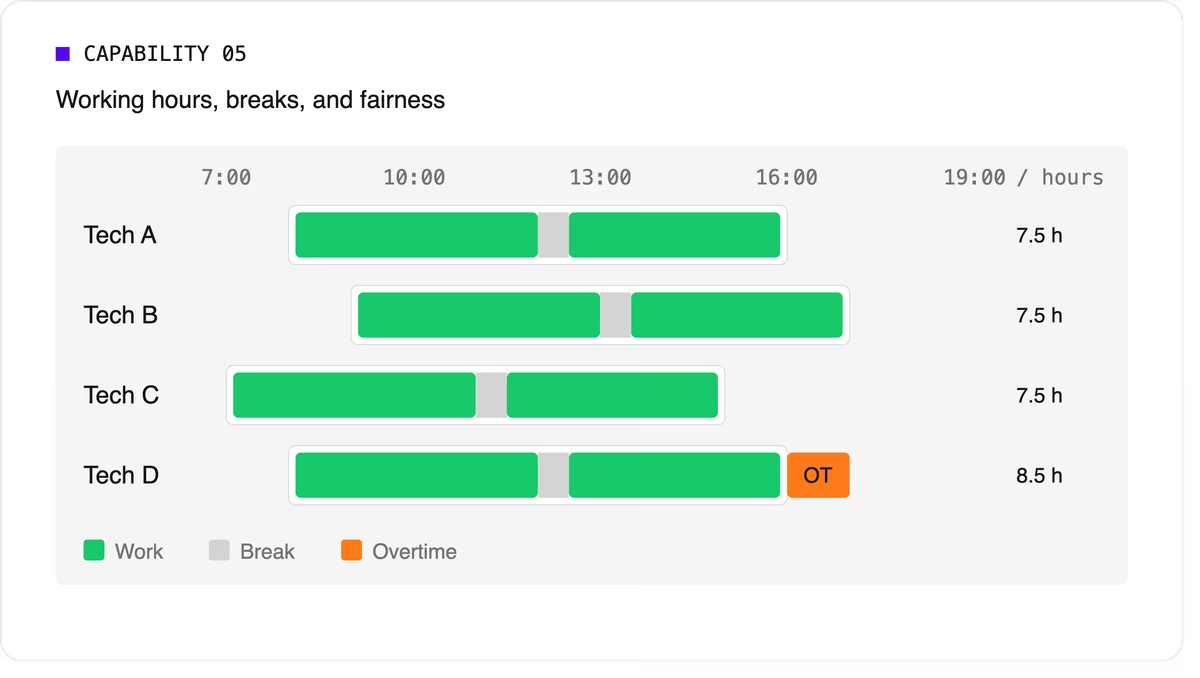
Scheduling software can support labor-law-style rules as constraints, but your organization remains responsible for verifying compliance with the regulations that apply to you.
6. Real-time replanning
Every schedule meets reality by mid-morning. A technician calls in sick, a job overruns, or an urgent call comes in. The software should replan quickly while changing as little as possible for everyone else. It should also let dispatchers lock (pin) jobs that are already in progress or confirmed with the customer.
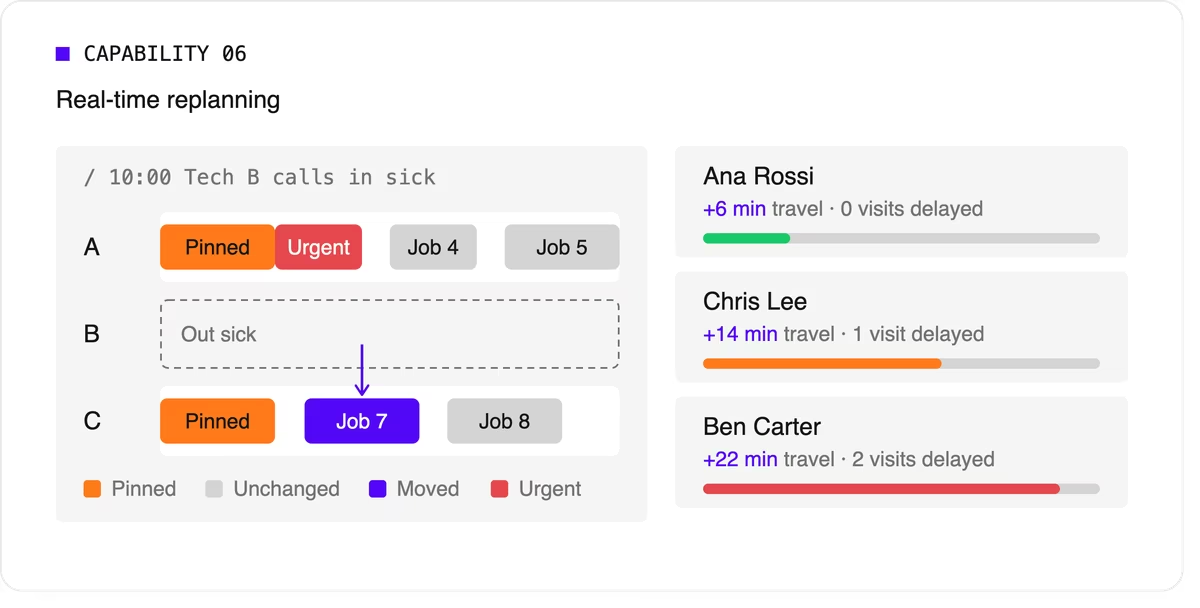
A strong version of this capability also recommends options. When a new urgent job arrives, the dispatcher should see which technicians could take it and what each choice would cost in travel or delayed work.
7. Explainability
Dispatchers and managers won't trust a plan they can't understand. Good technician scheduling software shows why a job was assigned the way it was, which rules were bent, and why some jobs couldn't be scheduled at all.
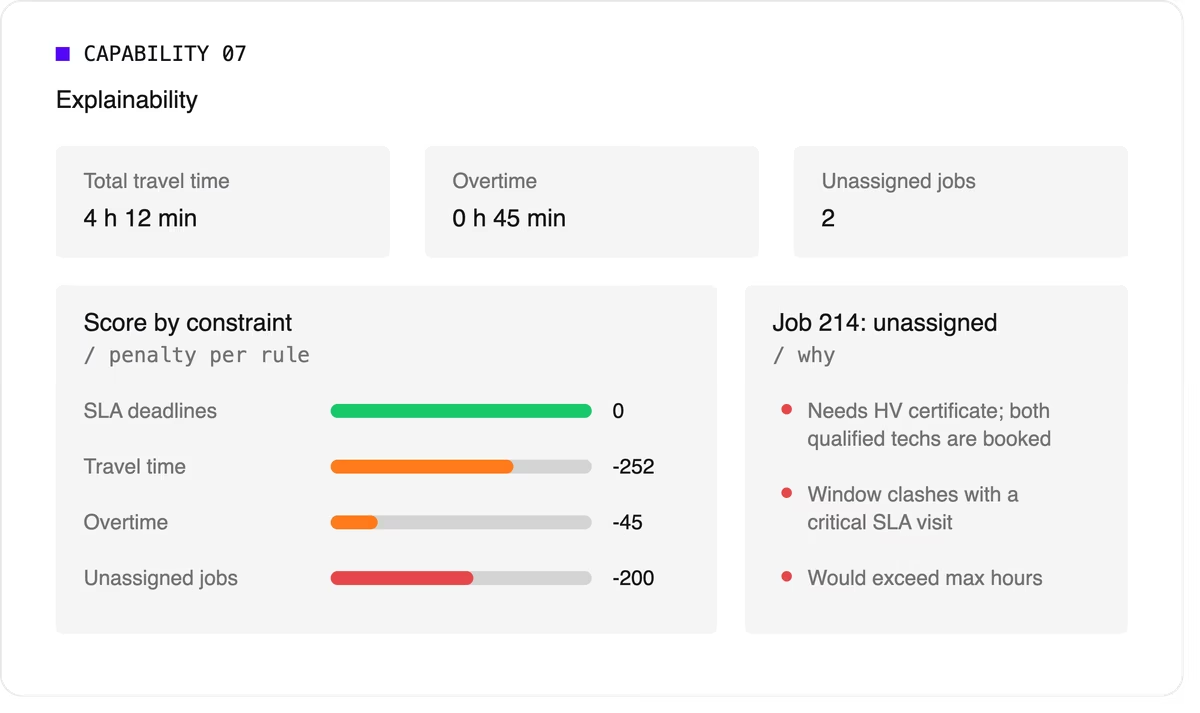
Look for a breakdown by constraint and clear metrics such as total travel time, overtime, and unassigned jobs.
8. Configurable priorities
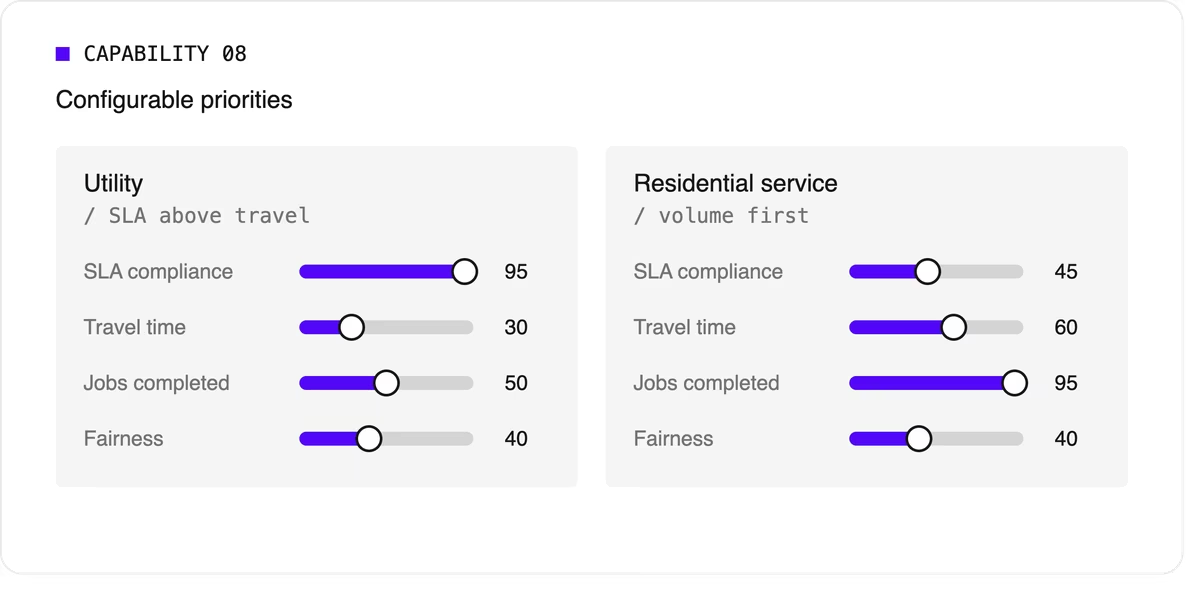
Every operation weighs its goals differently. A utility may put SLA compliance far above travel savings, while a residential service company may care most about completing as many jobs as possible per day. The software should let you adjust the relative weight of each goal without rewriting the underlying logic.
9. Integration and scale
Scheduling doesn't live on its own. It needs job data from your FSM or work order system, technician data from HR or workforce tools, and a way to push the finished plan to mobile apps. An API-first design makes this far easier than a closed tool with a separate interface.
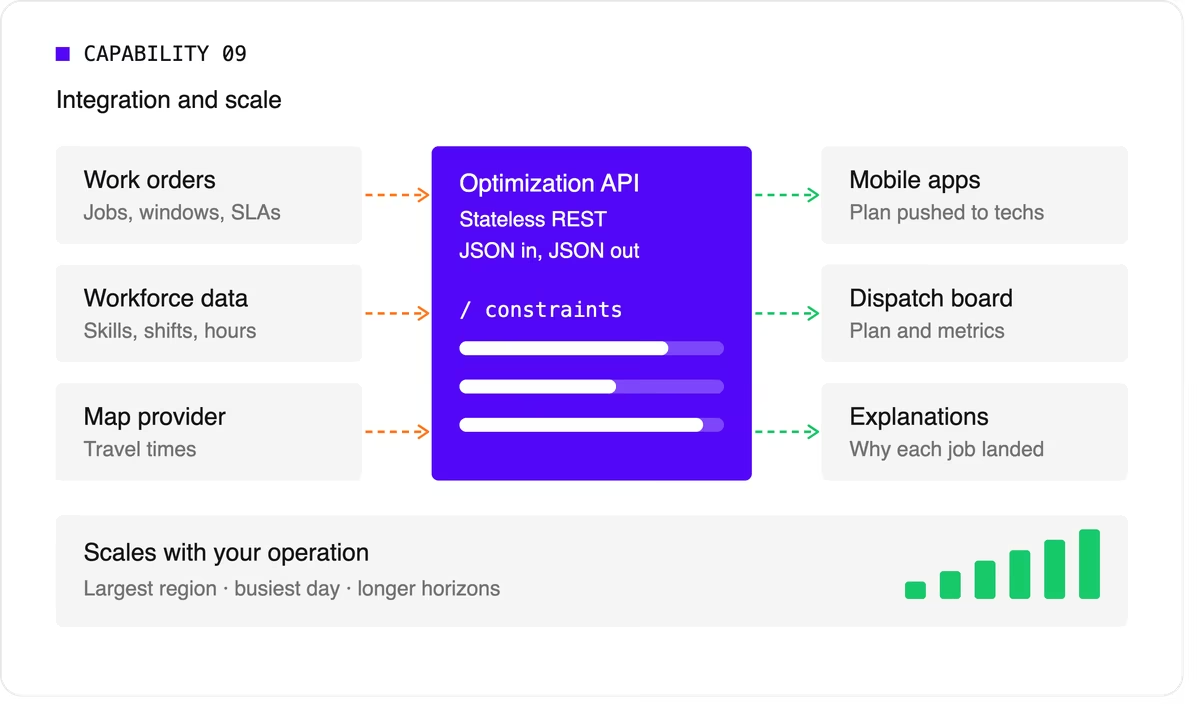
Scale matters too. The software should handle your largest region on your busiest day, and it should keep up as you add technicians, regions, or longer planning horizons.
A quick evaluation checklist
Use this table when comparing technicians scheduling software options or reviewing your own engine.
Scheduling software, FSM platform, or optimization engine?
When people search for technician scheduling software, they find three kinds of product.
- FSM platforms with a built-in scheduler cover the full workflow: work orders, mobile apps, invoicing, and scheduling. Their scheduling depth varies widely, from drag-and-drop boards to real optimization.
- Standalone scheduling tools focus on the dispatch board and often add basic auto-assignment. They're quick to adopt but can struggle with complex constraints.
- Optimization engines sit behind a user interface and do the heavy lifting. They don't manage work orders or invoices. Instead, they take in jobs, technicians, and rules, and return an optimized plan through an API. FSM vendors often embed one to strengthen their own scheduling, and large enterprises use one to add optimization to systems they already run.
Where Timefold fits
Timefold is an optimization engine in the third group. The Timefold Field Service Routing model covers the capabilities above: skill and seniority matching, customer time windows, visit dependencies with delays, multi-technician visits, working hours and fairness, and real-time replanning with recommendations. It ships with 50+ pre-configured constraints with adjustable weights, and every plan comes with metrics that show the tradeoffs it made.
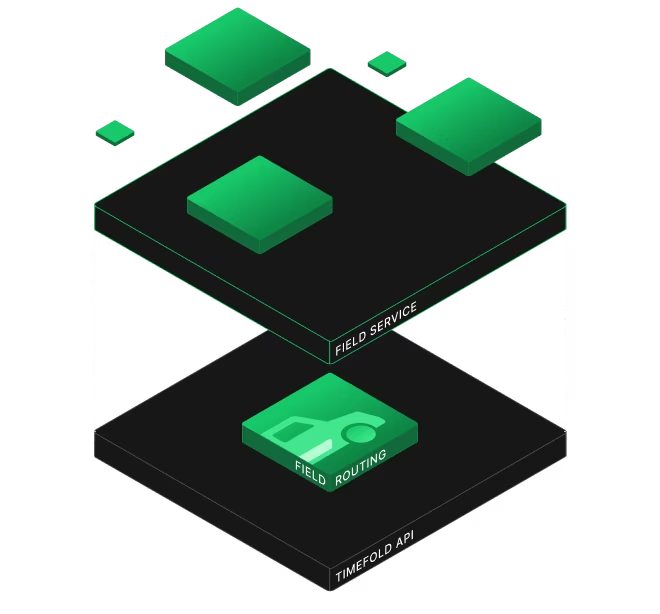
It connects through a stateless REST API, so it fits alongside the FSM or work order system you already use. To see how this applies to field teams specifically, read about route optimization for field technicians. If you're preparing to integrate, the data foundations of efficient field service walks through the data you'll need.
FAQ
What does technician scheduling software do?
It assigns jobs to technicians and plans each technician's day, taking skills, time windows, travel, and working hours into account. More advanced tools optimize the whole plan at once and replan automatically when things change.
What's the difference between technician scheduling and dispatching?
Technician scheduling creates the plan ahead of time. Dispatching sends technicians to jobs and manages changes during the day. Modern software blends the two by replanning continuously.
Do I need technician scheduling software if I have an FSM platform?
It depends on how deep your FSM's scheduling goes. If dispatchers still spend hours adjusting assignments by hand, or your FSM can't express rules like dependencies or multi-technician visits, an optimization engine behind your FSM can close the gap.
How many technicians do I need before scheduling software is worth it?
There's no fixed number. Complexity matters more than headcount. A team of 20 with several skill types, tight SLAs, and multi-technician jobs can benefit as much as a team of 200 with simple, uniform work.


Will Skynet control our schedule if the computer optimizes it for us?
Not every organization is comfortable with letting a computer program, such as OptaPlanner, now continued as Timefold (Java, open source planning engine), optimize their schedules. Let’s take a look why - and how to remedy it - on the course scheduling example.
Course scheduling introduction
In course scheduling, we need to assign each lecture to a time and a place. So we’re basically telling teachers and students were to be at what time. In the example schedule below, the Math lecture will be given the Monday morning in room 36:
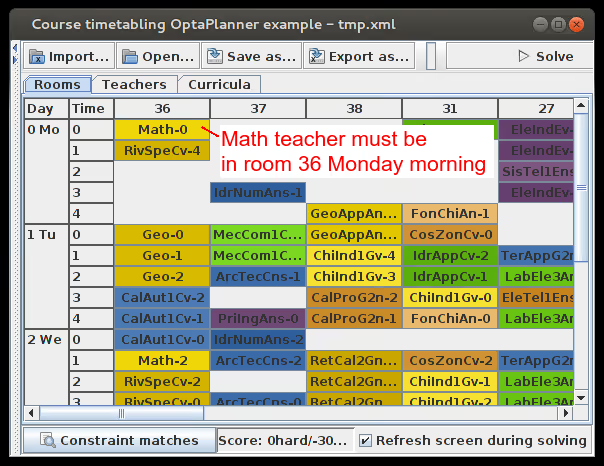
In the example above, OptaPlanner has come up with a feasible schedule. This means that no room, nor any teacher, nor any student has 2 lectures at the same time.
The boss wants to do it differently
Despite that the previous schedule is optimized according to the score function (which the boss probably defined in the first place), the boss wants to make some ad hoc changes. The Math lecture should be given on Tuesday morning instead of Monday morning:
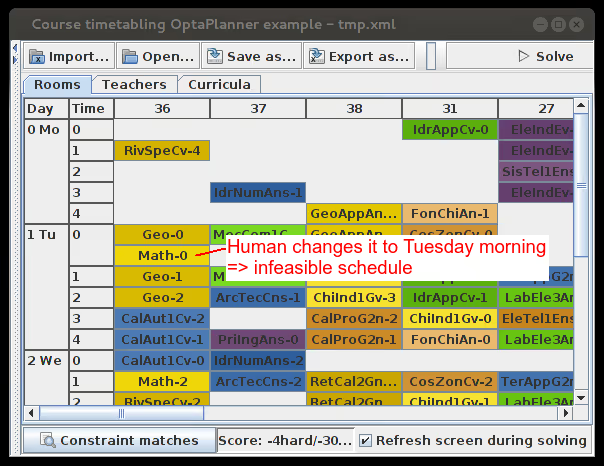
The schedule is now infeasible because Geo and Math are now in the same room at the same time. So we ask the computer to make it feasible…
“I’m sorry Dave, I’m afraid I can’t do that”
... and the first thing the computer does is change the Math lecture to another time and place:
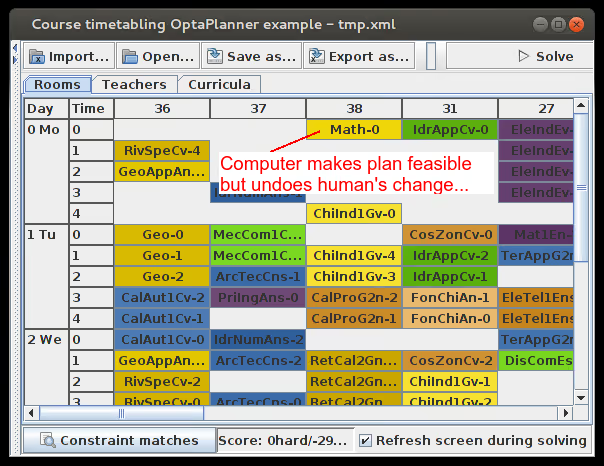
The boss is unhappy because his commands are ignored. Let’s fix that.
Immovable lecture
We lock the Math lecture in place, making it immovable for OptaPlanner:
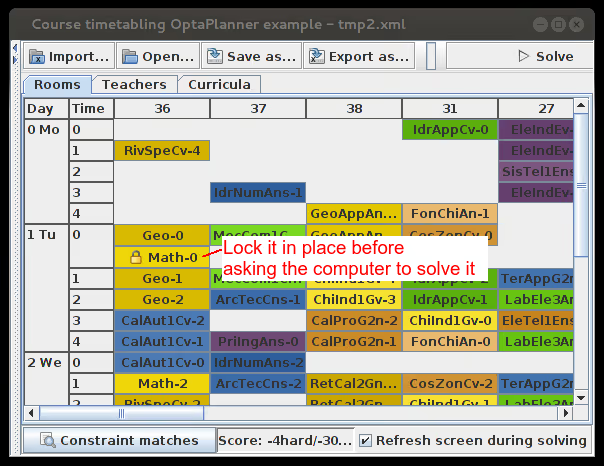
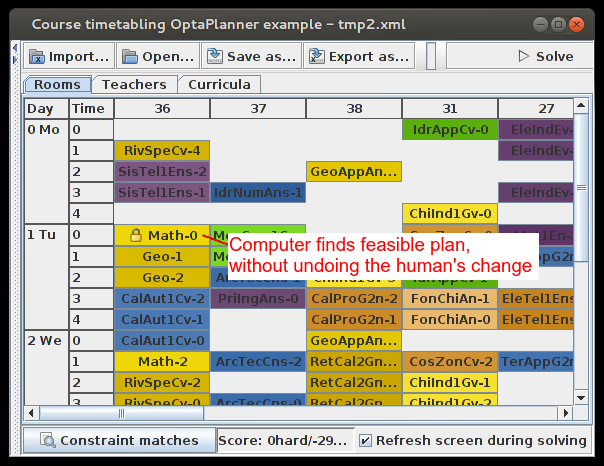
When we now solve the problem, the Math lecture isn’t moved. We get a feasible solution which makes the boss happy too:
Video demo
If you want to see this in action, skip to the end of this video:
The human must remain in control
We regularly see this requirement in other OptaPlanner use cases too (such as employee rostering, vehicle routing and equipment scheduling). But hopefully this article has shown that the human is indeed in control. There’s no Skynet or HAL algorithm to disobey us… for now :)
False assumptions for the Vehicle Routing Problem
Many companies are faced with the vehicle routing problem, when they need to:
- Deliver/pick up items at multiple locations
- Or execute repairs/maintenance at multiple locations
These companies want to minimize their fuel and time usage, to reduce their costs and ecological footprint. Sounds easy, right? Just take the shortest route. Unfortunately it’s not that simple… Let’s take a closer look.
Minimize the distance
In Vehicle Routing Problem (VRP), we need to transport items from the warehouse to the customers:
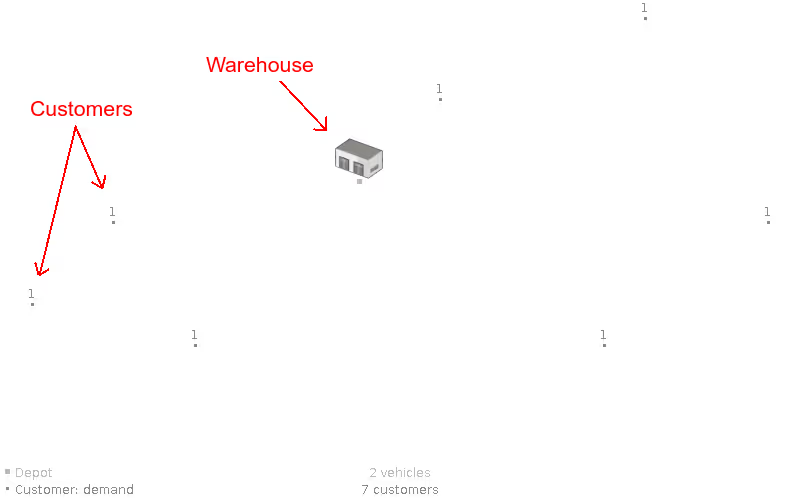
In this case, we have 7 customers across the region and 2 available vehicles stationed at the warehouse.
The shortest route to visit all these customers is this:
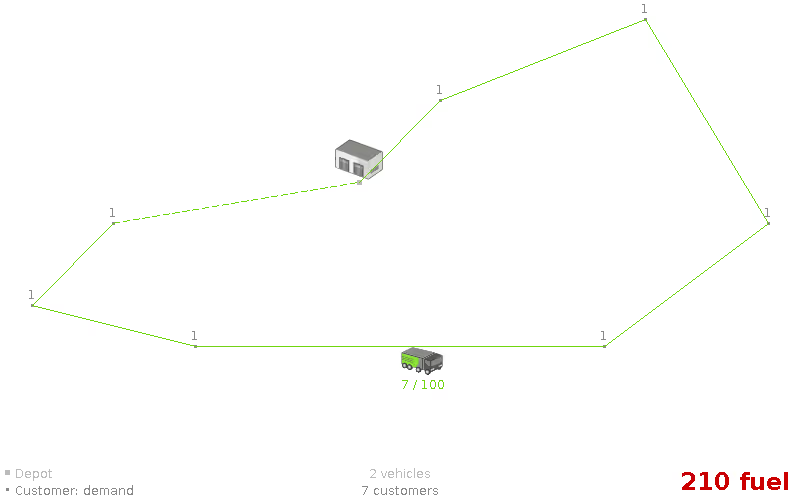
This optimal solution requires 210 fuel (which includes each vehicle driving back to the warehouse).
Notice that we only use 1 vehicle. Let’s continue from that assumption.
Assumption: An optimal VRP route uses only 1 vehicle. (false)
Vehicle capacity
In a real-world delivery/pick up scenario, each customer needs a number of items, but a vehicle’s capacity to transport items is limited.
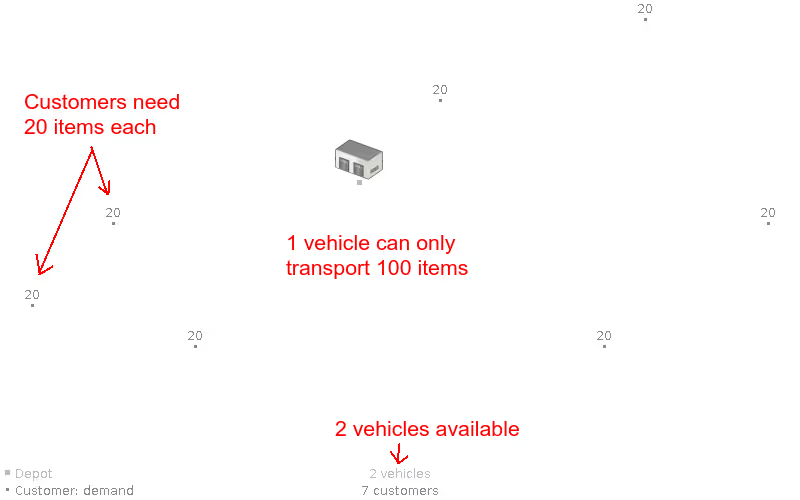
In this case, all 7 customers need 20 items and a vehicle can transport 100 items. So a single vehicle cannot transport the 140 items of all customers.
We need to use 2 vehicles now:
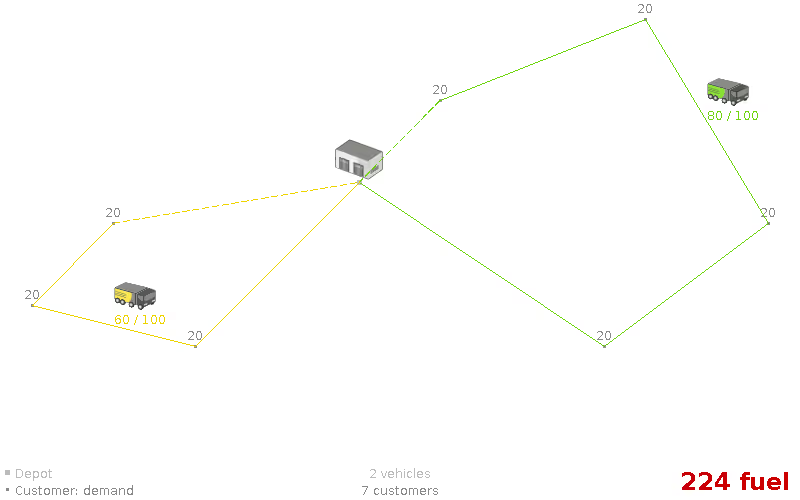
This optimal solution requires 224 fuel, which is - of course - more than the 210 fuel of the previous solution. The yellow truck transports 60 items and the green one 80 items.
Notice that none of the lines cross. Let’s assume that’s always the case.
Assumption: An optimal VRP route has no crossing lines. (false)
Let’s see what happens when some of the customers require more items than other customers.
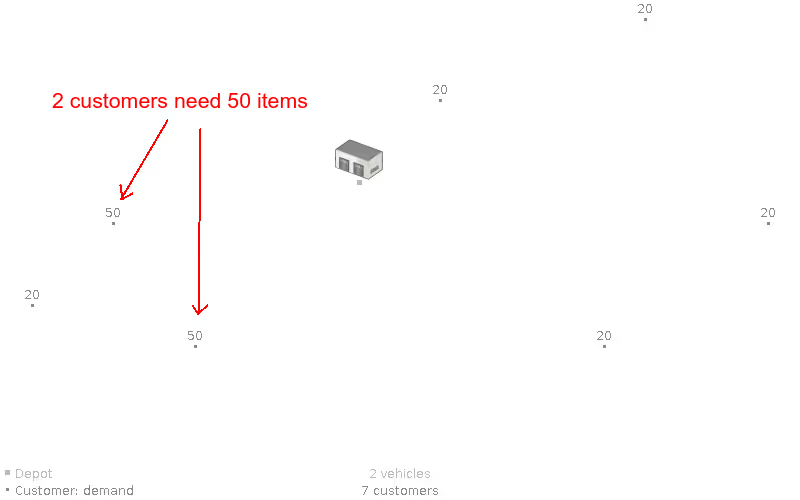
In this case, 2 customers need 50 items and the other 5 still need 20 items. So the previous solution is infeasible because the yellow truck would need to transport 120 items.
Now the lines do need to cross:
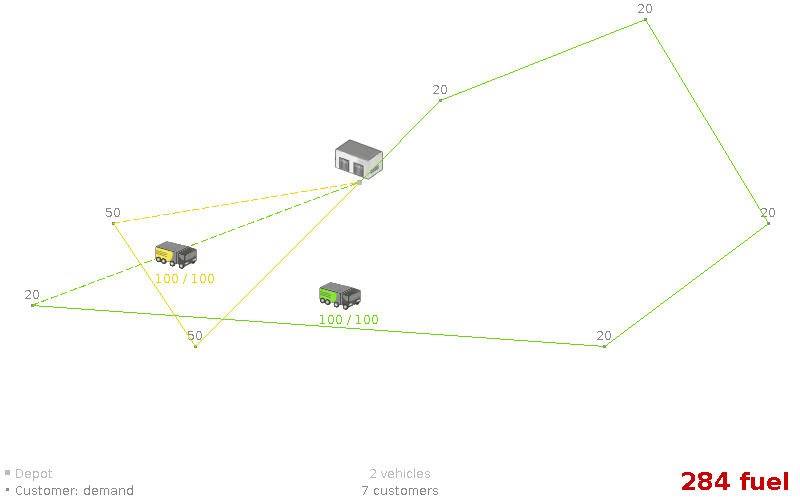
The optimal solution now requires even more fuel: 284. We found a feasible solution with 2 vehicles.
So we don’t seem to need any more vehicles.
Assumption: An optimal, feasible VRP route with n vehicles is still optimal for n+1 vehicles. (false)
Let’s add a 3rd vehicle to disprove that:
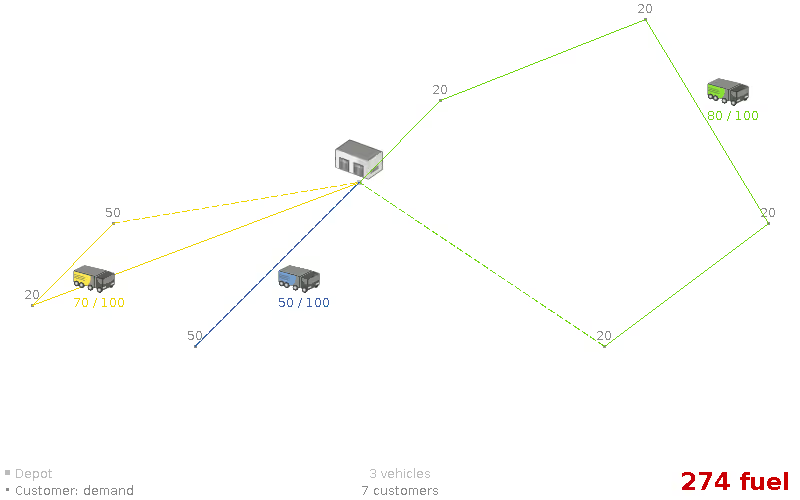
By adding an extra vehicle, the optimal solution now uses less fuel: only 274. This is a paradox: buying more vehicles can reduce expenses.
Notice that in both solutions above, no vehicle crosses its own line.
Assumption: An optimal VRP route has no crossing lines of the same color. (false)
Time Windows
In any real-world scenario, time is of the essence. Items need to be delivered on time, within the time window of each customer.
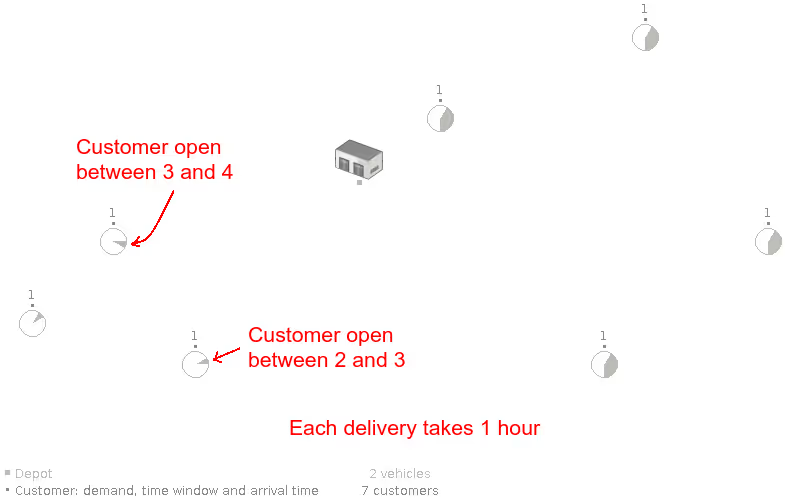
In the case above, a vehicle needs to arrive at the top left customer between 3 and 4 o’clock. Different customers have different time windows. For example, all 4 customers on the right are flexible: they are available between 1 and 6 o’clock. Additionally, each delivery/pick up/repair at a customer takes 1 hour to complete.
In the optimal solution, the yellow truck does cross its own line now:
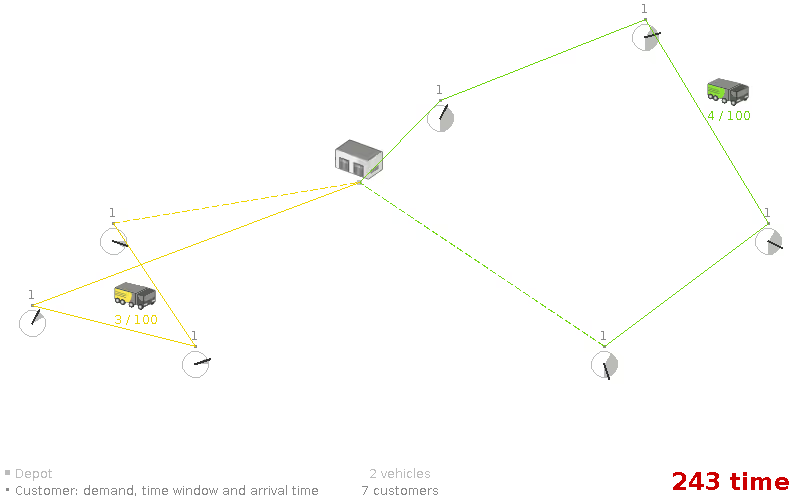
In the optimal solution, the yellow truck arrives at the most left customer at 1 o’clock. An hour later it leaves for the bottom left customer at which it arrives at 2:20 (because driving takes some 20 minutes). Again an hour later it departs and arrives at its 3rd customer at 3:40.
Notice how the time windows pretty much dictate the route, especially on the left side.
Assumption: We can focus on time windows before focusing on capacity (or vice versa). (false)
Let’s see what happens if the time windowed customers also need a number of items:
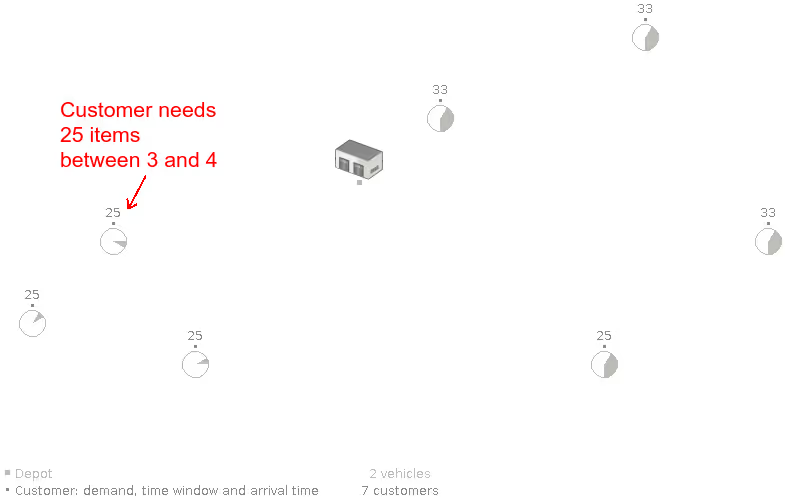
Given these requirements, we need to focus on the capacity and the time windows in parallel:
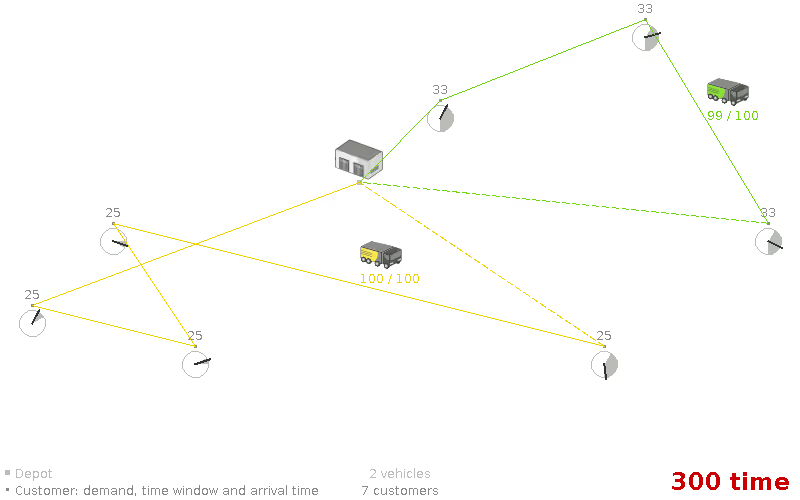
The optimal solution now puts the bottom right customer in the yellow truck, because there was no more room in the green truck.
Conclusion
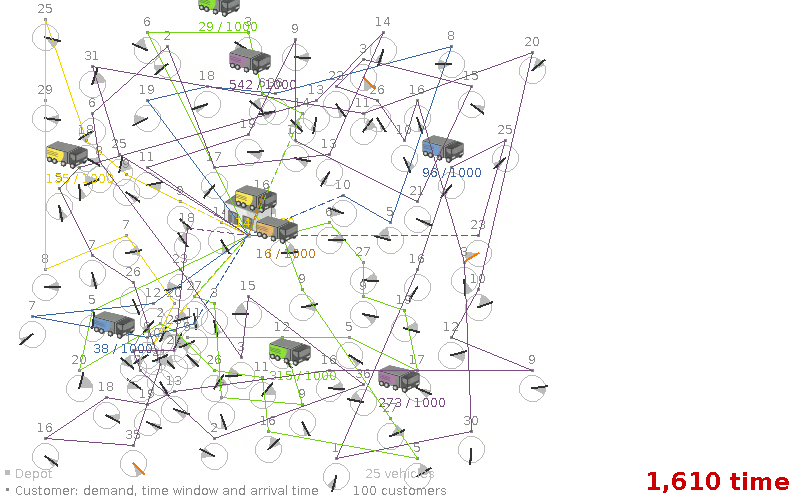
In a real-world vehicle routing problem, many assumptions fail. Finding a good solution is hard: there are no short-cuts. We need to be able to optimize without making assumptions. Yet, we cannot iterate through all possible states in a brute force manner either - even on relatively small problems - because of hardware limitations. So we need good, flexible algorithms - such as the heuristics and metaheuristics implemented in OptaPlanner, now continued as Timefold (Open Source, Java) - to solve bigger cases:

When scheduling works, everything works.
Less waste. More control. Teams that trust the plan.